If you sell software, the moment your pricing gets interesting is the moment your quoting process breaks. A flat, single-tier plan is easy to quote on a spreadsheet. A hybrid plan with seats, usage, and an annual discount is not.
This is the point where most SaaS revenue teams start looking at configure, price, quote (CPQ) software.
CPQ implementation is the process of setting up that software: mapping your product catalog, encoding your pricing and discount logic, connecting it to your CRM and billing systems, and getting your sales team to actually use it.
Done well, it turns quoting from a manual, error-prone task into a repeatable, governed workflow. Done poorly, it becomes an expensive shelfware project that sales reps route around.
This guide walks through what CPQ implementation actually involves for a SaaS company, the best practices that separate smooth rollouts from stalled ones, and a step-by-step plan you can adapt to your own quote to cash process.
What is CPQ implementation?
CPQ implementation takes your CPQ software from a blank slate to a system your revenue team relies on every day.
In practice, it covers five layers of work:
- Product catalog: Defining every plan, add-on, and bundle you sell, and how they can (or cannot) be combined
- Pricing logic: Encoding list prices, discount bands, and rules for flat, tiered, usage-based, or hybrid models
- Workflow and governance: Approval chains, discount limits, and quote expiry rules by deal size or customer type
- Integrations: Connecting CPQ to your CRM, e-signature, billing, and revenue recognition systems so a signed quote turns into an invoice without manual re-entry
- Adoption: Training reps, deal desk, and finance to work inside the new system instead of falling back on spreadsheets
For SaaS companies specifically, the catalog and pricing layers tend to be the hardest part. Unlike a manufacturer configuring physical products, a SaaS company usually has complex pricing structures, combining one-off fees, discounts, ramps, usage, credits, and more.
Why CPQ implementation for SaaS is harder than it looks
Most CPQ vendors sell the promise of "configure once, quote forever." In practice, SaaS pricing rarely holds still long enough for that to work.
The core problem is that subscription pricing isn't static, it's usage-based, seat-based, tiered, sometimes all three at once, and it changes mid-contract.
A CPQ system built around one-time product SKUs breaks down fast when it has to handle proration, mid-cycle upgrades, multi-year ramps, or a customer switching from seats to usage halfway through a term. Every one of those is a pricing rule someone has to define, and most teams don't discover the edge cases until a rep tries to quote one.
Then there's the legacy debt. Almost every SaaS company has a graveyard of grandfathered deals, one-off discounts, and "just this once" contract terms that sales agreed to years ago. None of that is in a spec document, it's in someone's head, or buried in a CRM note or in a spreadsheet.
CPQ implementation forces all of it into the open, which is exactly why it takes longer than anyone plans for.
Handoff to billing
The part that actually determines success, though, is the handoff to billing. A CPQ system can generate a technically correct quote and still create chaos downstream if what was quoted doesn't map cleanly to what gets invoiced.
That mismatch is where revenue leakage and involuntary churn quietly start, not at the point of sale, but a few months later when finance and the customer are looking at different numbers.
7 CPQ implementation best practices for SaaS teams
The following practices come up repeatedly in successful CPQ rollouts, regardless of which platform you choose.
1. Simplify your catalog before you configure it
It is tempting to migrate every historical price exception into the new system. Resist it. Before configuration starts, rationalize your product catalog and pricing tiers down to what you actually intend to sell going forward.
A clean catalog is faster to build, easier for reps to quote from, and much simpler to maintain. If you are redesigning pricing at the same time, this is also the moment to revisit your value metric and confirm it still reflects how customers get value from the product.
- SaaS CPQ implementation specialist
2. Design approval workflows around risk, not hierarchy
Approval chains that mirror your org chart tend to slow every deal down, including the simple ones. Instead, set approval thresholds based on discount depth, contract length, or deal size, so standard deals move through without friction and only genuine exceptions reach a manager or finance.
3. Involve finance and RevOps from day one
CPQ is not a sales-only project. The pricing logic you configure determines what gets billed and how revenue is recognized downstream.
Finance and RevOps should validate the pricing rules, discount guardrails, and how quotes map to billing automation before rollout, not after the first batch of quotes has already gone out.
4. Prioritize integrations over feature checklists
A CPQ tool with an impressive feature list is not useful if it sits disconnected from your CRM and billing platform. Confirm early how the CPQ syncs opportunity data in, and how signed quotes flow out to contracts, invoicing, and revenue recognition.
This is usually the single biggest driver of whether the rollout reduces manual work or just relocates it.
5. Pilot with a single team before a full rollout
Run the new CPQ with one sales pod or one region first. A pilot surfaces catalog gaps, workflow friction, and edge cases in pricing logic while the blast radius is still small, and gives you a group of internal advocates who can help train the rest of the team.
6. Plan for change management, not just configuration
The technical build is rarely what determines whether a CPQ implementation succeeds. Adoption does. Reps who are used to building quotes in a spreadsheet or a generic document tool will drift back to it unless the new system is clearly faster and unless leadership makes it the only path to an approved quote.
7. Treat the implementation as reversible, not permanent
Pricing changes. New products launch. Discount policy shifts. Choose a platform, and a configuration approach, that lets RevOps update rules without engineering involvement.
No-code CPQ platforms are built around this assumption, which matters more the longer the system stays in place.
How to implement CPQ in your SaaS business
The exact sequence varies by platform, but most SaaS CPQ implementations move through the same seven phases.
Step 1: Audit your current quoting process
Document how quotes get created today, including every manual workaround, spreadsheet macro, and email approval chain. This audit becomes your requirements list and your baseline for measuring improvement after go-live.
Step 2: Finalize your product catalog and pricing model
Lock down the products, plans, and bundles you will configure, along with the pricing model behind each one. For SaaS companies running hybrid or usage-based pricing, this step typically takes longer than expected, since it involves aligning sales, finance, and product on exactly how a metric like active seats or API calls translates into a bill.
Reviewing common enterprise SaaS pricing models at this stage can help confirm the structure will scale as you move upmarket.
Step 3: Select and configure your CPQ platform
Choose a platform that supports your pricing complexity without custom development. Legacy, code-heavy CPQ tools can take months to configure for a single pricing change, while no-code platforms are built specifically to let revenue teams make these changes themselves.
Build out the product catalog, pricing rules, discount guardrails, and quote templates in a sandbox environment first.
Step 4: Build approval workflows and guardrails
Configure approval routing, discount limits, and quote expiry logic. For companies negotiating multi-year deals, this is also the stage to configure support for ramp contracts and other structured multi-year terms, so reps do not need to build these manually outside the system.
Step 5: Connect integrations
Integrate the CPQ with your CRM (commonly Salesforce or HubSpot), your e-signature tool, and your billing and revenue recognition systems. Test the full path from opportunity to signed quote to invoice before opening the system to your wider sales team, including edge cases such as mid-term upgrades or multi-entity billing if you operate across multiple legal entities.
Step 6: Pilot, test, and refine
Run a pilot with one team, using real deals wherever possible rather than only test data. Track how long it takes reps to build a quote, how often quotes need manual correction, and how many deals get stuck in approval. Use this data to refine pricing rules and workflows before the full rollout.
Step 7: Roll out, train, and measure
Train the full sales org, migrate any remaining manual processes, and set a hard cutover date after which the CPQ is the only approved way to generate a quote.
Once live, track quote-to-cash metrics such as quote turnaround time, approval cycle time, and quote-to-close rate to confirm the implementation is delivering the efficiency gains it was built for.
Typical CPQ implementation timelines
Implementation timelines vary widely depending on catalog complexity and whether the platform requires code-level customization.
The table below outlines a general range for SaaS companies.
Common CPQ implementation pitfalls
Most failed or stalled CPQ implementations trace back to one of the following issues.
- Migrating pricing complexity instead of reducing it: carrying over every historical exception rather than rationalizing the catalog first
- Treating it as an IT project: leaving sales, finance, and RevOps out of catalog and workflow decisions until testing
- Underestimating integration work: assuming CRM and billing connections are plug and play without testing edge cases
- Skipping the pilot: rolling out to the entire sales team at once, which multiplies the cost of any configuration error
- No adoption plan: assuming reps will switch over on their own without training or a hard cutover date
- Choosing a platform that requires engineering for every change: locking RevOps into a dependency on developer time for routine pricing updates
How Alguna approaches CPQ implementation for SaaS teams
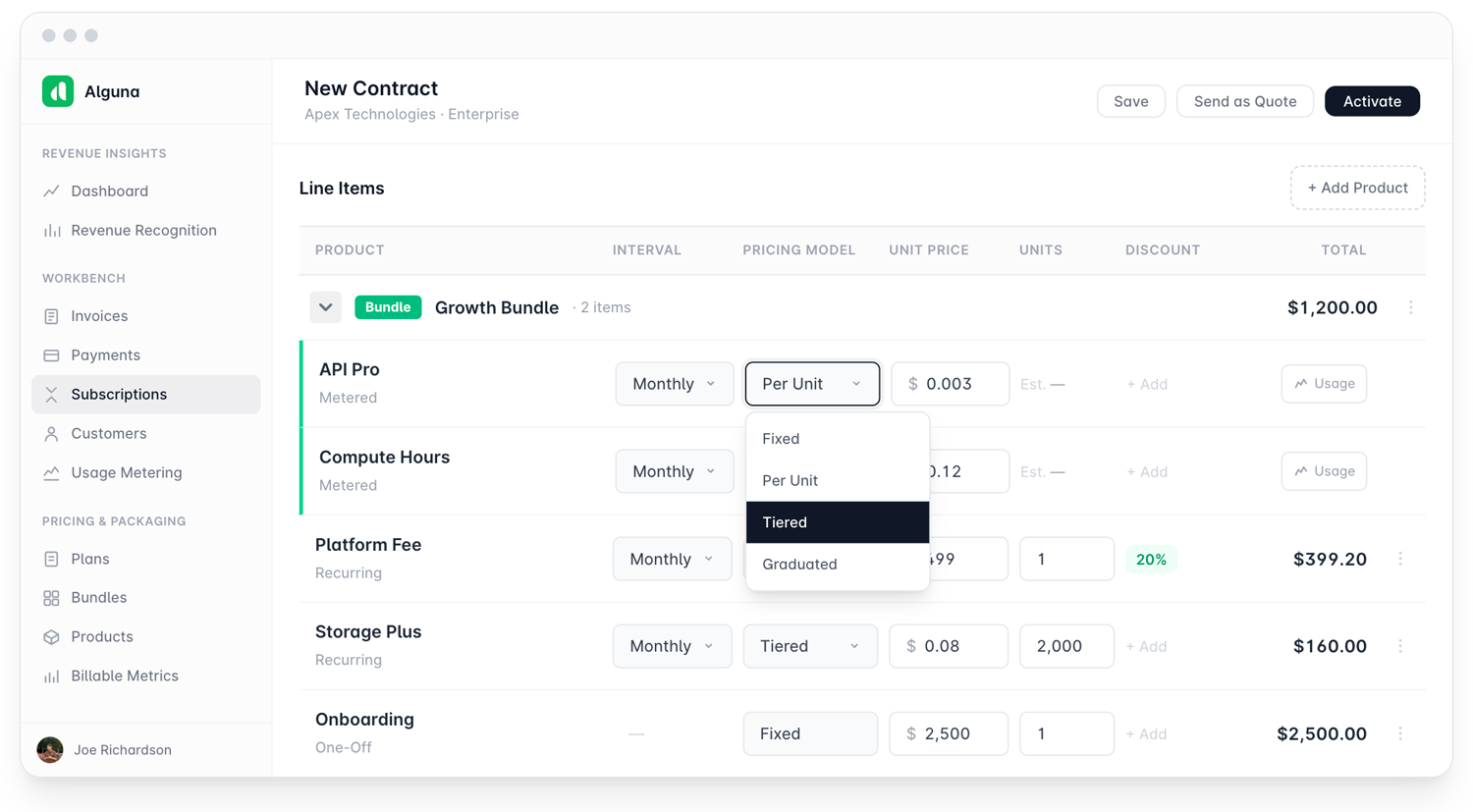
We built Alguna CPQ specifically to shorten the path described above. Because it is no-code, revenue teams can configure product catalogs, pricing rules, and approval flows themselves, without opening a ticket with engineering every time a pricing tier changes.
That difference is usually what separates a CPQ implementation that takes weeks from one that takes months.
A few implementation-specific details worth knowing if you are evaluating Alguna:
- Quote for any pricing model: We support flat, tiered, usage-based, prepaid-with-overages, and multi-attribute pricing out of the box, so hybrid SaaS pricing models do not require custom logic
- Direct CRM sync: Alguna CPQ integrates natively with CRM's like Salesforce and HubSpot, so reps configure and send quotes without switching tabs
- Built-in e-signature: Customers can review pricing, accept terms, and sign directly inline, which removes a separate e-signature integration step for many teams
- One platform for CPQ, billing, and revenue recognition: Because quotes flow directly into billing and RevRec, there is no separate reconciliation step between what sales sold and what finance invoices
- Configurable approval flows: Approval routing, redlining requirements, and quote expiry logic can be set by customer or product type without engineering support
This unified approach is also why we lead most of the comparisons on our own blog, including our breakdowns of the best CPQ software for SaaS teams and CPQ tools built for larger tech companies. If you are migrating off a legacy platform, our guide to Conga CPQ alternatives covers what that migration path typically looks like.
Getting started with your CPQ implementation
A CPQ implementation is as much a pricing and process project as it is a software rollout. The companies that get the most out of it start by simplifying their catalog, involve finance early, prioritize integrations over feature lists, and pilot before a full launch.
Get those fundamentals right, and the quote to cash software you choose becomes a genuine accelerant for the sales cycle rather than another system reps have to work around.
If you are exploring how AI-driven CPQ platforms are changing this process, or want to see how a no-code catalog and pricing engine handles your specific pricing model, from seat-based to tiered AI pricing, we would be glad to walk you through it.