In this guide, we compare the top Subskribe alternatives across quoting, billing, and revenue management so you can make an informed decision.
We've covered each platform's key features, real strengths, honest limitations, and pricing so you know exactly what you're walking into before you book a demo.
What is Subskribe?
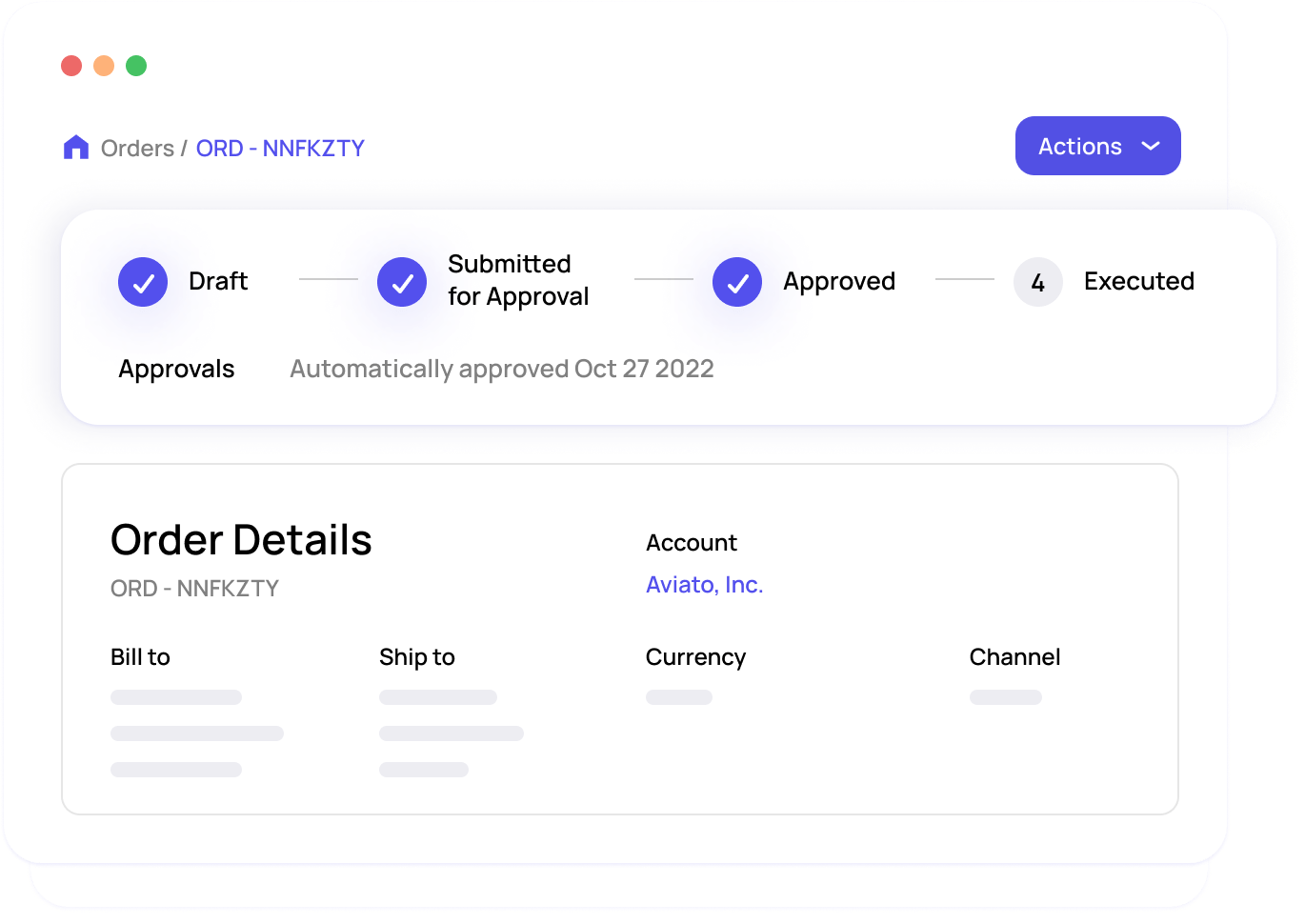
Subskribe was a quote-to-revenue platform built primarily for enterprise SaaS companies. It covered the full arc from CPQ (configure, price, quote) through subscription management and revenue recognition, with a particular focus on helping sales teams handle complex, multi-year deals. Subskribe integrated with CRMs like Salesforce and connected to accounting systems to keep revenue data in sync.
In November 2025, Subskribe was acquired by DealHub, an enterprise-grade CPQ vendor. The combined platform is now being positioned as a unified "Agentic Quote-to-Revenue" solution for large SaaS and AI-first enterprises. In practice, that means Subskribe's standalone roadmap is absorbed into DealHub's broader product direction, and the platform's center of gravity is moving firmly toward enterprise CPQ use cases.
For teams that chose Subskribe because it was a focused, billing-first solution without the complexity of a full CPQ platform, that shift matters. The merged product's target customer is larger, the implementation footprint is heavier, and the pricing reflects that.
If your team's needs don't align with that direction, you're right to be looking at alternatives now rather than waiting to see how the integration plays out.
Quick comparison: Subskribe alternatives at a glance
| Platform | Best for | Strengths | Limitations | Pricing |
|---|---|---|---|---|
| Alguna | Growing B2B SaaS teams that need fast, flexible billing | End-to-end quoting, billing, invoicing; usage-based billing; rapid onboarding | Less suited to very large enterprise orgs with complex legacy ERP requirements | Transparent, usage-based pricing; contact for details |
| Chargebee | Mid-market SaaS with recurring revenue | Wide integration ecosystem, strong dunning, flexible pricing models | Can become expensive at scale; UI complexity grows with usage | Starts at $299/month (Performance plan) |
| Maxio (formerly SaaSOptics + Chargify) | B2B SaaS focused on financial operations and metrics | Excellent SaaS metrics, revenue recognition, strong finance focus | Two products still feeling somewhat distinct; steeper learning curve | Custom pricing; starts around $500+/month |
| Zuora | Large enterprises with complex subscription models | Deep functionality, strong revenue recognition (ASC 606), global scale | Long implementations, high cost, best suited for very large teams | Enterprise pricing; typically $25,000+/year |
| DealHub | Sales teams that need guided selling and CPQ | Strong CPQ, guided selling playbooks, Salesforce-native | Less focus on billing and post-sale revenue management | Custom pricing; typically mid-market to enterprise |
| Salesforce Revenue Cloud | Salesforce-native enterprises | Deep CRM integration, end-to-end revenue lifecycle management | Expensive, complex to configure, requires Salesforce expertise | Enterprise pricing; $75+/user/month on top of Salesforce |
The 7 best Subskribe alternatives
Alguna
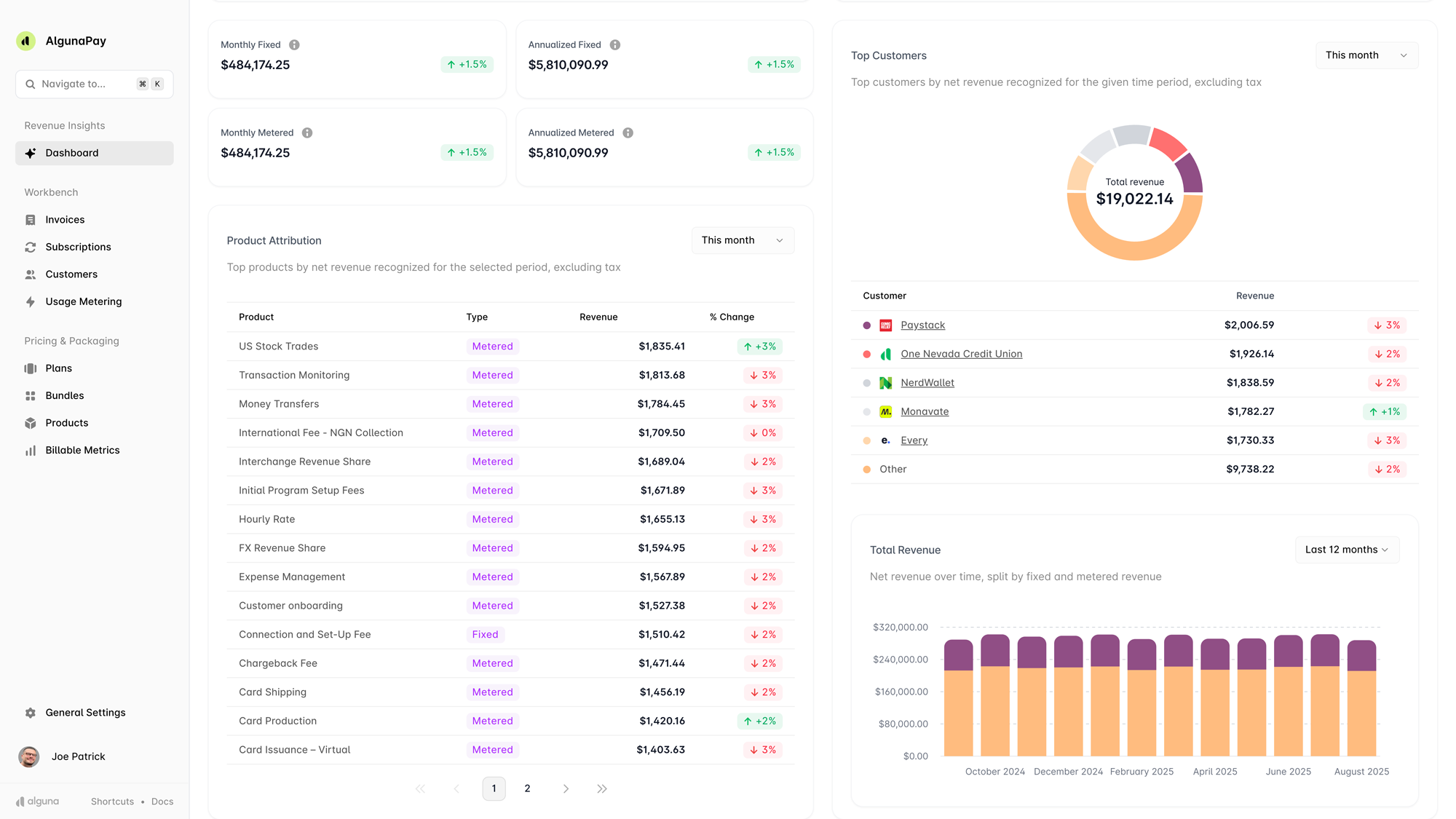
Alguna is an end-to-end quote-to-cash platform that was purpose-built for the AI era. Coming out of Y Combinator in 2023, the platform has made a name for itself in the market due to its ability to handle any type of pricing model and complex billing setups.
If you're looking for a platform to move your entire quote-to-cash processes to, Alguna is a strong contender. But notably, the platform has been built in a modular way, meaning you can choose to use its no-code CPQ, billing, or revenue recognition as standalone products based on your needs.
Unlike many of the legacy platforms in this space, Alguna is designed to be both powerful and fast to get up and running. From the moment a deal closes, Alguna handles revenue management, end-to-end.
What sets Alguna apart is its flexibility. Whether you sell seat-based subscriptions, outcome-based pricing, usage-based contracts, or a hybrid of both, Alguna supports your model without requiring any engineering work.
The platform is built for revenue teams that want to truly own their revenue workflows, without waiting on engineering or consultants every time something changes.
- Shane Curran, CEO at Evervault
Read the case study
Key features
- End-to-end quote-to-cash workflow. Alguna covers the full journey from sending a quote to collecting payment, keeping everything in one place rather than stitching together multiple tools.
- Flexible usage-based billing. The platform handles complex metered billing models out of the box, including tiered pricing, pay-as-you-go, and hybrid structures.
- Automated invoicing and collections. Once a customer is set up, billing runs on autopilot, reducing manual work for the finance team and minimizing late payments.
- Revenue visibility and reporting. Alguna provides a clear, real-time overview of revenue movements, ARR, and customer-level billing data, so you always know what's happening in your book of business.
- Fast customer onboarding. Creating agreements and onboarding new customers takes minutes, not days. Sales teams can move straight from a closed deal to a signed agreement without waiting on ops.
- Dedicated migration support. Alguna's team handles the heavy lifting during onboarding, including data migration from existing billing systems, with a clear plan from day one.
Pros
- Most customers are live within weeks, not months
- Handles complex usage-based billing that simpler tools can't support
- Strong customer support with a can-do attitude and real flexibility on specific requirements
- Clear revenue overview that gives teams a single source of truth
- Enables self-service accounts that used to be too labor-intensive to manage
- Transparent pricing with no hidden fees eating into your margins
Cons
- Not a great fit for very early stage companies
- Ecosystem not as well-developed as some incumbents
- May not be the right fit for very large enterprises with complex ERP requirements
Best for
- Scaling B2B SaaS and AI companies (Series A-enterprise) that want a modern, flexible revenue stack
- Teams with usage-based or hybrid pricing models that need a unified revenue engine that keeps up with market changes and pricing models
- Revenue teams that want to own their workflows without constant engineering involvement
Pricing
Paid plans start at $699/month.
"With Alguna, we're more confident in our operations, onboarding customers much faster, and we've even unlocked the ability to support self-service accounts that used to be too labor-intensive to manage."
- Adam Liska, Co-founder and CEO at Glyphic AI
Chargebee
Chargebee is one of the most established names in subscription billing for mid-market SaaS. It's a robust platform that handles recurring billing, dunning, revenue recognition, and a broad set of integrations with tools like Salesforce, HubSpot, NetSuite, and QuickBooks. If your primary need is recurring subscription management with minimal custom development, Chargebee is a capable option.
The platform has matured significantly over the past few years and now includes Chargebee Retention and revenue recognition modules. That said, as teams grow and billing logic becomes more complex, some find the platform's UI starts to feel clunky, and costs can escalate meaningfully past certain revenue thresholds.
Key features
- Recurring billing and subscription management. Chargebee handles the full lifecycle of subscriptions, including upgrades, downgrades, pauses, and cancellations.
- Revenue recognition (Chargebee RevRec). ASC 606-compliant revenue recognition tools help finance teams close books faster.
- Wide integration library. Connects with 30+ tools including CRMs, ERPs, payment gateways, and analytics platforms.
- Self-service billing portal. Customers can manage their own subscriptions, update payment methods, and download invoices.
Pros
- Mature, battle-tested platform with strong documentation and community
- Broad integration ecosystem covers most common SaaS tech stacks
- Strong dunning workflows reduce involuntary churn
- Multiple pricing model support, including flat-rate, tiered, and volume-based
Cons
- Pricing can get expensive quickly as your subscriber count or revenue grows
- Usage-based billing support exists but can require more configuration than newer platforms
- UI becomes harder to navigate as your product catalog and billing logic grows more complex
- Support quality can be inconsistent at lower plan tiers
Best for
- Mid-market B2B and B2C SaaS companies with primarily recurring subscription models
- Teams that need strong dunning and payment recovery workflows
- Organizations already using NetSuite or Salesforce that want native integrations
Pricing
Billing module starts at $7,188/yr for an annual commitment, billed monthly for up to USD 100K billing/month. Custom pricing for CPQ.
Chargebee's pricing scales based on revenue processed. Larger teams typically move to custom enterprise plans.
Maxio (formerly SaaSOptics and Chargify)
Maxio was formed through the merger of SaaSOptics (a B2B SaaS financial operations platform), Chargify (a subscription billing tool), and RevOps.io (a CPQ platform).
The result is a platform that's unusually strong on SaaS financial metrics, reporting, and revenue recognition, making it a popular choice among CFOs and finance leaders who want more than just a payment processor.
Maxio is particularly well-suited for B2B SaaS companies that invoice on net terms rather than taking credit card payments upfront. Its SaaS metrics dashboard is genuinely excellent, covering ARR, MRR, churn, LTV, and cohort analysis out of the box. The trade-off is that the two legacy products haven't fully converged yet, which can create some friction in the user experience.
Key features
- SaaS financial metrics. Real-time ARR, MRR, churn, and cohort reporting built specifically for subscription business models.
- Revenue recognition (ASC 606 / IFRS 15). Automated deferred revenue scheduling and recognition tools that satisfy audit requirements.
- Subscription and billing management. Handles recurring billing, upgrades, downgrades, prorations, and contract amendments.
- Invoice-based billing. Strong support for B2B net-terms invoicing, which many billing platforms don't prioritize.
- Integrations. Connects with Salesforce, QuickBooks, Xero, NetSuite, and HubSpot.
Pros
- Best-in-class SaaS metrics reporting for finance-focused teams
- Strong revenue recognition capabilities that hold up to audit scrutiny
- Good fit for B2B companies billing on net terms rather than card-on-file
- Covers both the billing execution layer and the financial reporting layer
Cons
- The merger of two products means the UX can feel inconsistent in places
- Steeper learning curve compared to more streamlined alternatives
- Less suited to complex usage-based or consumption-based billing models
- Onboarding can take several weeks depending on data migration complexity
Best for
- B2B SaaS companies with strong finance teams that prioritize metrics and reporting
- Organizations billing on net-30 or net-60 terms rather than automated card billing
- Companies preparing for a fundraise or audit that need clean revenue recognition
Pricing
Custom pricing; typically starts around $600+/month
Contact Maxio directly for current pricing, which is based on your billing volume and feature requirements.
Zuora
Zuora is the original enterprise subscription management platform and remains one of the most comprehensive solutions in the market.
It was built for large, complex organizations that need to manage thousands of subscriptions, multiple pricing models, global currencies, and rigorous revenue recognition requirements all from a single system.
The honest caveat: Zuora is not a lightweight product. Implementation projects routinely run three to six months and require significant investment from IT, finance, and RevOps teams. A
ccording to G2 user reviews, complexity and cost are the two most common reasons mid-market companies switch away from Zuora to more focused alternatives.
Key features
- Subscription order management. Handles complex, multi-element subscription orders with amendments, suspensions, and mid-cycle changes.
- Revenue recognition (Zuora Revenue). One of the most robust ASC 606 / IFRS 15 revenue recognition tools available, built for large-scale finance operations.
- Global billing. Multi-currency, multi-language billing with support for over 30 payment gateways and localized tax handling.
- Zuora CPQ. Configure, price, and quote functionality that integrates natively with Salesforce.
- Analytics and reporting. Detailed subscription metrics and cohort analysis through Zuora Central Platform.
Pros
- Unmatched depth for large enterprises with complex global billing requirements
- Industry-leading revenue recognition for regulated industries
- Broad ecosystem of certified implementation partners
- Strong audit trail and compliance documentation
Cons
- Implementation typically takes three to six months and requires dedicated resources
- High cost puts it out of reach for most companies below $20M ARR
- Can be overkill for companies with straightforward subscription or usage-based models
- Changes to pricing or billing logic often require professional services support
Best for
- Large enterprises with complex, multi-product subscription portfolios
- Companies with significant global operations and multi-currency billing needs
- Organizations in regulated industries with strict revenue recognition requirements
Pricing
Enterprise pricing; typically $25,000+/year
Zuora's pricing is fully custom and based on billing volume, modules required, and support tier. Expect a multi-week sales cycle to get a formal quote.
Stripe Billing
Stripe Billing is the subscription and recurring revenue layer built on top of Stripe's payment infrastructure. For developer-led companies, it's one of the fastest ways to get billing up and running.
The API is clean, the documentation is excellent, and since Stripe already handles payments for so many SaaS teams, adding Billing on top is often a natural extension rather than a full platform change.
Where Stripe Billing has clear limits is in the broader revenue management workflow. It doesn't provide a CPQ layer, doesn't handle complex sales-negotiated contracts natively, and its revenue reporting can leave finance teams wanting more. As one Glyphic AI founder put it, Stripe "just couldn't provide" the revenue visibility their team needed, which is what led them to look at Stripe Billing alternatives built more explicitly for B2B SaaS.
Key features
- Recurring billing and invoicing. Automated subscription billing with support for flat-rate, per-seat, and metered pricing models.
- Usage-based billing. Metered billing via the Stripe API for consumption-based pricing, though configuration can be complex at scale.
- Payment infrastructure. Best-in-class payment processing with support for 135+ currencies and dozens of local payment methods.
- Developer API. Extremely well-documented REST API with comprehensive SDKs for most major languages.
- Stripe Tax. Automated tax calculation and collection across jurisdictions, useful for global SaaS companies.
Pros
- Best-in-class payment infrastructure with unmatched reliability and global coverage
- Excellent developer experience with thorough documentation and active community
- Fast to get started, especially if you're already using Stripe for payments
- Transparent, predictable pricing model
Cons
- Not a full quote-to-revenue solution: lacks CPQ, contract management, and detailed revenue reporting
- Revenue visibility is limited compared to dedicated billing platforms
- Complex billing logic (e.g., multi-element contracts, amendments) requires significant custom development
- Pricing scales with revenue processed, which can become costly at higher volumes
Best for
- Developer-led SaaS companies that need flexible payment infrastructure above all else
- Early-stage teams that want to get billing live quickly without a heavy platform investment
- Companies with primarily B2C or PLG motion where the billing complexity is lower
Pricing
0.5–0.8% of revenue + payment processing fees.
Stripe Billing charges a percentage of revenue processed on top of standard Stripe payment fees. Volume discounts are available for larger organizations.
DealHub
DealHub, the CPQ platform that acquired Subskribe, is a revenue platform that leads with CPQ and guided selling, making it a strong fit for sales-led organizations that need to improve how their reps configure, price, and quote deals.
Its DealRoom feature, which creates a collaborative deal workspace for buyers and sellers, has become a standout in the market and is particularly effective for complex enterprise sales cycles.
DealHub's strength is in the pre-signature part of the revenue cycle. Where it's less comprehensive is post-sale: it's not designed as a full billing or revenue management platform. Teams that need both strong CPQ and robust billing typically need to pair DealHub with a dedicated billing solution or look for a more integrated alternative.
Key features
- CPQ (configure, price, quote). Guided selling flows that help sales reps build accurate, on-brand quotes without needing RevOps to review every deal.
- DealRoom. A shared digital space where sales teams and buyers can collaborate on deal terms, documents, and next steps.
- Contract management. Built-in eSignature and contract lifecycle management tightly connected to the quoting workflow.
- Subscription management. Basic subscription and renewal management, though less comprehensive than dedicated billing platforms.
- CRM integrations. Native integrations with Salesforce, HubSpot, and Microsoft Dynamics.
Pros
- Best-in-class guided selling and CPQ for sales-led organizations
- DealRoom is a genuinely differentiated feature for collaborative enterprise selling
- Strong CRM integrations keep deal data clean without manual updates
- Good contract management and eSignature built in
Cons
- Not a full billing platform: post-sale revenue management requires additional tools
- Pricing is typically in the mid-market to enterprise range, which can be steep for smaller teams
- Implementation can take several weeks, particularly for teams with complex approval workflows
- Less suited for usage-based or consumption-driven business models
Best for
- Sales-led B2B companies with complex enterprise deals that need guided CPQ
- Organizations that want to improve the buyer experience through collaborative deal rooms
- Teams using Salesforce or HubSpot that want a deeply integrated CPQ layer
Pricing
Custom pricing. Expect six figures.
DealHub doesn't publish pricing publicly. Contact their team for a demo and proposal tailored to your team size and use case.
Salesforce Revenue Cloud (Agentforce Revenue Management)
Salesforce Revenue Cloud, now Agentforce Revenue Management, is Salesforce's own answer to the quote-to-revenue problem, bringing together Salesforce CPQ (formerly Steelbrick), Salesforce Billing, and partner relationship management into a single platform.
For organizations that are deeply committed to the Salesforce ecosystem, it offers a compelling proposition: end-to-end revenue lifecycle management without leaving the CRM.
The caveat is significant: Revenue Cloud is expensive, complex to configure, and typically requires a dedicated Salesforce implementation partner to deploy. It's best suited for large enterprises with existing Salesforce infrastructure and dedicated Salesforce admins.
For most growing SaaS companies, it's an investment that demands careful consideration of both the cost and the ongoing administrative overhead it creates.
Key features
- Salesforce CPQ. Robust configure, price, quote functionality built natively inside Salesforce, with support for complex product catalogs and approval workflows.
- Revenue lifecycle management. Handles the full arc from quoting to billing, revenue recognition, and renewals within the Salesforce platform.
- Partner and channel management. Tools for managing indirect sales channels, partner pricing, and deal registration.
- Revenue recognition. ASC 606-compliant revenue recognition integrated with your CRM data.
- Analytics via Salesforce Reports and Tableau. Deep reporting built on top of your existing CRM and billing data.
Pros
- Native Salesforce integration means CRM and billing data stay in sync automatically
- Comprehensive end-to-end coverage for Salesforce-native organizations
- Strong partner and channel management capabilities
- Backed by Salesforce's global enterprise support network
Cons
- Very expensive when factored alongside existing Salesforce licensing costs
- Implementation typically requires a certified Salesforce partner and several months of work
- Ongoing admin overhead is significant; changes require Salesforce expertise
- Overkill for companies that aren't already deeply invested in Salesforce
Best for
- Large enterprises that are fully committed to the Salesforce platform and want revenue operations unified in one place
- Organizations with existing Salesforce CPQ investments that want to extend into billing
- Companies with complex channel or partner selling motions that benefit from Revenue Cloud's partner tools
Pricing
Seat based on top of licensing fees.
How to evaluate billing and revenue software
Choosing between Subskribe alternatives isn't just about feature checklists. It's about finding the right fit for where your company is now and where you're heading in the next 18 months. Here are the factors we'd prioritize when evaluating your options.
- Does it support your actual pricing model? Not all billing platforms handle usage-based, hybrid, or consumption pricing equally well. If you're selling anything other than a flat monthly subscription, test the platform's billing logic against your real pricing scenarios before committing.
- How long does implementation actually take? Ask every vendor for a realistic implementation timeline based on companies similar to yours. "Weeks, not months" is meaningful. A six-month implementation while your billing is stuck in limbo is a real cost.
- What does the total cost of ownership look like? Platform fees, implementation costs, migration costs, and ongoing admin overhead all add up. Some platforms look affordable at first and become expensive at scale. Model this out over two to three years.
- Will it grow with you? Your pricing model will almost certainly evolve. Look for a platform that can accommodate changes without requiring a new implementation every time your go-to-market shifts.
- What does the revenue visibility look like? Finance teams, founders, and board members all need to understand what's happening in your revenue. A billing platform that doesn't give you clear ARR, MRR, and churn metrics creates downstream reporting problems.
- How does the migration process work? Moving billing data from one system to another is high-stakes work. Ask for a concrete migration plan, and look for vendors that treat this as their responsibility, not yours.
- What do customers say post-implementation? G2, Capterra, and reference calls with current customers will tell you more than any demo. Pay particular attention to reviews from companies at a similar stage to yours.
Editorial suggestion: Consider adding a downloadable RFP template or scoring matrix for evaluating billing platforms here. This is a high-value asset for BOFU readers in the final stages of evaluation, and it creates a natural internal link target from other Alguna content.
Frequently asked questions
What's the main difference between Subskribe and its alternatives?Subskribe is built primarily for enterprise SaaS companies with complex CPQ requirements and large deal teams. Many of its alternatives, including Alguna, Chargebee, and Maxio, are better calibrated for growing B2B SaaS teams that need flexibility and speed without the overhead of a large enterprise platform.
The right choice depends on your company's size, billing model, and how much implementation complexity you're willing to absorb.
Which Subskribe alternative is best for usage-based billing?
For usage-based or consumption-based billing, Alguna and Stripe Billing are among the strongest options. Alguna is better suited for B2B teams that also need a full quote-to-cash workflow, while Stripe Billing is a strong choice for developer-led teams that primarily need flexible payment infrastructure. Chargebee also supports usage-based billing, though it requires more configuration for complex metered models.
How long does it typically take to switch from Subskribe to an alternative?
This varies significantly by platform and the complexity of your existing billing data. With a platform like Alguna, most customers are live within days or a few weeks. With enterprise-grade platforms like Zuora or Salesforce Revenue Cloud, implementation projects typically take three to six months. The key variable is how much of the migration work the vendor handles versus what falls to your team.
What should I look for in a Subskribe alternative if I'm a fast-growing startup?
For fast-growing startups, the most important factors are speed to value, pricing model flexibility, and operational simplicity. You want a platform that can get you live quickly, adapt as your pricing model evolves, and run billing on autopilot without requiring a dedicated billing engineer. Alguna, Chargebee, and Maxio are all worth evaluating in this context, with Alguna being particularly well-suited for teams with usage-based or hybrid pricing models.
Is Stripe Billing a good Subskribe alternative?
Stripe Billing is a strong choice if your primary need is flexible payment infrastructure and you're willing to build some of the surrounding revenue management workflow yourself. It's less suitable as a direct Subskribe alternative if you need CPQ, contract management, or rich revenue reporting, since those capabilities require significant custom development or additional tools on top of Stripe.
Do I need a Salesforce integration when switching billing platforms?
Not necessarily. Many B2B SaaS teams run their billing operations independently from their CRM, using the billing platform as the source of truth for revenue data and syncing what's needed into Salesforce for sales team visibility. That said, if your team relies heavily on Salesforce for contract management or renewal forecasting, you'll want to verify the depth of the Salesforce integration before committing to any alternative.
Stop wrestling with your billing platform and start growing
The best Subskribe alternative for your team depends on one honest question: What's the gap between what your current or prospective billing platform can do and what your revenue model actually needs?
If you're selling complex enterprise deals and need deep CPQ functionality at scale, Salesforce Revenue Cloud or Zuora may be worth the investment.
If you're a developer-led team primarily focused on payment infrastructure, Stripe Billing makes sense.
But if you're a growing B2B SaaS company that needs a modern, flexible platform that handles the full journey from quote to cash, works with your actual pricing model, and gets your team live without a months-long implementation project, Alguna is worth a close look.
That's the outcome every revenue team is after: a billing operation that runs in the background while your team focuses on closing deals, not managing invoices. Revenue operations should accelerate growth, not slow it down. The right platform makes that possible.
Book a 30-minute demo and we'll walk through your specific pricing model and use case.
Book a demo