A single account might now combine a platform fee, metered usage, a fluctuating seat count, and an outcome-based line, spread across multiple entities and currencies.
Every one of those lines is a place where an invoice can go wrong.
The impact on cashflow is instant. In US alone, 55% of all B2B invoiced sales are overdue, and the average company loses more than 39,000 dollars a year to late payments.
When invoices are variable and complex, getting them out accurately and getting paid on time gets harder, not easier.
In this guide we break down how AI pricing models reshaped SaaS invoicing, why hybrid and multi-entity setups make it so complex, the best practices that keep it under control, and a step-by-step approach to setting it up so it scales with you instead of against you.
What is SaaS invoicing?
The reason it deserves its own playbook is that SaaS revenue is recurring and, in the AI era, increasingly variable.
A traditional business sells a product once and issues one invoice. A SaaS business bills the same customer over and over, on a schedule, and the amount can change every cycle as usage rises, seats move, or a plan is upgraded mid-month. That makes invoicing an ongoing operation rather than a one-time event, and it ties directly into your broader invoice-to-cash cycle.
It helps to separate two terms people often use interchangeably.
- Billing is the logic that decides what a customer owes: the pricing, the metering, the proration.
- Invoicing is the document and the collection motion that turns that amount into cash.
The two are tightly linked, which is why modern teams treat B2B billing and invoicing as one connected workflow rather than two separate systems.
The pricing models driving modern SaaS invoicing
The AI era didn't just add one new pricing model, it added several, and most software companies now run more than one at the same time.
Each adds its own wrinkle to the invoice, and the combinations are where complexity really takes hold.
Hybrid is now the default. A single account might pay a platform fee, consume metered usage on top, add and drop seats through the year, and carry an outcome-based line as well.
That blend aligns price with value, but it's also exactly where invoicing starts to break if you're relying on spreadsheets.
If usage pricing is part of your mix, it's worth understanding how usage-based invoicing turns raw consumption into a clean, predictable charge.
Why AI era pricing makes invoicing so challenging
On paper, invoicing sounds mechanical. In practice, the move to AI era pricing turns it into one of the trickiest parts of running a software business.
Here are the six forces that cause the most pain.
- Pricing models multiplied. The rise of usage-based and hybrid pricing models means an invoice is no longer a fixed figure you can copy from last month. Each cycle, you have to pull accurate usage, apply the right rate across several pricing components, and produce a total you can defend if a customer questions it.
- Usage has to be metered in real time. When customers pay for what they consume, the invoice is only as good as the metering behind it. Counting API calls, tokens, or compute accurately and continuously, then turning that into a charge, is a data problem that flat subscriptions never had to solve.
- Mid-cycle changes never stop. Customers upgrade, downgrade, and cancel partway through a period, and seat-based pricing in particular means counts change constantly as teams add and remove users. Each change needs proration, and proration done by hand is slow and error-prone.
- Multi-entity and global billing add friction. Selling across borders and through several legal entities means multiple currencies, varying tax and VAT rules, and multi-entity billing that has to consolidate cleanly. Each layer is another chance for an invoice to be wrong or non-compliant.
- Revenue recognition has to keep up. What you invoice and what you can recognize as revenue are not the same thing. Standards like ASC 606 and IFRS 15 mean recurring, usage, and outcome-based charges have to be recognized correctly over time, so your invoicing data needs to feed clean numbers into your books and your quote-to-cash process.
- Variable invoices drive disputes and late payments. Even a perfect invoice doesn't pay itself, and variable totals invite questions. With overdue invoices already the norm in B2B, every extra dispute pushes your DSO higher and quietly starves the business of working capital you've already earned.
There's also a hidden tax on getting usage-based invoices wrong. When a customer opens an invoice that's far higher than they expected, you get a dispute, a support ticket, and sometimes a churn risk.
That problem even has a name: bill shock. In an AI era where charges move with consumption, transparency in how you invoice is as important as accuracy.
Manual invoicing vs automated invoicing
Most of these challenges trace back to one root cause: doing invoicing by hand.
The table below shows what changes when you move from manual work to billing automation.
The case for automating isn't only about speed. McKinsey estimates that demonstrated technologies can fully automate 42% of finance activities and mostly automate a further 19%.
Plus, in its more recent work on AI in finance, McKinsey found that teams adopting these tools spend 20% to 30% less time on data crunching, freeing them for higher-value work.
For an invoicing team, that's the difference between chasing numbers and acting on them.
SaaS invoicing best practices
You don't need to fix everything at once. These seven practices, applied in order, will take most SaaS invoicing from fragile to reliable.
- Centralize your pricing and contract data. Every invoice should be built from a single, trusted source of pricing, terms, and usage. When that data is scattered across a CRM, a spreadsheet, and someone's inbox, errors are inevitable.
- Automate recurring and usage-based invoices. Let the system generate invoices on schedule from real consumption and contract data. This removes the most common source of mistakes and frees your team from repetitive work.
- Invoice accurately the first time. Accurate metering and automatic proration mean the customer sees the right number on the first try. A correct invoice is the cheapest invoice, because it avoids disputes and rework entirely.
- Make it easy to pay. Offer multiple payment methods and clear payment links. The fewer steps between an invoice and a payment, the faster the cash lands.
- Automate dunning and collections. Set up reminder cadences and smart retries so overdue invoices are followed up consistently, without anyone having to remember. Reliable follow-up is one of the most effective levers for optimizing your receivables.
- Reconcile automatically and close faster. Match incoming payments to open invoices and sync the result to your accounting system. This turns month-end close from a scramble into a routine.
- Keep customers in the loop. Give customers visibility into their usage and upcoming charges before the invoice arrives. Transparency builds trust and prevents the disputes that slow collections down.
Treated together, these practices are really about building flexible billing that can absorb new pricing models without breaking, and protecting the cash flow you've already earned. If cash conversion is your priority, our guide on how to protect cash flow goes deeper.
How to set up SaaS invoicing that scales
If you're building or rebuilding your invoicing operation, here's a practical sequence to follow.
- Map your pricing and billing models. List every way you charge customers today: subscriptions, usage, seats, services. You can't automate what you haven't documented.
- Connect your data sources. Wire up your CRM, signed contracts, and usage data so invoices draw from accurate, current information rather than manual entry.
- Configure invoice templates and schedules. Define what each invoice should show, when it goes out, and how proration and credits are handled.
- Set up taxes, currencies, and entities. Configure the tax, currency, and legal-entity logic up front so global invoices are compliant by default, not patched after the fact.
- Enable payment collection and retries. Add the payment methods your customers prefer, and define retry rules for failed payments so you recover revenue automatically.
- Automate reminders and escalations. Build cadences that nudge customers before and after the due date, and escalate the accounts that need a human touch.
- Sync to your accounting system and monitor. Reconcile payments to your ledger automatically, then watch a live dashboard for current, overdue, and at-risk invoices so problems surface early.
How Alguna helps you automate SaaS invoicing
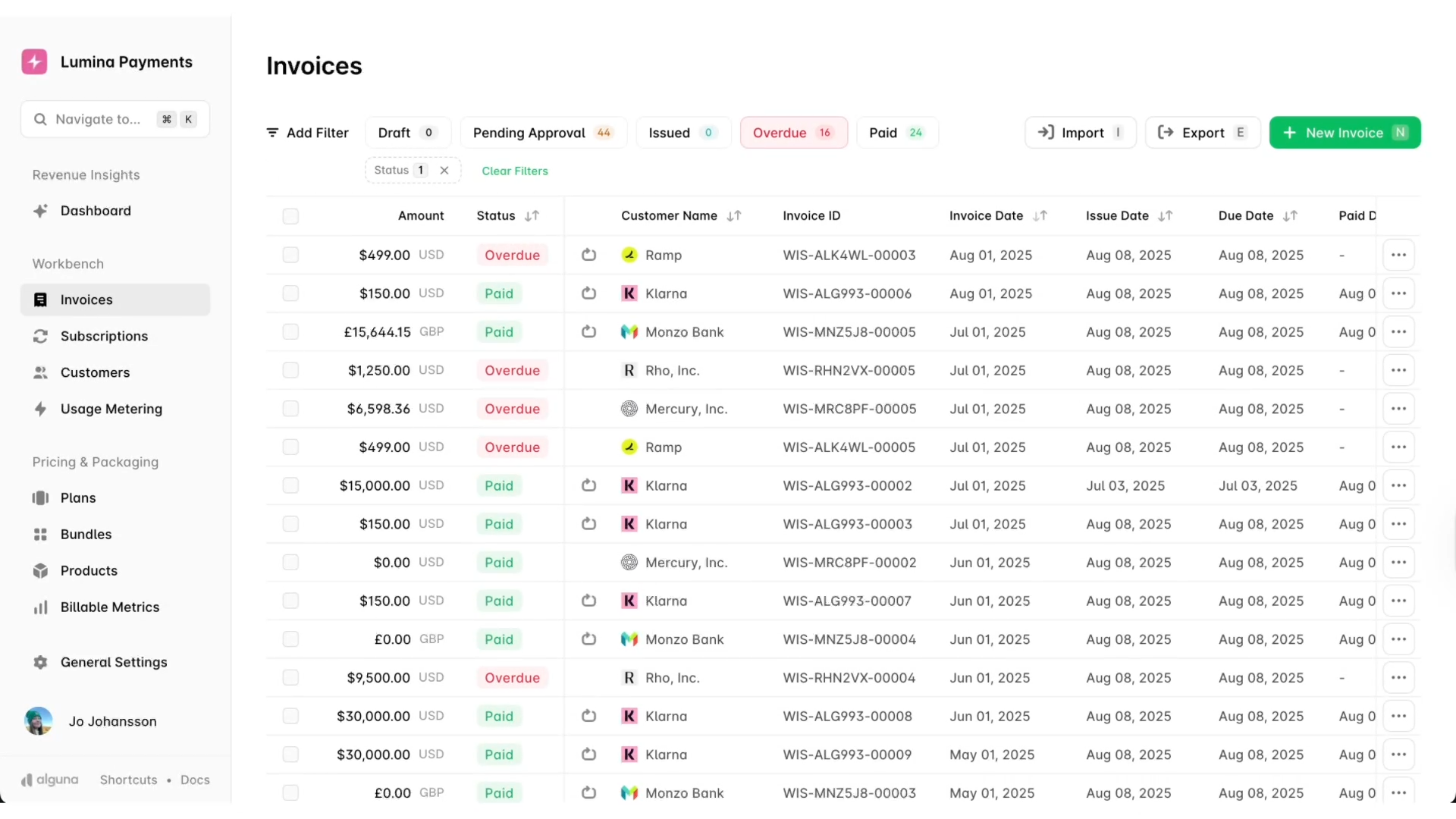
At Alguna, we built an end-to-end revenue management platform for the AI era, designed to handle complex pricing and high-volume billing.
Because quoting, billing, invoicing, and revenue recognition all live in one system, there's no data lag between when a deal closes and when an accurate invoice goes out, even when that invoice blends subscription, usage, seats, and outcomes.
Here's how our accounts receivable and invoicing product addresses the challenges above.
- Real-time AR dashboard: a live view of every outstanding invoice, synced to your CRM and billing, with filters by aging bucket, customer, and contract.
- Automated collections and dunning: reminders, smart retry attempts, and escalation workflows that follow up automatically so no overdue invoice slips through.
- Multi-method payments: support for ACH, SEPA, wire, cards, wallets, and offline logging, with smart routing rules based on amount, region, and preferred currency.
- Auto-reconciliation: we match payments to invoices instantly and sync the results to QuickBooks, Xero, Stripe, and your ERP, which removes the manual work from month-end close.
- Flexible retry rules and aging insights: customize retries by payment method, failure reason, or customer type, and visualize current, overdue, and at-risk invoices by segment or sales rep.
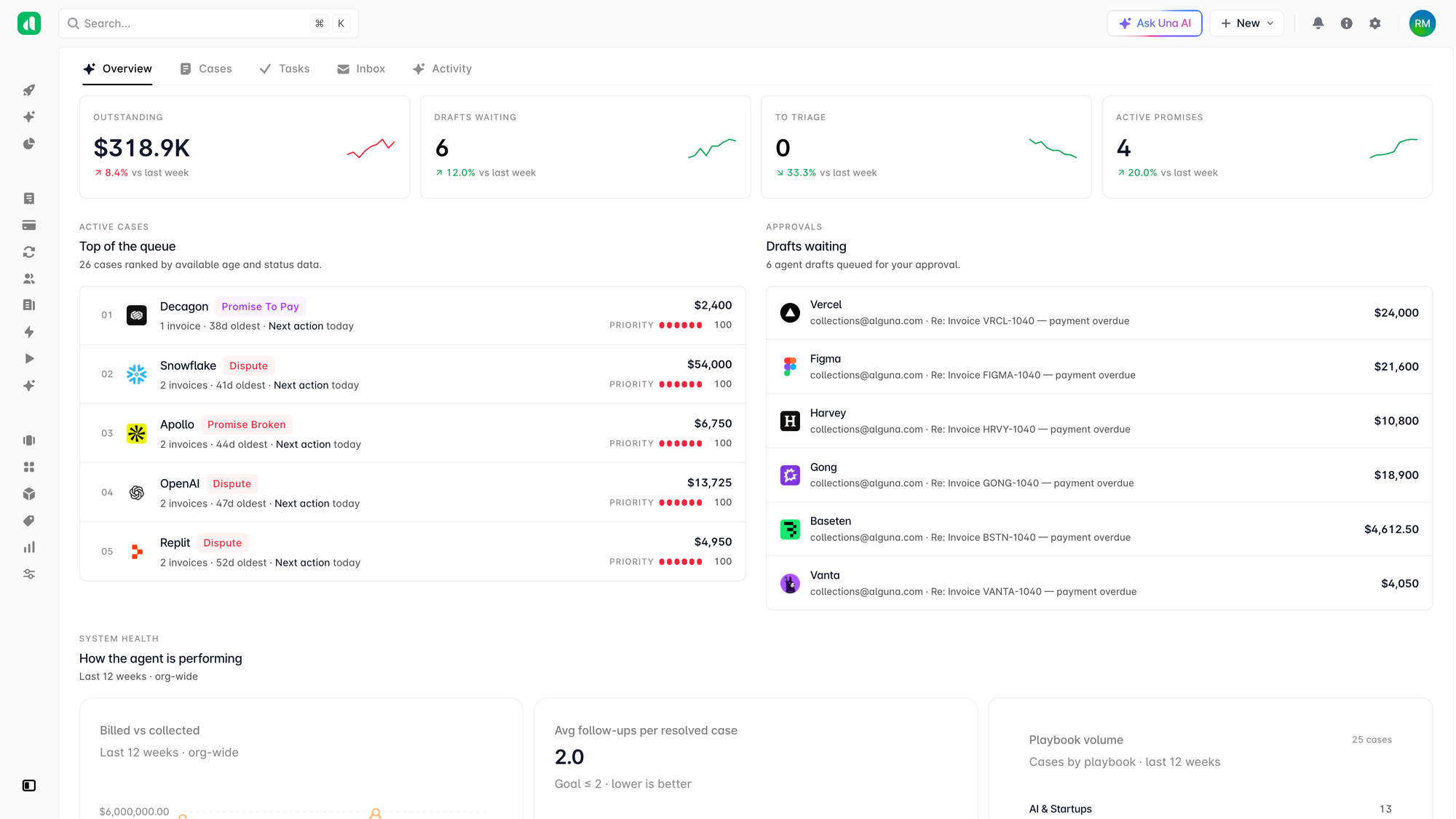
For teams that want to go further, our AI accounts receivable agent works your aging like a tireless specialist. It opens a case for every overdue invoice, drafts and sends follow-ups on the cadence you configure, reads replies, captures promises to pay, pauses on disputes, and escalates edge cases to your team.
You stay in control through an autonomy ladder with monitor, suggest, and act modes, so the agent only does as much as you're comfortable with. It's all part of the broader shift toward AI billing, where software handles the routine work and your team owns the judgment calls.
What's next for SaaS invoicing?
AI era pricing made SaaS invoicing harder because revenue is now variable, hybrid, and spread across entities and currencies, and because every late or incorrect invoice has a direct line to your cash flow.
The good news is that the same complexity that makes it painful by hand is exactly what automation handles well. Centralize your pricing and contract data, automate the repetitive work, and give yourself live visibility, and invoicing stops being a monthly fire drill, no matter how you price.
Want to see what automated SaaS invoicing looks like for your billing model? Book a demo and we'll walk you through how Alguna takes you from invoice to cash, with your use case in mind.
Frequently asked questions about SaaS invoicing
What is the difference between SaaS billing and SaaS invoicing?
Billing is the logic that calculates what a customer owes, including pricing, metering, and proration. Invoicing is the document and collection motion that turns that amount into cash. They work together, but billing decides the number and invoicing gets it paid.
Why do AI era pricing models make invoicing harder?
Because the invoice is no longer a fixed figure. Hybrid, usage-based, and outcome-based pricing means totals change every cycle, seat counts move, and charges often span multiple entities and currencies. Each variable line is a place where a manual invoice can be wrong, which is why automation has become close to essential.
Can I run SaaS invoicing on spreadsheets?
You can at a very early stage, but spreadsheets break down quickly once you add usage-based pricing, mid-cycle changes, multiple currencies, or a rising invoice count. Most SaaS companies move to dedicated invoicing software well before they reach 100 customers.
How does usage-based invoicing work?
The system meters a billable metric in real time, such as API calls or gigabytes processed, applies your pricing logic, and calculates the charge at the end of each period. The total can vary every cycle, which is why accurate metering and clear customer visibility matter so much.
How does automation reduce late payments?
Automation sends invoices accurately and on time, then follows up with consistent reminder cadences and smart retries on failed payments. Removing the manual chasing means overdue invoices get worked every day rather than whenever someone has a spare moment, which shortens the time it takes to get paid.