Updated on July 7th, 2026 to include additional sections, customer feedback, and resources.
When it comes to managing subscription billing and revenue recognition, Maxio has long been a go-to platform for SaaS and recurring revenue businesses. But as the market evolves and companies demand more flexibility, automation, and integration options, a growing number of Maxio alternatives are stepping up to meet those needs.
Here’s the kicker: Billing isn’t what it used to be. The AI economy requires a more flexible billing engine to keep up with evolving SaaS pricing models. This shift demands more of your revenue infrastructure than ever before, and some platforms simply won’t cut it.
Instead of stitching together tools, businesses need a single platform to configure pricing, generate quotes, manage contracts, automate invoicing, and surface revenue analytics—all with no code.
That’s why we’ve put together an overview of some of the best Maxio alternatives, including favored newcomers like Y Combinator backed Alguna and Metronome.
Why revenue teams look for Maxio alternatives
Maxio has powered subscription billing for a lot of SaaS companies over the years, but a few recurring themes come up once revenue teams start evaluating a change.
The most common trigger is a pricing model that has outgrown simple subscriptions. As companies add usage-based components, prepaid commitments, or hybrid pricing, translating that complexity into Maxio's billing engine often takes custom middleware and ongoing engineering support rather than configuration a revenue team can manage on its own.
Reporting is another common pain point. When usage-based revenue and subscription revenue live in different systems, it gets harder to answer a basic question, like what a customer's total contract value actually is, without pulling numbers from multiple places by hand.
And for revenue teams that need to move quickly, particularly around renewals, expansions, or mid-term contract changes, waiting on engineering to update a billing configuration slows down the entire quote-to-cash process.
What we heard from a company that tried to implement Maxio
A company with a prepaid and overage usage-based pricing model recently walked us through their attempt to migrate to Maxio.
A few things stood out:
- Splitting a single usage event across a prepaid and overage component required custom middleware, since Maxio didn't support it natively.
- There was no built-in way to move usage to a new subscription once a prepaid commitment ran out mid-term.
- Contract-level ARR was split across Maxio and the middleware, with no single view of total contract value.
Maxio's platform may have evolved since then, but it's a useful checklist of questions to ask any vendor if your pricing combines prepaid and usage-based components.
Maxio competitors: Comparison overview
| Platform | Best for | Pros | Cons | Pricing |
|---|---|---|---|---|
| Alguna | Unified revenue management for non-technical enterprise teams at B2B SaaS and AI companies | No-code automation of billing & revenue workflows; unified pricing, quoting, billing in one tool; real-time analytics & metrics; modern, intuitive UX; replaces multiple tools (CPQ, billing, spreadsheets) | Newer platform; limited native integrations (still expanding ecosystem) | Starts at $699/month incl. white glove migration and onboarding |
| Metronome | Enterprise scale usage-based billing | Simplified pricing setup, real-time metering and invoicing | FComplex implementation requires technical expertise | Custom |
| Hyperline | Billing for early stage startups | Subscription management, usage metering and recurring billing and invoice generation | Analytics and deep revenue recognition still under development; relies on Stripe and others for payment processing | Starts at $199/month + 0.6% of revenue |
| Sequence HQ | Companies with modern pricing models needing finance friendly billing | Flexible contract management, customizable, great support | Less proven for large enterprises; may lack some enterprise features (e.g. advanced revenue recognition or multi-entity accounting) | Starts at $799/month |
| Salesbricks | Streamlining custom contracts | Automates sales processes and improves sales workflows | Doesn’t support multi-currency, only support custom contracts, primarily focused on B2B SaaS (may be too much for simple B2C subscriptions) | Starts at $500 per month + $5,000 per annum for each $500k processed | Ordway | Finance teams managing complex billing and ASC 606 compliance | Deep revenue recognition (ASC 606/IFRS 15), flexible hybrid billing models, investor-ready SaaS metrics | Less intuitive UI compared to modern alternatives, custom reporting still maturing | Custom (transaction-volume-based fixed annual fee) |
1. Alguna: Best overall Maxio alternative
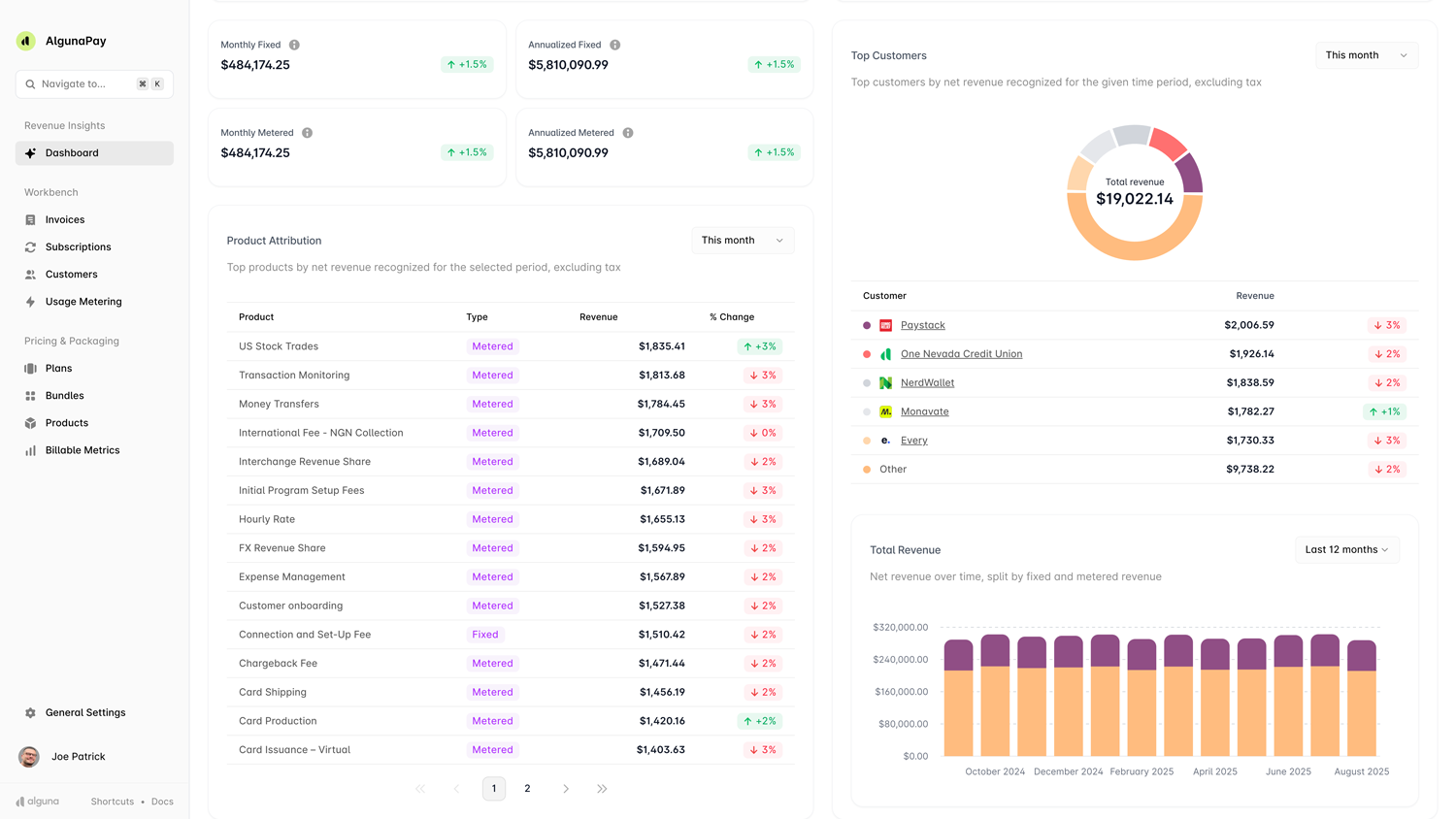
Alguna combines pricing, quoting, and billing in a fully automated revenue platform. From no-code CPQ and accounts receivables to real-time revenue analytics, Alguna is a modern option for businesses ready to move beyond Maxio’s limitations and unify PLG and sales-led in an end-to-end revenue management platform.
Alguna is Y Combinator backed and has purpose-built the platform to accommodate the billing complexities of modern SaaS, fintech, and AI companies.
Overview
Founded: 2023
HQ: San Francisco, CA and London, UK
Feature release cadence: Features shipped on a weekly basis, agile development focused on responding to complex billing needs.
Feature highlights
- Unified revenue operations: Keep pricing, contracts, invoicing, and billing in one tool.
- Flexible pricing engine: Create and manage modern SaaS and AI pricing models without the back-office headache.
- Powerful metrics: Define any metric relevant to your billing using an extensible query engine, providing immense flexibility.
- Billing management: Manage recurring setups and collect payments directly in the platform.
- Accounts receivable AI agent: Stop chasing payments and let Alguna's AI AR agent collect on your behalf, only escalating when required.
- Multi-entity support: Orchestrate invoices and billing based on different legal entities as needed.
- No-code automation: Configure complex pricing without engineering resources.
- Customer portal: Provide your customers with a self-service portal to manage their subscriptions and payment details, view and pay invoices, and change their legal details.
- API first business and additional integrations: Sync with CRMs (Salesforce, Hubspot, Zoho), and accounting tools (QuickBooks, Xero, Netsuite).
Pros:
- No-code automation: No technical expertise required.
- Focus on B2B SaaS and AI-native companies: Tailored features for the unique challenges of complex billing models in B2B SaaS and AI companies.
- Unified pricing, quoting, billing: Consolidate pricing, quoting, and billing into a single platform.
- Real-time analytics: Make informed decisions with real-time revenue and billing analytics.
- Modern UX: Sleek and intuitive interface designed for speed and efficiency.
- Replaces multiple tools: No more software bloat with a powerful revenue engine in one place.
- Dedicated customer support: Get personalized support from a team that gets it.
Cons:
- Newer platform: Smaller integration ecosystem compared to established players like Maxio.
Pricing: Starts at $699 per month. Including white glove migration and onboarding.
Why choose Alguna instead of other Maxio alternatives?
Choose Alguna if your business model requires flexible pricing that traditional subscription platforms like Chargebee or RevOps platforms (like Maxio's original Chargify side) struggle to accommodate.
It’s ideal for SaaS, AI, and fintech companies that need flexibility to monetize their services in an end-to-end revenue management platform and want to leave spreadsheets behind for good.
- Adam Liska, CEO and Co-founder at Glyphic AI
Read the case study
2. Metronome: Best for enterprise scale usage-based billing (Acquired by Stripe)
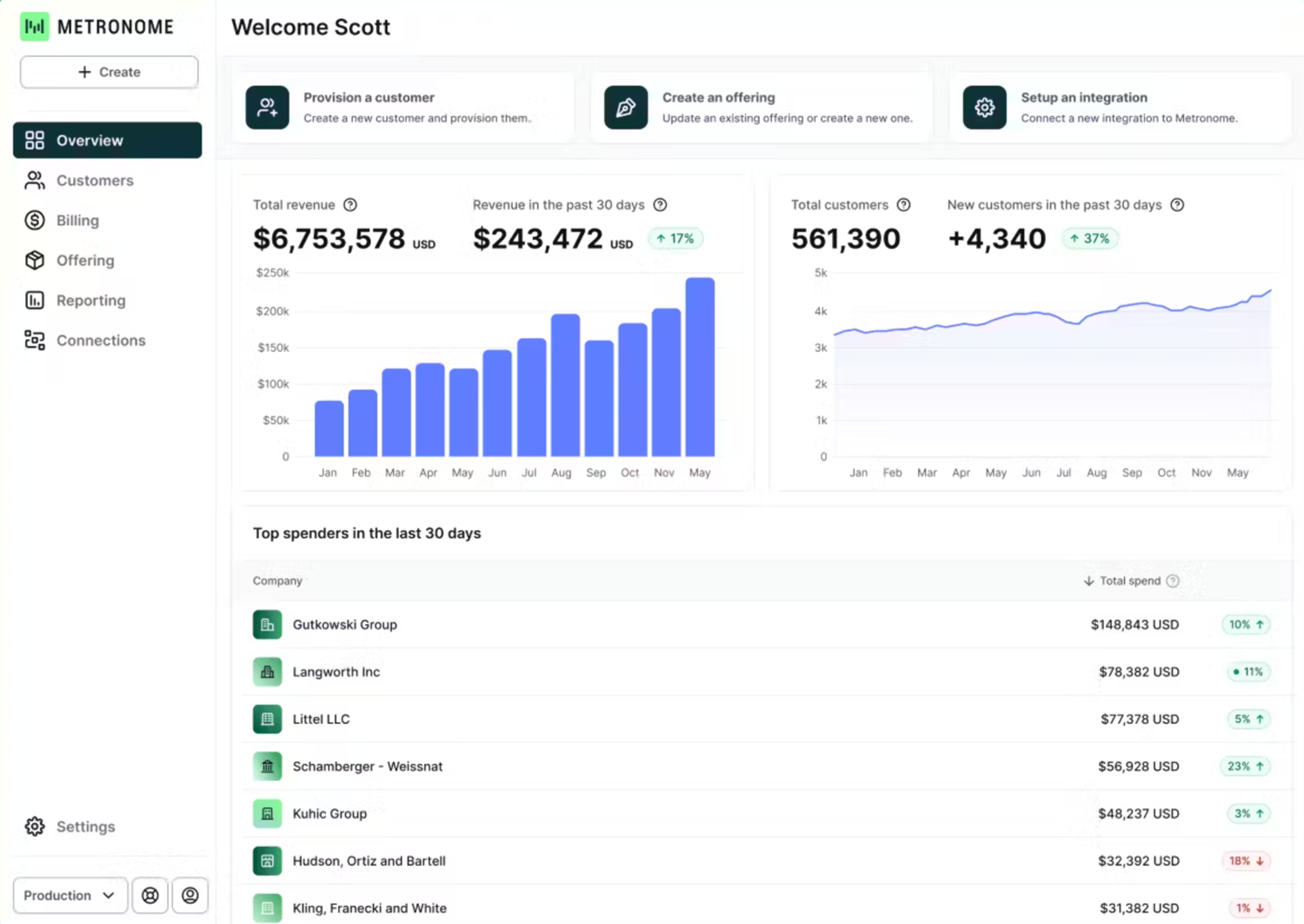
Metronome is a powerful Maxio competitor engineered specifically for high-volume, complex usage-based billing. Its focus is on providing a robust backend for developers to accurately meter and bill for granular consumption. It's an ideal choice for enterprise companies whose core product is tied to highly specific usage metrics, often with significant data volumes.
Overview
Founded: 2019
HQ: San Francisco, CA, USA
Feature release cadence: Frequent, with a strong focus on technical capabilities, metering, and integrations for high-volume data.
Pros:
- Built for engineers: Highly flexible and customizable via APIs, ideal for technical teams.
- High-volume usage metering: Excels at ingesting and processing massive amounts of raw usage data in real-time.
- Flexible metric definition: Allows defining complex billable units using SQL-based logic.
- Cloud marketplace integration: Native support for billing through major cloud marketplaces (AWS, Azure).
- Low latency alerting: Provides real-time insights into usage spikes or drops.
Cons:
- Single point solution: Best-in-class for scaled usage metering but doesn't cover the full end to end customer lifecycle.
- Can become expensive as revenue scales: Revenue caps on lower plans often leading to forced upgrades.
- Requires strong technical (SQL) knowledge for setup and maintenance: Less suitable for non-technical finance or RevOps teams without dedicated engineering support.
- Less robust in non-metering billing areas: Lacks comprehensive invoicing or advanced reporting compared to full billing suites like Maxio.
- Lacks built-in pricing simulation tools: Can be a drawback for dynamic pricing strategies.
Pricing: Custom
Feature highlights
- Real-time event ingestion and transformation.
- Flexible billable metrics using SQL.
- Modular pricing (rate cards, commits, credits).
- Customized pricing per customer.
- API-first for deep integration and custom experiences.
Why choose Metronome?
Choose Metronome if you have a strong engineering team and your business relies on high-volume, granular usage-based billing that requires deep technical control over metric definition and data processing. It's ideal for companies building modern, consumption-driven products and services that need a developer-centric billing infrastructure.
- Bob van Leeuwen, Director of Product at Starburst
3. Hyperline: Best for early stage startups
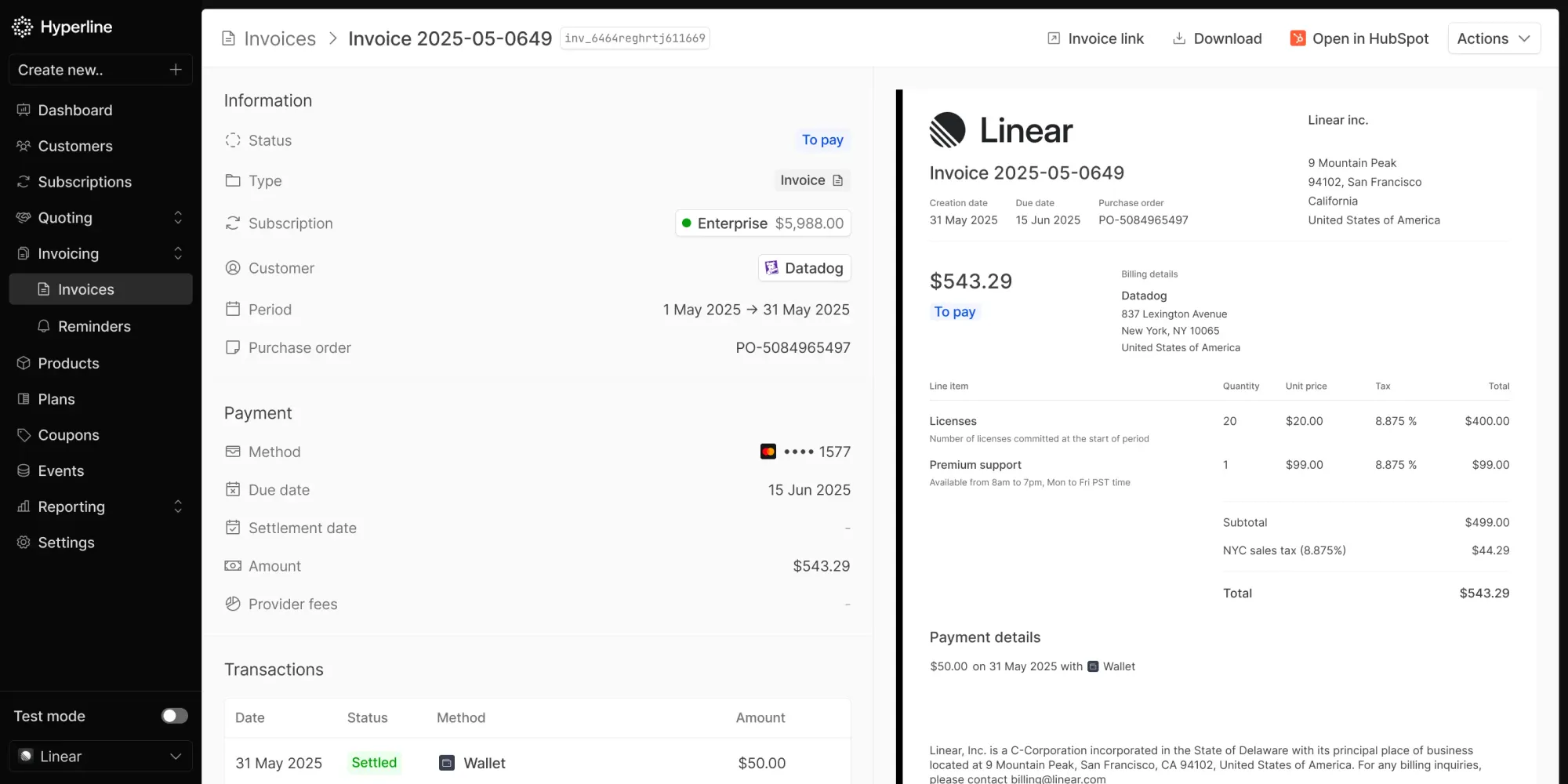
Hyperline is a next-generation billing platform designed to simplify subscription management, usage-based billing, and invoicing for early stage companies.
With a focus on the European market, it’s a great Maxio alternative for non-technical teams seeking a quick and flexible billing experience.
Overview
Founded: 2023
HQ: Paris, France
Feature release cadence: Monthly
Pros:
- Streamlined subscription management: Aims for simplicity in managing recurring subscriptions, plans, and customer contracts.
- API-first approach: Provides powerful APIs for seamless integration with existing systems.
- Focus on B2B SaaS needs: Tailored features for the specific challenges of recurring revenue models in software.
- Growth-ready: Designed to support growing businesses as they expand their customer base and offerings.
- Multiple payment methods: Supports Stripe and Adyen as payment gateways.
Cons:
- Relatively new entrant: The feature set might not be as exhaustive in all areas (e.g., highly niche revenue recognition scenarios) as Maxio's combined offerings.
- Selective focus (Stripe-centric): Hyperline’s strategy often leverages Stripe for payment processing (and even encourages connecting its CPQ directly to Stripe Billing). If you prefer a different payment gateway or require advanced tax handling, you might need to ensure Hyperline supports it (the platform does offer tax management and is adding more payment providers)
- Depth of finance features: Companies with very heavy accounting requirements (multi-entity consolidations, advanced audit trails) should evaluate if Hyperline meets their needs or if supplementary tools are required.
Pricing: Starts at $199/month + 0.6% of revenue
Why choose Hyperline?
If Maxio feels too cumbersome or requires too much engineering overhead, Hyperline offers a refreshing low-code Maxio alternative for early stage startups with a focus on ease of use.
- Benjamin Donteville, CEO at Scalability
4. Sequence HQ: Best for Finance friendly billing
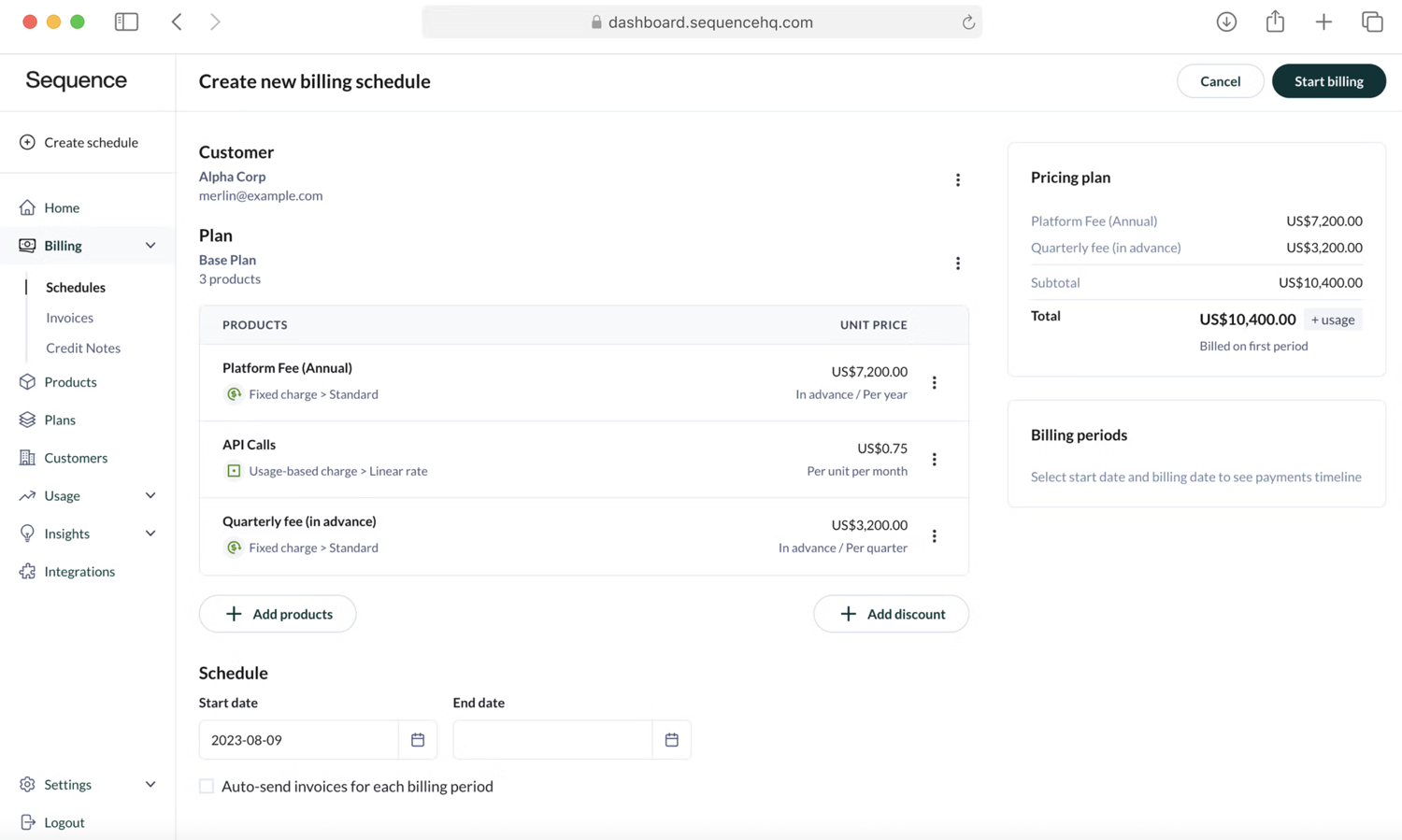
Sequence HQ is a quoting, billing, and accounts receivable platform built for B2B SaaS companies. It automates billing for custom contracts and supports advanced pricing models.
Overview
Founded: 2021
HQ: New York, NY
Feature release cadence: Sequence ships new features on at least a biweekly basis
Pros:
- Intelligent insights: Aims to provide predictive analytics and actionable recommendations based on revenue data.
- Reduces manual processes: Automates complex revenue workflows to minimize errors and improve efficiency.
- Supports dynamic pricing: Designed to handle flexible and evolving pricing models, common in modern digital services.
Cons:
- Integrations: Not as deep integration in third party CRM and accounting tools.
- Payment collection: Relying on third parties like Stripe to collect payments.
- Enterprise scale: Most of the customer base is early stage startups.
Pricing: Starts at $799/month
Feature highlights
- Billing automation for various pricing models
- Integrated quoting tools
- Revenue analytics
- Integration with core accounting tools
Why choose Sequence HQ?
Sequence is a great choice for finance teams that want agility without sacrificing rigor–you get a nimble system that can adapt to any deal structure, backed by strong financial controls and reporting.
- Senior Finance and HR Director at Small Business
Read the full review on G2
5. Salesbricks: Best for streamlining custom contracts
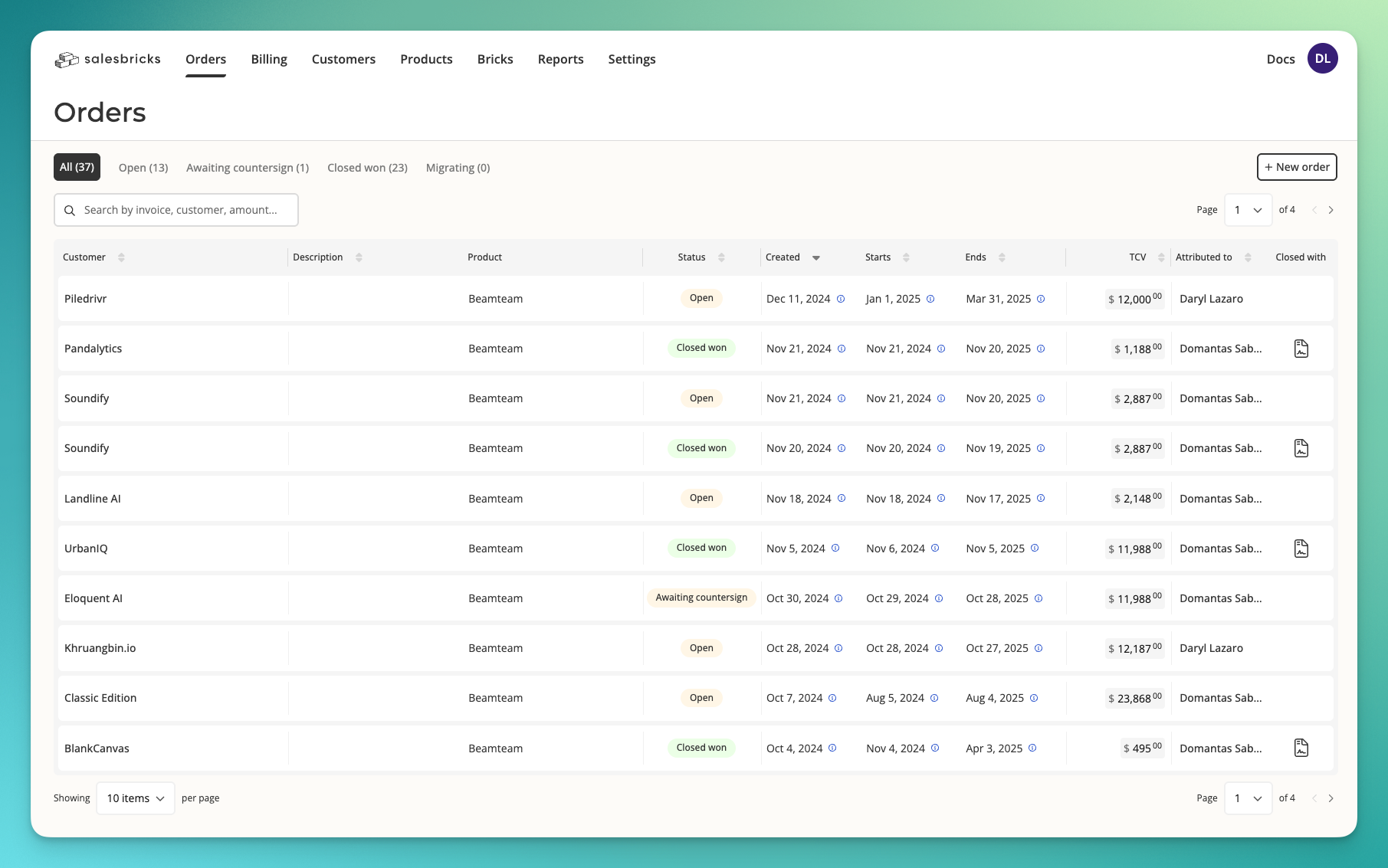
Salesbricks is a modern deal closing platform built with sales teams in mind, streamlining the entire quote-to-cash process for SaaS and B2B companies.
For teams frustrated by manual quoting, slow approvals, or disconnected billing workflows, Salesbricks provides a seamless, user-friendly solution that keeps the sales process moving and revenue flowing.
Overview
Founded: 2021
HQ: San Francisco, CA
Feature release cadence: Regular updates with a focus on automation, reporting, and integration improvements.
Pros
- Sales automation: Automates repetitive tasks and improves efficiency.
- Comprehensive analytics: Real-time insights into sales performance.
- CRM integrations: Salesbricks integrates with popular CRM systems like Salesforce and HubSpot.
- User-friendly: Easy to set up and use.
Cons
- Newer platform: As a relatively new entrant compared to legacy CPQ solutions, Salesbricks may lack some niche features or deep integrations.
- Lacks customization and advanced reporting for large enterprises.
Pricing: Starts at $500 per month + $5000 per annum for each $500k processed
Feature highlights
- Automated sales processes
- User-friendly deal structuring
- Enables tailored quotes and proposals using templates
- Integration with CRM tools
Why pick Salesbricks over other Maxio competitors?
If your priority is speed and simplicity within your sales org, Salesbricks delivers a modern quote-to-cash flow that empowers sales teams with minimal overhead—making it a compelling option for small or mid-sized businesses.
- Kevin, President and COO at Small Business
Read the full review on G2
6. Ordway: Best for finance teams managing complex billing at scale
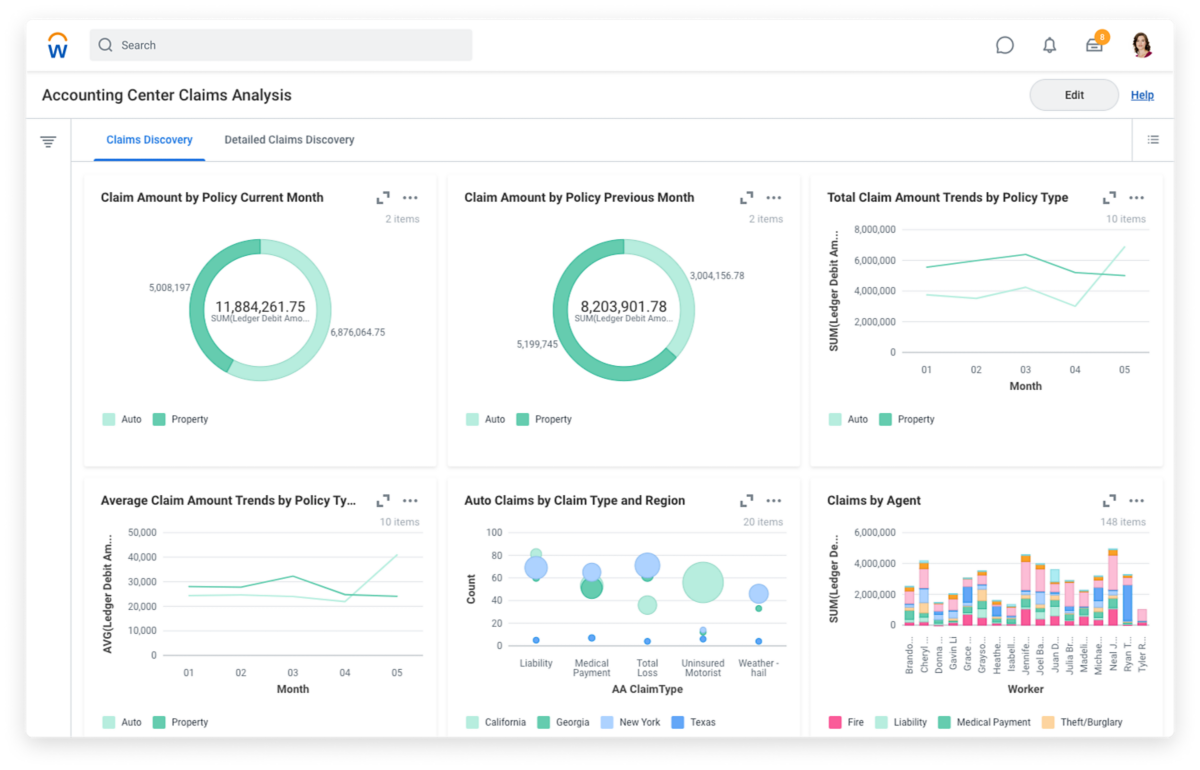
Ordway is a billing and revenue automation platform purpose-built for SaaS, cloud, and fintech companies that need to manage sophisticated pricing models without leaning on spreadsheets or manual workarounds.
Just like Alguna, Ordway sits between your CRM and your general ledger, capturing signed sales orders and converting them automatically into invoices, revenue schedules, and investor KPIs. It's a strong Maxio competitor for finance-led organizations that need audit-ready revenue recognition alongside flexible billing.
If you're evaluating Ordway as a Maxio alternative, here's what you need to know.
Overview
Founded: 2017
HQ: Washington, DC, USA
Feature release cadence: Regular updates with a strong focus on accounting compliance, billing flexibility, and ERP integrations.
Key features
- Subscription and usage-based billing: Ordway supports per-user, tiered, volume, pay-as-you-go, and hybrid pricing models—including prepaid credits with drawdowns, monthly minimums, rollovers, and overage fees. The rating engine ingests usage data directly from your product or via API, and can calculate billable quantities using methods like high-water mark or percentile billing.
- Revenue recognition (ASC 606 and IFRS 15): Finance teams can define custom revenue recognition templates and track deferred versus recognized revenue schedules. Journal entries are housed in a dedicated sub-ledger and can be published directly to your ERP or general ledger.
- Accounts receivable and dunning automation: Aging reports, automated dunning workflows, and a customer self-service portal for invoice viewing and payment management help reduce manual collections effort and accelerate cash flow.
- SaaS metrics reporting: Ordway surfaces investor-ready KPIs out of the box, including MRR/ARR, net dollar retention, bookings, churn, and renewal rates—segmented by product line, region, or market segment.
- CRM and ERP integrations: Native connections to Salesforce, HubSpot, QuickBooks, NetSuite, Sage Intacct, Avalara, and Stripe mean sales orders flow automatically into billing without manual re-entry.
- AI agentic workflows: Ordway has introduced AI-powered automation for billing and accounting tasks, including a natural language interface for querying SaaS metrics.
- Multi-entity support: Consolidated AR aging reports across multiple operating entities give finance leaders global cash flow visibility in a single view.
Pros
- Deep accounting compliance makes it a strong fit for companies preparing for audits, fundraising, or international expansion
- Praised for responsive customer support and a willingness to accommodate custom billing scenarios
- Monthly bill runs that previously took weeks are typically reduced to one or two days after implementation
Cons
- The UI can feel less intuitive than more modern platforms, particularly for teams coming from tools with a cleaner interface
- Some advanced reporting dashboards and cohort analytics are still maturing; the custom reporting module covers most use cases but isn't always out-of-the-box for every business model
- Pricing is custom and transaction-volume-based, which can make upfront cost modeling difficult
Best for
- Mid-market SaaS and cloud companies that need GAAP-compliant revenue recognition alongside billing automation
Pricing
Ordway uses a fixed annual fee structure based on the dollar value of transactions processed, not a percentage model.
TL;DR: Evaluate Ordway as a Maxio alternative
Choose Ordway if your finance team is managing complex contract structures, mixed billing models, and needs audit-ready revenue recognition baked in. It's particularly well-suited for mid-market SaaS companies.
How to evaluate Maxio alternatives
It’s easy to go down a rabbit hole when it comes to Maxio alternatives. Even if you’re a seasoned pro when it comes to billing platforms, best practices, and revenue management, it’s always better to begin if you narrow down what “best” looks like to you.
Because the “best” tool isn’t always the one with the longest feature list. It’s the one that aligns with your workflows, your tech stack, and your growth plans.
Here’s how we recommend approaching your evaluation:
1. Map your core requirements
Start by listing your must-haves. Do you need dunning management out of the box? Multiple payment gateways? Support for complex pricing models like usage-based or hybrid subscriptions? Get your team together and document your current pain points with Maxio, as well as any gaps you want to fill.
2. Consider your integration ecosystem
Billing doesn’t live in a vacuum. Your new platform should play nicely with your CRM, accounting software, analytics tools, and customer support systems. Check for native integrations, but also see how robust the API is—especially if you have custom workflows or plan to automate processes down the road.
3. Evaluate the platform’s flexibility and scalability
Ask yourself: Will this tool grow with us? Some platforms are fantastic for startups but can become limiting as your customer base and billing complexity increase. Look for flexibility in product catalog management, invoicing, and reporting. Bonus points if the vendor has a track record of supporting companies at your stage and beyond.
4. Dig into pricing transparency
Billing software pricing can be surprisingly opaque. Watch out for hidden fees (like charges for additional API calls, invoices, or users). Model your expected usage and ask each vendor for a clear, apples-to-apples quote. If possible, talk to existing customers about their real-world billing experiences.
5. Assess usability and support
A powerful platform is only valuable if your team can actually use it. Request a trial or demo, and have your finance and ops folks test drive the interface. Do they offer a POC period? How steep is the learning curve? What’s the quality of documentation and customer support? Fast, knowledgeable support can be a lifesaver when you’re dealing with revenue-critical systems.
6. Prioritize compliance and security
Don’t overlook PCI compliance, GDPR readiness, and data security features. Your customers’ payment data is on the line, and so is your reputation.
7. Read between the lines on roadmaps
Finally, ask about the vendor’s product roadmap. Are they actively innovating, or is development stagnant? A platform that’s evolving with the market will serve you better in the long run.
In short: evaluating Maxio alternatives isn’t just about ticking boxes—it’s about finding a partner that fits your business today and can scale with you tomorrow.
Frequently asked questions about Maxio competitors
How does Maxio compare to Alguna when it comes to usage-based billing and flexibility?
Alguna offers greater flexibility with real-time usage metering and customizable pricing models. Maxio is solid when it comes to traditional subscription billing, but less adaptive for complex usage-based needs.
Which platform has a shorter implementation timeline, Maxio or Aloguna?
Alguna typically offers a faster implementation, often going live in weeks, while Maxio deployments can take months due to heavier configuration needs.
How do Maxio vs Metronome compare when it comes to handling complex usage-based billing models?
Metronome is purpose-built for advanced, granular usage-based billing, whereas Maxio has more limitations in supporting highly customized consumption models.
What are the main differences between Maxio vs Metronome for B2B SaaS subscription management?
Maxio provides robust tools for subscription management and revenue recognition, while Metronome specializes in usage-based scenarios but offers fewer subscription management features out of the box.
Which platform between Maxio vs Orb is better suited for automating collections and managing dunning processes?
Orb provides basic dunning tools, but Maxio has more mature collections automation; Alguna, however, combines both with integrated payments and flexible recovery workflows.
Is Maxio vs Orb a better fit for scaling SaaS companies with complex billing needs?
Orb is better suited for fast-scaling SaaS with complex, usage-heavy pricing, while Maxio works well for companies scaling around seat-based or hybrid models.
Which solution, Maxio vs Orb, is easier to implement for teams without extensive technical resources?
Maxio typically requires more configuration and finance involvement, while Orb is more API-driven; Alguna strikes a middle ground with no-code setup and flexible APIs.
Moving forward with the right Maxio alternatives
Choosing the right billing and revenue platform is a big decision—one that can impact everything from your team’s efficiency to your customer experience and, ultimately, your bottom line.
As you weigh your options, remember that when it comes to Maxio alternatives, it isn’t just about matching features; it’s about finding a solution that truly fits your business model, integrates seamlessly with your existing tools, and can adapt as you grow.
Take the time to trial your shortlist, ask the tough questions, and make sure you’re partnering with a provider that’s committed to your long-term success.
Ready to leave the limitations of Maxio behind?
Book a demo to get a closer look at Alguna's advanced capabilities and discover how we can put your back-office on autopilot with a flexible billing engine that scales.