If you manage accounts receivable, you already know the struggle: a pile of overdue invoices, a team stretched thin, and the same manual follow-up process running on repeat.
Chasing payments takes time. And more often than not, that time comes at the expense of strategy, customer relationships, and growth.
But there's a smarter way to collect.
Intelligent collections are changing how finance and revenue teams collect money owed by using AI in accounts receivable and using automated AR solutions to help teams recover more revenue with less effort.
In this guide, we walk you through what intelligent collections actually are, why they matter, and how you can put them to work in your business.
What are intelligent collections?
Unlike traditional collections, which rely heavily on manual outreach and spreadsheet tracking, intelligent collections systems work in the background continuously. They identify which accounts need attention, trigger the right communication at the right time, and give your team a clear view of what's outstanding and why.
Think of it this way: Instead of your team deciding each morning who to call or email, the system surfaces the accounts that need action, suggests the next best step, and in many cases, takes that step automatically.
Key terms you should know
Before we go further, here's a quick breakdown of the core concepts:
| Term | What it means |
|---|---|
| Accounts receivable (AR) | The money owed to your business by customers for goods or services already delivered |
| Collections process | The steps a business takes to recover outstanding payments from customers |
| Dunning | The process of communicating with customers to collect overdue payments, typically through a sequence of reminders |
| Days Sales Outstanding (DSO) | A measure of how long it takes a company to collect payment after a sale — a key AR health metric |
| Aging report | A categorized breakdown of unpaid invoices by how long they've been outstanding (e.g., 0–30, 31–60, 61–90 days) |
| Escalation | Moving an overdue account to a higher-priority follow-up stage, such as a phone call or formal dispute process |
Why intelligent collections matter for your business
The scale of the problem is hard to ignore. According to research by Atradius, nearly 50% of all B2B invoices in the Americas are paid late. For most businesses, that translates directly into cash flow pressure, strained customer relationships, and a finance team stuck in reactive mode.
Manual collections processes make this worse. When your team is manually tracking down payments, they're often working from incomplete data, sending generic reminders, and losing track of where each account actually stands. The result? Accounts slip through the cracks, disputes take longer to resolve, and DSO climbs.
Intelligent collections solve this by replacing guesswork with process. When everything runs through a structured, automated and AI-powered system, your team spends less time on admin and more time on the accounts that actually need human attention.
Best practices for intelligent collections
Putting intelligent collections into practice isn't just about switching on a tool. It requires a thoughtful approach to how you structure your workflows, communicate with customers, and measure success.
Here's what we know works.
1. Segment your accounts before you automate
Not all overdue accounts are equal. A long-term customer who's two days late on a payment deserves a different approach than a new customer with a 90-day delinquency.
Before you automate anything, segment your AR portfolio by:
- Payment history and behavior
- Invoice value and risk level
- Customer relationship and tenure
- Days outstanding (current, 30, 60, 90+ days)
This segmentation allows you to apply the right escalation logic and communication tone to each group and avoid the relationship damage that comes from treating a loyal customer like a delinquent account.
2. Build dunning sequences that reflect your customer relationships
A dunning sequence is the series of communications you send to collect an overdue payment. In an intelligent collections setup, these sequences run automatically based on triggers (e.g., invoice due date, number of days overdue).
A well-structured dunning sequence typically includes:
- A friendly pre-due reminder (2–3 days before the due date)
- A payment due notification (on the due date)
- A first overdue reminder (7 days past due)
- A second escalation (14–21 days past due)
- A formal demand or handoff to your collections team (30+ days past due)
Keep the tone professional but human throughout. Automated doesn't have to mean cold.
3. Prioritize your team's time with smart queuing
One of the biggest wins from intelligent collections is what it does for your team's focus. When the system handles routine reminders automatically, your collectors can concentrate on the accounts that genuinely need human intervention.
Set clear criteria for when an account should be escalated to a person, such as:
- Disputes raised by the customer
- No response after multiple automated touchpoints
- High-value accounts above a set invoice threshold
- Customers with a previously agreed payment plan
When your team only works the accounts that need them, they're more effective — and customers get a better experience too.
4. Keep your customer data clean and up to date
Intelligent collections is only as good as the data behind it. If your CRM or billing system has outdated contact information, wrong invoice amounts, or missing payment terms, your automated workflows will fire on bad data.
Make it a habit to:
- Verify customer contact details at invoice creation
- Sync payment terms across your billing and AR systems
- Flag and resolve data discrepancies before they enter the collections workflow
- Review and update your aging report on a regular cadence
5. Measure DSO and collection effectiveness regularly
If you're not measuring it, you can't improve it. The two most important metrics to track in an intelligent collections program are Days Sales Outstanding (DSO) and your Collection Effectiveness Index (CEI).
| Metric | What it measures | Why it matters |
|---|---|---|
| DSO | Average days to collect payment after a sale | Lower DSO = faster cash flow |
| CEI | Percentage of collectible AR recovered in a period | Higher CEI = more effective collections |
| Bad debt ratio | Percentage of AR written off as uncollectable | Lower ratio = healthier AR portfolio |
| Promise-to-pay rate | % of customers who commit to a payment plan and follow through | Indicates quality of collector interactions |
How to set up intelligent collections in your business
Ready to get started? Here's a practical, step-by-step approach to implementing intelligent collections in your accounts receivable workflow.
Step 1: Audit your current collections process
Before you change anything, map out how collections works today. Document every step: who does what, which tools you use, how reminders are sent, and where things fall through the cracks. This baseline audit will tell you where automation will have the most impact.
Ask yourself:
- How many manual touchpoints does each overdue invoice require?
- What percentage of your AR is currently overdue?
- What's your current DSO, and how does it compare to your industry benchmark?
- Where does your team spend the most time in the collections process?
Step 2: Choose the right intelligent collections software
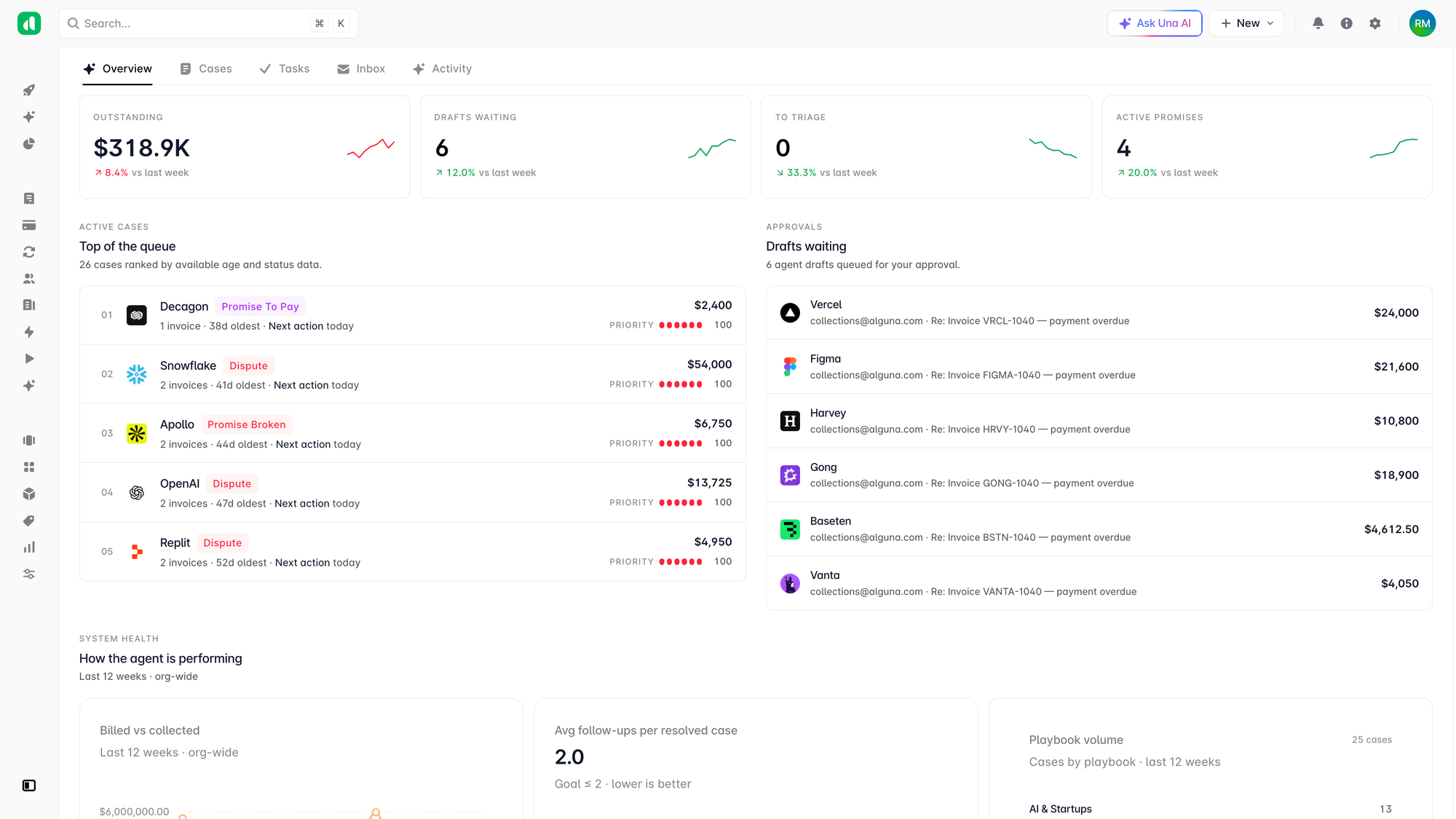
Intelligent collections works best when it's built into your billing and invoicing platform, rather than bolted on as a separate tool.
Look for a solution that gives you:
- Native intelligent collections (without manual workarounds)
- Agentic dunning sequences with customizable rules
- Real-time AR aging dashboards
- Customer-level communication history
- Integration with your existing CRM and accounting software
- Clear escalation workflows for your collections team
Step 3: Map your customer segments to workflow rules
Using the segmentation you defined in the best practices section, configure your workflow rules. Assign each customer segment a dunning sequence, an escalation threshold, and a communication template.
For example:
- Enterprise customers: Longer grace period, personalized outreach, dedicated account manager involvement
- SMB customers: Standard dunning sequence, automated reminders, escalation to collections team at 30 days
- New customers: Earlier touchpoints, clearer payment instructions, lower escalation threshold
Step 4: Set up your communication templates
Write your dunning email and message templates for each stage of the collections sequence. Keep them professional, clear, and action-oriented. Each message should:
- State clearly what's owed and when
- Include a direct link or call to action to pay
- Provide a contact point for questions or disputes
- Reflect the appropriate tone for that stage (friendly early on, more formal later)
For more guidance on writing effective payment communications, see our guide to accounts receivable best practices.
Step 5: Test before you go live
Before switching on automated collections across your entire AR portfolio, run a test with a small segment of accounts. Check that the right emails are going to the right people at the right times, that escalation triggers are firing correctly, and that your team's queue is populating as expected.
Look out for:
- Incorrect contact details causing failed deliveries
- Sequence triggers firing too early or too late
- Accounts being escalated that shouldn't be (e.g., accounts with active disputes or payment plans)
Step 6: Monitor, refine, and improve
Intelligent collections isn't a set-it-and-forget-it solution. Once you're live, monitor your key metrics weekly for the first month, then monthly after that. If DSO isn't improving or certain segments have low response rates, revisit your templates and trigger logic.
The best collections programs evolve continuously based on what the data tells you.
5 common challenges (and how to avoid them)
Even with a well-designed intelligent collections setup, a few common pitfalls can undermine results:
| Challenge | Why it happens | How to avoid it |
|---|---|---|
| Over-automating | Teams apply one-size-fits-all rules to all accounts | Segment accounts and customize workflows by customer type |
| Poor data quality | Outdated contacts, incorrect invoice data | Maintain clean CRM and billing data before automating |
| Ignoring disputes | Automated sequences chase accounts with active disputes | Build dispute flagging and pausing logic into your workflows |
| No human oversight | Finance teams disengage from the process entirely | Use automation to assist, not replace, your collections team |
| Measuring the wrong things | Focusing on volume of reminders sent rather than payments collected | Track DSO, CEI, and cash recovery as primary success metrics |
A more intelligent future for collections
Intelligent collections are quickly becoming a competitive necessity. As payment cycles lengthen and customer expectations rise, businesses that still rely on manual collections processes are leaving cash on the table and risking the customer relationships they've worked hard to build.
The companies getting this right aren't necessarily bigger or better resourced. They're simply more systematic. They've replaced ad hoc outreach with structured workflows, vague follow-ups with clear dunning sequences, and reactive firefighting with proactive cash flow management.
If you're ready to take a more structured approach to accounts receivable, explore how Alguna can help you reduce DSO, recover more revenue, and give your team back the time they need to focus on what matters.