If your finance team still spends hours chasing invoices, reconciling payments, and manually matching cash to outstanding receivables, you're leaving real money and real time on the table.
The good news: a new generation of accounts receivable automation solutions can handle most of that work for you. The hard part is figuring out which one is the right fit.
We put together this guide to help you cut through the noise. We cover what AR automation actually means, how the leading platforms compare, and what to look for when you're evaluating your options, including a closer look at Alguna, one of the most flexible accounts receivable automation platforms built for modern SaaS and B2B companies.
What is an accounts receivable automation solution?
That includes generating and sending invoices, matching incoming payments to open invoices (a process known as cash application), triggering dunning workflows when payments are late, and surfacing real-time data on your outstanding receivables.
The best accounts receivable automation platforms go further than that. They integrate directly with your ERP, CRM, and billing systems to eliminate manual data entry, support usage-based and subscription billing models, and give your finance team a single source of truth for revenue.
82% of businesses that fail do so because of cash flow problems, according to SCORE. Automating AR is one of the most direct levers available to improve cash flow visibility and reduce days sales outstanding (DSO).
Here's a quick breakdown of the core capabilities most AR automation platforms cover:
- Automated invoicing: Generating, formatting, and sending invoices based on billing schedules, contract terms, or usage data
- Cash application: Automatically matching incoming payments to open invoices, reducing manual reconciliation
- Dunning and collections: Automated follow-up sequences for overdue accounts, with configurable escalation paths
- ERP and CRM integration: Syncing AR data with systems like Salesforce, HubSpot, NetSuite, and QuickBooks
- Revenue reporting: Real-time dashboards showing DSO, aging reports, collection rates, and cash forecasts
- Customer portals: Self-service interfaces where customers can view invoices, make payments, and raise disputes
There's an important distinction worth drawing here. Some platforms position themselves as invoicing accounts receivable automation solutions, covering billing and collections end-to-end.
Others are more narrowly focused on a single part of the workflow, like cash application or dunning. When evaluating your options, it's worth being clear about which parts of your AR process you actually need to automate.
Comparison table: Top AR automation platforms at a glance
Here's a high-level overview of the ten platforms we cover in this guide. We'll go deeper on each one in the sections below.
| Platform | Best for | Strengths | Limitations | Pricing |
|---|---|---|---|---|
| Alguna ✓ | B2B SaaS and tech companies with complex or usage-based billing | End-to-end quoting, billing, and invoicing; flexible pricing models; strong ERP connectors; white-glove onboarding | Best suited for B2B; less relevant for high-volume consumer billing | Starts at $699/month |
| Tabs | B2B SaaS companies looking to automate contract-to-cash | AI-powered contract extraction; fast setup; clean UI | Narrower feature set outside the contract-to-cash flow | Custom pricing |
| Chargebee | Subscription businesses needing revenue lifecycle management | Mature subscription billing; strong integrations; global tax handling | AR automation features are secondary to billing; can feel heavy for smaller teams | Starts at $599/month |
| Maxio | B2B SaaS companies managing subscription revenue and metrics | Deep revenue recognition; subscription analytics; Chargify and SaaSOptics heritage | Complex setup; UI can feel dated; not ideal for usage-based billing edge cases | Custom pricing based on MRR |
| Younium | Nordic and European B2B SaaS companies | Subscription management; strong multi-currency support; Salesforce native | Smaller ecosystem than US-first platforms; fewer native integrations | Custom pricing |
| HighRadius | Mid-market and enterprise companies with high invoice volumes | AI-powered cash application; deep ERP integration; large enterprise track record | High cost; long implementation timelines; less suited to smaller teams | Enterprise pricing; contact sales |
| Quadient AR | Mid-market businesses seeking integrated AR automation | End-to-end AR automation; customer collaboration portal; NetSuite and QuickBooks integration | Some features are add-ons; interface can be less intuitive for new users | Custom pricing |
| Upflow | Finance teams looking for intuitive dunning and collections automation | Clean, user-friendly interface; strong dunning workflows; good Stripe and QuickBooks integration | More limited cash application capabilities; less suited to complex enterprise billing | Starts at $440/month |
| Monk | European SMBs and mid-market companies | Simple setup; solid collections workflows; multi-language support | Smaller platform with fewer integrations; limited in advanced analytics | Custom pricing |
| Zuora | Large enterprises with complex subscription and recurring revenue models | Industry-leading subscription billing; robust revenue recognition (ASC 606); broad integrations | Expensive; complex to implement; often requires dedicated admin resources | Custom enterprise pricing |
10 highly rated accounts receivable automation software options
Today's accounts receivable automation solutions range from lightweight collections tools to full-suite platforms that handle everything from quote to cash.
Below, we dig deeper into
1. Alguna
Alguna is an end-to-end quoting, billing, and invoicing platform built for B2B and SaaS companies that need more than basic invoicing. It handles the full quote-to-cash process, from quote generation and and automated invoicing, through to payment collection, and revenue reporting, without requiring you to stitch together multiple tools.
What makes Alguna stand out from other automated accounts receivable solutions is its flexibility. Whether you're billing on a flat subscription, a tiered model, a usage-based structure, or a hybrid pricing model, Alguna can handle it.
It's one of the few platforms purpose-built for the billing complexity that modern SaaS and AI companies actually deal with day-to-day.
"Alguna enables complex usage-based billing for us in a way that other products can't." — Shane Curran, CEO at Evervault
Key features
- End-to-end quoting and contract management: Build quotes, send agreements, and move customers into billing workflows in a single platform, without switching between tools.
- AI contract extraction: Upload existing contracts and automatically identify billing terms, payment schedules, and contract terms.
- Automated invoicing and payment collection: Invoices generate and send automatically based on your billing schedule, with payment links and reminders built in.
- Dunning management: Trigger automated reminders, smart retry attempts, and escalation workflows.
- Flexible billing models: Support for flat-rate, tiered, usage-based, and hybrid pricing structures, making it one of the few accounts receivable automation platforms with native ERP connectors that handles billing complexity at this level.
- Revenue dashboards and reporting: Real-time visibility into MRR, ARR, DSO, and outstanding receivables, giving finance teams a single source of truth.
- Native ERP integration: Connects with accounting and ERP systems to eliminate double data entry and keep your books in sync.
- Self-service customer management: Customers can be onboarded, upgraded, and managed with minimal manual effort from your team.
Pros
- Handles the full quote-to-cash workflow in one platform
- Genuinely flexible billing models, including complex usage-based structures
- Fast implementation (2-4 weeks for most teams) with most of the heavy lifting handled by the Alguna team
- Strong visibility into revenue movements that simpler tools can't provide
- White-glove onboarding and a responsive support team
Cons
- Primarily designed for B2B, not the best fit for high-volume consumer billing
- Custom pricing means you need to contact sales to get a number
Best for
- B2B SaaS companies with usage-based or hybrid billing models
- Finance teams that want a single platform for quoting, billing, invoicing, and revenue reporting
- Companies scaling from 10 to hundreds of customers and needing their billing to keep up
- Teams that want hands-on support during onboarding and migration
Pricing: Pricing starts at $699 per month. Book a demo to get a tailored quote.
"With Alguna, we're more confident in our operations, onboarding customers much faster, and we've even unlocked the ability to support self-service accounts that used to be too labor-intensive to manage."
— Adam Liska, Co-founder and CEO at Glyphic AI
Chasing payments, reconciling invoices, and managing billing complexity manually is a drain on your finance team's time and your company's cash flow. Alguna is built to take that off your plate.
Book your personalized demo
2. Tabs
Tabs is an AI-native accounts receivable platform built specifically for B2B SaaS companies. Its core differentiator is the ability to extract billing terms directly from contracts using AI, then automatically generate invoices based on those terms, reducing a process that typically takes hours to a matter of minutes.
For teams drowning in contract amendments and custom billing schedules, Tabs offers a compelling proposition. It positions itself as a contract-to-cash platform, and that narrow focus means it does that specific workflow particularly well.
Key features
- Automated invoice generation: creates invoices from extracted contract data, reducing manual billing work significantly.
- Collections and dunning: automated follow-up sequences for overdue invoices.
- Revenue analytics: dashboards for tracking ARR, churn, and billing metrics.
Pros
- AI-powered contract extraction is a genuine time-saver for complex billing
- Clean, intuitive interface that's easy to get started with
- Purpose-built for B2B SaaS billing complexity
Cons
- The feature set is narrower than more established platforms outside the core contract-to-cash workflow
- Fewer native integrations than larger competitors
- Relatively early-stage platform; less of a track record than enterprise-grade options
Best for
- B2B SaaS companies with complex contract terms and bespoke billing schedules
- Finance teams spending significant time manually extracting billing data from contracts
Pricing: Custom pricing. Contact Tabs directly for a quote.
3. Chargebee
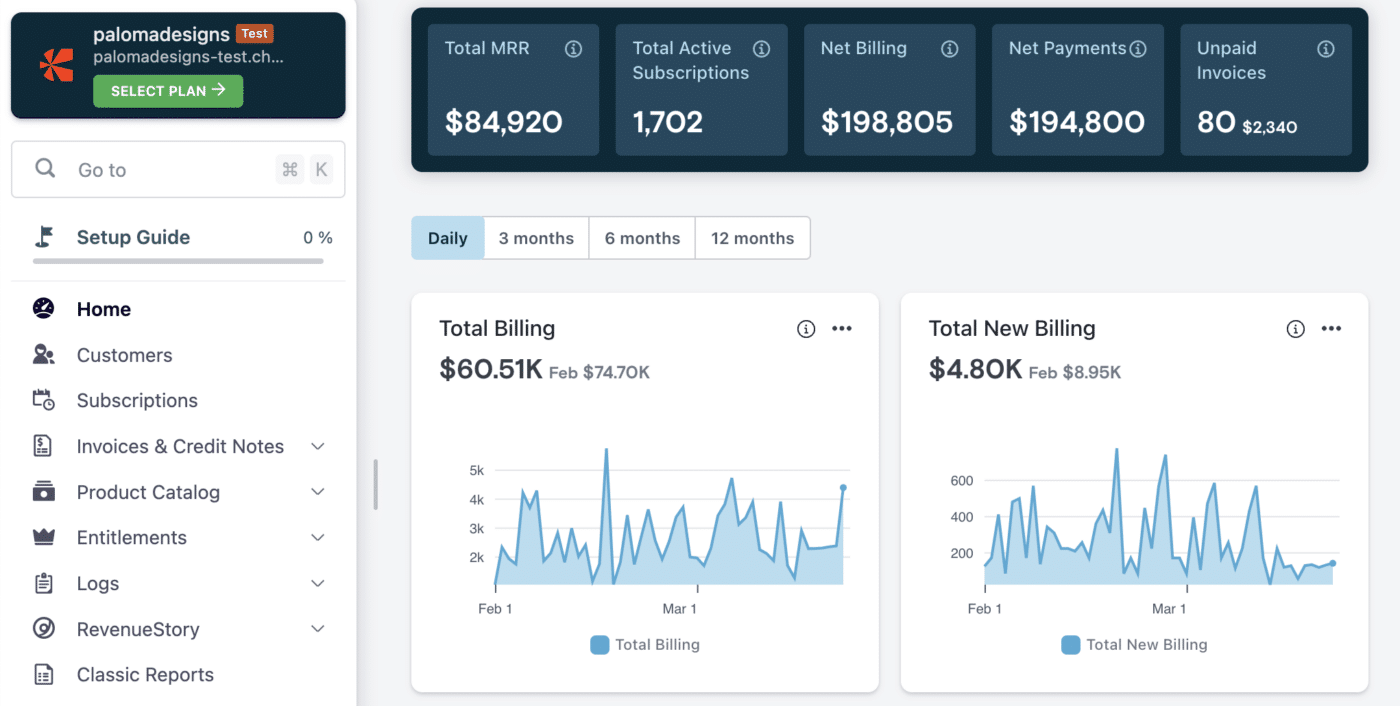
Chargebee is one of the most established subscription billing and revenue management platforms on the market. It's particularly strong for SaaS companies that need to manage the full subscription lifecycle, from plan management and trial conversions through to renewals, upgrades, and cancellations.
Chargebee added dedicated AR automation capabilities with its Chargebee Receivables product, which covers automated collections, dunning, and dispute management. For companies already using Chargebee for billing, this is a natural extension.
Key features
- Subscription billing engine: supports a wide range of pricing models, including flat-rate, tiered, per-seat, and usage-based billing.
- Automated dunning: configurable payment retry logic and customer communications for failed payments.
- Revenue recognition: automated ASC 606 compliant revenue recognition.
- Global tax compliance: handles tax calculation and reporting across multiple geographies.
- Broad integrations: connects with Salesforce, HubSpot, NetSuite, QuickBooks, and most major CRMs and ERPs.
Pros
- Mature platform with a large customer base and extensive documentation
- Strong global tax handling, particularly useful for companies billing internationally
- Wide ecosystem of integrations
Cons
- AR automation is a secondary product, not the platform's core strength
- Can feel complex and heavy for smaller teams that just need streamlined invoicing
- Pricing scales up quickly as you add features and billing volume
Best for
- Subscription businesses that need a full revenue lifecycle platform
- Companies with international billing and complex tax requirements
Pricing: Performance plan starts at $599/month. Enterprise pricing available.
4. Maxio
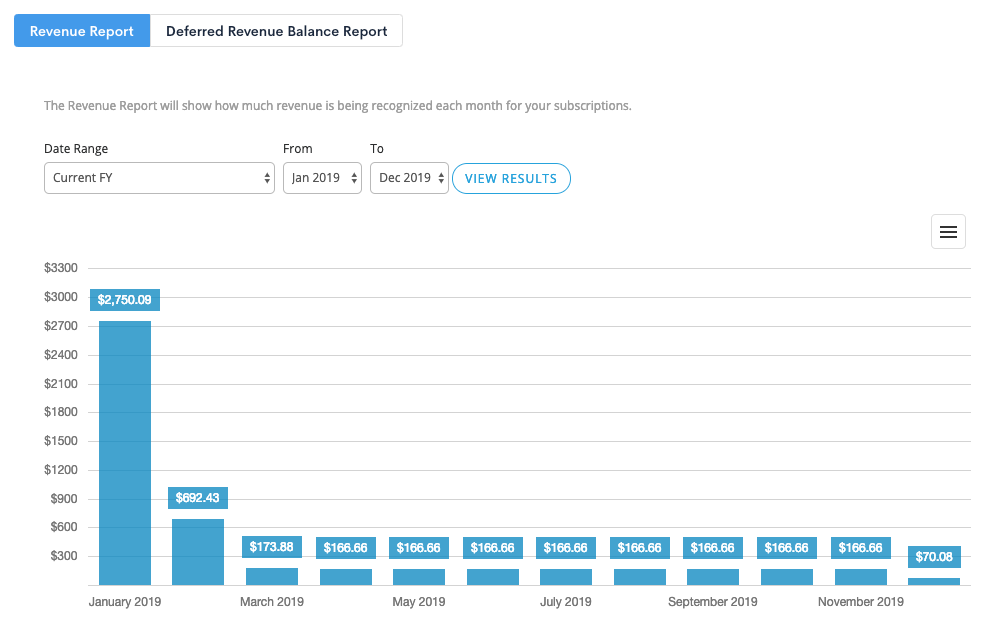
Maxio was formed from the merger of Chargify and SaaSOptics, two well-known names in subscription billing and SaaS financial management. The resulting platform combines Chargify's billing engine with SaaSOptics' revenue recognition and metrics capabilities, making it a strong choice for B2B SaaS companies that need both.
Maxio focuses specifically on the subscription billing and revenue operations needs of B2B SaaS teams, with deep support for metrics like MRR, ARR, churn, and LTV alongside core billing automation.
Key features
- Subscription billing: handles complex subscription structures, mid-cycle changes, and proration.
- Revenue recognition: automated, ASC 606 compliant revenue recognition with deferred revenue tracking.
- SaaS metrics: out-of-the-box dashboards for MRR, ARR, churn, and expansion revenue.
- AR automation: invoicing automation, dunning, and collections workflows.
Pros
- Strong combination of billing and revenue recognition in one platform
- Mature SaaS metrics tracking with a solid analytics layer
- Good fit for B2B SaaS companies managing investor reporting alongside billing
Cons
- Complex initial setup, often requiring significant configuration time
- UI can feel dated compared to newer competitors
- Usage-based billing edge cases can be harder to manage
Best for
- B2B SaaS companies that need both billing automation and sophisticated revenue metrics
- Finance teams preparing for audits or investor due diligence who need clean revenue recognition
Pricing: Custom pricing based on MRR. Contact Maxio for details.
5. Younium
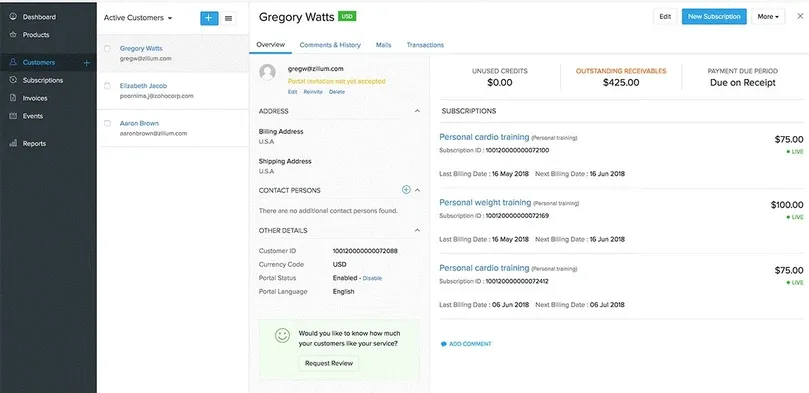
Younium is a subscription management platform with strong roots in the Nordic and European B2B SaaS market. It offers an end-to-end solution for subscription billing, invoicing, and revenue recognition, with native Salesforce integration and strong multi-currency support.
For European SaaS companies that need a platform built with local accounting standards and currencies in mind, Younium is worth a serious look. It positions itself as a "financial backbone" for subscription businesses, sitting between the CRM and the ERP.
Key features
- Subscription lifecycle management: handles plan changes, renewals, upsells, and cancellations with full audit trails.
- Salesforce-native integration: built to work natively within Salesforce CRM workflows.
- Multi-currency invoicing: strong support for billing in multiple currencies with local compliance considerations.
- Revenue recognition: automated recognition aligned with IFRS 15 and ASC 606.
Pros
- Strong multi-currency and multi-entity support
- Native Salesforce integration reduces data sync headaches for Salesforce-heavy teams
- Good fit for European regulatory and accounting requirements
Cons
- Smaller ecosystem and fewer native integrations than US-first platforms
- Less well-known outside the Nordic and European markets
Best for
- European B2B SaaS companies, particularly those with Salesforce as their CRM
- Companies billing across multiple currencies and entities
Pricing: Custom pricing. Contact Younium for a quote.
6. HighRadius
HighRadius is an enterprise-grade AR automation platform that has built a strong reputation in the mid-market and enterprise segments, particularly for companies processing high volumes of invoices and cash receipts.
HighRadius is a serious platform for serious problems. If you're running an enterprise finance team dealing with thousands of invoices per month across multiple ERPs, it's one of the most capable solutions on the market. If you're a 50-person SaaS company, the cost and complexity probably aren't warranted.
Key features
- AI-powered cash application: one of the most sophisticated platforms that automate cash application processes in accounts receivable, with high match rates even on complex, short-paid, or partially paid invoices.
- Automated collections and dunning: intelligent prioritization of collection activities based on customer risk and payment history.
- Credit risk management: automated credit scoring and credit limit management.
- Deep ERP integration: certified connectors for SAP, Oracle, NetSuite, and other major ERPs.
Pros
- Best-in-class cash application automation for high-volume environments
- Strong enterprise ERP integration, particularly with SAP and Oracle
- Comprehensive platform covering the full AR lifecycle
Cons
- High cost and long implementation timelines make it impractical for smaller companies
- Requires dedicated resources to manage and administer the platform
- Overkill for teams that primarily need invoicing and dunning automation
Best for
- Mid-market and enterprise finance teams with high invoice and payment volumes
- Companies running SAP or Oracle ERP that need certified, deep integration
Pricing: Enterprise pricing. Contact HighRadius for a quote.
7. Quadient AR
Quadient AR (formerly known as YayPay) is an accounts receivable automation platform with a particular focus on customer collaboration and the collections workflow. Its standout feature is a customer-facing payment portal that allows customers to view invoices, make payments, and raise disputes without needing to contact your AR team directly.
For mid-market businesses that spend a disproportionate amount of time on customer communication around invoices and payments, Quadient's collaborative approach to AR can meaningfully reduce that burden.
Key features
- Customer collaboration portal: a self-service portal for customers to review invoices, make payments, and resolve disputes.
- Automated collections workflows: configurable dunning sequences with AI-assisted prioritization.
- Cash application automation: automated matching of payments to open invoices.
- ERP integration: pre-built connectors for NetSuite, QuickBooks, Sage, and Microsoft Dynamics.
Pros
- Strong customer-facing portal reduces inbound enquiries from customers about invoices
- Good pre-built integrations with mid-market ERPs like NetSuite and QuickBooks
- Solid collections workflow automation
Cons
- Some advanced features are offered as add-ons, which can push the total cost up
- Interface can take some time to learn for new users
Best for
- Mid-market businesses with a high volume of customer AR queries and disputes
- Companies using NetSuite or QuickBooks looking for a well-integrated AR automation layer
Pricing: Custom pricing. Contact Quadient for a quote.
8. Upflow
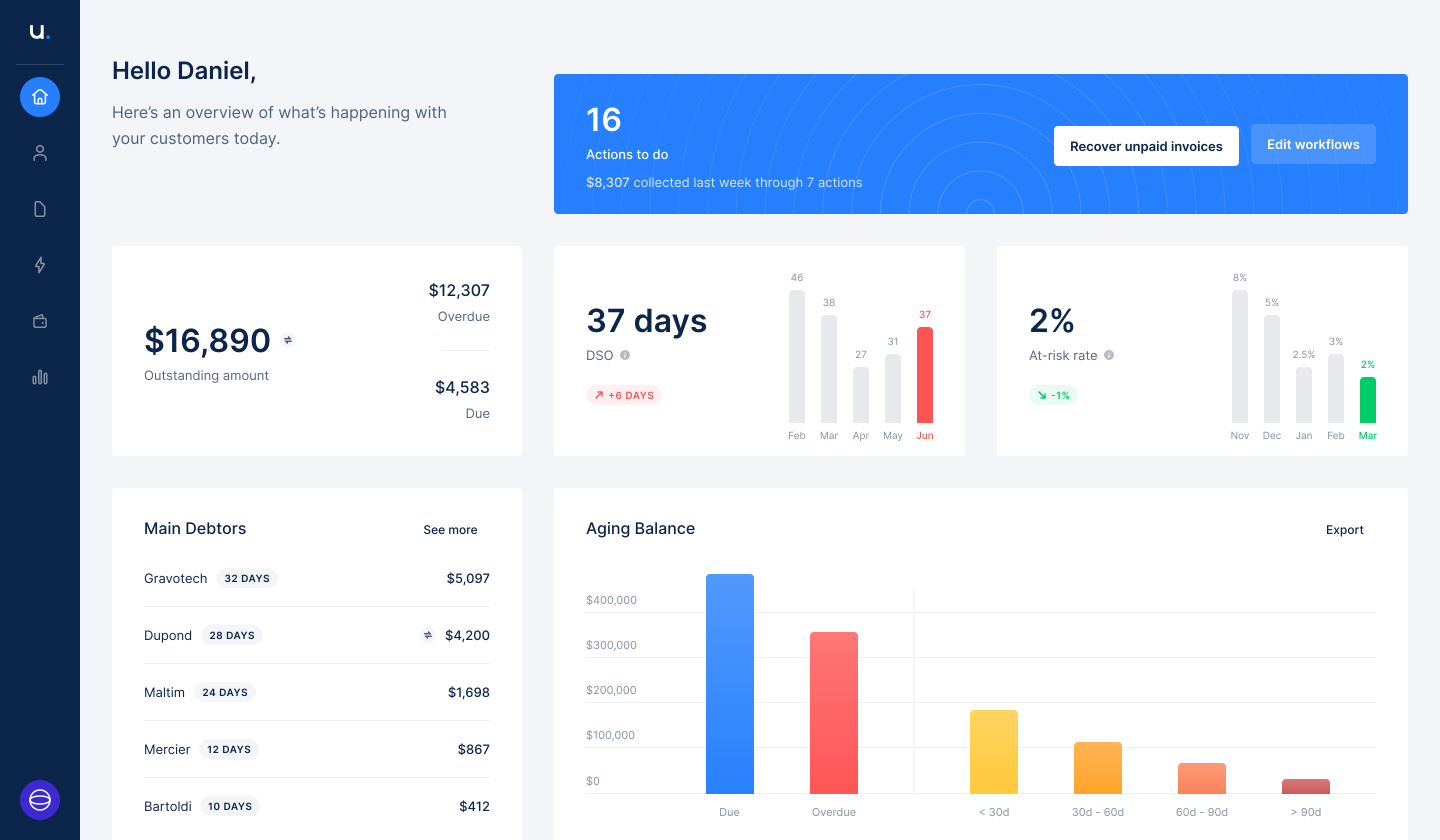
Upflow is a collections-focused AR automation platform that's earned a loyal following among finance teams at growing B2B companies, largely because of its clean interface and the quality of its dunning automation. It connects easily with Stripe, QuickBooks, and other billing tools to pull invoice data, then automates the follow-up workflow from there.
Upflow doesn't try to do everything. It focuses on the problem of getting paid faster, and it does that specific thing well. For teams that already have a billing system in place and just need smarter collections automation on top of it, Upflow is worth evaluating.
Key features
- Automated dunning workflows: fully configurable sequences for chasing overdue invoices, with email, Slack, and in-app notifications.
- AR analytics: dashboards for DSO, aging reports, and collection performance.
- Customer portal: a self-service payment portal for customers.
- Integrations: native connectors for Stripe, QuickBooks, Xero, and NetSuite.
Pros
- One of the cleanest, most user-friendly interfaces in the AR automation category
- Strong, highly configurable dunning workflows
- Good integration with Stripe and common accounting tools
Cons
- Cash application capabilities are limited compared to full-suite AR platforms
- Not designed for companies with complex billing models; better suited to straightforward invoicing
- Less suitable for companies that need a combined billing and AR automation solution
Best for
- Finance teams at growing B2B companies that need better collections automation on top of an existing billing setup
- Teams already using Stripe or QuickBooks who want a clean, easy-to-use AR layer
Pricing: Starts at $440/month. See Upflow's pricing page for current plans.
9. Monk
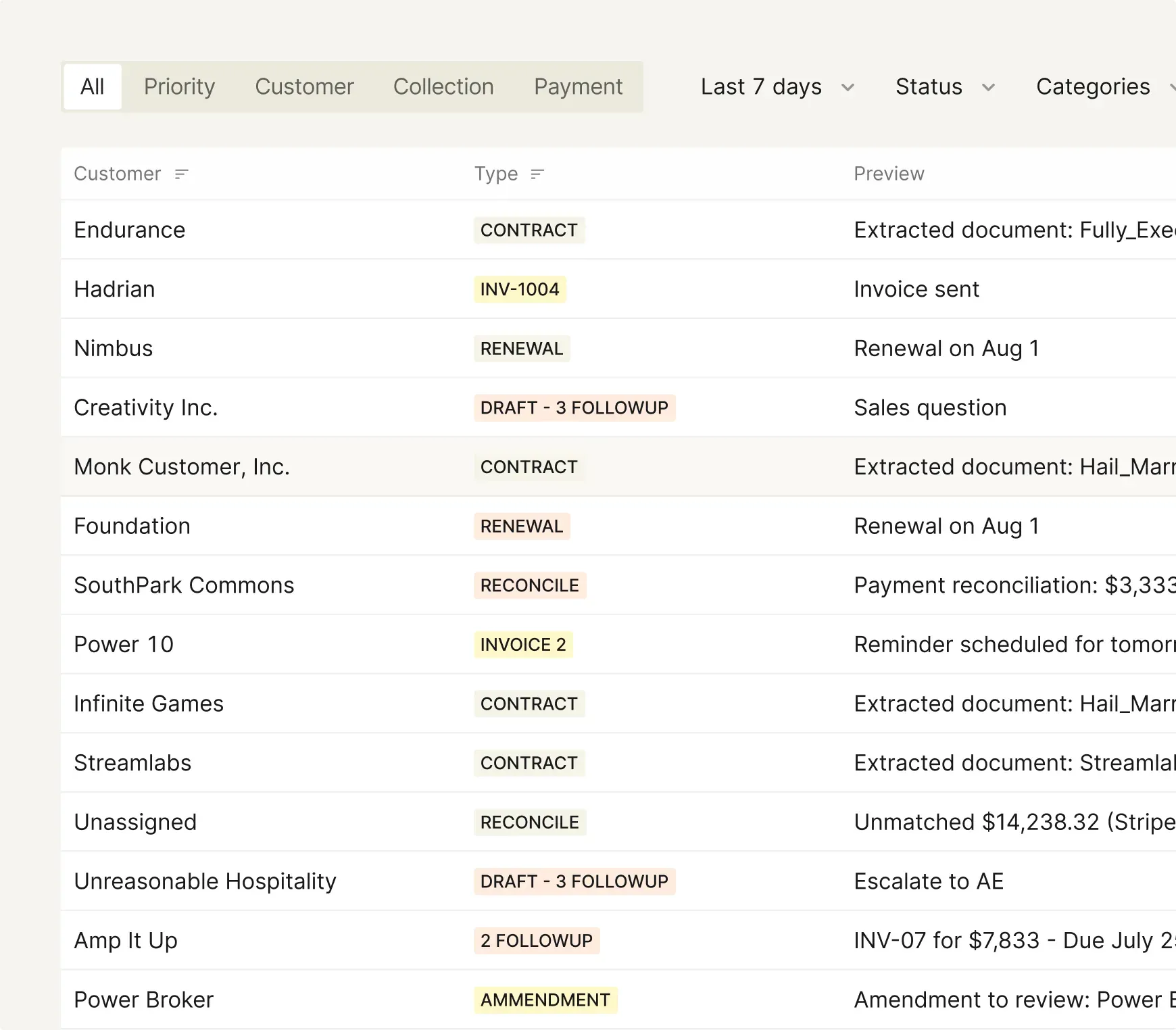
Monk is a collections and AR automation platform with a focus on European SMBs and mid-market companies. It simplifies the collections process with automated reminders, a customer payment portal, and integrations with popular accounting software, making it accessible for finance teams that don't have the resources to implement a complex enterprise platform.
Monk's strength is its simplicity. It gets teams up and running quickly without extensive configuration, which is a real advantage for smaller finance teams that need a working solution fast rather than a highly customizable one.
Key features
- Automated payment reminders: configurable email sequences for overdue invoices with multi-language support.
- Customer payment portal: a simple, clean portal for customers to view and pay invoices.
- Accounting integrations: connects with tools like Pennylane, QuickBooks, and other European accounting platforms.
- AR reporting: basic dashboards for tracking overdue accounts and collection progress.
Pros
- Quick and simple setup with minimal configuration required
- Multi-language support, useful for European teams billing across multiple countries
- Accessible for smaller finance teams without dedicated AR resources
Cons
- Smaller platform with fewer integrations than US-first alternatives
- Limited advanced analytics and reporting compared to larger platforms
- Less well-suited to complex billing models or large invoice volumes
Best for
- European SMBs and mid-market companies looking for an easy-to-deploy collections solution
- Teams that need multi-language support for customer-facing communications
Pricing: Custom pricing. Contact Monk for a quote.
10. Zuora
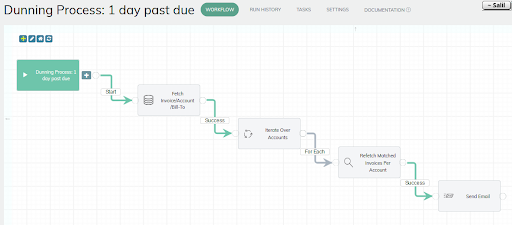
Zuora is the original subscription billing platform and remains one of the most comprehensive options for large enterprises managing complex recurring revenue models. It covers the full spectrum from subscription order management through to billing, AR, and revenue recognition, and it has a deep track record with large-scale deployments.
Zuora is one of the few platforms that genuinely qualifies as a full accounts receivable automated solution at enterprise scale. It also integrates with virtually every major ERP, making it a strong choice for companies asking which platforms offer ERP integration for accounts receivable automation at the highest level of sophistication.
Key features
- Subscription order management: handles complex subscription structures including bundles, volume discounts, and mid-cycle changes.
- Revenue recognition: automated, auditor-ready ASC 606 and IFRS 15 compliance.
- AR automation: invoice generation, collections workflows, and cash application.
- Broad ERP integration: certified connectors for SAP, Oracle, NetSuite, and Salesforce, covering the most common ERP integration for accounts receivable automation platforms use cases.
Pros
- Industry-leading subscription billing engine with deep feature coverage
- Strong revenue recognition capabilities for complex enterprise use cases
- Extensive integration ecosystem covering virtually every major ERP and CRM
Cons
- Expensive and complex to implement, often requiring a dedicated admin and consulting support
- Implementation timelines can stretch to months, not weeks
- Overkill for companies that don't have enterprise-scale billing complexity
Best for
- Large enterprises with complex subscription billing, multi-entity structures, and high invoice volumes
- Companies that require auditor-ready revenue recognition as part of their billing platform
Pricing: Custom enterprise pricing. Contact Zuora for a quote.
How to evaluate AR automation software
With so many platforms on the market, narrowing down your shortlist can feel overwhelming. Here are the criteria that matter most when evaluating an accounts receivable automation solution for your business.
1. Match the platform to your billing model
Not every AR automation platform handles every billing model well. If you're billing on a usage-based or hybrid model, you need a platform that can handle that complexity natively, not one that bolts it on as an afterthought.
Start by being precise about what you're billing today and what you expect to bill 12 months from now.
2. Check ERP and CRM integration depth
An AR platform that can't talk to your existing systems will create more work, not less. Check whether the platform offers a native, certified connector to your ERP (NetSuite, QuickBooks, SAP, etc.) and your CRM, and ask how data syncs in both directions.
Remember, generic "integrations via Zapier" are not the same as a native connector.
3. Evaluate cash application capabilities
For companies with high invoice volumes, the quality of cash application automation matters enormously. The best platforms that automate cash application processes in accounts receivable achieve match rates well above 90%, dramatically reducing manual reconciliation.
Ask vendors for specific match rate data from customers similar to you.
4. Assess the collections and dunning workflow
Collections automation is only valuable if it's configurable enough to reflect how you actually want to communicate with customers. Look for platforms that let you customize sequences, message templates, escalation paths, and timing without requiring engineering effort.
The ability to segment customers and apply different strategies based on their tier or risk profile is a significant advantage.
5. Consider total cost of ownership, not just the headline price
Many enterprise AR platforms have low headline prices but high implementation costs, ongoing admin costs, and consultant fees. Get a clear picture of what it will cost to get the platform live, what it will cost to run it month-to-month, and what happens to pricing as your billing volume grows.
A platform like Alguna that provides white-glove onboarding is often cheaper in total cost of ownership than platforms that require external consultants to implement.
6. Ask about reporting and revenue visibility
Your AR platform should do more than just collect payments. It should give you a clear picture of your revenue health, including DSO trends, aging by customer or segment, collection rates, and cash forecasting.
If the reporting layer is weak, you'll find yourself exporting data to spreadsheets to answer basic finance questions, which defeats much of the purpose.
7. Run a real pilot before committing
The best way to evaluate any AR automation platform is to run it against real data. Most vendors offer a proof-of-concept or pilot period. Use it to test the specific scenarios that are hardest for you today: complex invoice structures, disputed payments, multi-currency scenarios, or whatever creates the most friction. Don't evaluate on the basis of demos alone.
"Revenue and invoicing are sensitive areas, so as a founder I wanted to be extra cautious. Alguna's team made me feel completely at ease: they answered every question, laid out a clear migration plan, and kept me in the loop throughout. The process turned out to be far smoother than I expected, with most of the heavy lifting handled behind the scenes."
— Adam Liska, Co-founder and CEO at Glyphic AI
Frequently asked questions
What is an accounts receivable automation solution?
An accounts receivable automation solution is software that automates the manual, repetitive tasks involved in managing money owed to your business. This typically includes automated invoice generation and delivery, payment reminders and dunning, cash application (matching payments to invoices), and reporting on outstanding receivables and DSO. The goal is to reduce manual work, collect payments faster, and give your finance team better visibility into the business's cash position.
What's the difference between AR automation and billing automation?
Billing automation focuses on creating and sending invoices based on pricing models and contract terms. AR automation is the broader category that includes billing but also covers the downstream processes: collecting payments, reconciling cash, managing overdue accounts, and reporting on receivables health. The best platforms, like Alguna, cover both ends of the workflow from quote to cash.
Which platforms offer ERP integration for accounts receivable automation?
Most of the platforms covered in this guide offer some level of ERP integration, but depth varies significantly. Alguna, Zuora, HighRadius, and Chargebee all offer native integrations with major ERPs like NetSuite, SAP, Oracle, and QuickBooks. The distinction to look for is whether the integration is a certified, native connector or a basic API connection via a middleware tool like Zapier. For accounts receivable automation platforms with native ERP connectors, depth of integration matters more than the number of integrations listed.
What are the best AI accounts receivable automation platforms for reducing DSO?
Platforms that have demonstrated strong DSO reduction tend to combine automated dunning with intelligent prioritization, where the system identifies which accounts to chase first based on payment likelihood. HighRadius, Alguna, Upflow, and Quadient AR all have capabilities in this area. According to IOFM research, companies that implement AR automation report an average DSO reduction of 10 to 20 days. The actual reduction you see will depend on the quality of your collections workflow before automation and how well the platform fits your billing model.
What should I look for in an end-to-end accounts receivable automation platform?
A genuinely end-to-end solution covers the full workflow from invoice generation through to payment collection and revenue reporting, without requiring you to use separate tools for each step. Look for platforms that handle billing (including complex pricing models), automated invoicing, collections and dunning, cash application, and reporting in one place. Fragmented solutions that require heavy integration work between tools often end up costing more in engineering time than they save in finance team efficiency.
How long does it take to implement an AR automation platform
Implementation timelines vary widely. Simple dunning-focused tools like Upflow can be live in days. Full-suite platforms like Zuora or HighRadius typically take weeks to months to implement fully. Alguna takes a white-glove approach where their team handles most of the heavy lifting, which often means faster time-to-value than self-serve platforms that require significant internal configuration. Regardless of platform, it's worth asking specifically what the typical implementation timeline is for companies of your size and billing complexity.
Can AR automation handle usage-based billing?
Not all platforms handle usage-based billing equally well. This is an area where Alguna specifically excels: it's built to handle complex usage-based models where invoice amounts vary based on actual consumption, API calls, seats, or other usage metrics. Chargebee and Zuora also support usage-based billing, but their implementations can be complex to configure. If usage-based billing is a core part of your model, it's worth pressure-testing this specifically during any vendor evaluation.
Stop chasing payments: It's time to automate your AR
The right accounts receivable automation solution doesn't just save your finance team time. It changes the shape of your cash flow, reduces the DSO that ties up working capital, and gives you the revenue visibility you need to make better decisions faster.
The platforms we've covered in this guide range from narrow collections tools to full-suite enterprise platforms. The best fit for your business depends on your billing model, your team size, and how much of the AR workflow you actually need to automate.
If you're a B2B or SaaS company with complex billing, a need for strong ERP integration, and a desire to manage quoting, billing, invoicing, and revenue reporting in one place, Alguna is built for exactly that.
Book a personalized demo and see how Alguna handles your specific billing model, from quoting and contracts all the way through to automated invoicing and collections.
Book a demo with Alguna