If your finance team is still chasing invoices over email, manually reconciling payments, and pulling aging reports by hand, it's more common than you think.
But you're leaving money on the table. (A lot of it.)
Late payments create cash flow headaches, drain your team's time, strain customer relationships, and quietly erode your revenue potential.
That's exactly why more B2B finance and revenue teams are turning to accounts receivable automation to fix what manual processes can't.
In this guide, we walk through everything you need to know about the benefits of accounts receivable automation, from the foundational definitions to a practical implementation roadmap you can start following today.
What is accounts receivable automation?
Accounts receivable (AR) automation is the use of software to handle the repetitive, rule-based tasks in your order-to-cash cycle without human intervention.
Instead of your team manually sending invoices, following up on overdue payments, matching remittances, and posting cash, software handles it for you — faster, more accurately, and at scale.
AR automation typically covers the following areas of the collection lifecycle:
- Invoice generation and delivery: Automatically creating and sending invoices the moment a deal closes or a service period ends
- Payment reminders and dunning: Sending timed, personalized follow-ups via email or SMS without manual scheduling
- Payment processing and reconciliation: Accepting payments online and automatically matching them to the right invoice and customer record
- Cash application: Posting payments to your general ledger without manual data entry
- Reporting and analytics: Generating real-time aging reports, DSO (days sales outstanding) tracking, and collection performance dashboards
- Customer portal access: Giving buyers a self-service hub to view invoices, dispute line items, and pay on their own schedule
Think of it this way: AR automation removes the friction between earning revenue and actually collecting it.
6 top benefits of accounts receivable automation
Accounts receivable automation benefits go well beyond saving a few hours each week. We're talking about structural improvements to how cash flows through your business.
Here's what the research, and real-world experience, consistently shows.
1. Faster collections and reduced DSO
Automated reminders go out precisely on schedule, and online payment options remove barriers for your customers. The result is a measurably shorter cash conversion cycle.
2. Fewer billing errors
Manual data entry is the leading cause of invoice disputes. Automation pulls data directly from your CRM or ERP, dramatically cutting the error rate and the disputes that come with it.
3. Better cash flow visibility
Real-time dashboards let finance leaders see exactly what's outstanding, what's overdue, and what's coming due — without waiting for someone to pull a report.
4. Stronger customer relationships
Consistent, professional communication and self-service portals make the payment experience easier for your customers, which means fewer disputes and fewer awkward collection calls.
5. Improved compliance and audit readiness
Every transaction, reminder, and exception is logged automatically, giving you a clean audit trail without extra effort from your team.
6. Scalability without headcount growth
As your customer base and invoice volume grows, automation scales with you — no need to hire additional AR staff just to keep pace with growth.
Source: IOFM, Accounts Receivable Research Report
A closer look: How AR automation reduces DSO
Days Sales Outstanding (DSO) is the single most important metric for any AR team. It measures how many days, on average, it takes you to collect payment after a sale. The lower your DSO, the healthier your cash flow.
Automation reduces DSO by removing the two biggest delays in the collection cycle:
- Invoice delivery lag: Invoices that go out late get paid late. Automation triggers invoice delivery immediately after a service is delivered or a contract milestone is hit.
- Reminder gaps: When a human has to manually track and send follow-ups, reminders fall through the cracks. Automated dunning sequences keep the pressure consistent without anyone on your team having to monitor it.
Companies using AR automation reduced their average DSO by up to 30% compared to those relying on manual processes.
Benefits of accounts receivable automation for B2B companies
B2B AR has its own set of complexities that consumer billing simply doesn't face: high invoice volumes, net payment terms, multi-stakeholder approvals, and customers who expect a frictionless experience even when paying on NET 30 or NET 60.
That's why the benefits of accounts receivable automation for B2B companies are even more pronounced than in B2C contexts.
Why B2B accounts receivable is uniquely challenging
- Average invoice values are higher, making errors more costly
- Payment terms can stretch 30 to 90 days, creating long cash flow gaps
- Customers often have their own internal approval processes that delay payment
- Disputes and deductions are more common and more complex to resolve
- Finance teams deal with a high volume of varied payment methods (ACH, check, wire, credit card)
Automation addresses each of these challenges directly. Automated payment portals give your customers one place to see all open invoices, dispute line items, and pay by their preferred method. Structured dispute workflows turn what used to be a long email thread into a tracked, time-stamped process with a clear resolution path.
For teams managing subscription billing or usage-based pricing, the benefits of automating accounts receivable processes are especially significant. When billing is dynamic and invoices vary each cycle, manual invoicing becomes a near-impossible operational burden at scale.
"The shift to automated AR isn't just about efficiency — it's about giving revenue teams the financial visibility they need to make better decisions, faster."
- Mary Driscoll, Senior Research Fellow, APQC
How to implement AR automation: A step-by-step guide
Whether you're implementing the top benefits of implementing accounts receivable automation software for the first time or replacing a legacy system, the implementation journey follows a predictable path.
Here's how to approach it without disrupting your operations.
1. Audit your current AR process and identify pain points
Start by documenting your current workflow: how invoices are created, delivered, followed up on, and reconciled. Interview your AR team to understand where time is lost and where errors most commonly occur. This gives you a clear picture of what to prioritize in your automation setup.
2. Define your requirements and success metrics
Based on your audit, list the capabilities you need (e.g., automated invoicing, dunning sequences, payment portal, ERP integration) and set measurable goals. What DSO reduction are you targeting? What collection rate improvement would justify the investment?
3. Evaluate and select your AR automation software
Assess tools based on your requirements, not just feature lists. Request demos, ask for customer references in your industry, and test how each platform handles your most complex use cases. We cover what to look for in more detail in the next section.
4. Clean up your data before migration
Deduplicate customer records, standardize payment terms, and resolve any open billing discrepancies before your go-live date. This is the unglamorous but critical step that most teams underestimate.
5. Configure your workflows and communication templates
Set up your dunning sequences, invoice templates, approval rules, and escalation paths. Review all customer-facing communications carefully — this is what your customers will see, so it needs to reflect your brand and tone.
6. Run a pilot with a segment of your customer base
Before going live with all customers, run a controlled pilot with a representative subset. This surfaces integration issues and edge cases without risking your entire AR operation.
7. Roll out fully, monitor KPIs, and iterate
Go live, track your pre-defined metrics weekly for the first 90 days, and refine your workflows based on what you observe. Automation isn't a set-it-and-forget-it solution, the best-performing teams continuously tune their configurations as their business evolves.
Accounts receivable automation software: Benefits of modern platforms
Older, bolt-on tools were built to digitize manual tasks, essentially taking a paper process and making it electronic.
Modern accounts receivable automation software goes much further. It connects your entire order-to-cash cycle, surfaces real-time intelligence, and gives both your finance team and your customers a genuinely better experience.
When your AR platform integrates natively with your CRM, ERP, and billing system, you're building a financial infrastructure that scales with your business, reduces revenue leakage, and gives leadership the cash flow visibility they need to make confident decisions.
Here's what modern platforms bring to the table that legacy tools simply can't match.
5 benefits of a modern automated accounts receivable system
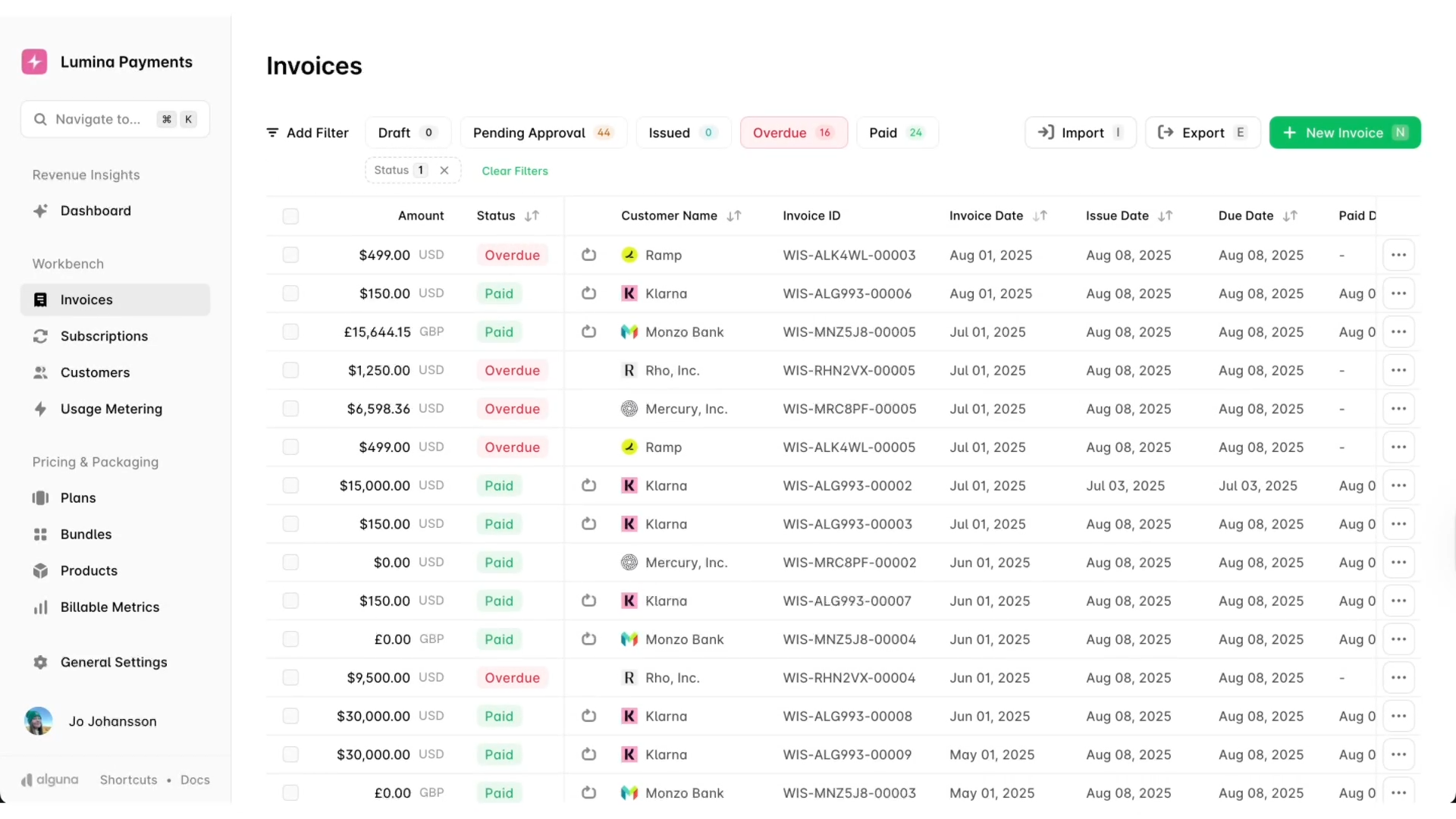
Whether you're just starting to explore automation or building a business case for your finance team, these are the five benefits that consistently move the needle most.
- Faster cash collection. Automated invoicing and dunning sequences remove the delays that come with manual follow-up. Invoices go out immediately, reminders land on schedule, and online payment options mean customers can pay the moment they're ready — no checks in the mail, no chasing down approvals.
- Fewer errors and disputes. Manual data entry is where most billing mistakes originate. An automated system pulls data directly from your CRM or ERP, so invoice amounts, payment terms, and customer details are accurate from the start. Fewer errors mean fewer disputes, and fewer disputes mean faster payment.
- Real-time cash flow visibility. Instead of waiting for someone to pull an aging report, your finance team gets live dashboards showing exactly what's outstanding, what's overdue, and what's due in the next 30 days. That visibility changes how you plan and how quickly you can act on problems.
- A better experience for your customers. A self-service payment portal lets your customers view invoices, raise queries, and pay on their own schedule — without having to email your AR team for a copy of an invoice or a remittance address. That convenience reduces friction and, counterintuitively, tends to accelerate payment.
- Scalability without adding headcount. As your business grows, invoice volume grows with it. With manual processes, that means hiring more AR staff just to keep pace. With automation, your existing team handles significantly more volume without the workload increasing proportionally — freeing them up for higher-value work like cash forecasting and strategic collections.
Frequently asked questions about AR automation and its benefits
What are the main benefits of accounts receivable automation?
The core benefits include reduced DSO, fewer billing errors, improved cash flow visibility, stronger customer relationships, and the ability to scale collections without proportional headcount growth. For a full breakdown, see our benefits section above.
How long does it take to implement AR automation?
For most mid-market companies, a full implementation takes between six and twelve weeks, depending on the complexity of your existing systems and data quality. A phased rollout — starting with a pilot segment — can get you live faster and reduce risk.
Is AR automation only for large enterprises?
No. The benefits of an automated accounts receivable system apply equally to growing mid-market companies. In fact, smaller finance teams often see the biggest productivity gains because each person freed from manual tasks represents a proportionally larger share of team capacity.
What's the ROI of automating accounts receivable?
ROI varies by company size and starting point, but common metrics include a 20 to 30% reduction in DSO, a 50 to 80% reduction in manual AR processing time, and a measurable decrease in bad debt. The fastest payback typically comes from reducing the cost to collect and accelerating cash application.
How does AR automation connect to revenue recognition?
When your AR system integrates with your billing and general ledger, payments post automatically and accurately, which directly improves the reliability of your revenue recognition data. This is especially important for SaaS and subscription businesses with complex recognition schedules.
Start collecting smarter
The benefits of accounts receivable automation are clear: faster collections, fewer errors, better visibility, and a more scalable operation overall. For B2B finance teams still relying on manual processes, the gap between what's possible and what's being achieved widens every quarter.
Done right, AR automation changes the financial health of your business, and the sooner you implement it, the sooner you start seeing the results
Alguna is an end-to-end quoting, billing, and invoicing platform built for B2B revenue teams. See how we help finance and sales work together to collect faster.
Book your personalized demo