Updated on March 6th, 2026 to include more vendors, updated FAQ section, and additional internal resources.
• Learn how automated billing system software streamlines invoicing, subscriptions, usage billing, and revenue automation across the entire quote-to-cash process.
• Discover how to choose the right billing automation software for your business model, pricing structure, and growth stage.
You've closed the deal. The contract is signed. And now someone on your team is manually copying figures into a spreadsheet, cross-referencing usage data from a different tool, and hoping the invoice that eventually goes out is accurate.
Sound familiar?
Manual billing is one of the most common hidden costs in B2B companies. Manual invoice processing typically costs $15 to $16 per invoice, while automated billing systems can reduce this expense to as low as $3 per invoice, a potential saving of up to 80% for high-volume businesses.
And that's before you account for the downstream damage: strained customer relationships, revenue leakage, and finance teams spending their days on reconciliation instead of strategy.
This guide is for revenue, finance, and operations teams who are actively evaluating options. We cover what automated billing software actually is, what features matter, and how the leading platforms compare.
What is automated billing software?
Instead of finance teams creating and sending invoices one by one, automated billing software connects directly to your product, CRM, or subscription data to calculate charges, issue invoices, apply taxes, and record revenue automatically.
At its most basic, automated billing software replaces the manual work of creating invoices and chasing payments. At its most sophisticated, it connects your quoting, contracting, usage tracking, revenue recognition, and financial reporting into a single system.
Here are a few terms you'll come across as you evaluate tools:
Recurring billing refers to charging customers on a predictable schedule, such as monthly, quarterly, or annually, for a fixed amount. This is the foundation of most subscription businesses.
Usage-based billing (also called metered billing or consumption billing) means charging customers based on how much of your product they actually use. Think API calls, tokens processed, active users, or gigabytes consumed. This model is becoming increasingly common in SaaS and AI-native companies.
Dunning is the process of recovering failed payments. Good billing software automates this: it retries the charge, sends the customer a notification, and escalates the process if the issue isn't resolved.
Revenue recognition refers to the accounting rules that govern when revenue can be officially recorded. For companies that need to comply with ASC 606 or IFRS 15, this is a non-negotiable part of the billing stack.
CPQ (Configure, Price, Quote) is the process of building a customized pricing proposal for a prospect. Some billing platforms include this natively; others require a separate tool.
How automated billing system software works
Automated billing system software connects every stage of the quote-to-cash process, from the initial sale to revenue recognition, into one continuous workflow.
Here’s how it works:
- Sales and CRM data: When a deal is closed, details such as product, pricing, and contract terms flow automatically from your CRM or CPQ tool into the billing system, eliminating duplicate data entry.
- Billing and invoicing: The system then uses this data to generate invoices on a regular schedule. It then applies recurring, usage-based, or one-time charges and delivers them via email or customer portal.
- Payment processing and collection: Integrated payment gateways automatically charge customers. Failed payments trigger retries and dunning workflows, improving collection rates.
- Accounting and revenue recognition: Once payments are received, the automated billing tool syncs invoices and payments to the general ledger or ERP. Revenue is recognized automatically over time to maintain ASC 606 compliance.
- Reporting and reconciliation: Real-time dashboards show MRR, churn, and collections data. With unified records, the month-end close becomes faster and more accurate.
Haven AI chose Alguna's automated billing software to replace multiple point-tool solutions. Today, everything flows through one single system with Alguna running the billing lifecycle end-to-end.
Read the case study
Top automated billing software: Comparison overview
Choosing billing software is a long-term decision. Your billing system touches your customers, your revenue data, your finance team, and your engineering stack.
Getting it wrong is expensive.
Below are seven of the best billing automation software that will reduce manual work, billing errors, and keep your revenue healthy.
If you want to schedule a demo of automated billing software, choose from the list of vendors below and go directly to their site to complete your demo booking.
| Platform | Best for | Key features (automated billing) | Limitations | Pricing* |
|---|---|---|---|---|
| Alguna | Automated billing for scaling AI-native SaaS and fintech companies | Unified quote-to-cash platform. No-code CPQ → automated invoicing, usage and hybrid pricing, contract-to-billing sync, revenue recognition | Newer ecosystem vs. legacy players | Free plan available. Paid plans from $699/month. | Tabs | B2B finance teams that need contract-to-cash automation | AI contract ingestion eliminates manual data entry, handles complex billing models strong collections workflows | No native CPQ; pricing not publicly listed; relatively newer platform | Custom pricing; contact for a demo |
| Stripe Billing | Developer-led startups | API-first subscriptions & invoices, usage metering, tax & payments in one stack | More engineering for complex no-code flows, no native rev-rec. | 0.7% of revenue. |
| Chargebee | Mid-market SaaS | Subscription lifecycle automation; invoicing; trials/coupons; dunning; rev-rec add-on | Setup complexity; advanced features on higher tiers | Starts at $599/month up to $100k in billings |
| Recurly | Subscription-first SaaS | Automated subscriptions & invoicing; dunning; gateway integrations | Less flexible for complex usage/hybrid | Tiered / quote-based |
| Maxio | Finance teams & metrics | Recurring & usage billing; invoicing; collections; rev-rec; SaaS reporting | QTC automation often needs integrations | Starts at $599/month up to $100k in billings |
| Zuora | Large enterprises | Enterprise subscription & revenue automation; deep ERP/CRM integrations | Long implementations; admin overhead | Estimate $50k/year, add-ons and integrations cost extra |
| Younium | B2B SaaS w/ ERP ties | Automated subscription & usage billing; multi-entity; ERP integrations | Smaller ecosystem; flexibility varies by use case | Custom pricing |
*Pricing is summarized at a high level, always confirm latest details directly on vendor websites.
Deep dive: 8 billing and automation software platforms built for SaaS, AI, and fintech companies
Choosing the right billing automation software isn’t just about sending invoices, it’s about building the foundation for predictable, scalable revenue.
As SaaS pricing and packaging shift toward usage-based, hybrid, and AI-driven monetization, traditional systems struggle to keep up with contract complexity, multi-entity setups, and real-time data requirements.
If your goal is to reduce revenue leakage, shorten billing cycles, and gain full visibility across contracts, usage, and payments, this breakdown will help you identify which platform best fits your business model and growth stage.
1. Alguna: AI-native automated billing software unifying CPQ, billing, and revenue automation for SaaS and fintech
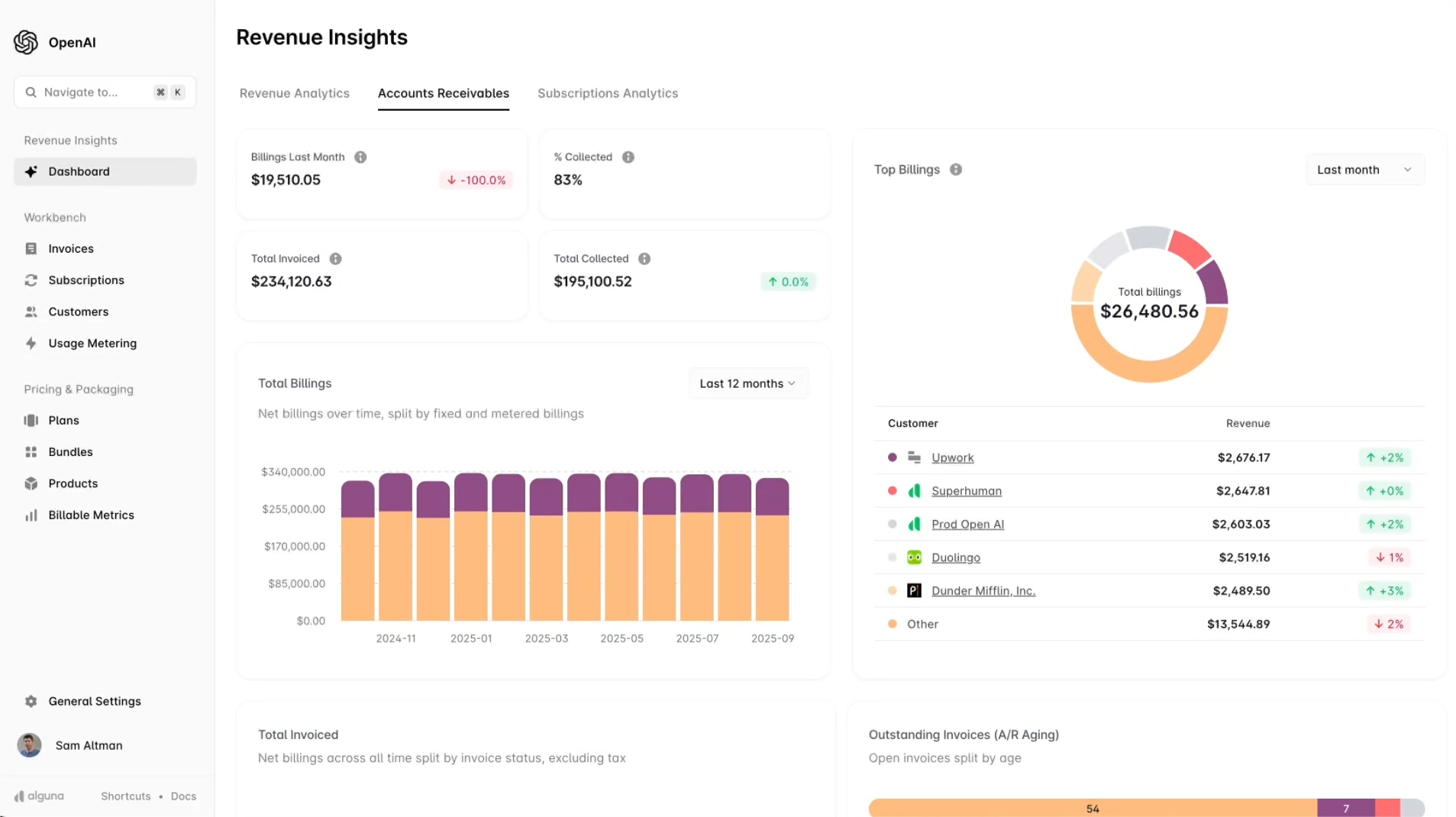
Alguna is one of the few AI-native automated billing and quote-to-cash platforms built for SaaS, fintech, and AI companies. It’s purpose-built to handle hybrid pricing models, such as subscriptions, usage-based, and outcome-based, in a single system.
Backed by Y Combinator, Alguna launched in 2023 by founders that spent decades in fintech at companies like Primer, Dojo, and Bank of America and saw the problem first-hand.
That’s why Alguna takes a modern, no-code approach to billing that enables teams to automate complex revenue workflows, manage contracts intelligently, and adjust pricing in real-time, without writing a single line of code.
Alguna raises $4M to put an end to the patchwork of point tools and spreadsheets that silently drain millions in revenue every year.
Read announcement
Key features:
- No-code automation: RevOps and product teams can launch new pricing or promotions in minutes through a visual interface with no developers required.
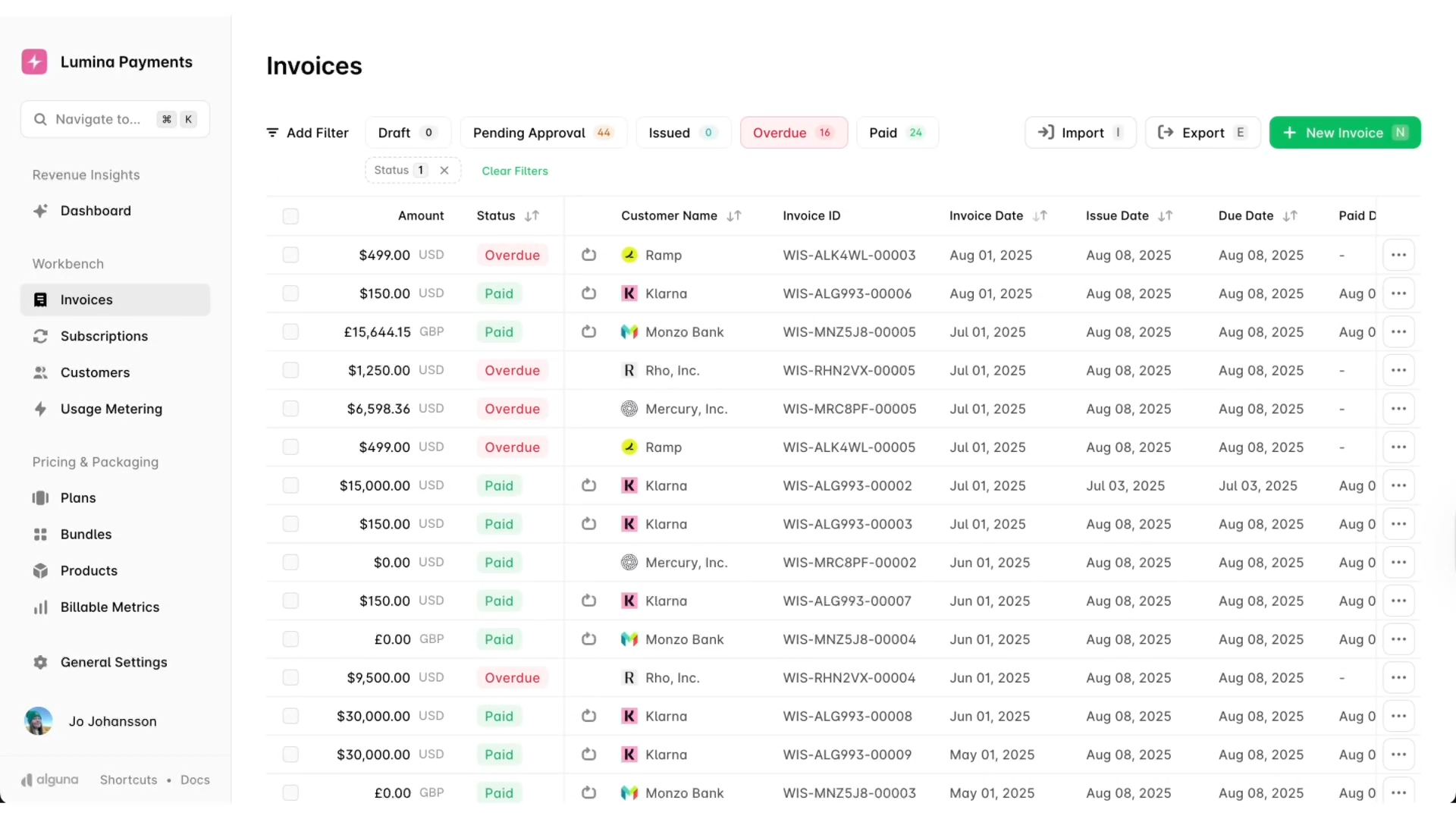
- Unified CPQ, billing, and revenue recognition: Combines configure-price-quote, subscription/usage billing, and automated revenue recognition in one system, giving finance teams a single, spreadsheet-free source of truth for quotes, invoices, and revenue schedules.
- Flexible pricing models: Natively supports subscriptions, usage-based, hybrid, one-off, and outcome-based pricing, which is ideal for AI or SaaS companies billing per API call, credit, or overage.
- AI-powered contract processing: Automatically ingests and extracts terms from contracts and order forms, reducing manual data entry and streamlining quote-to-order workflows.
- ASC 606-compliant revenue recognition: Handles deferrals and allocations automatically, generating revenue schedules and journal entries for your GL with no separate RevRec tool needed.
- Real-time insights: Built-in dashboards for MRR, ARR, churn, and cohort analysis deliver consistent, audit-ready metrics with live billing and revenue data.
Pros:
- Built for usage-based and AI monetization: Unlike legacy systems, Alguna was designed for modern billing use cases out of the box. Metered usage, AI token consumption, and tiered overages are easily configured and not treated as exceptions.
- Unified data, fewer errors: By consolidating CPQ, billing, and revenue recognition, Alguna eliminates data handoffs where errors occur. Teams gain a single source of truth for revenue, which enhances accuracy and eliminates the need for spreadsheet reconciliations.
- Fast implementation and white-glove support: Most customers go live in weeks. Alguna’s experienced team offers white-glove onboarding and fully managed migration at no extra cost.
- No-code and agile: Business teams can configure pricing rules and billing logic without writing code. Changes that might take developers weeks, such as adding new usage tiers, can be implemented in minutes.
Before Alguna, billing lived in silos. Contracts were signed through DocuSign and then handed off to finance, who had to configure everything manually. The team went live with Alguna in two weeks and sales and finance are now in lockstep.\
Read the case study
Cons:
- Newer platform: Founded in 2023 by YC-backed ex-Primer and ex-Dojo founders.
- Not ideal for very simple billing: If your billing setup isn’t sophisticated yet, say, a couple of fixed plans, you probably don’t need Alguna right away.
Best for:
- Fast-scaling SaaS, AI, and fintech companies that are graduating from spreadsheets or basic tools like Stripe to subscription billing automated software that unifies CPQ, billing, and revenue.
- Companies that charge based on usage, consumption, or variable metrics in addition to subscriptions.
- Companies that want powerful billing automation without developer overhead.
Schedule a demo of Alguna's automated billing software
2. Tabs: Automated billing system for B2B finance teams
Tabs is an automated revenue automation platform built for B2B finance teams. Its central idea is that the signed contract should be the single source of truth for everything that follows: invoicing, collections, revenue recognition, and reporting.
Where Tabs sits slightly outside the mainstream billing market is in its deliberate focus on the contract-to-cash workflow rather than the broader quote-to-cash process—it doesn't include native CPQ, so teams that need quoting capability will need to bring their own.
Key features
- Flexible billing models: Supports subscription, usage-based, metered, milestone, hybrid, seat-based, prepaid credits, and committed spend billing natively.
- Collections automation: Automated payment reminders, embedded payment links, overdue balance dashboards, and AI-driven escalation workflows to reduce days sales outstanding (DSO).
- ASC 606 revenue recognition: Automated revenue recognition powered directly by contract and billing data, with no spreadsheets required.
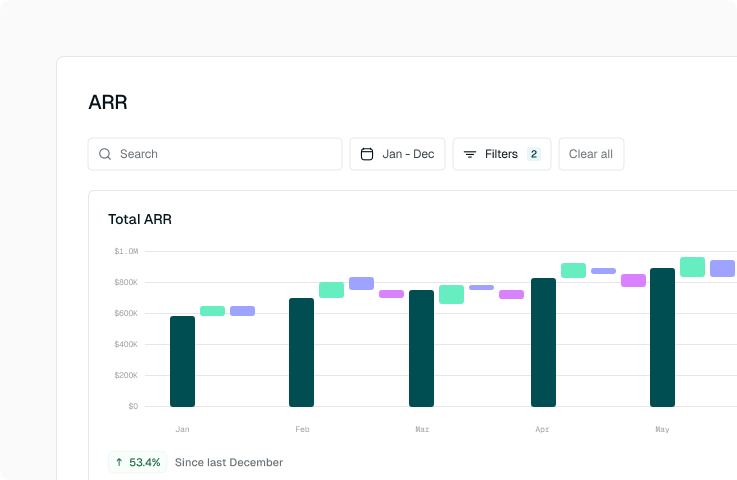
- Real-time reporting: Live visibility into ARR, cash, AR balance, renewals, and what's been invoiced, collected, and recognized.
- Developer-friendly APIs: Extend the platform, connect systems, and embed billing into your product workflow.
- Integrations: Connects with Salesforce, HubSpot, NetSuite, QuickBooks, and Sage Intacct.
Pros
- Handles a wide range of billing models natively, including complex hybrid and committed-spend structures
- Built-in ASC 606 revenue recognition removes the need for a separate rev rec tool
- Collections automation meaningfully reduce the time finance teams spend chasing payments
- SOC 2 compliant
Cons
- No native CPQ functionality, so teams that need to generate quotes as part of the sales process will need a separate tool
- Simpler businesses may find it over-engineered for their needs
- Relatively newer platform with a smaller base of long-term user reviews than established players
Best for
- B2B finance and RevOps teams managing large volumes of contracts with varied or complex billing terms
- Companies where billing errors stem from manual contract interpretation rather than payment processing
- Organizations that need billing, collections, and revenue recognition in a single connected workflow
- Finance teams that want to automate repetitive billing and AR tasks without adding headcount
2. Stripe Billing: Developer-friendly billing automation software for startups
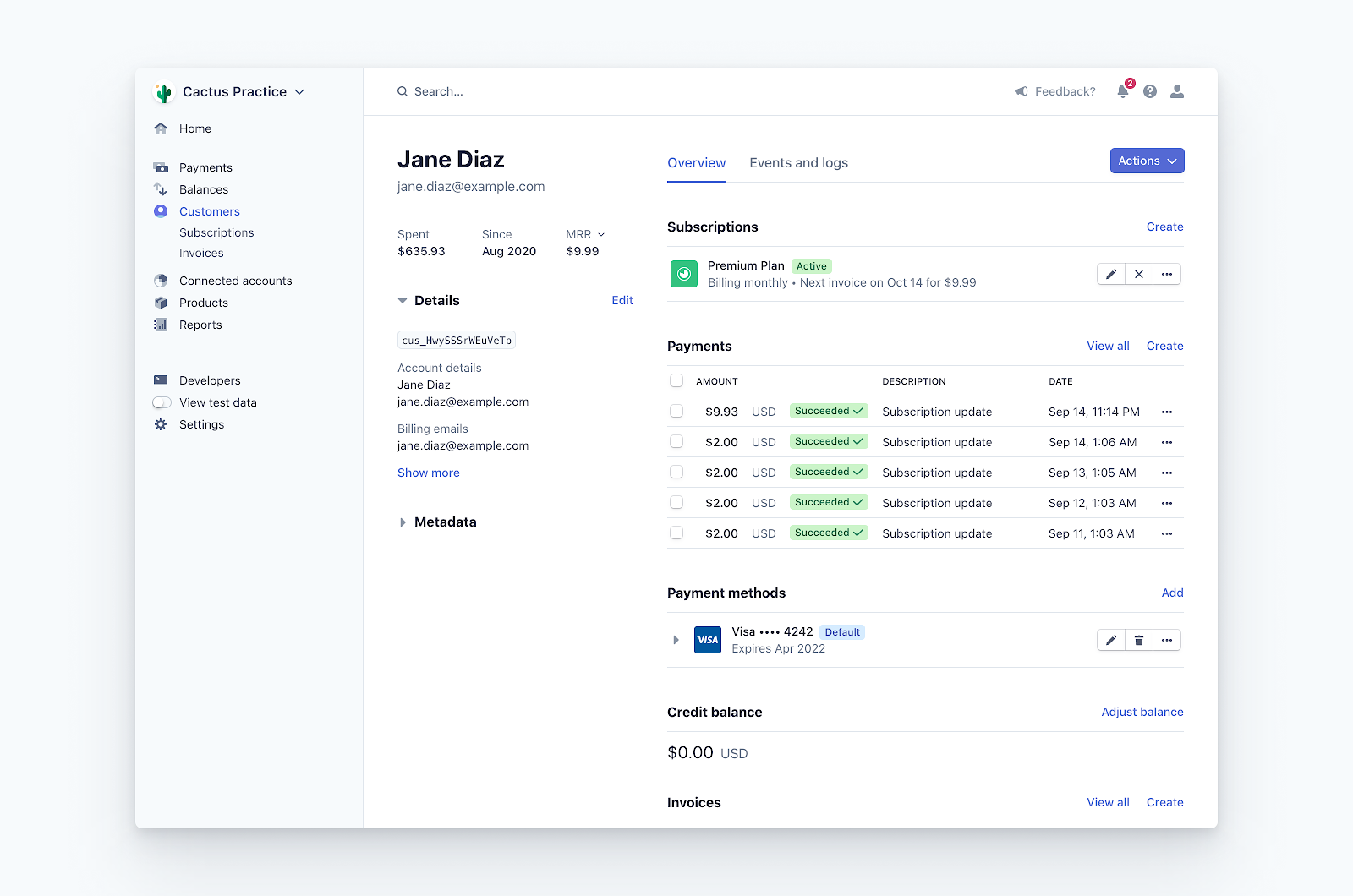
Stripe Billing is a developer-friendly automated subscription billing software designed to help SaaS and digital businesses manage recurring payments, invoicing, and usage-based charges through powerful APIs.
For startups already using Stripe to accept credit card payments, Stripe Billing offers an easy way to add subscription billing on top. It’s especially popular among small SaaS companies and product-led startups who value a quick, API-driven solution.
Key features:
- API-first subscriptions: Highly customizable via API. Developers can programmatically create customers, set up plans, and manage upgrades or cancellations, embedding billing logic directly into the product.
- Usage-based metering: Supports metered billing for pay-as-you-go or overage models by tracking usage each period and automatically calculating charges.
- Integrated payments: Works natively with Stripe Payments to process cards, ACH, and wallets like Apple Pay. Invoices can automatically charge the customer's card on file, simplifying the checkout process.Customer self-service: Includes a hosted portal for updating payment info, viewing billing history, and managing subscriptions, with automatic invoice and receipt emails.
Pros:
- Developer-friendly: Excellent API documentation and broad familiarity among engineers make Stripe an easy implementation. A small team can launch a basic subscription service in days.
- Unified with payments: Combines billing and payment processing in a single system, eliminating the need for a separate payment gateway. Stripe also handles PCI compliance automatically.
- Great for simple recurring models: Ideal for straightforward subscriptions with a limited number of plans or billing intervals. It scales easily and only charges transaction fees, keeping early costs low.
Cons:
- Limited flexibility for complex billing: Lacks advanced features for multi-tiered plans, custom contracts, or mixed one-off and recurring charges. Handling complex proration or invoice structures often requires workarounds.
- Developer-dependent configuration: Built for engineers, so non-technical users may need help setting up discounts, invoice layouts, or other custom logic that requires API access or scripts.
- No native revenue recognition or deep integrations: Stripe focuses on billing and payments. Revenue recognition, detailed reporting, and CRM syncing typically require external tools or custom development.
Best for:
- Tech-savvy startups looking for subscription billing automation software, especially those already using Stripe for payments.
- Teams who prefer to “build it themselves” will appreciate Stripe’s flexibility.
Pricing: Stripe Billing takes 0.7% of billed revenue, with no monthly platform fee. For instance, billing $1,000 costs $7. Standard Stripe payment process fees also apply (typically 2.9% + 30¢ per card transaction).
3. Recurly: Automated recurring billing software focused on retention, dunning, and churn management for SaaS
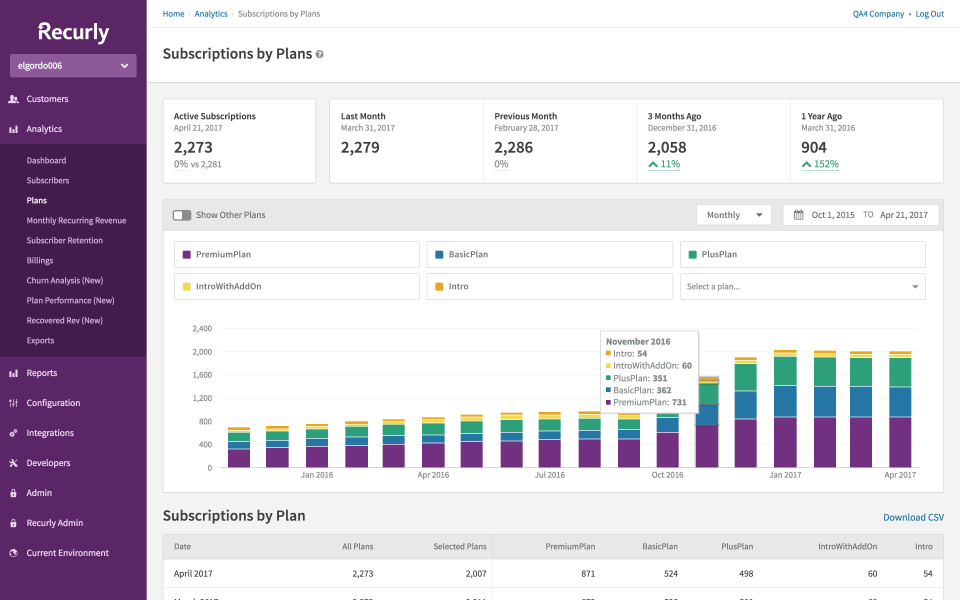
Recurly is a subscription billing automation software that’s recognized for its robust capabilities in recurring payments and subscription management. It has been popular among mid-market SaaS companies, as well as digital media and consumer subscription services, such as streaming services and subscription boxes.
Recurly emphasizes quick integration and optimizing revenue through reducing churn. Companies choose Recurly when they want reliable subscription billing, management, and invoicing software with automated billing features, without the heavy complexity of enterprise systems.
Key features:
- Recurring billing and invoicing: Automates the full subscription cycle with customizable plans, billing intervals, trials, coupons, and recurring invoices, making it ideal for standard subscription models.
- Payment gateway flexibility: Gateway-agnostic platform supporting Stripe, Braintree, PayPal, and others, with smart routing to optimize payment success rates.
- Dunning and churn management: Adaptive retry logic, expired card updates, and configurable dunning workflows help recover failed payments and reduce involuntary churn.
- Analytics dashboards: Built-in reporting for MRR, churn, lifetime value, and subscriber trends, offering clear subscription insights, though not full financial reporting.
Pros:
- User-friendly and quick to launch: Recurly’s clean admin UI and straightforward API make setup simple. Most teams can configure plans and start billing in days without heavy development or training.
- High payment recovery rates: Advanced dunning and card updater tools automatically recover failed payments, boosting revenue and reducing churn, especially valuable for subscription-based businesses.
- Multiple payment options: Supports credit cards, ACH, PayPal, and other gateways, giving customers flexibility and helping global or consumer-facing companies increase conversions.
Cons:
- Limited customization: Recurly handles standard billing well but lacks flexibility for complex pricing, custom workflows, or deep configuration. It’s less developer-extensible than Stripe and less configurable than Chargebee for edge cases.
- Weak multi-entity support: Not ideal for companies managing multiple entities or brands. Each may require its own account or manual consolidation, which adds operational friction.
- Light on accounting features: Provides basic subscription metrics but no built-in revenue recognition or ASC 606 compliance. Finance teams must export data to external accounting tools for deeper reporting.
Best for:
- Mid-sized SaaS and online subscription businesses that want a reliable, out-of-the-box billing solution.
- Global or consumer-facing brands offering multiple payment methods and gateways to reach international customers.
Pricing: Custom based on transaction volume.
4. Chargebee: Subscription billing automated software for SaaS
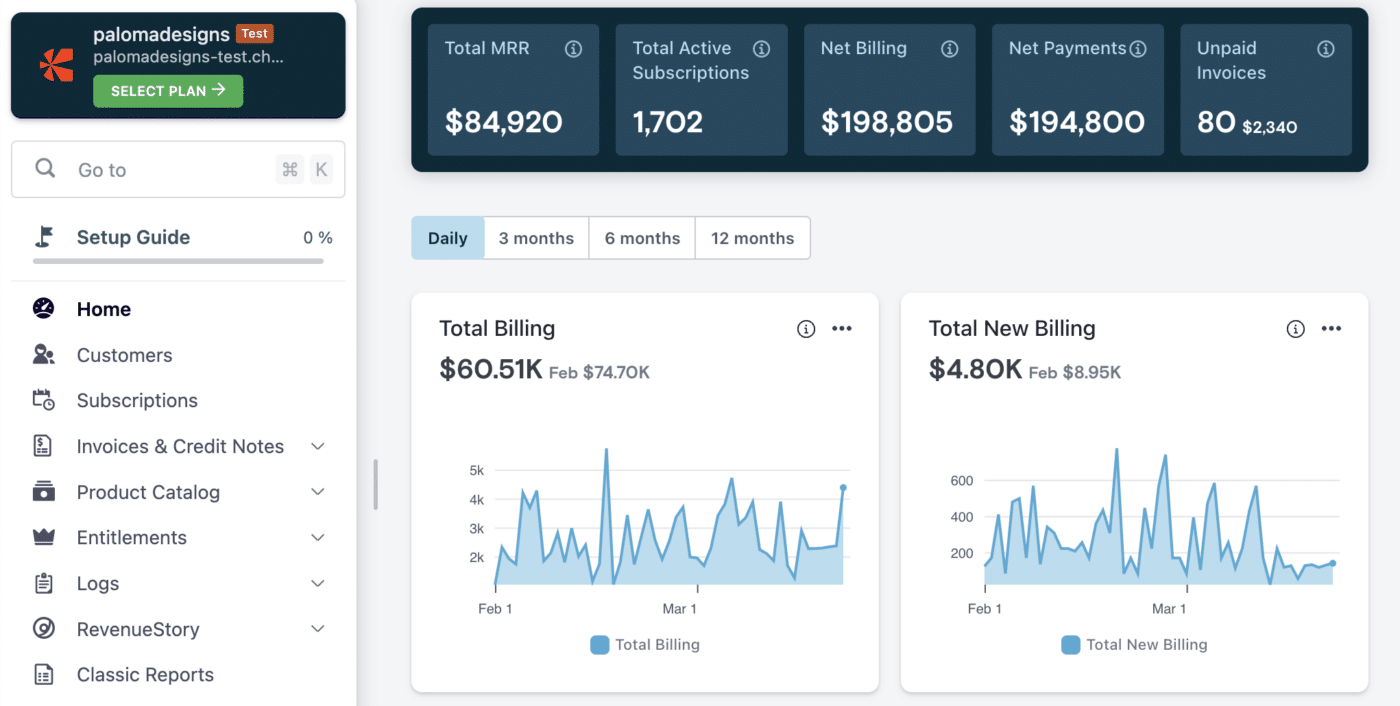
Chargebee is a leading subscription billing automated software and revenue management platform popular with mid-market B2B SaaS companies. It automates subscriptions, invoicing, and payments, with add-ons for revenue recognition and analytics.
Known for being feature-rich and scalable, Chargebee covers nearly every scenario a growing SaaS might face, like trials, upgrades, coupons, taxes, and more. It’s more complex to implement than simpler tools, but it delivers robust flexibility without custom development.
Key features:
- End-to-end subscription automation: Manages the full lifecycle, from trials and upgrades to cancellations, with proration, add-ons, and flexible billing frequencies.
- Invoicing and quotes: Generates invoices for both online and offline payments, and lets sales teams create quotes that convert directly into active subscriptions.
- Dunning and payment recovery: Automates payment retries, reminders, and card updates to reduce failed payments and churn. Supports multiple gateways for flexible collections.
- Integrations and tax support: Connects with CRMs, accounting tools, and payment gateways, while managing global tax compliance through native features and add-ons.
Pros:
- Feature-rich and scalable: Covers almost every recurring billing scenario out of the box (quarterly billing, annual plans with proration, and multi-subscription invoices), all without custom development. This breadth saves significant engineering time.
- No-code admin for non-technical teams: Despite its depth, Chargebee’s interface is intuitive and user-friendly. Finance or support teams can manage subscriptions, apply credits, and issue refunds without developer help.
- Robust ecosystem of integrations: Connects easily with CRMs, accounting systems, and payment gateways. Customer and invoice data sync automatically, while webhooks trigger custom actions to fit existing workflows.
Cons:
- Customization may require engineering. Chargebee handles most standard scenarios, but novel pricing models or complex workflows may require developer support via the API. It can feel rigid for highly custom billing needs.
- Feature gating by plan tier: Advanced capabilities, such as multi-entity management, revenue recognition, or analytics, are only available on higher-priced plans. Growing companies may need to upgrade sooner than expected.
- Longer implementation time: Setup requires configuring products, pricing, and workflows, as well as migrating data. It’s not plug-and-play, so smaller teams without technical resources may find onboarding time-consuming.
Best for:
- Mid-market SaaS companies that have outgrown a simple billing tool or manual process.
- Companies operating across multiple countries that require invoicing (not just card payments) or managing complex deal structures, such as custom ramps and product add-ons.
Pricing: Starts at $599/month (billed annually) for up to $100K in MRR, with a 0.75% overage fee beyond that. Enterprise plans are custom.
5. Zuora: Automated billing system software for global organizations with complex, multi-entity subscription models
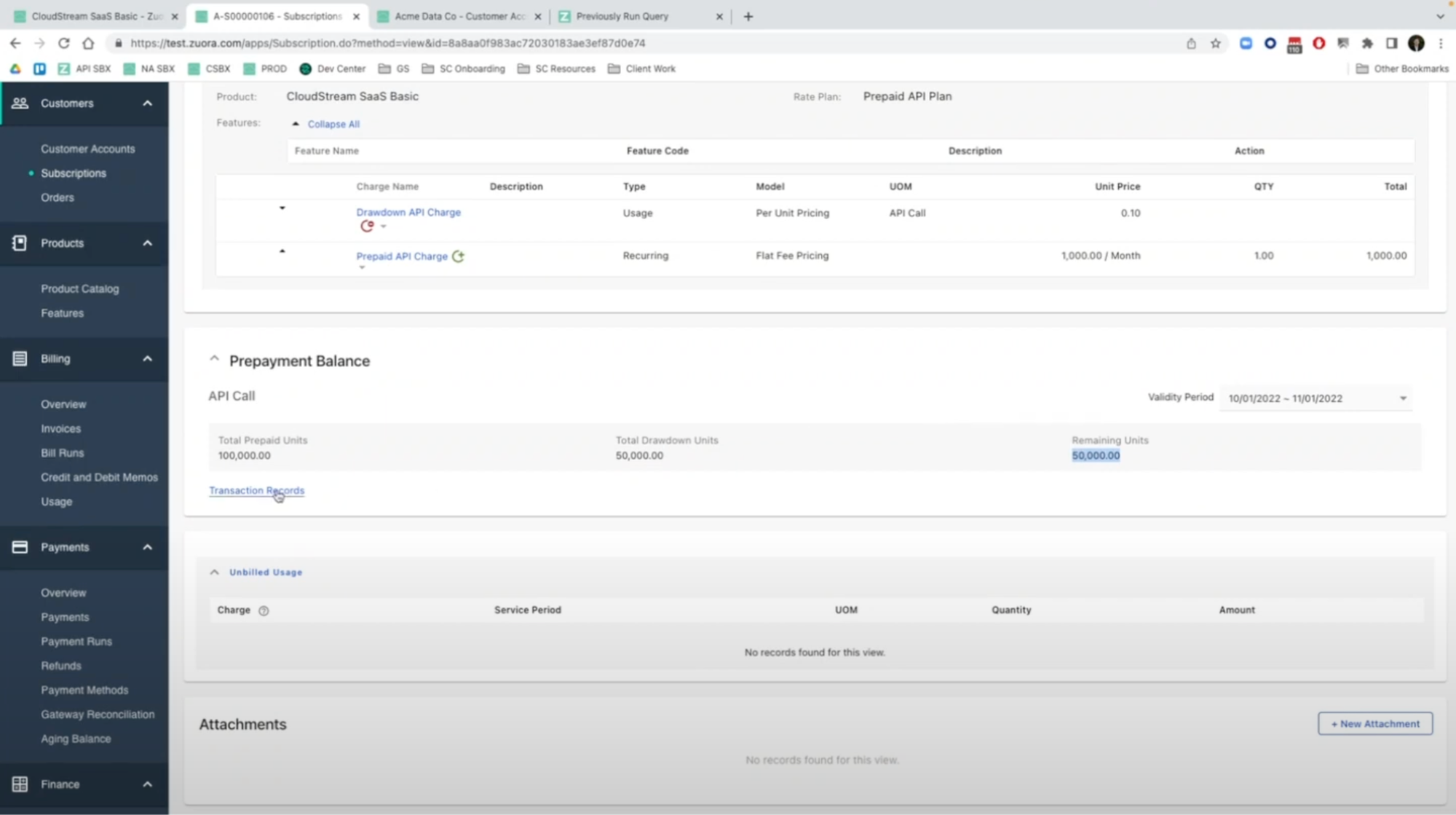
Zuora is an enterprise-grade platform for subscription billing and revenue operations. It delivers a full quote-to-cash infrastructure, supporting nearly any pricing model across multiple entities and currencies with built-in compliance and an extensive integration ecosystem.
Many global enterprises rely on Zuora to manage billing at a massive scale. The trade-off is that it’s resource-intensive to implement and best suited to teams equipped for a large, sophisticated system.
Key features:
- Advanced product catalog: Configure detailed plans with multiple charges, tiered or volume pricing, and ramp schedules for complex multi-year enterprise subscriptions without custom code.
- Order-based subscription management: Uses an “order-to-revenue” model where every change (upgrade, renewal, cancellation) is tracked as an order, ensuring accurate co-terminations and a full audit trail.
- Global billing and collections: Automates recurring billing and integrates with multiple gateways for worldwide payments. Zuora Collect and Zuora Payments add advanced dunning and optimized payment routing.
- Revenue recognition and compliance: The Zuora Revenue module (from its Leeyo acquisition) supports ASC 606/IFRS 15 compliance, handling complex multi-element arrangements with automated schedules and entries.
Pros:
- Powerful and flexible: Supports nearly any billing scenario, including one-time charges, usage tiers, bundles, and overage pools. Ideal for companies with intricate pricing or contract terms.
- Global and enterprise-ready: Handles multiple currencies, entities, and complex tax or compliance requirements out of the box. SOC 1/SOC 2 certifications and role-based access controls meet strict enterprise standards.
- End-to-end quote-to-cash: With add-ons like Zuora CPQ and Zuora Revenue, the platform unifies quoting, provisioning, billing, collections, and revenue recognition in a single, connected system, thereby reducing integration overhead.
Cons:
- High cost and long implementation: Pricing typically starts around $50K per year and can reach six figures with add-ons. Implementations often take 3–6 months and require dedicated consultants or RevOps engineers.
- Complex and resource-intensive: Zuora’s steep learning curve and intricate data model require most companies to have trained administrators or specialists to manage it effectively.
- Limited agility: Making pricing or product changes requires significant configuration and testing. It’s not designed for fast-moving startups needing to iterate quickly.
Best for:
- Large SaaS, telecom, or IoT companies with millions in ARR, global operations, and dedicated RevOps teams.
- Businesses connecting billing to existing ERP or CRM systems like Oracle, SAP, or Salesforce as part of digital transformation initiatives.
Pricing: Starts at roughly $50,000 per year, with extra costs for implementation and integrations. Final pricing scales based on billing volume, transaction count, and customer base.
6. Maxio: Finance-first billing automation software combining invoicing, revenue recognition, and SaaS analytics
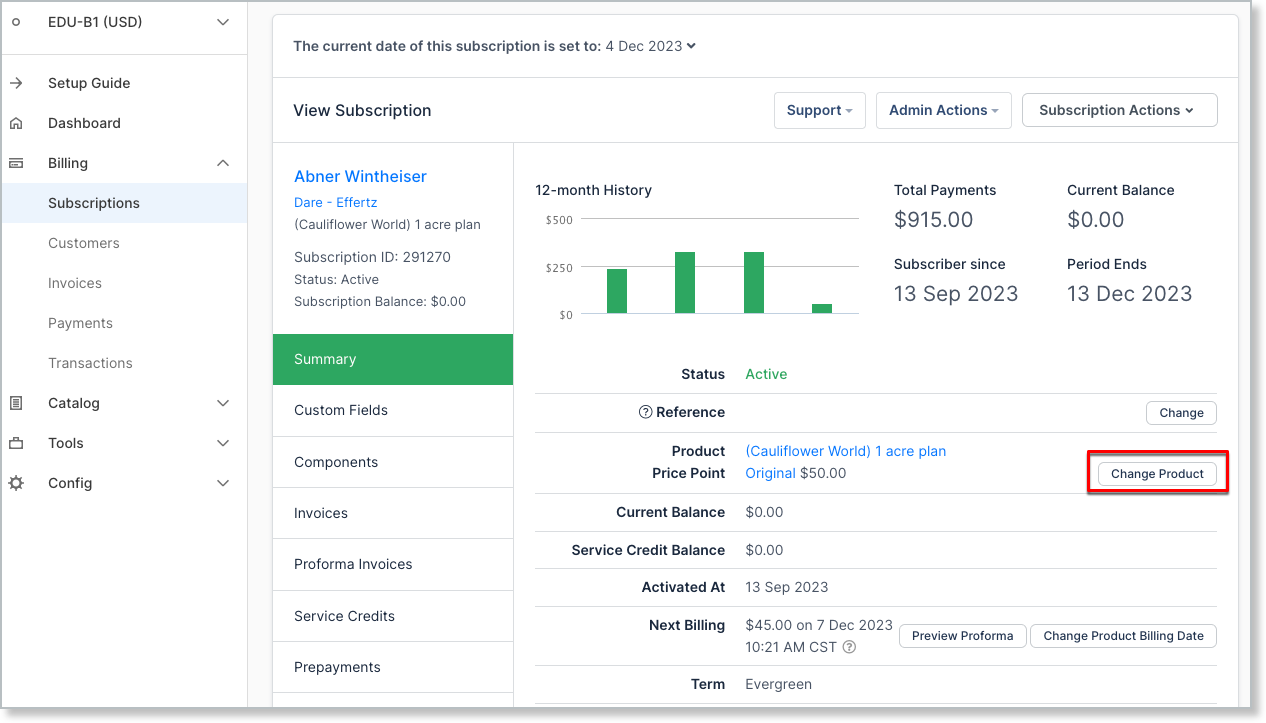
Maxio was formed from the merger of Chargify (subscription billing) and SaaSOptics (revenue recognition and analytics) and most recently RevOps.io, with the goal of creating a unified automated billing software platform for SaaS finance teams.
It combines billing automation with GAAP-compliant financial reporting and SaaS metrics, giving CFOs and founders real-time visibility into MRR, LTV, churn, and other key metrics. Positioned as an all-in-one solution, Maxio helps companies connect billing directly with financial performance and investor reporting.
Key features:
- Subscription and billing management: Inherits Chargify’s strength for managing recurring billing, trials, proration, and event-based charges via API, which covers most SaaS billing scenarios.
- Revenue recognition automation: From the SaaSOptics side, Maxio automates revenue schedules, deferrals, and journal entries for ASC 606 compliance, eliminating the need for manual Revenue Recognition tools.
- SaaS analytics dashboards: Combines billing data with performance metrics, like MRR, ARR, churn, and LTV, providing finance teams with real-time visibility into key SaaS metrics.
- CRM and ERP integrations: Syncs seamlessly with tools like Salesforce, QuickBooks, and NetSuite, ensuring billing data flows across systems for a unified quote-to-cash view.
Pros:
- Finance-oriented design: Built for finance teams, Maxio streamlines month-end close and ensures audit-ready compliance. Key financial data is centralized, reducing manual accounting work each period.
- Comprehensive SaaS metrics: Provides native reporting for MRR, churn, and LTV, so teams don’t need Excel or BI tools. Ideal for companies raising capital or tracking unit economics.
- No-code for daily operations: Non-engineers can create plans, issue credits, and extend trials directly in the UI. Integrations with tools like QuickBooks and Salesforce are set up once and require minimal maintenance.
Cons:
- Limited flexibility for complex pricing: Rooted in Chargify, Maxio can struggle with highly customized or variable pricing models. It’s well-suited for standard SaaS billing but less suitable for experimental or hybrid structures.
- Complex implementation: Setup can be time-intensive, requiring data migration, revenue rule configuration, and report validation. Many companies rely on onboarding support or external consultants.
- Steeper learning curve: The combined interface from Chargify and SaaSOptics isn’t as modern or intuitive as newer tools, and teams may need training to use it effectively.
Best for:
- Finance-driven SaaS companies that want billing automation tied directly to financial reporting and compliance.
- Mid-market to growing enterprises that have outgrown spreadsheets and need deeper insight into MRR, churn, and unit economics.
Pricing: Starts at $599/month for up to $100K in MRR, with higher tiers available for larger volumes. Pricing is broadly comparable to Chargebee’s.
7. Younium: Automated billing software for European SaaS
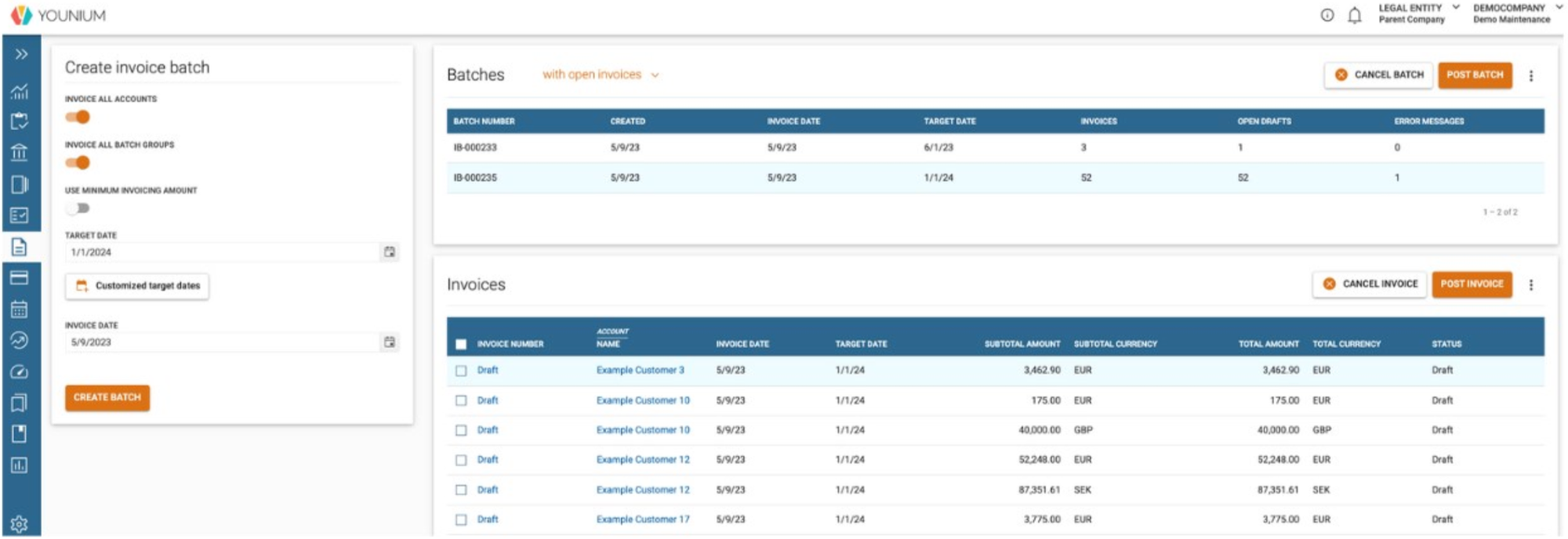
Younium is a European-based subscription management and billing automation platform designed for B2B SaaS companies. Known for its deep ERP and finance integrations, it positions itself as a “subscription hub” that unifies billing and financial reporting.
Younium supports multi-entity operations, revenue recognition, and complex organizational structures, helping finance teams maintain control as they scale. While less globally recognized than some competitors, it has a strong footprint among European SaaS firms with advanced financial requirements.
Key features:
- Subscription management: Tracks multiple plans, add-ons, and pricing tiers with versioned and auditable changes for full compliance visibility.
- Automated billing and invoicing: Generates recurring and usage-based invoices with proration, co-terming, and multi-currency/language support for global SaaS operations.
- Multi-entity consolidation: Manages multiple legal entities within one system, keeping billing separate by region while providing unified reporting for headquarters.
- ERP and CRM integrations: Connects with systems like NetSuite, Microsoft Dynamics, and Salesforce to sync data across finance and sales for a complete quote-to-cash view.
Pros:
- ERP-friendly approach: Designed for finance-first organizations, Younium integrates tightly with systems like NetSuite to reduce revenue leakage and improve billing accuracy and control.
- Multi-currency and multi-entity support: Handles multiple countries or business units with ease, enforcing local tax and invoicing rules while maintaining a global financial view.
- European compliance expertise: Fully GDPR compliant and tailored to EU requirements such as VAT and invoicing regulations, making it a preferred choice for European SaaS companies.
Cons:
- Limited flexibility for usage-based models: Strong for standard B2B SaaS billing but less adaptable for emerging or highly customized pricing, such as AI or real-time usage billing.
- Smaller ecosystem: Adoption is lower outside Europe, meaning fewer third-party integrations, community resources, and local experts compared to global players like Stripe or Chargebee.
- Basic UI and experience: Functional but less polished than newer platforms. Most users choose Younium for backend strength rather than interface design.
Best for:
- European B2B SaaS companies that need localized billing automation with GDPR and VAT compliance built in.
- Finance-led SaaS organizations that require seamless ERP integration and centralized billing across multiple entities and currencies.
Pricing: Younium’s pricing isn’t publicly listed but is generally positioned for mid-market SaaS.
14 features to look for in automated billing software
Not all billing platforms are built the same. The features that matter for a 10-person SaaS startup are different from what a 200-person fintech company needs.
Use this table as a framework for your evaluation to help identify which capabilities are non-negotiable for your business versus which are nice-to-haves.
| Feature | What it does | Why it matters | Must-have for |
|---|---|---|---|
| Recurring billing | Automatically charges customers on a set schedule (monthly, quarterly, annually) | Eliminates manual invoicing and ensures consistent, on-time billing | All subscription businesses |
| Usage-based metering | Tracks and bills customers based on actual consumption (API calls, tokens, seats, etc.) | Supports modern pricing models and ensures you're capturing all earned revenue | SaaS, AI, and infrastructure companies |
| CPQ (configure, price, quote) | Generates accurate, customized quotes based on product configuration and pricing rules | Connects sales and billing so nothing gets lost between a closed deal and the first invoice | B2B companies with complex pricing |
| Contract management | Stores contract terms, handles renewals, amendments, and co-terming | Keeps billing aligned with what was actually agreed—critical for custom enterprise deals | Companies with negotiated contracts |
| Dunning management | Automates failed payment recovery through retries, emails, and escalation sequences | Reduces involuntary churn and recovers revenue that would otherwise be lost | All subscription businesses at scale |
| Revenue recognition (ASC 606 / IFRS 15) | Allocates and records revenue in line with accounting standards | Required for audit readiness, investor reporting, and any path toward an acquisition or IPO | Audit-bound or fundraising companies |
| Multi-currency and tax support | Handles invoicing, charging, and tax calculation across different countries and currencies | Removes compliance headaches for global businesses | Companies billing international customers |
| CRM and ERP integrations | Syncs billing data with your CRM (e.g., Salesforce, HubSpot) and accounting tools (e.g., NetSuite, Xero) | Eliminates manual data entry between systems and keeps revenue data consistent | All companies with existing CRM or ERP |
| Self-service customer portal | Lets customers view invoices, update payment methods, and manage their plans without contacting support | Reduces support ticket volume and improves the customer experience | High-volume or SMB-focused businesses |
| No-code configurability | Allows pricing rules, billing logic, and invoice templates to be changed without engineering involvement | Lets revenue and finance teams iterate on pricing without creating a development backlog | Growth-stage companies iterating on pricing |
| Real-time revenue reporting | Provides live visibility into MRR, ARR, usage, churn, and customer-level revenue data | Replaces manual spreadsheet reconciliation and gives leadership a reliable single source of truth | All companies; critical for investor reporting |
| Payment gateway flexibility | Supports multiple payment processors (Stripe, GoCardless, Braintree, etc.) and payment methods | Avoids vendor lock-in and allows you to optimize for payment costs or regional preferences | Mid-market and enterprise companies |
| Audit trail and compliance logging | Records all billing actions, changes, and approvals in a tamper-evident log | Required for SOC 2, financial audits, and dispute resolution | Regulated industries and Series B+ |
| Proration and mid-cycle changes | Calculates accurate charges when customers upgrade, downgrade, or change plans mid-cycle | Ensures fair, accurate billing during contract changes and reduces customer disputes | Any business where plan changes are frequent |
A note on prioritization: if you're at an early stage with simple pricing and low billing volume, you likely need recurring billing, basic dunning, and clean integrations with your payment processor and accounting tool. As you scale—especially if you move toward usage-based models, custom enterprise deals, or investor-driven reporting requirements—the features higher up on this list become non-negotiable. Build for where you're going, not just where you are today.
How to choose the right billing and automation software
Selecting the right automated billing software depends on your business model, tech stack, and growth plans. Here are the main factors to evaluate before you commit:
- Automation depth and flexibility: Consider your current and future pricing needs. Do you only bill on recurring subscriptions, or will you eventually introduce usage-based or hybrid models? The best billing automation software should handle any mix of recurring, usage, or outcome-based pricing so you’re not locked into rigid workflows later.
- Integration coverage: Billing software must integrate seamlessly with the systems you already use, including CRM and CPQ tools for sales data, payment gateways for collections, and ERP or accounting software for financial reporting. Strong integrations eliminate duplicate data entry and reduce reconciliation errors.
- Reporting and compliance: Look for platforms that provide accurate billing metrics and compliance-ready reports. If you follow standards like ASC 606, ensure the system includes automated revenue recognition, tax calculation, and audit trails. Reliable reporting saves finance teams hours each month and prevents costly errors during audits.
- Scalability and multi-entity support: Think about where your business will be in one to two years. If you expect to grow internationally or process thousands of invoices, you’ll need multi-currency, multi-entity, and high-throughput capabilities. Tools like Alguna and Zuora are built for global scale and can handle heavy billing volumes without lag.
- Cost, usability, and support: Compare pricing models (flat fee vs. percentage of revenue) and consider how they’ll affect you as you scale. Ease of use and vendor support, especially during implementation, matter as much as features. A guided onboarding process can make or break your rollout.
Frequently asked questions: Automated billing software
What is the best automated billing software for SaaS with usage tiers in 2026?
Alguna leads with no-code tiered and hybrid billing, Stripe Billing suits developer teams building via API, Chargebee and Recurly cover standard subscription tiers, and Zuora handles complex enterprise needs.
What are the best automated billing engine platforms for SaaS with complex billing in 2026?
For complex models (multi-entity setups, custom contracts, or hybrid pricing), look for systems with CPQ, revenue recognition, and compliance features. Alguna offers this end-to-end without code, Zuora fits large enterprises, Maxio serves finance-led teams, and Chargebee works well for mid-market SaaS scaling in complexity.
How does automated subscription billing software work?
Subscription billing automation software, also known as automated recurring billing software, manages recurring invoices, payments, and renewals. It generates invoices at set intervals, charges saved payment methods, applies proration, calculates taxes, and triggers dunning workflows for failed payments, ensuring consistent and error-free billing cycles.
Can I use free automated billing software for my startup?
Yes. Many billing platforms offer free tiers or trials. Alguna has a free starter plan, Chargebee Launch is free until you hit a revenue threshold, and Stripe Billing only charges transaction fees. These plans are ideal for testing, but they limit features such as revenue recognition and customer volume.
What’s the difference between billing automation and revenue automation?
Billing automation streamlines invoicing and payment collection, while revenue automation ensures the proper recognition of billed revenue under standards such as ASC 606. The best solutions, such as Alguna, combine both, automating the full quote-to-cash and revenue recognition process for faster, more accurate closes.
The best billing automation platforms drive revenue
Every deal your team closes deserves to be billed accurately, on time, and without anyone chasing a spreadsheet to make it happen.
Yet for most B2B companies, the reality is this: billing remains one of the last manual processes in an otherwise automated revenue engine.
This shows up in the numbers, in perpetuity. Missed charges, delayed invoices, failed payments that nobody caught, and finance teams buried in reconciliation instead of reporting.
The platforms we've covered in this guide each solve a real problem. But the best automated billing software for your business isn't necessarily the one with the most features or the longest customer list. It's the one that fits how you price today, can grow with how you'll price tomorrow, and doesn't require a six-month implementation and a dedicated administrator to keep it running.
Put billing on autopilot with Alguna
Billing shouldn't be the bottleneck in your revenue process. Book a demo and we'll show you how Alguna unifies your quoting, contracts, and billing, so your team can focus on closing deals, not chasing invoices.