How much of your day goes to looking for answers instead of acting on data?
While figuring out why usage is higher for a specific customer, whose invoice is overdue, and which customers up for renewal renew doesn’t exactly require any heavy lifting in Alguna, we decided to make it even easier for revenue teams to stay on top of their day-to-day.
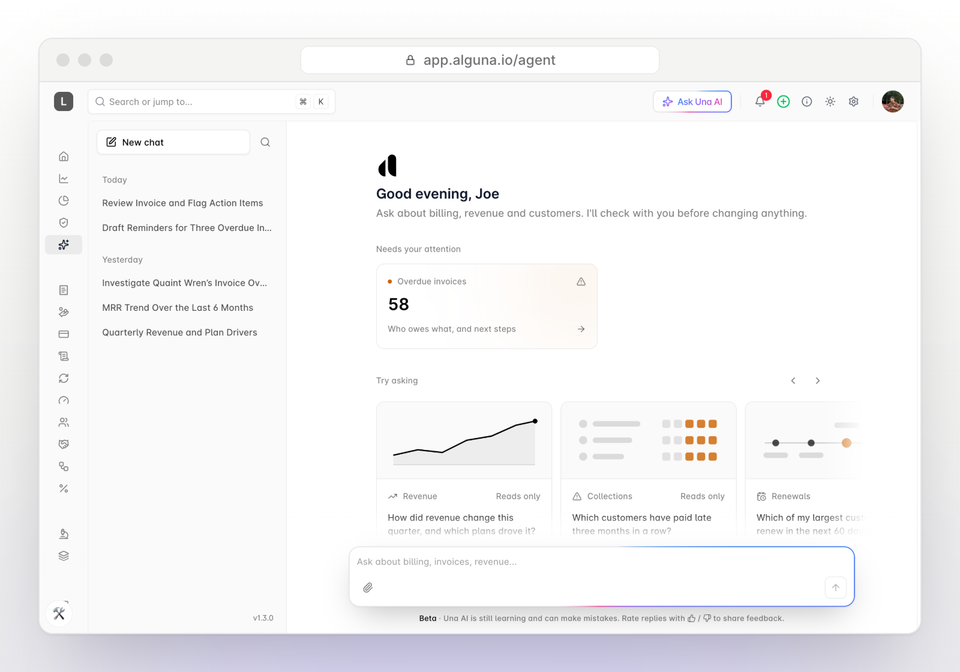
Una is the AI assistant built into Alguna. You ask a question in plain English and get the answer in seconds, from your own revenue data.
When you want to get something done, Una AI guides you through it: it takes you to the right screen, fills in the details for you to check, and walks you through each step. Nothing changes until you review and confirm it.
Una AI works next to you in the dashboard and in Slack, and it already knows the customer, invoice, or contract you have on your screen.
Let’s take a look at how Una AI gets you the answers you need faster and helps you work smarter.
How Una AI makes your day better
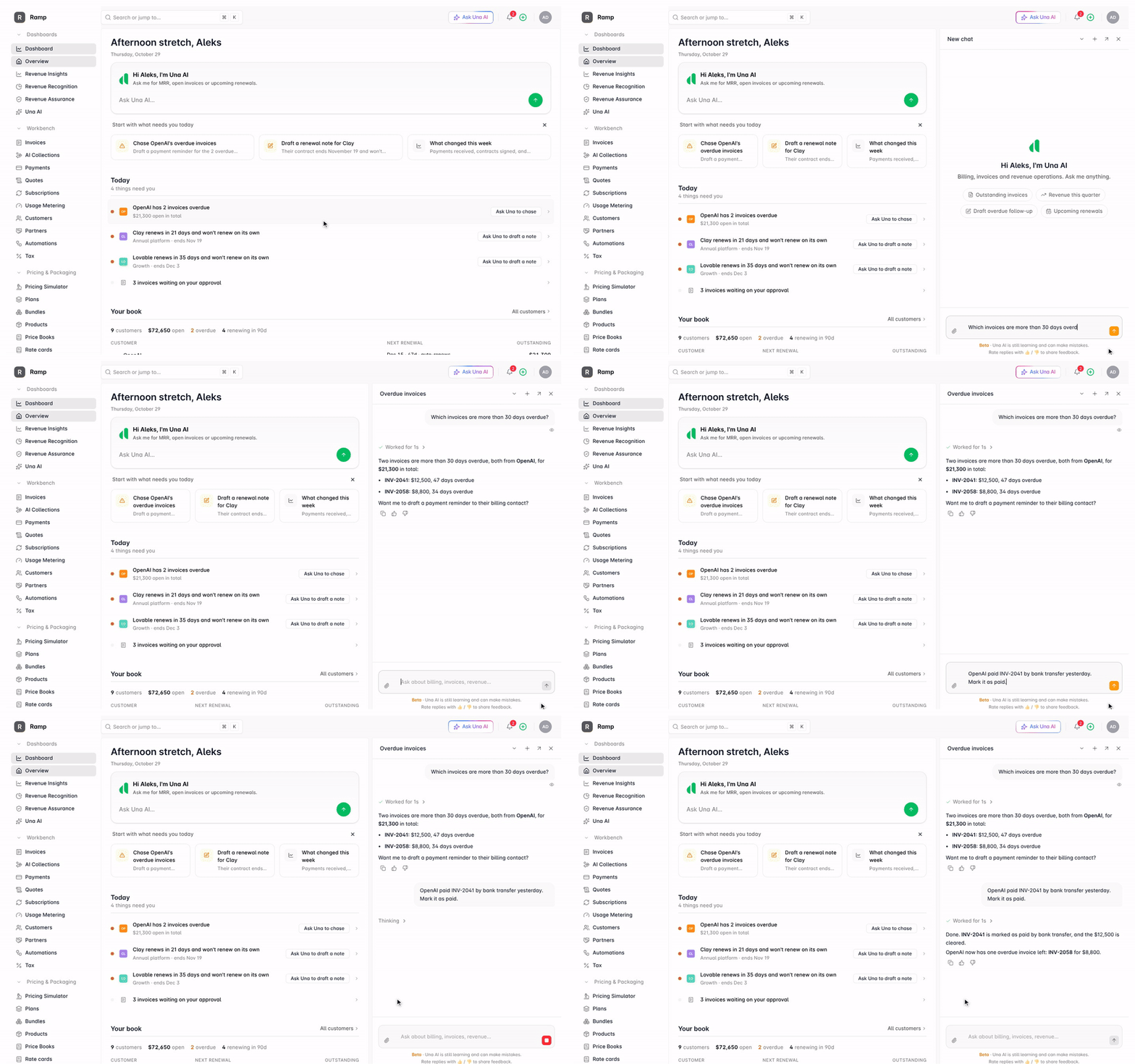
We built Una AI so your whole team can get answers and get work done faster, whether they're in Alguna all day or once a month.
Una AI has the full context across customer accounts and every page or screen you’re on, but you’re always in control.
In practice, this means Una AI can only see and do what your own role in Alguna allows. It never changes anything without showing you first and getting your approval, and every action it takes is recorded.
Type a question or a task in plain English, and Una AI answers it or completes the work.
Here's what that looks like day to day.
Get answers in seconds, not hours
Ask about any customer, subscription, invoice, payment, quote, credit, or refund. Una AI reads your live data, so you get today's numbers, not last week's export. It can also check hundreds of records at once, for questions like "Which overdue invoices have a line item over $5,000?"
Hand off the busywork
Ask Una AI to add a customer, draft an invoice, set up a product or plan, prepare a subscription change, issue a credit note or add prepaid credits. Before anything in your account changes, Una shows you exactly what it will do and waits for you to approve it. Pending actions also wait for you under Una AI → Approvals.
Skip the explaining
Una AI sees the page you're on. Ask about "this invoice" or "these subscriptions" and it already knows which ones you mean. It can also fill in a form for you to review, or take you straight to the right screen.
Learn Alguna as you go
Ask how anything in Alguna works and Una AI answers from our help docs, then helps you do it.
Teach Una how your team works
Tell Una AI to remember something, such as a customer's preferred billing contact, and it will use it next time. Save a repeatable task as a skill (a saved set of instructions), then type / in chat to run it again.
Let it work while you don't
Automations run Una AI on a schedule or when something happens in your account. For example, every Monday morning it can list overdue invoices and who to chase.
Set them up under Una AI → Automations.
Interact with Una directly in Slack
Send Una AI a direct message or @mention Una in a channel to get an answer without opening Alguna.
The result: no more exporting to spreadsheets, no more waiting on someone else for a number, and no more clicking through screens to make a simple change.
Top 3 use cases our customers love
These are the three jobs where Una saves the most time.
Each one used to mean an export, a spreadsheet or a message to another team.
1. Make billing changes in one sentence
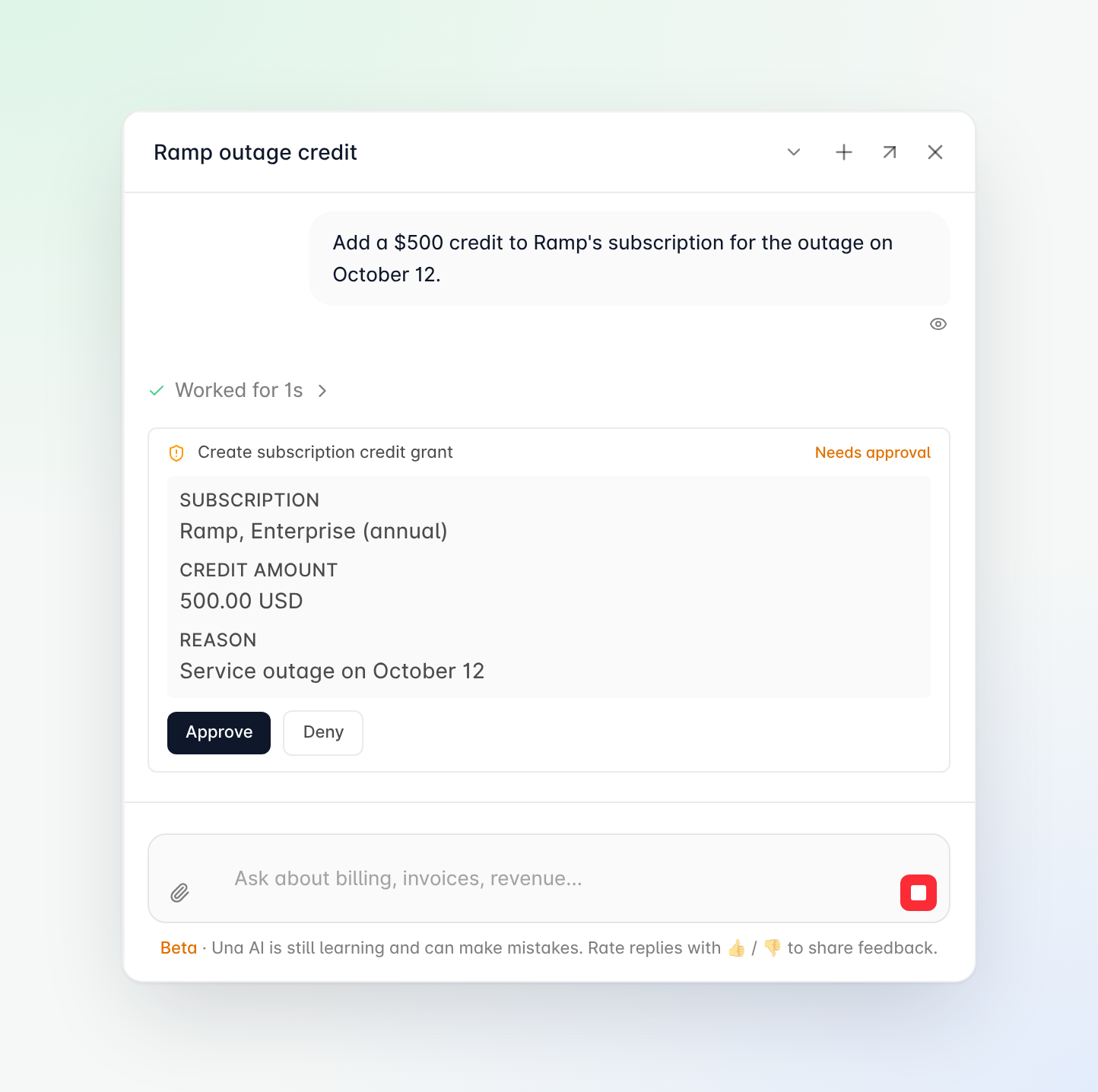
Upgrades, one-off fees, prepaid credits and new customers each take several steps across different screens.
Describe the billing change to Una AI in plain English and it finds the right customer and subscription, prepares the change, and shows you exactly what will happen: what's changing, the amount and when it takes effect. It applies the change only when you click approve, and if you click deny, nothing changes.
Because every change waits for your approval, you can hand Una AI the routine edits and still decide exactly what reaches your customers' invoices.
Goodbye extra clicks.
2. Get a 360° view of your customer’s revenue health
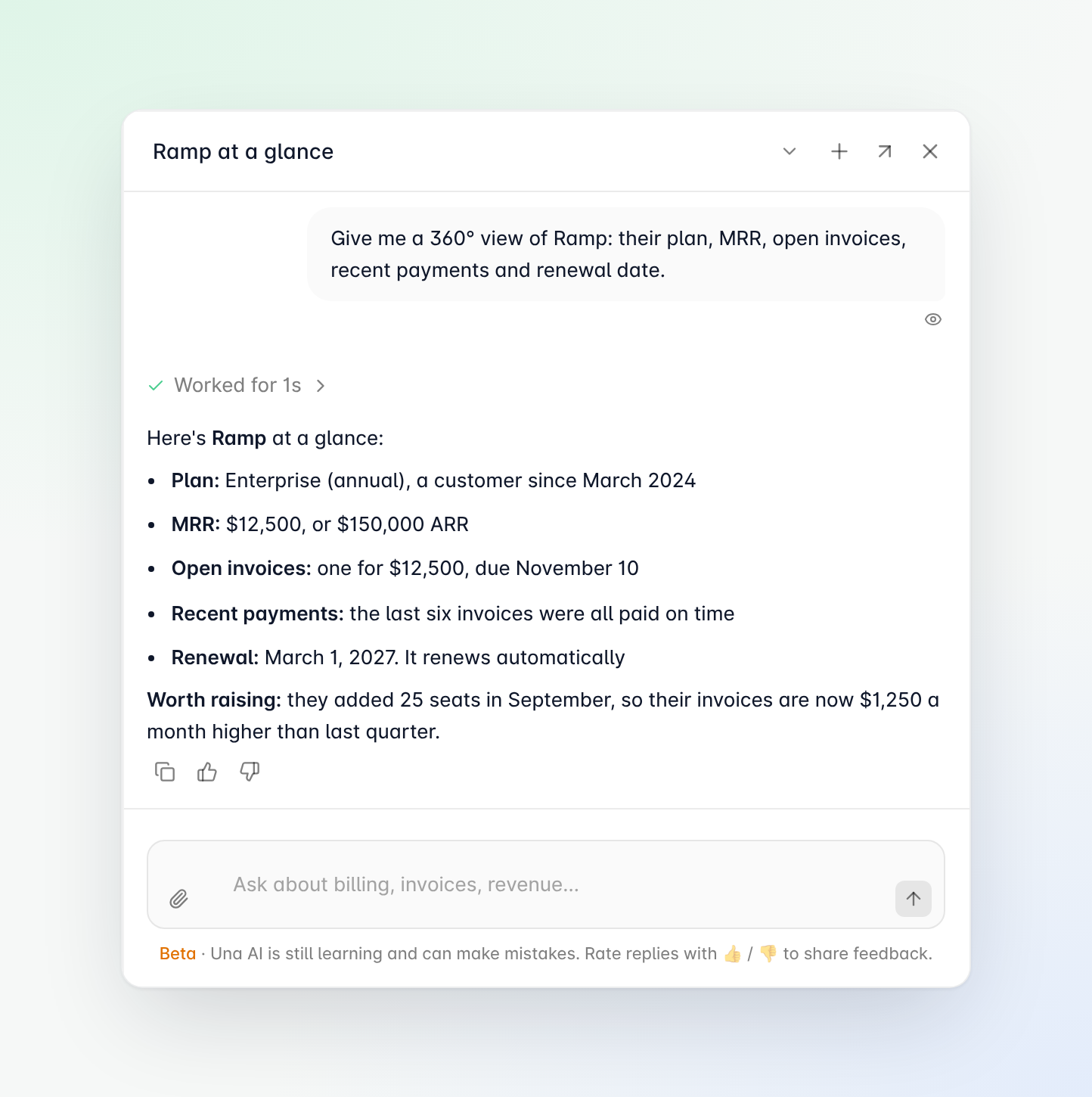
Before a renewal or check-in, you need the customer's plan, what they pay, any open invoices and recent changes. That usually means four tabs and a spreadsheet.
Ask Una AI and you get it all in one answer, taken from the same records Alguna bills from. Una brings together the customer's plan, their monthly and annual recurring revenue, open and overdue invoices, recent payments and their renewal date.
It also points out what needs your attention, such as an overdue invoice or a contract that won't renew on its own. If you're already on the customer's page in Alguna, you don't need to name them.
Just ask "Tell me about this account and flag anything I should act on."
3. Get up to speed with overdue invoices
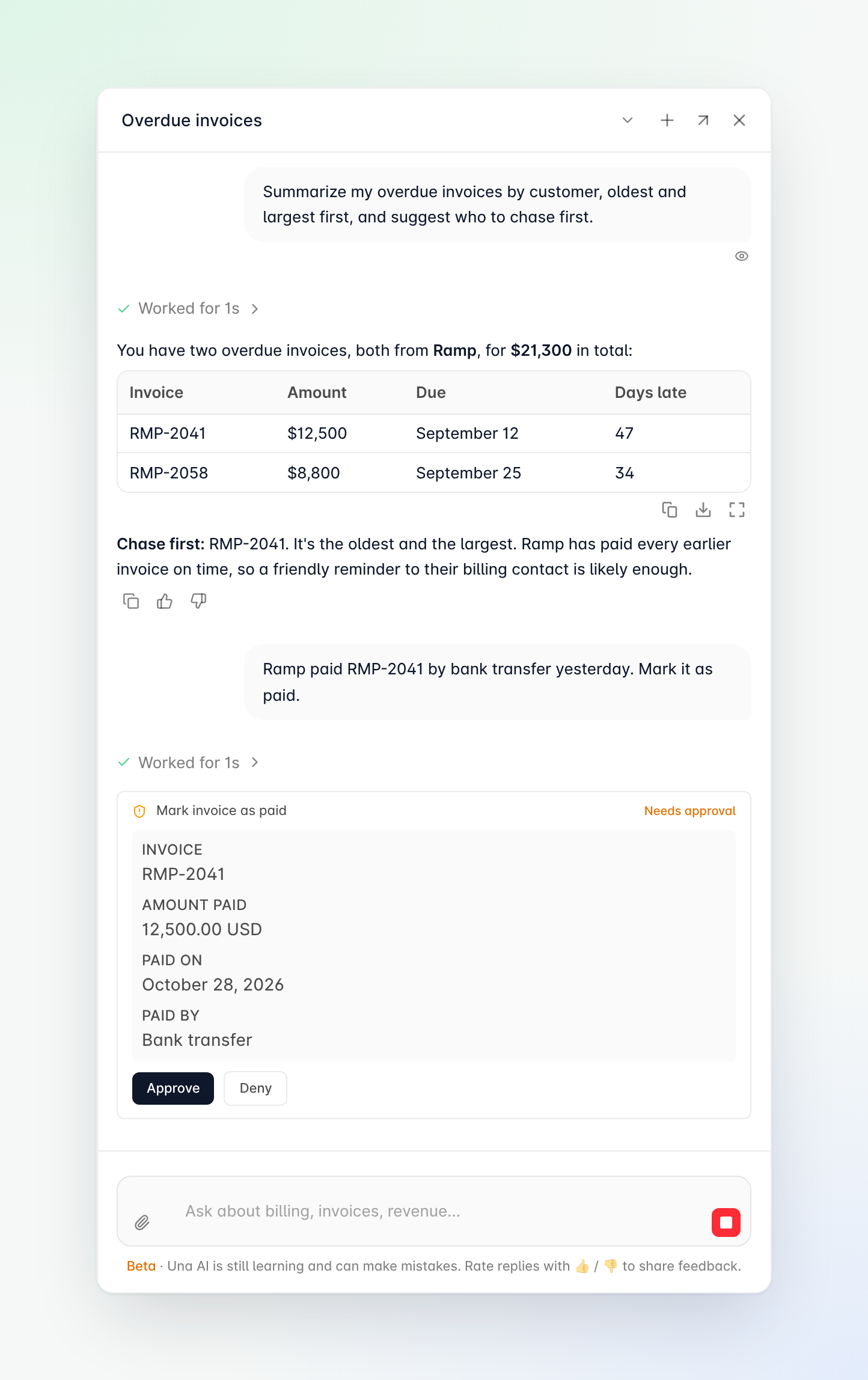
Ask Una AI what's overdue and it lists every late invoice, who owes it and how many days late it is.
It can also put them in order for you, oldest and largest first, and suggest who to chase first. When you're ready to follow up, ask Una AI to draft a payment reminder for you to send.
When a customer tells you they've paid, tell Una AI and it marks the invoice as paid once you approve.
No more ageing reports, and no more matching payments to invoices by hand.
Prompts to try, by role
Not sure where to start?
Copy any of these into Una AI and swap in your own customer names and dates.
| Prompt to try | What you get |
|---|---|
| Finance and billing | |
Which invoices are still in draft, and which of those are over $10,000? | Draft invoices worth a second look before they go out |
Why is this invoice higher than last month's? Compare the line items. | A line-by-line comparison, from the invoice's page |
Draft an invoice for Acme for a $2,500 one-off onboarding fee. | A draft invoice, created once you approve |
Which invoices were paid this week, and by which customers? | This week's payments, by customer |
List the credit notes we've issued to Acme this year. | Every credit note for one customer |
| Accounts receivable | |
Which invoices are more than 30 days overdue? Group them by customer. | Late invoices by customer, with days overdue |
Who is the billing contact for Northwind, and what do they owe in total? | The right contact and their open balance |
Which customers have more than one overdue invoice? | The customers to chase first |
Draft a friendly payment reminder for Northwind's overdue invoices. | A reminder email ready for you to send |
Mark invoice INV-1042 as paid. They paid by bank transfer yesterday. | The invoice marked as paid once you approve |
| Revenue operations | |
Create a new customer called Globex, billed in USD, with billing contact [email protected]. | A new customer, created once you approve |
Add a $1,000 goodwill credit to Initech's subscription for the delayed onboarding. | A credit on their subscription, once you approve |
Add 50,000 credits to Acme's prepaid wallet. | Prepaid credits added once you approve |
Which subscriptions are still in draft and haven't been activated? | Deals that haven't gone live yet |
What does the Enterprise plan include, and which customers are on it? | The plan's products and prices, and who's on it |
| Sales and account management | |
Which quotes are out for signature right now, and which have the highest ARR? | Open deals, biggest first |
What is Acme paying today, and when does their contract renew? | Current price and renewal date |
Which subscriptions are renewing in the next 90 days? | Your upcoming renewals |
Tell me about this account and flag anything I should act on. | An account summary, from the customer's page |
| Customer success | |
What features does this customer have access to on their current plan? | What their plan includes, from the customer's page |
How many prepaid credits does Globex have left? | Their remaining credit balance |
Explain this customer's last invoice in plain English so I can send it to them. | A plain-English explanation to share |
| Leadership | |
How many subscriptions do we have in each status right now? | Active, scheduled, paused and canceled counts |
How much is overdue right now, and which five customers owe the most? | Total overdue and where it sits |
How many quotes are waiting for approval? | Deals waiting on a decision |
Prompts that say "this" work best from that customer's or invoice's page in Alguna.
Get started in five minutes
There is nothing to install. Una is already in your Alguna account.
- Open Una AI. Log in to Alguna and click Ask Una AI at the top of any page, or choose Una AI in the main menu for a full-screen chat.
- Ask your first question. Pick a prompt from the list above, or type your own in plain English.
- Approve what it proposes. When you ask Una to change something, it shows you the change first. Click approve to apply it, or deny to leave everything as it is.
- Save what you repeat. Turn a task you do every week into a skill or an automation, so it runs with one click or on its own.
- Bring Una into Slack. Connect Slack under Settings → Integrations, then send Una a direct message or @mention it in a channel.
Try Una AI today
The questions that used to take an afternoon now take a sentence. Una gives you the answer from your live data, does the routine work for you, and checks with you before changing anything.
Already an Alguna customer? Log in and click Ask Una AI to ask your first question.
Book a demo and we'll show you how to run your revenue workflows end-to-end with your very own AI teammate.