No two Salesforce orgs look the same. But every single one has custom fields, objects, and reports built around how your team sells.
Fitting billing data into that usually means kicking off a (costly) consultant project or building a homegrown integration. Plus, it requires upkeep every time your setup changes.
With our upgraded Salesforce integration, you decide where billing data lands in Salesforce, and you set it up yourself in Alguna. Quotes and opportunities are connected too, so reps spend less time updating records and more time selling.
Here's what's new:
- Custom mapping: Any Alguna value can fill any Salesforce field.
- Quotes linked to opportunities: Your opportunities always show the latest quote numbers.
- Subscriptions and line items as Salesforce records: Added seats, new products and cancelled items show up as they happen, so your reps never work from an old contract.
- Automatic opportunity updates: Your opportunities update in Salesforce when a quote changes or is signed. Any failed sync is retried automatically.
- Renewal and upsell opportunities surfaced: When a subscription enters its renewal window, a renewal opportunity appears on the account.
Map any Alguna value to any Salesforce field
Every sales team tracks deals a little differently. Your opportunity might need ARR in one custom field, first-year value in another, and the share of revenue from a specific product in a third.
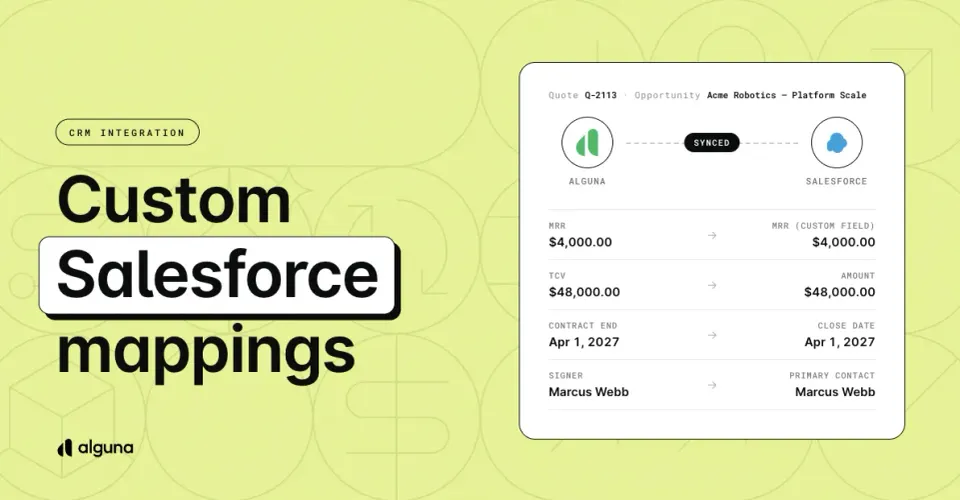
Field mapping lets you choose exactly which Alguna value lands on which Salesforce field.
The field list comes live from your Salesforce org, so your custom fields show up as soon as they exist. Alguna only offers fields it can write to and checks that types match, so a date never lands in a currency field.
When a single field isn't enough, write a formula:
| Formula | Writes |
|---|---|
arr * 0.1 |
10% of the deal's ARR |
product_arr("prod_a") |
ARR from the lines selling that product |
arr - product_arr("prod_a") |
ARR from everything except that product |
product_count() |
How many distinct products the deal sells |
If a Salesforce object requires fields that your mapping leaves empty, Alguna warns you before the first record fails. You can still save, because a Salesforce flow may fill them in. Any rejection Salesforce does send back names the missing fields, not a generic error.
Set it up in Settings → Connections → Integrations → CRM → Field mappings, or read the field mapping guide.
Quotes and opportunities that stay in sync
When a quote changes and the opportunity doesn't, your forecast drifts. Reps retype ARR, someone forgets the close date, and the pipeline review turns into a reconciliation exercise.
You can now link every Alguna quote to a Salesforce opportunity. Pick the opportunity when you create the quote, or start the quote straight from the opportunity. The picker searches all of your opportunities, not just the most recent few.
Once a quote is linked, Alguna writes its numbers back onto the opportunity: MRR, ARR, TCV, contract dates, signer, and whatever else you map. The opportunity updates when the quote changes and again when it's signed.
- One primary quote per opportunity. An opportunity can have several quotes. The primary one is what Alguna writes back. A signed quote always becomes primary.
- Sync status on the quote. The CRM card shows Synced · 5m ago, Not yet synced, or Sync failed with the reason. Failed syncs retry automatically, and you can click Sync now at any time.
- Require an opportunity on every quote. Turn this on and no quote gets saved without a linked opportunity, so nothing gets priced outside your pipeline.
Set it up in Settings → Connections → Integrations → CRM → Settings.
Subscriptions, products, and tiers as Salesforce records
A signed deal doesn't stop changing. Customers add seats, swap products and cancel lines, and your account team needs to see what the customer is paying for today, not what they signed a year ago.
Alguna can now write each subscription to a Salesforce object you choose, usually a custom object such as Subscription. Below it, every product on the subscription becomes a child record, and every pricing tier on a product can become a record of its own. You link each level to its parent with a lookup field.
- Records are created the first time a subscription becomes active and updated on every change after that.
- When a product or tier is removed from a subscription, Alguna deletes its record from Salesforce.
- Alguna only sends values that changed since the last write, so repeated updates don't burn API calls.
This replaces the fixed Alguna Subscription custom fields on the Account. If you use those today, see moving from the Alguna custom fields, or email [email protected] and we'll help you move over.
Set it up with Map an object in Settings → Connections → Integrations → CRM → Field mappings.
Let your opportunity stages run the quote-to-close process
Your reps already move opportunities through stages. They shouldn't then have to open a second system to create the quote, void the old one, or mark the deal won.
Alguna automations can now start from a Salesforce opportunity change. The trigger knows the new stage, when it was entered, and which fields changed. You build the rule from pickers that read your own Salesforce org: your objects, your fields, and your stage picklist, so there are no API names to type.
The automation library includes ready-made Salesforce templates:
| Template | Runs when |
|---|---|
| Create quote when opportunity enters stage | An opportunity moves into a stage you choose |
| Amendment quote when expansion opportunity advances | An expansion opportunity moves forward |
| Close opportunity as Won on signature | A quote is signed |
| Contract record on signature | A quote is signed |
| Void quotes when opportunity is lost | An opportunity is marked lost |
| Subscription record on activation | A subscription becomes active |
If a Salesforce validation rule blocks a write, the automation run shows Salesforce's own message, so you know which rule to look at.
Set it up in the Automations tab of Settings → Connections → Integrations → CRM, then click Add from template.
Renewal and upsell opportunities, created for you
Renewals slip when nobody opens the opportunity in time. Upsells go missing from the pipeline when a rep sends an amendment quote and forgets to log the deal.
Alguna can now create these opportunities in Salesforce at the moment they're needed. Each one is linked to the right account, named consistently, and filled with the values you mapped.
| Template | Runs when |
|---|---|
| Create renewal opportunity at renewal window | A subscription enters its renewal window |
| Create renewal opportunity when quote is signed | A quote is signed |
| Create renewal opportunity when a renewal quote is created | Someone creates a renewal quote in Alguna |
| Create upsell opportunity when an amendment quote is created | Someone creates an amendment quote in Alguna |
| Cancel renewal when renewal opportunity is lost | A renewal opportunity is marked lost |
An amendment quote (a change to an existing subscription, such as added seats) gets its own upsell opportunity, linked to the quote. When the amendment is signed, the Close opportunity as Won on signature template closes it too. Alguna skips any quote that already has a linked opportunity, so you never get duplicates.
Add them from the Automations tab in Settings → Connections → Integrations → CRM.
Smaller improvements
- Faster quote creation from an opportunity. The opportunity link is saved with the quote in a single step, and the write to Salesforce happens in the background. You land in the quote builder without waiting on Salesforce.
- More reliable account imports. Alguna cleans up messy website values and converts country names and codes to one standard. One bad record no longer stops a bulk import, and you see which accounts failed and why.
- Checkboxes that save. Salesforce checkboxes can't be empty, so an unset yes/no value is now written as no instead of failing the record.
- Clearer errors. Salesforce rejections show Salesforce's own message, such as which required fields are missing, rather than raw JSON or "unexpected error".
- No polling on a broken connection. If Salesforce rejects Alguna's credentials, syncing pauses until you reconnect instead of failing on every run.
- A default CRM. If you connect more than one CRM, choose which one Alguna uses for opportunities, quote links and field mapping.
Get started
Already connected to Salesforce? Open Settings → Connections → Integrations → CRM. Map the fields you want on your opportunities, then add the automation templates that match how your team sells.
New to the integration? Connect Salesforce from Settings → Connections → Integrations. We recommend connecting a Salesforce sandbox first. The Salesforce setup guide walks through each step.
Have a feature request or feedback? Tell your Account Manager or email [email protected] with what's working, what could be better, or what you'd like the Salesforce integration to do next.