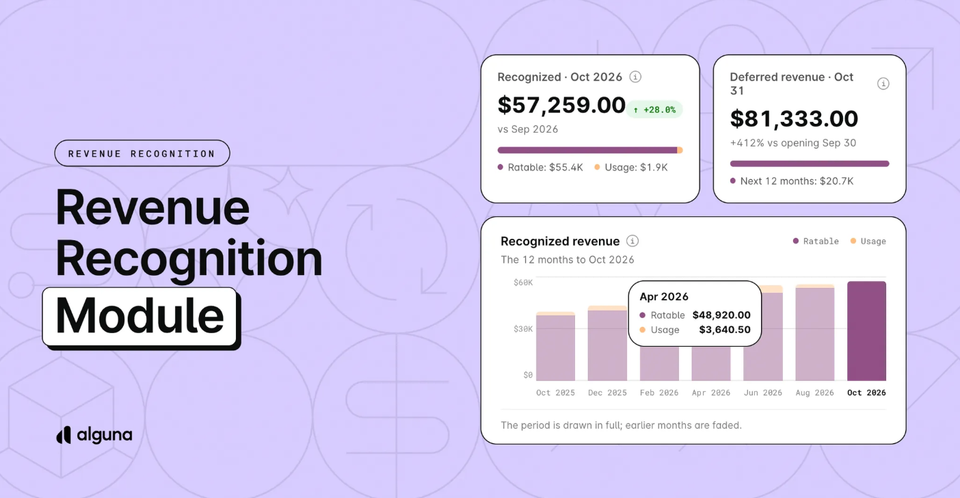
Month end shouldn't start with an export.
Revenue that lives in a spreadsheet turns every month-end into a rebuild. Someone pulls the invoices, the contracts, and the usage exports, re-creates deferred and recognized revenue by hand, and reconciles it against billing before the close can even start.
We built revenue recognition directly on the contracts you already bill.
The same subscription that produces your invoice now produces your revenue schedule. When a contract changes, through an upgrade, a credit note, or a late signature, the schedule recalculates from the date the change takes effect.
This way, billing and revenue can't drift apart, because they come from the same place.
Your ledger stays your system of record. When you close a month in Alguna, the figures are locked and the journal entry is drafted for you. You review it and post it to NetSuite, QuickBooks, Xero, Light, or import the file into your ERP of choice.
It's built to ASC 606 and IFRS 15, and there's no separate spreadsheet to reconcile each month.
Here's what's new.
Revenue comes from the contract, not an export
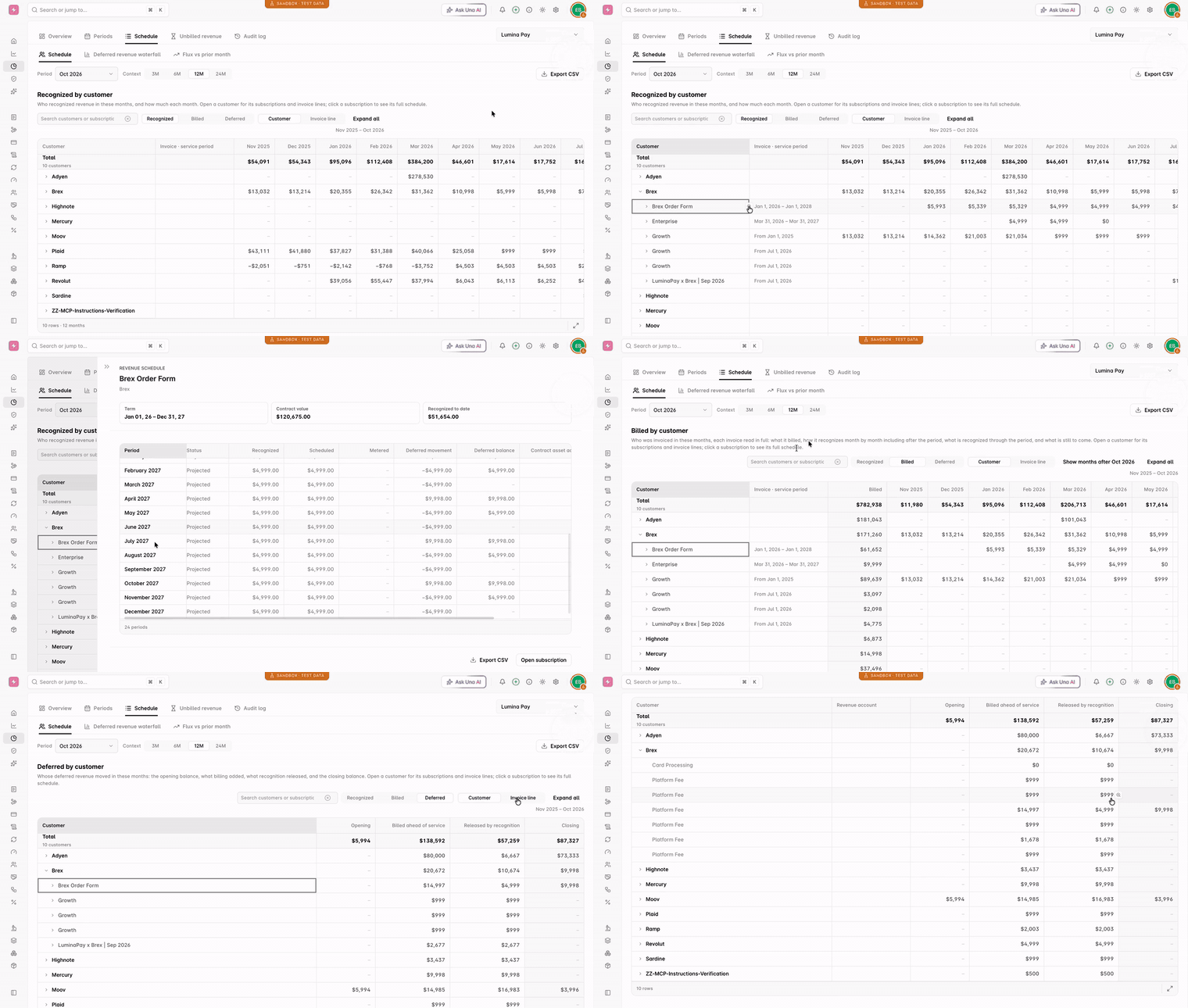
In Alguna, each customer's contract lives in one versioned record: the subscription.
An activated quote becomes the subscription, and every change to it is a new version with an effective date. Each invoice it produces is deferred, then recognized period by period, until you close the month and post the journal entry.
That's the difference from tools that work from invoices synced after the fact. Alguna recognizes revenue from the contract itself, so there's nothing to map and nothing to reconcile.
Every revenue schedule shows three numbers:
- Deferred revenue. Billed but not yet earned.
- Recognized revenue. Earned as the service is delivered.
- Unbilled revenue (contract asset). Earned but not yet invoiced.
Take a $1,200 annual plan invoiced in January. It's recognized at $100 a month, so in January you see $100 recognized and $1,100 deferred, not $1,200 of revenue.
If you spend too much time reconciling billing with your ledger, book a demo to see it run on your own contracts.
Close your month
Most of the close goes into reconciling billing with the ledger, then typing the result in as a journal entry.
Now you close each month per legal entity in a few clicks, and Alguna drafts the journal entry for it.
Closing a month saves its figures as they stood, so a late credit note or a corrected price can't restate it. If a month really has to be restated, reopen it, then close it again.
The journal entry is drafted from the figures Alguna locked. Nothing is sent automatically: you review it and post it. A month that's already posted is corrected with an adjustment entry for the difference, never a second copy of the month.
- Unbilled revenue at month end. Usage, overages, and fees billed in arrears are priced the way the invoice will price them, including tiers, proration, discounts, prepaid allowances, and spend caps. The accrual and its reversal on the 1st are ready to import.
- A CSV export that matches. The month's export uses the same figures as the journal entry, and a closed month exports identically every time.
- No double counting. Monthly invoices that already reach your ledger through the invoice sync can be left out of the journal entry.
This means no more rebuilding revenue in a spreadsheet and no more journal entries typed by hand.
Choose a revenue rule for each product
Not every contract earns the way it bills. A ramped deal, a setup fee, or a block of prepaid credits usually ends up on a side schedule that someone maintains by hand.
In Alguna, you set the rule once per product, and one contract can mix several rules.
Subscriptions are recognized evenly over time by default, and metered revenue is recognized as usage is consumed. You can also set a default per legal entity and override it on a single contract.
The cases that usually need a side schedule are built in:
- Over the whole contract. For ramped pricing, free months, and annual escalators. A three-year deal at $1,200, $1,320, and $1,452 is recognized evenly across 36 months.
- At a point in time or over time. A perpetual license is recognized on delivery, and onboarding as it's delivered.
- Prepaid credits. Recognized as your customer uses them. Unused credits are recognized when they expire, or earlier, alongside usage, if you can estimate breakage.
- Setup fees. An implementation fee that doesn't stand on its own is spread over the contract term. A $600 setup fee on a $1,200 annual plan is recognized at $150 a month, not $700 in the first month.
Contract changes update the numbers
Contracts rarely stay as signed. Upgrades, ramps, free months, credit notes, and back-dated signatures each mean finding the affected months and redoing the math.
In Alguna, every subscription change is a new version with an effective date, and the revenue schedule recalculates from it.
Upgrades and added products are recognized from the date of the change, or treated as a separate contract if you choose. Downgrades apply to the remaining term, or are caught up all at once in the month of the change.
A cancellation stops recognition on the cancellation date.
- Credit notes don't reopen the past. They're booked as a reversal in the month they're dated, so earlier months stand.
- Back-dated contracts start at signature. Revenue starts when the contract is signed, not on the start date written in it.
- Free months and delayed billing. Revenue starts with the contract and is carried as unbilled until the first invoice.
- Annual committed spend. A share of the minimum is recognized each month, so the year ends at the commitment or the usage, whichever is higher.
Keep an audit trail
When your auditors ask where a number came from, the answer shouldn't involve re-deriving last quarter.
In Alguna, every number traces back to its source. Closed months don't move: later changes are booked as catch-up adjustments in the open month, and each one is linked to the invoice or credit note that caused it.
- Every action is logged. Closes, reopens, journal entries, and adjustments each record who did it, when, and what changed.
- Unbilled lines tie out. Each line clears against the invoice that later bills it, which is the cut-off test auditors run.
- Exchange rates aren't guessed. If a rate is missing, the report stops and names the missing currency pair instead of assuming one.
Built for multi-entity, multi-currency finance teams
Schedules, closes, and journal entries all work per legal entity, and revenue reports in any currency using the exchange rates you set. Closed months keep the rates they were reported at.
You can view revenue for your whole company, or drill into a legal entity, customer, product, or subscription. Each subscription has its own Revenue schedule tab.
The remaining performance obligations (RPO) report shows contracted revenue you haven't recognized yet, the figure your board and investors ask for.
MRR, ARR, and ACV are there for each subscription, along with revenue movement across new, expansion, contraction, and churn.
The same revenue schedules are available through the API, daily or monthly, so your data team can pull them into your own reporting.
Get started
Period close, which powers locked months, drafted journal entries, and the contract-level rules, is turned on per organization.
To opt in, email [email protected] or message us in your shared Slack channel.
Once it's turned on:
- Open Revenue recognition in your dashboard to see recognized, deferred, and unbilled revenue by month for each legal entity.
- Set a revenue rule on each product, under Revenue Recognition on the product page.
- If you report in more than one currency, add your exchange rates in Settings → Workflows → Billing → FX Rates.
- Close your first month, review the drafted journal entry, and post it to QuickBooks, Xero, or Light, or export the file for your ERP.
For the full setup, including every revenue rule and the API, read the revenue recognition guide.
If you spend too much time reconciling billing with your ledger, book a demo to see it run on your own contracts.