This article contains:
• Most recent customer reviews from vendor websites and/or G2
• Most recent product screenshots to reflect true product status
• Most recent pricing (as per vendor websites and customer reports)
Finance and revenue teams have never had more complexity to manage. Subscription models, usage-based pricing, hybrid billing arrangements, multi-entity contracts, and the pressure to close the books faster.
Legacy systems and the manual spreadsheet era simply can't keep up.
Companies that invest in finance automation see up to 30% faster close cycles and significantly fewer revenue recognition errors. And with AI and automation increasingly redefining revenue cycle processes, the question is no longer whether to automate, but which platform to trust with it.
The right automated revenue management system should eliminate the bottlenecks between quoting, billing, and revenue recognition, giving your team a single source of truth and freeing them to focus on growth rather than reconciliation.
What is revenue automation software?
Before comparing platforms, it helps to be clear on what we're actually talking about. "Revenue automation" is a broad term that gets applied to very different tools, and some terms might be used interchangeably.
So let's start by define the categories that matter most, acknowleding that there's some overlap.
Revenue automation software
A platform that automates one or more stages of the revenue lifecycle: quoting, billing, invoicing, payment collection, and revenue recognition. It connects the commercial relationship (what you sold) to the financial record (what you recognize and collect).
Automated revenue management system
A broader term for a system that orchestrates the full revenue workflow, often including real-time dashboards, automated dunning, multi-currency handling, and integrations with CRM and ERP systems.
Revenue automation tools
Point solutions that handle specific parts of the revenue workflow, such as usage metering, invoice generation, or subscription lifecycle management. Often used in combination.
Revenue cycle automation suite
An end-to-end solution that covers the complete revenue cycle from order-to-cash, including contract management, billing, collections, and financial reporting in one unified platform.
Automated revenue collection system
Focused specifically on the payment collection side: automated payment retries, smart dunning sequences, payment method management, and failed-payment recovery.
Usage-based revenue automation
Tooling purpose-built for companies that charge based on consumption, API calls, seats, or other metered metrics, rather than flat subscription fees. This requires real-time metering, aggregation, and flexible rating logic.
AI revenue automation
The application of AI and machine learning to revenue workflows, including predictive churn detection, anomaly detection in billing, automated contract analysis, and intelligent payment recovery sequencing.
Most companies eventually need more than just a billing tool. They need a platform that connects commercial operations to financial reporting, scales with their pricing model, and doesn't require an engineering sprint every time they want to change a price.
Quick comparison: 6 platforms at a glance
Here's how the six leading revenue automation software companies stack up across the dimensions that matter most to most buyers.
| Platform | Best for | Strengths | Limitations | Pricing |
|---|---|---|---|---|
| Alguna ⭐ | B2B SaaS with complex, usage-based, or hybrid pricing | End-to-end quote-to-cash; handles complex usage-based billing; fast onboarding; strong support | Newer platform; less name recognition than legacy players | Free tier available. Starts from $699/month. No revenue cut. |
| Chargebee | Subscription-first SaaS scaling toward enterprise | Strong subscription management; extensive integrations; good self-serve flows | Limited usage-based billing depth; can get expensive at scale | From $599/month, revenue cut based on billings. |
| Maxio | B2B SaaS needing subscription billing plus revenue recognition | Combined billing and revenue recognition; ASC 606 compliance; strong for finance teams | Less flexibility for usage-based models; steeper learning curve | Starts from $599/month. Custom pricing based on MRR. |
| Tabs | B2B companies managing complex contract billing | Contract-native billing; handles amendments and renewals well; AI-powered data extraction | Narrower scope; less robust as a full revenue cycle automation suite | Contact for pricing. |
| Recurly | Consumer subscription businesses and mid-market SaaS | Strong subscription billing; excellent dunning and revenue recovery; easy to implement | Less suited for complex B2B contracts or usage-based billing | From $249/month plus a percentage of revenue. |
| Sage Intacct | Mid-market to enterprise finance teams needing a full ERP | Deep financial reporting; ASC 606 and IFRS 15 compliance; strong audit trail | Not a billing platform; requires other tools for front-end billing; complex to implement | Custom pricing, starting from ~$15,000+ per year. |
Revenue automation software: In-depth reviews of 6 popular tools
Let's go deeper on each platform. We've structured every review the same way so you can compare like-for-like. We've also added the
Alguna
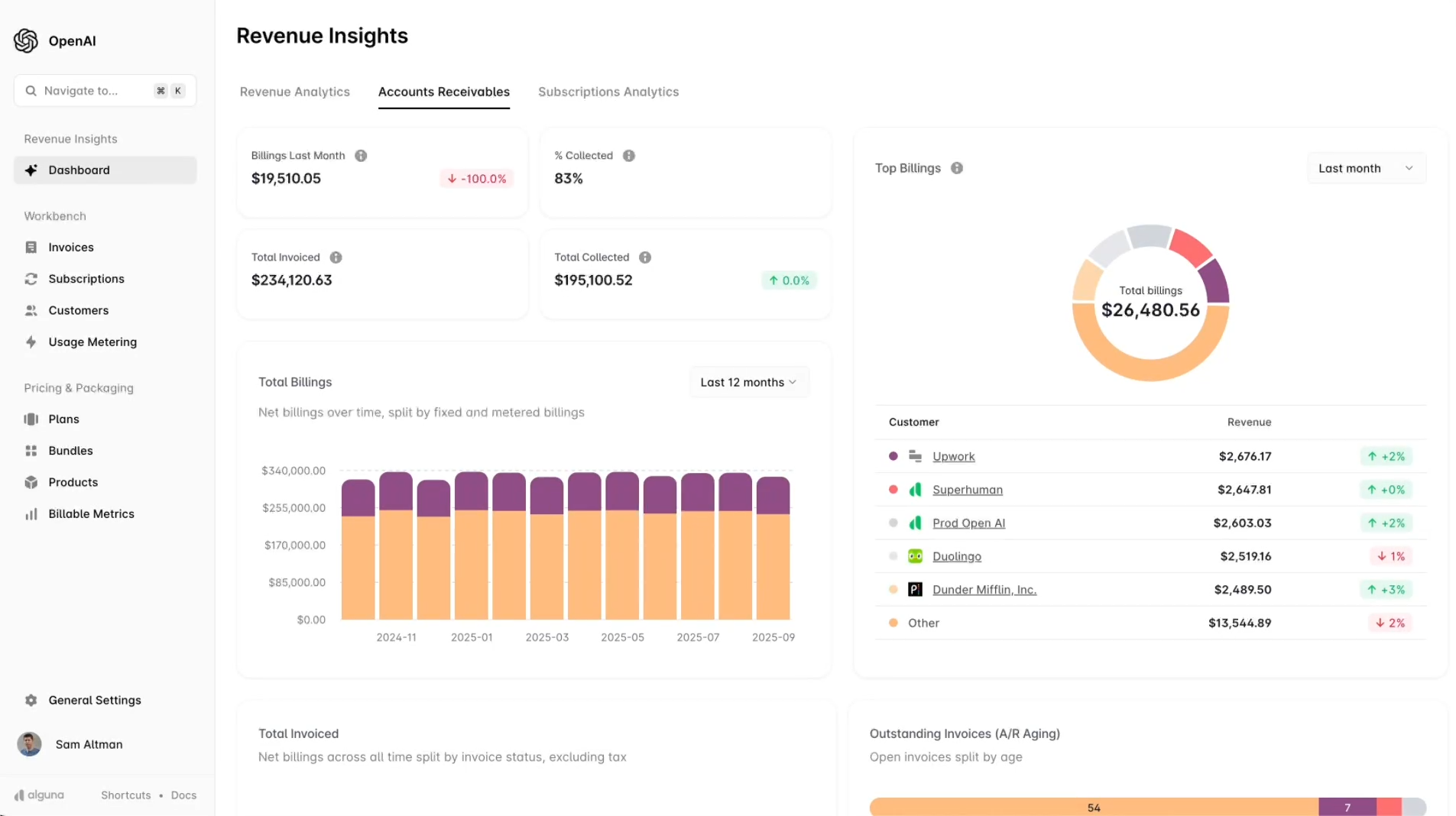
Y Combinator backed Alguna is a revenue automation platform built specifically for B2B SaaS and fast-growing AI companies. It covers the full quote-to-cash workflow in a single, integrated platform: from quoting and contracting through to billing, invoicing, and automated revenue recognition. Unlike tools that specialize in just one part of the revenue lifecycle, Alguna is designed to replace a stack of disconnected tools.
What sets Alguna apart is its ability to handle genuinely complex pricing models, including usage-based billing, seat-based models, tiered pricing, and hybrid arrangements, without requiring you to loop in engineering every time your pricing changes.
It's the platform of choice for fast-growing B2B companies that have outgrown Stripe's manual workflows but don't yet need the implementation overhead of an enterprise ERP.
"Alguna enables complex usage-based billing for us in a way that other products can't."
- Shane Curran, CEO at Evervault
Key features
- End-to-end quote-to-cash: Generate branded and professional quotes, send contracts, automate billing, and track payments, all from one platform. No more copy-pasting between tools.
- Contracts AI: Upload existing contracts in bulk and extract contract data with AI. Turn contracts into live subscriptions instantly and skip hours of manual work.
- Usage-based revenue automation: Native support for metered billing, consumption-based pricing, and hybrid models. Ingest usage data via API (or CSV uploads) and Alguna handles the rating, aggregation, and invoicing automatically.
- Revenue reporting and dashboards: A real-time overview of MRR, ARR, churn, expansion revenue, and cash collections. No spreadsheet required.
- Automated invoicing and collections: Invoices go out automatically on schedule, with smart dunning for failed payments and automated payment retries.
- Contract and plan management: Create and manage subscription plans, mid-cycle changes, upgrades, downgrades, and renewals without engineering support.
- CRM and accounting integrations: Native integrations with Salesforce, HubSpot, Xero, QuickBooks, and more, so your revenue data flows cleanly into the tools your team already uses.
- Self-service account support: Supports self-service account creation, upgrades, and downgrades, making it easy to serve both high-touch enterprise customers and lower-touch product-led growth accounts.
Pros
- Handles genuinely complex usage-based and hybrid pricing without custom engineering work
- Fast to implement, with a white-glove onboarding experience and dedicated migration support, customers report being live in 2-4 weeks
- Gives revenue teams and founders a clear, real-time overview of revenue movements in one place
- The team is highly responsive and willing to go the extra mile on specific customer requirements
- Eliminates the manual overhead of billing so teams can focus on customer growth rather than admin
- Adam Liska, Co-founder and CEO at Glyphic AI
Read the case study
Cons
- As a newer platform, it has less brand recognition than legacy players like Chargebee or Zuora
- The depth of native integrations is still growing, though the core CRM and accounting connections are solid
- Typically not a good fit for very early-stage startups (here, we recommend Stripe instead)
Learn more about when to upgrade from Stripe to Alguna in this guide.
Best for
- B2B SaaS companies with complex usage-based, outcome-based or hybrid pricing models
- Founders and revenue teams who want a single source of truth for revenue data without building a bespoke data stack
- Companies migrating off Stripe and/or spreadsheets who need a smooth, low-risk transition
- Teams that want fast, high-quality support rather than a self-serve ticket queue
- Businesses that need to support both enterprise accounts and self-service product-led growth
Pricing:
- Free tier available.
- Startup plans available.
- Paid plans start from $699/month.
- Custom enterprise pricing based on your specific requirements.
See how Alguna handles your revenue workflows and recover up to 20% ARR
Book a 30-minute demo and bring your real pricing scenarios. We'll show you exactly how Alguna handles them, live, without a scripted deck.
Chargebee
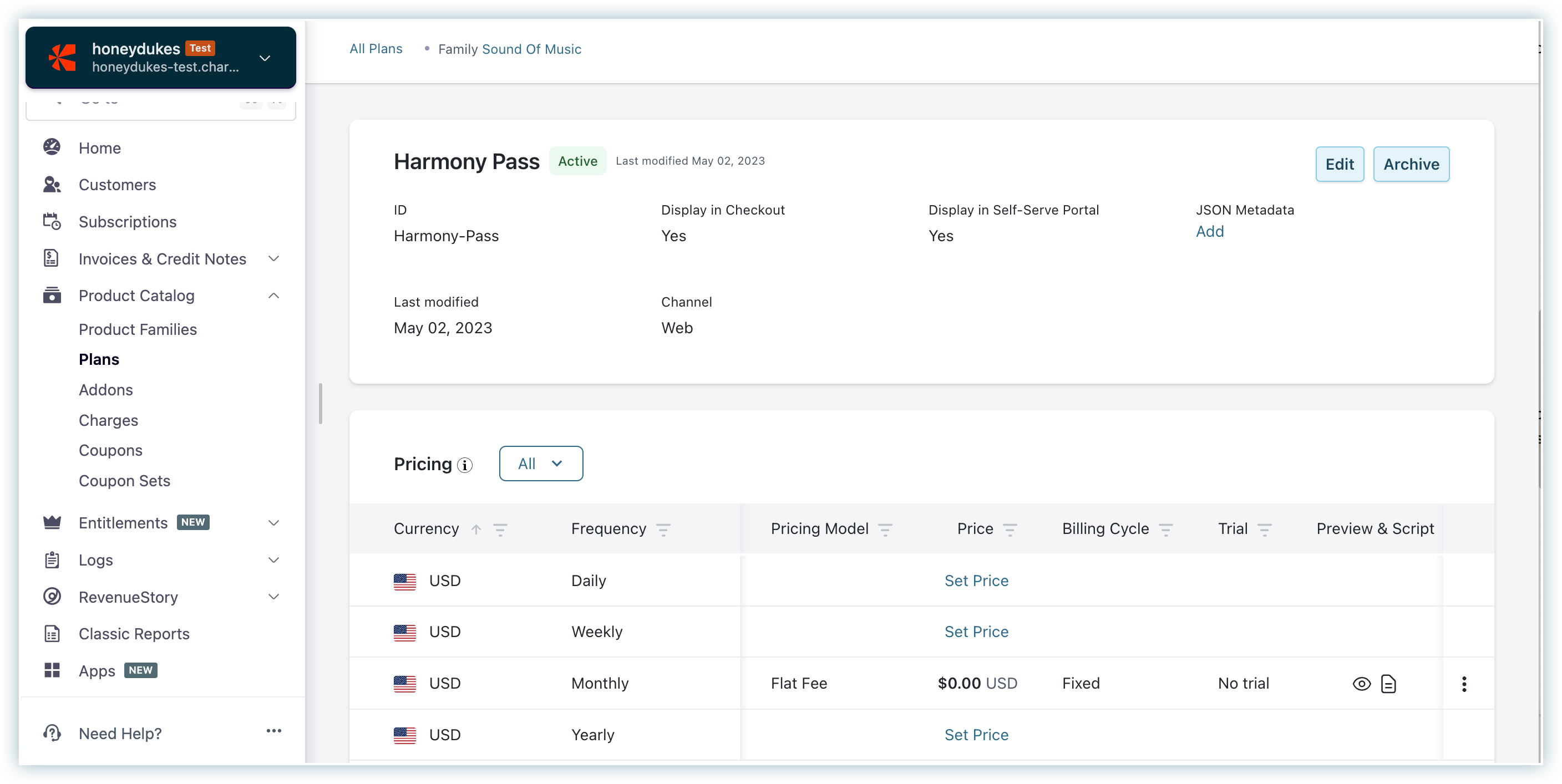
Chargebee is one of the most established names in subscription billing software. Founded in 2011, it has built a large customer base by making it relatively easy for SaaS companies to launch and manage subscription products. It integrates with a wide range of payment gateways and accounting tools, and its UI is generally well-regarded for its accessibility.
Chargebee's strength is in straightforward subscription billing: trial management, plan upgrades, coupon codes, automated renewals, and a solid self-serve checkout experience. For companies with standard subscription pricing, it's a capable platform.
The challenges tend to emerge when pricing models become more complex, particularly with usage-based or consumption billing, which Chargebee has added but which many customers report as less mature than its core subscription features.
Key features
- Subscription lifecycle management: Full support for trials, subscriptions, pauses, downgrades, and cancellations with automated workflows.
- Revenue recognition module: A built-in Chargebee RevRec feature that handles ASC 606 and IFRS 15 compliance for subscription revenue.
- Usage-based billing: Metered billing capabilities, though these work best for simpler usage models and can require workarounds for complex consumption pricing.
- Self-serve portal: Customer-facing portal for plan management, invoice downloads, and payment method updates.
- Integrations ecosystem: Connects with Salesforce, HubSpot, NetSuite, QuickBooks, Xero, Zuora, and many others.
- Dunning management: Automated failed-payment retry sequences with configurable logic.
Pros
- Mature and well-documented platform with a large user community and extensive resources
- Strong for standard SaaS subscription models and self-serve checkout flows
- Wide integration ecosystem covering most major CRMs and accounting tools
- A solid choice for companies that need revenue recognition handled alongside billing
Cons
- Usage-based billing depth is limited compared to platforms purpose-built for consumption pricing
- Pricing scales up quickly as revenue grows, with costs that can become significant at higher MRR
- Some users report that the platform feels complex relative to what it actually enables out of the box
- Customer support quality is frequently cited as inconsistent in G2 and Capterra reviews
Best for
- SaaS companies with predominantly subscription-based pricing and relatively standard plan structures
- Teams that need a self-serve checkout experience with minimal engineering effort
- Companies that need combined billing and revenue recognition in one tool
- Businesses at the Series A to Series C stage with established subscription revenue streams
Pricing: The Starter plan begins at $249/month. Performance and Enterprise tiers are available at higher price points, with fees also scaling based on revenue volume.
⚠️ Note that Chargebee takes a revenue cut based on billing volume.
The good:
- Arliegh B., February 2026
• The Chargebee support team is very responsive and quick to help whenever it’s needed. When we have a business requirement that isn’t yet covered in Chargebee, they treat it as a product improvement request and work to get it added to the software as early as possible.
- Verified user, January, 2026
• I find the bulk import of payments feature very handy, as it allows me to apply payments to invoices easily and flags errors for immediate correction or later adjustments. The home dashboard is also very convenient.
- Ana L., December 2025
The bad:
- Arliegh B., February 2026
• While Chargebee does log events, the tax-specific audit trail (for example, who changed a tax profile, when it was changed, and why) isn’t as detailed as it would be helpful to have.
- Verified user, January, 2026
- I wish we could record a payment and allocate it to several invoices at once, at least the ones concerning the same customer, on the same menu, which currently we can't; we have to record the payment, and it's then recorded as excess payment and we need to open each invoice to apply that excess amount to each individual invoice. Particularly when you're working mostly B2B, this is very annoying.
- Ana L., December 2025
Maxio
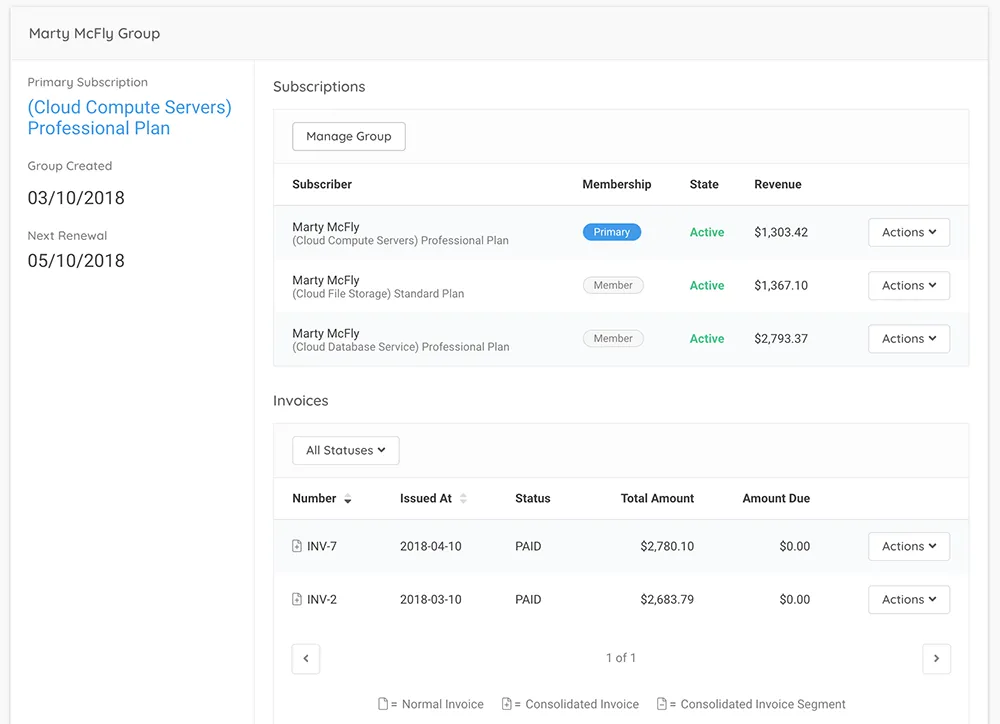
Maxio (formerly SaaSOptics and Chargify) is a B2B billing and financial operations platform that resulted from the merger of two established SaaS finance tools. It's built primarily for B2B software companies that need to connect subscription billing to financial reporting and revenue recognition, making it a strong candidate for finance-led buying teams.
The platform covers subscription billing, usage-based pricing, contract management, and ASC 606-compliant revenue recognition.
Where Maxio tends to be most compelling is for companies where the CFO or VP of Finance is driving the platform selection and where audit-readiness and revenue reporting accuracy are top priorities.
Key features
- Subscription and usage billing: Handles both recurring subscription billing and usage-based consumption models within the same platform.
- Revenue recognition: ASC 606 and IFRS 15 compliant revenue recognition, with automated deferred revenue scheduling.
- Financial reporting: MRR, ARR, churn, cohort analysis, and other SaaS metrics built directly into the platform.
- Contract management: Manages B2B contracts, including amendments, renewals, and multi-year deal structures.
- ERP integrations: Deep integrations with NetSuite, QuickBooks, and Xero for accounting synchronization.
- Analytics dashboards: Real-time SaaS metrics and revenue analytics for finance and executive teams.
Pros
- One of the few platforms that genuinely combines billing and revenue recognition in a single product
- Strong for finance teams that need audit-ready revenue reporting and ASC 606 compliance
- Good B2B contract handling for multi-year and amendment-heavy customer relationships
- Helpful for companies preparing for due diligence or a fundraising process
Cons
- Less flexible than purpose-built usage-based billing platforms for complex consumption pricing
- The onboarding and implementation process is often cited as lengthy and complex
- The UX can feel dated compared to newer entrants in the space
- Pricing is not transparent and can be difficult to estimate without a full sales process
Best for
- B2B SaaS companies where the finance team is the primary owner of the billing platform
- Companies preparing for an audit, IPO process, or investor due diligence
- Organizations that need combined subscription billing and revenue recognition without a separate RevRec tool
- Businesses with multi-year contracts and complex renewal structures
Pricing: Custom pricing based on MRR. Most customers report starting costs in the range of $500 to $1,000+ per month depending on revenue volume and features required.
The good:
- Shane H., March 2026
• I like the flexibility of Maxio. The key is that it can handle pretty much any sort of transaction via API. It was great for cross-platform integration by tying into our existing server backend, allowing multiple payment points for users.
- James M., March 2026
• The platform has solid core capabilities and, on paper, covers many of the requirements you’d expect from a CPQ and billing solution in their respective areas.
- Verified user, January 2026
The bad:
- Shane H., March 2026
• The lack of a quick and easy checkout cart function that didn't require full-time developer implementation was a downside. We needed something preformed and ready to use, but Maxio required an involved and technical setup process.
- Shane H., March 2026
• Our experience with support, accountability, and issue ownership was deeply frustrating. During a prolonged and complex engagement, responsibility was frequently pushed back onto us as the customer, even when we provided documentation and evidence to the contrary.
- Verified user, January 2026
Tabs
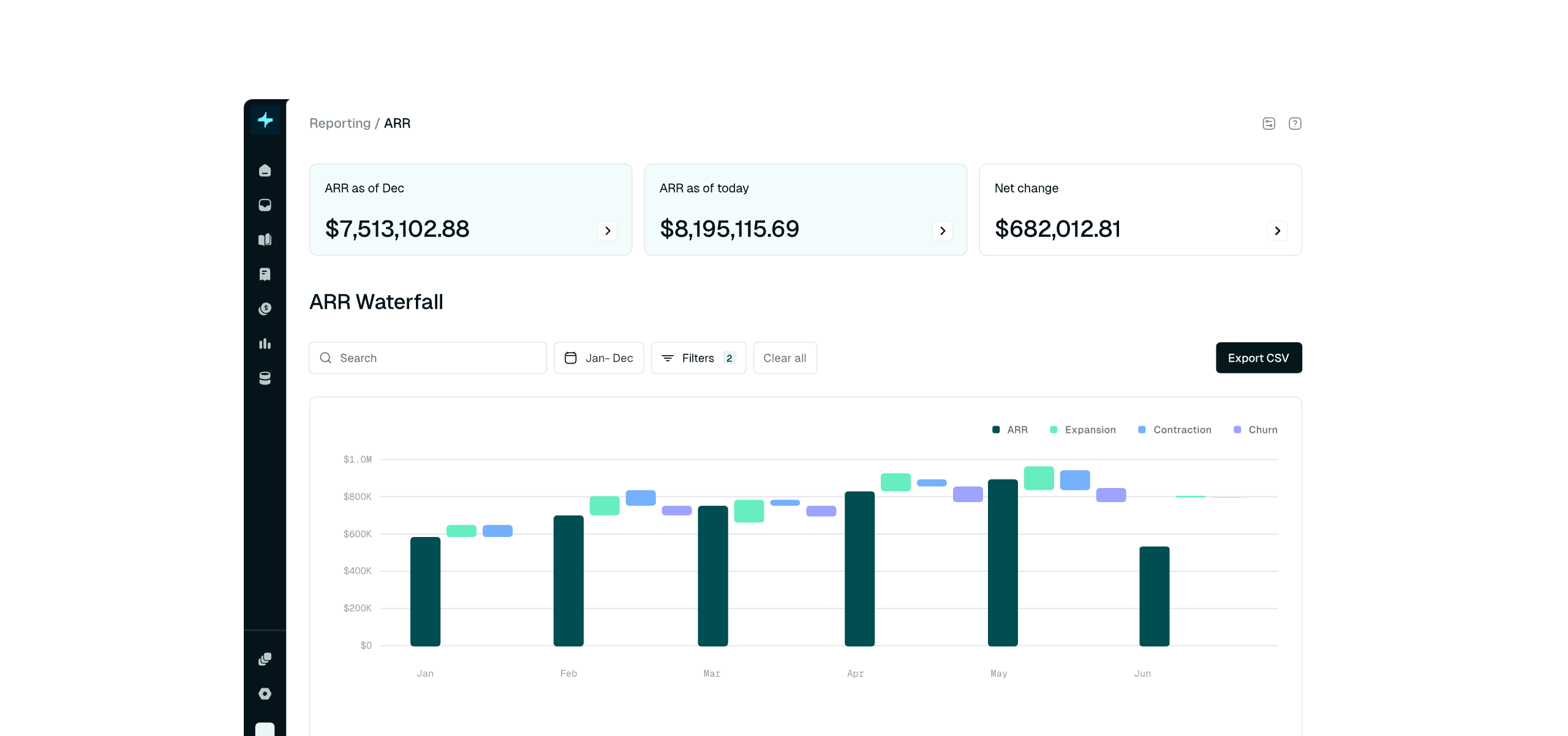
Tabs is a newer entrant in the revenue automation space with a specific focus on contract-native billing for B2B companies. Rather than starting from a pricing configuration and fitting contracts around it, Tabs reads your contracts directly, using AI to extract billing terms and automate invoice generation based on what was actually agreed.
This approach is genuinely differentiated for companies with high contract complexity: custom terms, volume discounts, milestone billing, or frequent amendments. Tabs' AI-powered contract extraction reduces the manual reconciliation work that typically falls on finance teams, and its subscription billing capabilities are designed around the reality of how B2B deals are actually structured. If you want to evaluate the revenue automation software company Tabs on subscription billing, it's worth considering how contract-centric your revenue model actually is.
Key features
- AI contract extraction: Uses AI to read billing terms directly from contracts, automatically generating invoices that match what was agreed, rather than what was configured.
- Contract-native billing: Billing logic lives in the contract, not just in a plan configuration, making it easier to handle one-off terms, custom discounts, and non-standard structures.
- Amendment and renewal management: Handles mid-contract changes, co-termination, and renewal workflows without manual rework.
- Accounts receivable automation: Automates invoice delivery, payment tracking, and collections follow-up.
- Revenue reporting: Tracks billed revenue, recognized revenue, and outstanding AR with real-time dashboards.
Pros
- Genuinely innovative approach to contract-native billing that reduces manual reconciliation
- Strong for companies with high contract variability and complex amendment workflows
- AI-powered contract extraction is a real differentiator for reducing finance team overhead
- Clean, modern UI that's generally well-reviewed by users
Cons
- As a newer and more focused platform, it's not a full revenue cycle automation suite for all use cases
- Less suited for usage-based billing or consumption-driven pricing models
- Smaller integration ecosystem compared to more established players
- Pricing is not publicly available, which makes early-stage evaluation harder
Best for
- B2B companies whose billing is driven primarily by custom contract terms rather than standard plans
- Finance teams spending significant time manually reconciling invoices against contract terms
- Companies with high rates of contract amendments, renewals, and co-termination
- Organizations looking to reduce AR overhead and automate their collections workflow
Pricing: Not publicly listed. Get in touch for a quote.
The good:
- Verified user, January 2026
• I love how Tabs saves our team countless hours by automatically ingesting contracts, pulling out products, and setting up future invoices. This automation allows us to be reviewers instead of preparers, and we no longer need to track future invoices manually.
- Monette Q., January 2026
• I feel that the implementation of Tabs went pretty smoothly, despite a few discrepancies from what was initially promised during the sales cycle.
- Joshua R., January 2026
The bad:
- Verified user, January 2026
• One area we are waiting for Tabs to stand up is consumption and getting that area more automated. This allows us to not have to upload a .csv file and invoices can be generated quicker.
- Monette Q., January 2026
• I find the sales tax process isn't very seamless, especially when selling to customers in multiple locations across different states.
- Joshua R., January 2026
Recurly
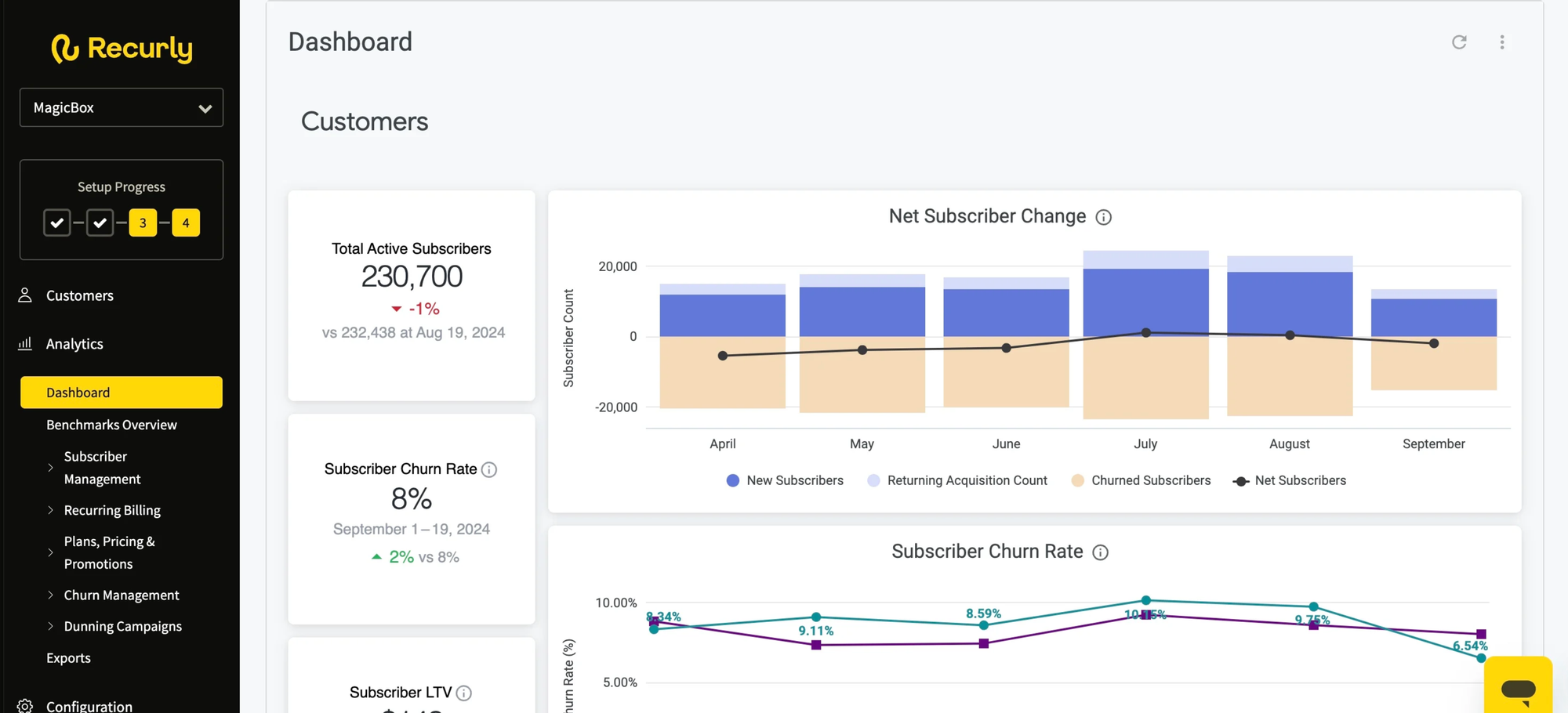
Recurly has been a leading subscription billing platform since 2009 and has built a strong reputation particularly in consumer subscription businesses and mid-market SaaS. It's best known for its robust dunning management and payment recovery capabilities, which have made it a popular choice for businesses where failed payment recovery has a meaningful impact on revenue.
When you evaluate the revenue automation software company Recurly on subscription billing, its strengths are clear: it makes it relatively straightforward to launch, manage, and scale subscription products, with a well-developed self-serve customer portal and a strong set of integrations. The limitations tend to show up in B2B contexts, where contract complexity, usage-based pricing, and enterprise billing requirements push beyond what Recurly was designed to handle.
Key features
- Subscription management: Full lifecycle management for subscriptions including trials, discounts, plan changes, pauses, and cancellations.
- Dunning and revenue recovery: One of the most sophisticated automated revenue collection systems in the market, with intelligent payment retry logic and customizable dunning sequences.
- Self-serve customer portal: Hosted customer portal for plan management, invoice history, and payment method updates.
- Revenue recognition: Basic ASC 606 revenue recognition capabilities for subscription revenue.
- Analytics and reporting: MRR, churn, LTV, and subscriber metrics with good visualization tools.
- Global payments support: Multiple payment gateway integrations and multi-currency support for international businesses.
Pros
- Industry-leading dunning and failed-payment recovery that meaningfully reduces involuntary churn
- Easy to implement for standard subscription products, with good documentation and developer resources
- Strong self-serve checkout and customer portal experience
- Well-established platform with a track record of reliability at scale
Cons
- Not well-suited for complex B2B billing scenarios, custom contract terms, or deep usage-based pricing
- Pricing includes a percentage of revenue, which can become expensive as the business scales
- Less suitable as a full automated revenue management system for B2B SaaS companies
- Revenue recognition is relatively basic compared to platforms like Maxio or Sage Intacct
Best for
- Consumer subscription businesses and B2C SaaS with high subscriber volumes
- Mid-market SaaS companies with standard subscription plans and a self-serve customer base
- Companies where payment recovery and dunning automation are a top priority
- Businesses that need reliable, globally supported subscription billing without heavy customization
Pricing: Starts at $249/month plus a percentage of revenue (typically 0.9%). Enterprise pricing is available.
The good:
- Verified User, January 2026
• I love Recurly for its intuitive and easy-to-navigate user interface, which simplifies accessing all subscription details on a single page without the need to jump between multiple screens.
- Fahad K., December 2025
• I appreciate Recurly for its seamless management of all our customers' billing, which significantly simplifies this aspect of our operations. The automation features stand out as a major benefit, as they ensure our customers are automatically charged on a regular schedule, be it monthly, quarterly, bi-annually, or annually, without any manual involvement after the initial setup.
- Rachel L., November 2025
The bad:
- Verified User, January 2026
• I find the third-party integrations with Recurly to be somewhat problematic. If these integrations are not executed properly, they can become messy, leading to coordination challenges.
- Fahad K., December 2025
• The reporting and analytics features are not as robust and user-friendly as I would like. It involves many steps and feels overly complicated without a clear reason. In addition, some basic reports are missing, making it challenging to access necessary data quickly.
- Rachel L., November 2025
Sage Intacct
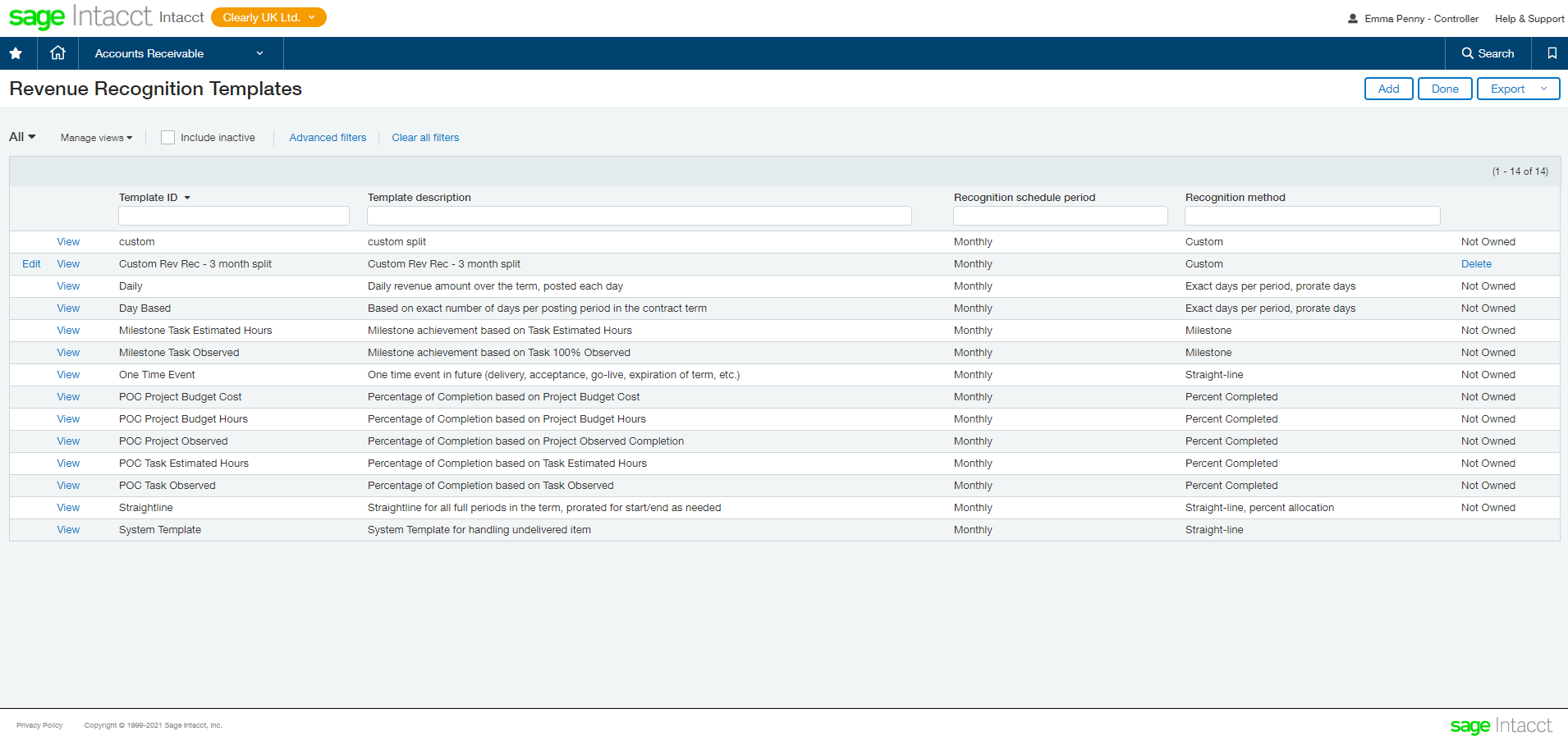
Sage Intacct is a cloud-based financial management and ERP platform that includes revenue automation software features focused primarily on financial reporting and revenue recognition. It's worth being clear about where Sage Intacct sits in the landscape: it is fundamentally an accounting and ERP system, not a billing platform. This distinction matters when evaluating Sage revenue automation software features for your specific needs.
Where Sage Intacct genuinely excels is in providing mid-market and enterprise finance teams with a robust, auditable financial system that handles complex multi-entity accounting, revenue recognition under ASC 606 and IFRS 15, and detailed financial reporting.
Most companies using Sage Intacct for revenue automation pair it with a separate billing platform (such as Chargebee, Recurly, or Alguna) to handle the front-end billing workflow.
Key features
- Revenue recognition: Highly configurable ASC 606 and IFRS 15 revenue recognition with automated deferred revenue scheduling and contract modification handling.
- Multi-entity accounting: Strong support for companies with multiple subsidiaries, currencies, or legal entities that need consolidated financial reporting.
- Financial reporting: Deep, customizable reporting across P&L, balance sheet, cash flow, and SaaS metrics with real-time data.
- Sage revenue automation software features: Automated journal entries, accounts receivable management, and billing schedules integrated with the core GL.
- Audit trail: Comprehensive audit logging and compliance features designed for companies in regulated industries or those preparing for IPO.
- Integrations: Connects with Salesforce, Stripe, and a wide range of billing and CRM platforms via its marketplace.
Pros
- Best-in-class revenue recognition and financial compliance capabilities for mid-market to enterprise companies
- Strong multi-entity and multi-currency support for complex organizational structures
- Highly auditable with comprehensive controls, ideal for companies in regulated industries
- A well-established platform with a large ecosystem of implementation partners
Cons
- Not a front-end billing platform: you'll need a separate tool to actually invoice customers and collect payments
- Implementation is complex and typically requires a specialist partner, adding cost and time
- Annual cost is typically well above $15,000 and scales significantly with user count and modules
- Overkill for early-stage or mid-stage SaaS companies that don't yet need a full ERP
Best for
- Mid-market to enterprise companies that need a robust ERP with strong revenue recognition capabilities
- Finance teams in regulated industries or those preparing for IPO or audit
- Organizations with multi-entity, multi-currency, or multi-subsidiary structures
- Companies that already have a billing platform and need a more powerful financial backend
Pricing: Custom pricing. Typically ranges between $15,000 to $20,000+ per year depending on modules and user count.
The good:
- Levi S., March 2026
• What I like most about Sage Intacct is its flexibility and strong reporting capabilities. The use of dimensions makes it easy to analyze financial data across departments, projects, or locations without creating an overly complex chart of accounts.
- Marcus G., March 2026
• There are many factors that contribute to why I like Sage Intacct, but above all, the biggest benefit has been my company’s increased efficiency thanks to Sage’s automation.
- Haley D., March 2026
The bad:
- Levi S., March 2026
• One thing I dislike about Sage Intacct is that some processes are not as intuitive as they could be, especially for new users. Certain tasks require several steps or navigating through multiple menus, which can take time to learn.
- Marcus G., March 2026
• While Sage Intacct is a powerful tool, the interface can feel somewhat outdated and unintuitive compared with newer cloud platforms. Training the team and learning all the modules we needed also took more time than we expected.
- Haley D., March 2026
How to evaluate revenue automation software
Choosing a revenue automation platform is a decision that typically affects your finance team, your engineering team, your sales operations, and your executive reporting, so it's worth getting structured about how you evaluate your options.
Here are the eight dimensions that matter most.
1. Pricing model fit
Does the platform natively support your pricing model? If you're running usage-based, hybrid, or custom pricing, make sure you test this with real data before committing.
⚠️ Many platforms claim to support usage billing but struggle with real-world complexity.
2. Integration depth
Map out every system the platform needs to connect with: your CRM, ERP, payment gateway, and data warehouse. Check whether the integrations are native or require middleware, and ask how data flows in real time versus batch.
3. Revenue recognition requirements
If ASC 606 or IFRS 15 compliance is a priority, check whether revenue recognition is native to the platform or requires a separate tool. Make sure you understand exactly which revenue scenarios are handled automatically and which require manual intervention.
4. Implementation timeline and support
Ask specifically about the onboarding and migration process. How long does it typically take to go live? Who handles the migration from your existing system? What does ongoing support look like beyond the implementation phase?
5. Scalability
Think two or three years ahead. Does the platform support the pricing models, customer volumes, and geographical markets you expect to be in? The cost of migrating platforms later is almost always higher than it looks today.
6. Total cost of ownership
Look beyond the headline monthly price. Factor in implementation costs, integration development, per-transaction fees, and the internal time your team will spend managing the platform.
For platforms that charge a percentage of revenue, model out what the cost looks like at 2x and 5x your current scale.
7. Security and compliance
Verify SOC 2 Type II compliance, PCI DSS certification (for payment handling), and relevant data residency requirements, especially if you have European customers under GDPR.
Ask to see security documentation, not just marketing claims.
8. AI and automation roadmap
As AI and automation continue to redefine revenue cycle excellence, ask each vendor about their AI capabilities today and their roadmap. Predictive dunning, anomaly detection, and AI-powered contract extraction are increasingly table stakes for modern revenue automation tools.
The scenarios that break most billing platforms are your specific pricing edge cases, your specific contract structures, and your specific customer mix. The only way to know if a platform handles them is to test it.
Frequently asked questions about revenue automation software
What's the difference between subscription billing software and a full revenue automation platform?
Subscription billing software manages recurring charges: creating plans, triggering renewals, handling upgrades and downgrades. A full revenue automation platform covers the broader revenue lifecycle, including quoting, contracting, billing, collections, revenue recognition, and reporting.
Most growing B2B SaaS companies eventually need the latter, even if they start with the former. If you find yourself doing significant manual work to reconcile billing data with financial records, that's usually a signal you've outgrown a point billing tool.
Which revenue automation tools are best for usage-based billing?
For pure usage-based revenue automation, Alguna is purpose-built for this use case and handles complex metered models without requiring custom engineering. Chargebee and Maxio both support usage billing, but their capabilities are better suited to simpler consumption models.
If your pricing is heavily usage-driven with complex rating logic, look for a platform that lets you ingest raw usage events and apply flexible aggregation rules, rather than one where you have to pre-aggregate usage before submitting it.
How do I evaluate the revenue automation software company Recurly on subscription billing for my business?
Recurly is a strong fit if you have a predominantly consumer or B2C subscription business, a high subscriber volume, and standard plan structures. Its dunning and payment recovery capabilities are genuinely best-in-class.
Where it tends to fall short is in complex B2B scenarios: custom contract terms, usage-based pricing, multi-year deals, and the kind of enterprise billing flexibility that B2B SaaS often requires. Test Recurly with your actual pricing model and contract scenarios before committing.
What are the key Sage revenue automation software features I should know about?
Sage Intacct's revenue automation capabilities are primarily financial and accounting-oriented: automated revenue recognition under ASC 606 and IFRS 15, deferred revenue scheduling, multi-entity consolidation, and comprehensive audit trails.
It's not a front-end billing platform, so you'll still need a separate tool to generate invoices and collect payments from customers. Its value is strongest once your organization has grown to the point where a full ERP is justified, typically at the Series C stage or later.
How does Tabs revenue automation software subscription billing work differently from other platforms?
Tabs takes a contract-native approach: rather than configuring billing rules in the platform, Tabs reads the billing terms from your actual contracts using AI and generates invoices accordingly. This is particularly valuable for B2B companies with high contract variability where the billing terms for each customer differ.
It reduces the risk of billing errors from misconfigured plans and significantly cuts the manual reconciliation work that finance teams typically do. It's a different paradigm from platforms like Alguna or Chargebee, which start from plan configuration rather than contract terms.
What does AI revenue automation actually mean in practice?
AI revenue automation refers to the application of machine learning and AI to specific points in the revenue workflow.
In practice, this includes things like AI-powered contract extraction (reading billing terms from contracts automatically), predictive dunning (using ML to optimize payment retry timing based on historical success rates), anomaly detection in billing data (flagging unusual patterns that might indicate errors), and intelligent churn prediction.
The most impactful near-term applications are in contract processing and payment recovery, where AI can meaningfully reduce manual work and improve outcomes.
Is a revenue cycle automation suite worth it for an early-stage startup?
It depends on your pricing model complexity and how much revenue you're processing. Early-stage companies with simple pricing and low volume can often get away with Stripe plus a spreadsheet.
The moment your SaaS pricing model becomes complex, your customer count grows, or your finance team is spending more than a few hours a week on billing reconciliation, the case for a proper revenue cycle automation suite becomes compelling. The switching cost of moving platforms later is usually higher than the monthly cost of starting with the right tool earlier.
Your revenue infrastructure deserves more (than spreadsheets)
The right revenue automation software isn't just a billing tool. It's the system of record for your commercial relationships, the engine that turns contracts into cash, and the source of truth your finance team needs to report with confidence. Getting that right has a compounding effect on every part of your business.
The six platforms we've covered here each serve a different part of the market:
- Alguna is the strongest choice for B2B SaaS and AI companies with complex, usage-based, or hybrid pricing that need a full quote-to-cash solution with excellent support
- Chargebee works well for subscription-first SaaS companies that need a reliable billing platform with good self-serve flows
- Maxio is best for finance-led teams that need combined billing and revenue recognition in one place
- Tabs is differentiated for companies whose billing is driven by complex, custom contract terms
- Recurly excels for consumer subscription businesses that prioritize payment recovery and dunning automation
- Sage Intacct is the right choice for mid-market to enterprise companies that need a full ERP with deep revenue recognition capabilities
Whichever direction you're leaning, the most important thing is to test with your actual data. No demo environment ever broke in the same places your real customer contracts will.
See how Alguna handles your revenue workflows and recover up to 20% ARR
Book a 30-minute demo and bring your real pricing scenarios. We'll show you exactly how Alguna handles them, live, without a scripted deck.