Still manually generating invoices, chasing down failed payments, or reconciling billing data at month-end? That means you're leaving money, time, and growth on the table.
Billing is one of the most operationally intensive functions in any SaaS or subscription business. It touches every customer, every revenue line, and every reporting cycle. And yet, for many companies, it's still largely manual.
Billing automation replaces repetitive, error-prone billing tasks with intelligent, rules-driven workflows that run in the background while your team focuses on higher-value work.
According to McKinsey, finance functions that automate core processes can reduce operational costs by up to 40% and dramatically improve accuracy. For SaaS companies managing complex pricing models and high customer volumes, those gains are significant.
This guide covers everything you need to know about billing automation: what it is, how it works, the best practices for getting it right, and how to actually implement it in your business.
What is billing automation?
Instead of a finance team member building an invoice in a spreadsheet, chasing a customer for payment, or manually reconciling a failed charge, automated billing software do all of that automatically based on rules, triggers, and integrations you define.
In practical terms, billing automation software handles tasks like invoice creation and delivery, recurring payment collection, automted dunning, revenue recognition, and real-time reporting.
It's important to distinguish between "billing automated" as a one-off configuration and true billing automation as a system. A fully automated billing setup runs continuous, scheduled, and event-triggered processes across the full quote-to-cash process, not just a single step.
Manual billing vs. billing automation: What's the difference?
The shift from manual to automated billing isn't "just" about efficiency. It also removes a class of errors that quietly drain revenue: duplicate invoices, missed charges, incorrect tax calculations, and payment failures that go unnoticed for weeks.
| Area | Manual billing | Billing automation |
|---|---|---|
| Invoice generation | Created manually, error-prone | Generated automatically based on rules or usage |
| Payment collection | Relies on reminders and follow-up | Auto-charged on schedule or trigger |
| Failed payments | Requires manual outreach | Smart retries and automated billing recovery |
| Revenue recognition | Spreadsheet-based, slow | Real-time billing automation with instant reporting |
| Scalability | Limited by headcount | Scales with customer volume |
| Compliance | Ad hoc and inconsistent | Built-in audit trails and tax handling |
Key terms to know
- Automated billing: A system that generates, delivers, and processes invoices without manual steps.
- Subscription billing automation: Recurring billing logic that manages the full subscription lifecycle, including upgrades, downgrades, renewals billing automation, and cancellations.
- SaaS billing automation: Billing automation built for the specific complexities of SaaS: usage-based pricing, seat-based models, freemium conversion, and MRR/ARR tracking
- Automated dunning management: Automated workflows that retry failed payments, update expired cards, and communicate with customers to recover revenue.
- Real-time billing automation: Systems that trigger billing events instantly based on usage or actions, rather than on a fixed schedule.
- AI billing automation: The use of machine learning and AI to optimize billing decisions, predict churn, flag anomalies, and personalize payment recovery.
6 best practices for billing automation
Getting billing automation right isn't just about picking the right tool. How you configure, integrate, and manage your billing system matters just as much. Here are the practices that separate high-performing billing setups from frustrating ones.
1. Map your billing logic before you automate anything
The most common mistake teams make when automating billing processes is automating a broken process.
Before you touch any software, document your current billing rules, pricing models, edge cases, and exceptions. If you have tiered pricing, usage overages, or multi-year contracts, map how each of these should behave in your system.
This is especially important if you're planning to automate custom billing rules, where small misconfigurations can produce billing errors at scale.
2. Integrate billing with your CRM and ERP from day one
SaaS billing automation services with CRM integration are significantly more powerful than standalone billing tools. When your billing system knows what your CRM knows about a customer's contract terms, product tier, and account status, it can generate accurate invoices without manual data entry.
According to Salesforce, companies with integrated CRM and billing systems see up to 29% improvement in revenue cycle efficiency. That's the difference between your finance team reconciling data manually and your system doing it automatically.
3. Build a strong dunning and automated billing recovery workflow
Failed payments are one of the leading causes of involuntary churn in subscription businesses. Profitwell research estimates that involuntary churn accounts for between 20% and 40% of total churn for most SaaS companies.
An effective automated billing recovery setup includes smart retry logic (retrying at optimal intervals), automatic card updater integration, email and in-app dunning sequences, and escalation workflows for long-overdue accounts.
When you learn how to manage failed payments in automated billing systems effectively, you can recover a meaningful share of revenue that would otherwise be written off.
4. Automate recurring billing, but build in manual override capability
Fully automated billing is the goal, but your system needs to support exceptions. Some customers will have negotiated custom terms. Some invoices will need manual adjustment before they go out.
Build your billing automation so that your team can intervene when needed, without breaking the automated flow for everyone else.
5. Use real-time data to close the financial reporting gap
One of the underappreciated benefits of real-time billing automation is what it does for your month-end close. When billing events trigger immediate entries in your revenue recognition system, your finance team isn't spending the last week of every month reconciling data.
This is particularly valuable when you're looking at SaaS billing automation solutions for month-end financial close.
6. Don't set and forget your billing automation
Billing automation isn't a one-time implementation. Your pricing models will change. You'll launch new products. Regulations will evolve. Build a review cadence into your billing operations to audit your rules, check for edge-case failures, and update your automation as your business grows.
How to automate billing processes: A step-by-step guide
Whether you're starting from scratch or replacing a patchwork of manual processes, here's how to approach automating billing processes in a structured way.
Step 1: Audit your current billing process
Before you can automate, you need to understand what you're automating. Map out every step in your current billing workflow, from quote to invoice to payment collection. Identify where manual work is happening, where errors tend to creep in, and where the biggest delays occur.
Key questions to answer:
- How are invoices currently generated and sent?
- What happens when a payment fails?
- How do pricing changes flow through to billing?
- How long does your month-end close typically take?
- Where do billing disputes most commonly originate?
Step 2: Define your billing rules and pricing models
Document every pricing model you operate: flat-rate subscriptions, usage-based tiers, per-seat licensing, one-time charges, or hybrid combinations. Define the rules that govern how each should be billed: billing frequency, proration logic, discount handling, and tax treatment.
This is where you also identify your need to automate custom billing rules, for examplfe, a customer on a legacy pricing plan, a volume discount that applies above a certain threshold, or a contract with a built-in annual price escalator.
Step 3: Choose the right billing automation software
The best billing automation for SaaS will depend on your pricing complexity, customer volume, and existing tech stack. Use this evaluation framework when assessing tools:
| Criteria | What to look for | Questions to ask | Red flags |
|---|---|---|---|
| Integration depth | Native CRM, ERP, and payment gateway connections | Does it sync bidirectionally? | CSV-only imports |
| Pricing flexibility | Supports usage, flat-rate, tiered, and hybrid models | Can we automate custom billing rules? | Rigid pricing tiers only |
| Recovery tools | Smart retry logic and dunning workflows | How does it handle failed payments? | Manual-only follow-up |
| Reporting | Real-time billing automation dashboards | Can finance run their own reports? | Static exports only |
| Compliance | Tax handling, audit logs, and revenue recognition | Does it support ASC 606? | No audit trail |
For enterprise use cases, look specifically at platforms built for top SaaS billing platforms for order-to-cash automation, where billing connects seamlessly to CPQ, CRM, and revenue reporting.
Alguna is built specifically for this. It handles the full order-to-cash cycle for SaaS and subscription companies, including automated invoicing, renewals billing automation, usage-based billing, and real-time revenue reporting, all in one platform. See how it works.
Step 4: Integrate with your existing systems
Your billing automation system needs to talk to your CRM, ERP, payment gateways, and accounting software. Native integrations are always preferable to custom-built connections, as they're more reliable and easier to maintain.
Key integrations to prioritize:
- CRM (Salesforce, HubSpot): For contract terms, customer status, and deal data
- Payment gateways (Stripe, Adyen, Braintree): For payment processing and card management
- Accounting software (QuickBooks, Netsuite, Xero): For GL entries and revenue recognition
- CPQ software: For automating billing process from quote through to invoice
Step 5: Configure and test before going live
Run your billing automation in a sandbox environment with real-world test cases before you flip the switch. Test every billing scenario your business runs: standard renewals, upgrades mid-cycle, failed payment recovery, contract end dates, and tax edge cases.
This is the step most teams rush, and it's where most post-launch billing errors originate. Build a test library that covers at least 80% of your real billing scenarios.
Step 6: Go live, then optimize
Once you're live, monitor your automated billing system closely for the first 60 to 90 days. Track your failed payment recovery rate, invoice error rate, and time to close. Use those metrics to refine your dunning sequences, adjust retry logic, and clean up any edge-case handling.
The best billing automation setups improve over time. Review your configuration quarterly, and revisit your AI billing automation capabilities as your platform evolves.
The role of AI company billing automation and what it means for you
AI is changing what's possible in billing. AI for subscription billing automation is no longer a future concept; it's available today in leading platforms and it delivers measurable results.
Here's where AI adds the most value in billing:
- Predictive dunning: AI analyzes payment behavior to determine the optimal timing, channel, and message for each customer, improving recovery rates
- Anomaly detection: Flags unusual billing patterns (duplicate charges, unexpected usage spikes) before they become customer issues
- Churn prediction: Identifies at-risk accounts based on billing signals, allowing your team to intervene proactively
- Smart pricing recommendations: AI-driven analysis of usage data to suggest pricing adjustments or upsell opportunities
For companies evaluating AI company billing automation, it's worth noting that the value of AI is almost entirely dependent on the quality of the underlying billing data. Getting your core automated billing system right first creates the foundation for AI to do its best work.
How to automate enterprise billing processes
Enterprise billing has a different set of challenges compared to SMB: more complex contracts, custom pricing arrangements, multi-entity billing, longer sales cycles, and stricter compliance requirements.
Key considerations for enterprise billing automation:
- Contract-based billing: Enterprise customers often have negotiated terms that differ from your standard pricing. Your billing automation needs to honor these at the account level
- Multi-currency and multi-entity: Global enterprise accounts may need invoices in multiple currencies and from multiple legal entities
- Revenue recognition: Enterprise SaaS companies are often subject to ASC 606 and IFRS 15 requirements. Fully automated billing systems with built-in revenue recognition save significant audit prep time
- Approval workflows: Large invoices or non-standard terms may require internal approval before billing. Your system should support these without breaking your automated billing process
Alguna is designed with enterprise billing in mind. You can read more about how we handle enterprise quote-to-revenue workflows, including complex contract structures, multi-entity billing, and automated revenue recognition.
Automated billing software: What to look for
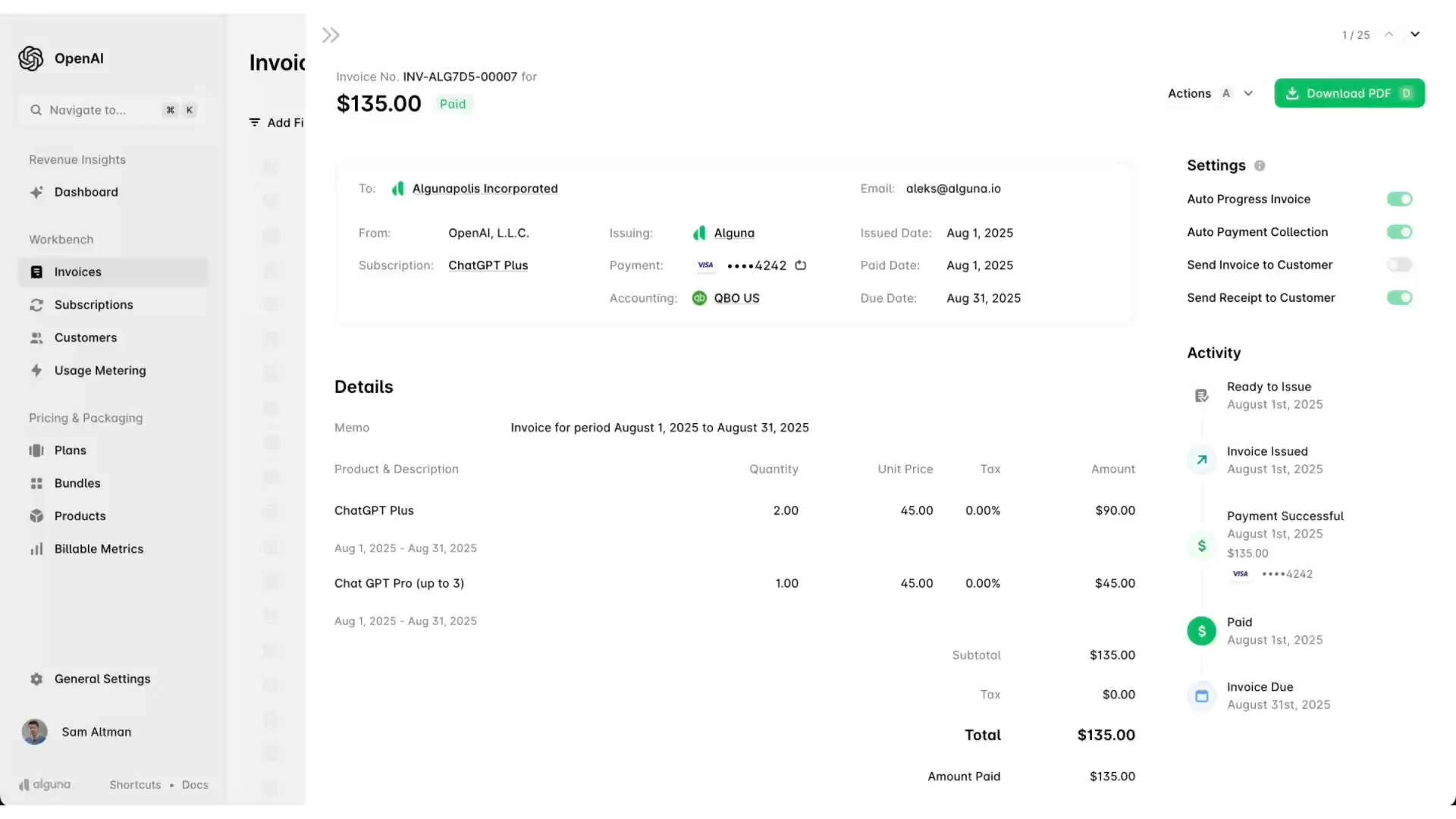
There's a strak contrast between tools with basic recurring billing functionality and a purpose-built quote-to-cash software that automates your billing cycles end-to-end. Understanding that distinction will save you from migrating twice.
The core function of billing automation software is to remove human intervention from repetitive billing tasks. But the best platforms go beyond invoice generation to cover the entire revenue workflow: CPQ, subscription billing, usage metering, automated billing recovery, revenue recognition, and reporting.
What does billing automation software actually do?
Here's what a modern billing automation platform handles:
| Feature | What it does |
|---|---|
| Automated invoice generation | Creates and sends invoices based on pricing rules, usage data, or contract terms |
| Subscription billing automation | Handles recurring charges, upgrades, downgrades, and cancellations automatically |
| Automated billing recovery | Retries failed payments and notifies customers through dunning sequences |
| Custom billing rules | Lets you automate custom billing rules for discounts, tiered pricing, or usage thresholds |
| SaaS billing automation + CRM integration | Connects billing to CRM and ERP systems to sync customer data in real time |
| Real-time reporting | Gives finance and revenue teams instant visibility into MRR, ARR, churn, and payment status |
What separates purpose-built billing automation software from workarounds
When evaluating your options, look for these differentiators:
- End-to-end coverage: The best billing automation software handles everything from quoting through to payment collection and revenue reporting, without requiring you to stitch together multiple tools.
- Pricing model flexibility: Look for platforms that support flat-rate, usage-based, tiered, seat-based, and hybrid pricing out of the box. If you need to automate custom billing rules today, you'll almost certainly need more flexibility tomorrow.
- No-code configuration: Finance and revenue operations teams should be able to manage billing rules without engineering support. Developer-heavy platforms create bottlenecks that slow down pricing changes and new product launches.
- Native integrations: Purpose-built platforms connect natively to your CRM, accounting software, and payment gateways. This is what makes SaaS billing automation services with CRM integration genuinely powerful rather than just theoretically useful.
- Migration support: Switching billing platforms is high-stakes. Look for vendors that offer white-glove migration, not just documentation.
For a deeper comparison of billing automation platforms, including how to evaluate the best AR automation tool for SaaS billing, read our dedicated guide to automated billing software.
The impact of billing automation: Real examples
The benefits of billing automation aren't abstract. Here's how two companies used Alguna to move from manual, fragmented billing to fully automated revenue operations.
Glyphic: From billing chaos to a single source of truth in 3 weeks

Glyphic is an AI copilot for sales teams that gives each seller back at least 34% of their day. With $5.5M in funding and a rapidly growing customer base, their billing complexity was scaling faster than their processes could keep up.
Before Alguna, Glyphic was operating a patchwork billing stack: Stripe for card payments, spreadsheets for tracking seat counts, and ad-hoc invoices created across multiple tools. Billing seat expansions were irregular, proration was so time-consuming it often went undone, and revenue data was scattered across a fragmented tool stack with no single source of truth.
“In the early days when we had maybe 20 customers, everything was very manageable. But when we got to scale, things quickly changed. I wanted a single place where I could understand our revenue and make sure that we actually invoiced our customers correctly.”
Adam Liska, CEO, Glyphic
With Alguna, Glyphic completed the full migration in three weeks. Billing rules were configured to handle their nuanced pricing, including customers with varying seat counts and different payment methods. Seat changes were prorated automatically. The entire migration was handled by Alguna's team, with zero disruption to Glyphic's customers.
The results were immediate. After implementing Alguna, Glyphic had its second best month ever in terms of added revenue. 75% of that revenue came from upsells that had never been billed before because the manual process made it too difficult to track.
Haven AI: Eliminating "Dark Fridays" and reducing billing time by 80%
Haven AI builds AI agents for property management teams. As they scaled to around 20 customers and introduced multiple product bundles, their billing setup, which relied on PandaDoc, Stripe, and spreadsheets, began to break down.
Haven's co-founder and CEO Juan Burgos would spend what he called 'Dark Fridays' manually verifying who had paid, reconciling data across tools, and tracking down customers for billing details. Creating a single contract took 30 to 40 minutes. And because PandaDoc couldn't automatically create subscriptions in Stripe after a contract was signed, the handoff between signing and billing was entirely manual.
“No one wants to have the billing conversation. It's something that you wish would just happen in the background. If I have to follow up and hound customers to enter their billing details, that's just a new task that's on my to-do list that I now have to deal with.”
- Juan Burgos, Co-founder and CEO, Haven AI
After migrating to Alguna, contract creation went from 30 to 40 minutes down to under 5 minutes. Billing time overall dropped by 80%. Customers could now see a clear breakdown of exactly what they were paying for, which eliminated the follow-up questions Haven previously got on every invoice.
Dark Fridays are gone. Burgos no longer spends hours reconciling data. Today, once a customer is signed up, everything runs on autopilot.
Frequently asked questions about billing automation
What is automated billing?
Automated billing is the use of software to handle the creation, delivery, and collection of invoices and payments without manual effort. Instead of a team member building an invoice in a spreadsheet or chasing a customer for payment, an automated billing system does all of this based on predefined rules and triggers.
This includes generating invoices on schedule, charging saved payment methods, handling subscription renewals, and following up on failed payments.
How does an automated billing system work?
An automated billing system works by connecting your pricing rules, customer data, and payment methods into a single workflow. When a billing event occurs, such as a subscription renewing, a usage threshold being crossed, or a contract milestone being reached, the system generates the appropriate invoice, charges the customer, and records the transaction.
If a payment fails, it initiates automated billing recovery sequences to retry the charge and notify the customer. All of this happens in the background without anyone on your team having to intervene.
What is the difference between automated billing and subscription billing automation?
Automated billing is the broader category. It refers to any billing process that runs without manual input, including one-time invoices, usage-based charges, and recurring payments.
Subscription billing automation is a specific type that focuses on managing the full subscription lifecycle: recurring charges, upgrades, downgrades, renewals billing automation, proration, and cancellations. All subscription billing automation is automated billing, but not all automated billing involves subscriptions.
How do I manage failed payments in automated billing systems?
Managing failed payments in automated billing systems typically involves a combination of smart retry logic, card updater integrations, and dunning sequences. Smart retry logic retries the charge at optimized intervals based on the type of failure. Card updater tools automatically refresh expired card details when your payment gateway issues updates. Dunning sequences send customers automated notifications, either by email or in-app, asking them to update their payment information.
The most effective automated billing recovery setups combine all three, reducing involuntary churn without requiring manual outreach for every failed payment.
What's the best billing automation for SaaS?
The best billing automation for SaaS depends on your pricing complexity, customer volume, and existing tech stack. Look for platforms that support the pricing models you use today and the ones you're likely to adopt as you grow, including usage-based billing, seat-based pricing, and hybrid models. Native integrations with your CRM and accounting software matter as much as the billing features themselves.
And because SaaS billing automation solutions for month-end financial close are increasingly important to finance teams, prioritize platforms with real-time reporting and built-in revenue recognition.
Can I automate custom billing rules?
Yes. Most purpose-built billing automation platforms let you define custom billing rules to handle non-standard pricing arrangements. This includes things like volume discounts that kick in above a certain threshold, legacy pricing plans for early customers, annual price escalators built into multi-year contracts, or complex proration logic for mid-cycle changes.
The key is choosing a platform with flexible rule configuration that your finance or revenue operations team can manage without engineering support.
How long does it take to implement billing automation?
Implementation timelines vary depending on the complexity of your billing model and your existing tech stack. For SaaS companies with relatively standard subscription models, it's possible to go from kick-off to fully automated billing in two to four weeks, as Glyphic did with Alguna.
More complex setups, such as enterprise billing with custom contract terms, multi-entity structures, or usage-based pricing, typically take longer to configure and test. Look for vendors that offer hands-on migration support to reduce risk and compress timelines.
Wrapping up
For any SaaS or subscription business that wants to scale, billing automation is the foundation of a reliable revenue operation.
The companies that get it right automate more than just invoice generation. They automate recurring billing, recovery, renewals, recognition, and reporting, creating a system that keeps pace with their growth without adding operational headcount.
Whether you're just starting to automate billing processes or looking to replace a legacy system with something built for modern SaaS, the steps are the same: audit what you have, define your rules, choose the right platform, integrate deeply, and optimize continuously.