Want to cut time spent on billing by 80?
If you're still managing invoices in spreadsheets, chasing payments over email, or piecing together reports from multiple tools, you're not alone. But the cost of staying manual is adding up faster than most finance leaders realize.
82% of companies report moderate to critical cash flow disruption due to late payments, and technology/SaaS companies are among the hardest hit: 44% report severe disruption, and 22% lose over 10% of their annual revenue.
The good news? The right accounts receivable software can change all of that.
The AR automation market is projected to grow from $3.40 billion in 2025 to $6.57 billion by 2031, and the companies driving that growth aren't just large enterprises.
Startups, scale-ups, and mid-market businesses are increasingly turning to dedicated AR platforms to reduce days sales outstanding (DSO), automate collections, and get a clear view of their revenue.
In this guide, we break down what accounts receivable software actually does, what features matter most, how the top platforms compare, and how to evaluate your options.
What is accounts receivable software?
It replaces manual tasks like drafting invoice emails, chasing overdue payments with dunning management , and reconciling transactions with automated workflows that run in the background while your team focuses on higher-value, strategic work.
At its core, accounts receivables software manages the journey from invoice creation to cash in the bank.
Depending on the platform, that can include:
- Generating and sending invoices automatically
- Tracking invoice status in real time
- Automating payment reminders and dunning sequences
- Accepting multiple payment methods (ACH, SEPA, cards, wire)
- Applying cash to open invoices and reconciling payments
- Reporting on AR aging, DSO, and collections performance
- Forecasting cash flow based on payment history
What is accounts receivable collections software?
While general AR software covers the full invoice-to-cash lifecycle, accounts receivable collections software focuses specifically on the collections side: automating payment reminders, escalating overdue accounts, managing dunning workflows, and helping teams prioritize their outreach.
Some platforms are purpose-built for collections (e.g., Quadient AR), while others include collections as part of a broader quote-to-cash solution.
Accounts receivable software vs. accounts payable software
It's worth clarifying the distinction. Accounts receivable (AR) refers to money that's owed to you, invoices you've issued to customers. Accounts payable (AP) refers to money you owe to vendors and suppliers.
Some platforms, like Sage Intacct, handle both AP and AR in a unified accounts payable and receivable software solution. Others specialize in AR only.
If you need both, it's worth evaluating whether a single integrated platform makes more sense than two point solutions.
Standalone vs. ERP-embedded AR software
Some AR tools are standalone accounts receivable software, they specialize purely in the invoicing and collections workflow and integrate with your existing ERP or accounting system. Others are built into a broader ERP platform (like SAP or NetSuite), meaning AR is one module of many.
Standalone tools tend to be easier to implement and more flexible, while ERP-embedded options offer tighter data consistency if you're already on that platform.
8 accounts receivable software features to look for
Whether you're looking for leading accounts receivable software for financial services or accounts receivable AI software specifically, today's AR market sure has something for every need.
Here's what to evaluate when comparing accounts receivable software features across platforms:
1. Automated invoicing and delivery
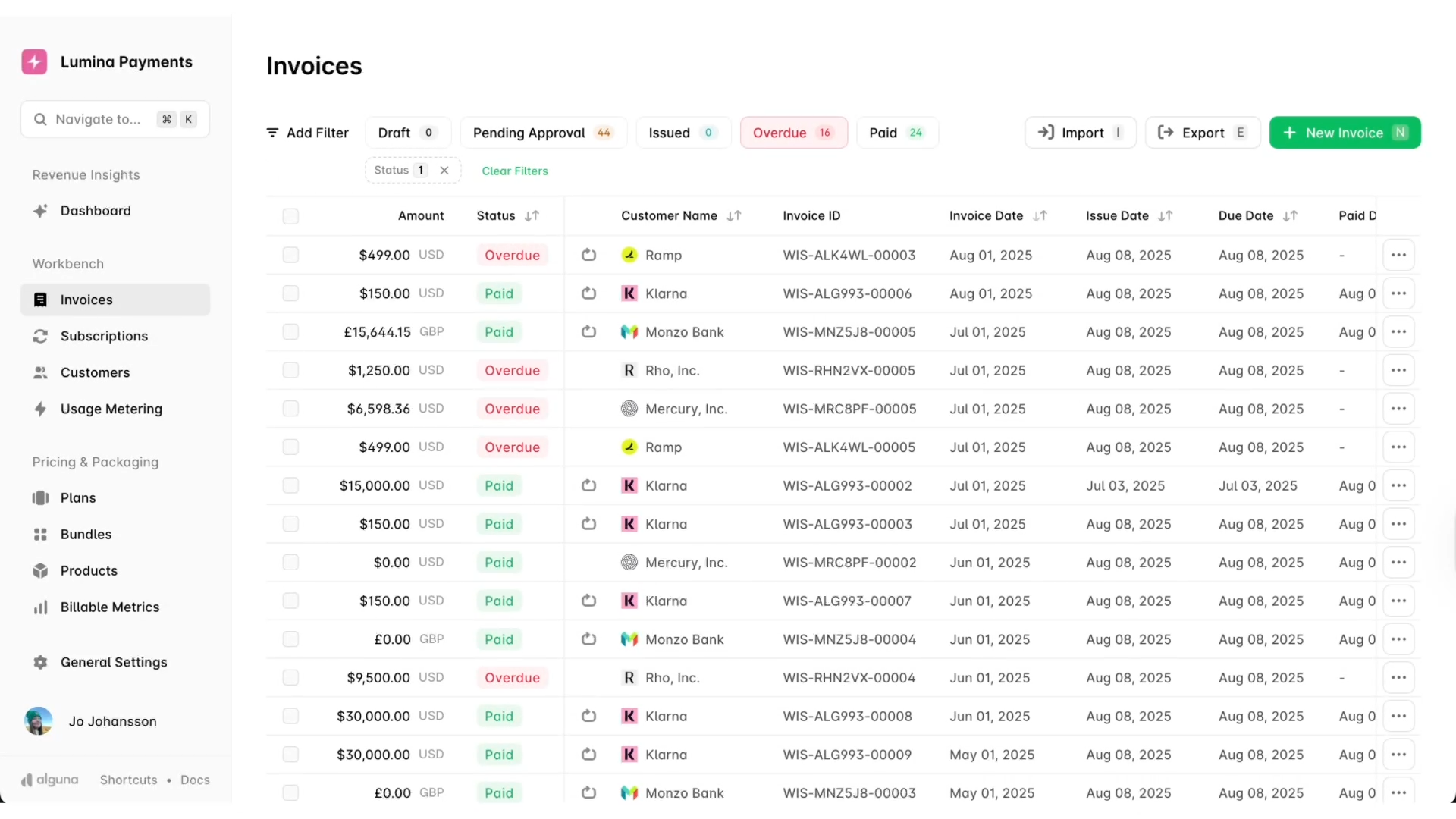
Automatically generate, brand, and send invoices based on billing schedules, contract terms, or usage data. Look for platforms that support one-off invoices, recurring invoices, and usage-based billing, especially if your pricing model is anything other than flat-rate.
2. Collections workflows and dunning
Automated accounts receivable collections software should let you configure multi-step dunning sequences: reminders before the due date, follow-ups after, and escalation paths for severely overdue accounts.
The best platforms personalize these sequences by customer segment, payment history, or account value.
3. Real-time AR dashboard and aging reports
An accounts receivable invoice tracking dashboard gives you a live view of what's current, overdue, and at risk, filtered by customer, aging bucket, or sales rep.
This is critical for prioritizing collections efforts and understanding your cash position without pulling a manual report.
4. Cash application and auto-reconciliation
Automatically match incoming payments to open invoices and sync results to your accounting system. This eliminates hours of manual reconciliation at month-end close and reduces errors that create downstream reporting problems.
5. DSO management and AR metrics reporting
Look for platforms with built-in accounts receivable automation software features for DSO management: days sales outstanding tracking, payment trend analysis, aging summaries, and collections performance metrics.
These insights let you spot problems early and benchmark your AR health over time.
6. Payment method flexibility
Customers pay via different methods, CH, SEPA, wire, cards, and increasingly digital wallets. The more payment options you offer, the faster you'll get paid. Look for platforms that support smart routing rules that optimize payment method based on amount, region, and customer preference.
7. ERP and accounting software integration
Your AR platform needs to sync cleanly with your existing stack. Whether you're on QuickBooks, Xero, Stripe, NetSuite, or Salesforce, look for accounts receivable software integration that goes beyond basic export and offers real-time, bi-directional data sync.
8. Complex customer hierarchy support
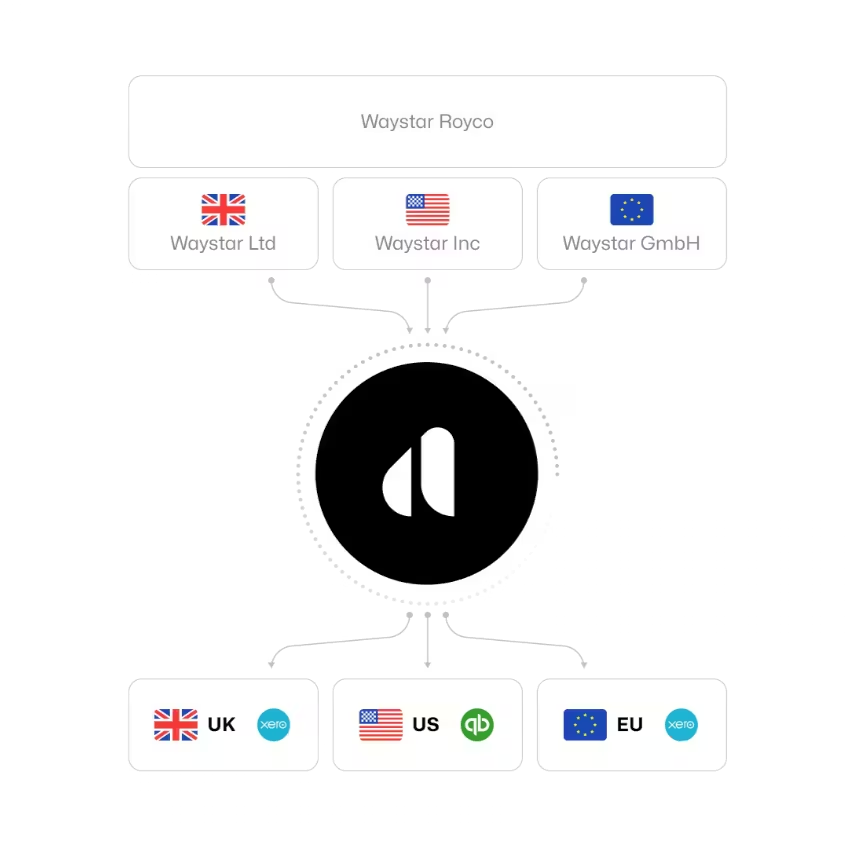
For B2B companies with enterprise clients, accounts receivable management software features for complex customer hierarchies matter. This includes parent-child account structures, where payments from a subsidiary need to be correctly allocated across multiple entities or invoice, what some platforms call parent-child customer hierarchy payment allocation.
9 top accounts receivable software: Comparison overview
Use the table below to compare the leading platforms across the dimensions that matter most for your evaluation.
| PLATFORM | BEST FOR | STRENGTHS | LIMITATIONS | PRICING |
|---|---|---|---|---|
| Alguna | B2B SaaS, AI, and fintech companies with usage-based or hybrid pricing | End-to-end quote-to-cash; real-time AR dashboard; multi-method payments; automated dunning; auto-reconciliation | Newer to market; primarily focused on B2B SaaS/tech verticals | Free (Starter); $699/month (Growth); Enterprise custom |
| HighRadius | Large enterprises with complex cash application and multi-ERP environments | AI-powered cash application; 35+ credit agency integrations; 90%+ automation rate; supports 135+ currencies | Complex implementation (3–6 months); enterprise-level pricing; steep learning curve for smaller teams | Custom (contact for quote) |
| Quadient AR | Mid-market B2B companies processing 500+ invoices/month | 34% DSO reduction; 94% cash flow forecasting accuracy; 50% reduction in manual tasks; 403% ROI over 4 years | No universal search across billing subsidiaries; communications are account-level, not invoice-level by default | Custom (approx. $500+/month) |
| Sage Intacct | Mid-market companies needing a full ERP with native AR | Strong Salesforce integration; multidimensional reporting; saves 36 hours/month; configurable workflows | AR is part of a larger ERP; can be overkill for companies only needing standalone AR | Custom (contact for quote) |
| Invoiced | B2B companies with complex invoicing needs and global payment requirements | 1,200+ payment options; G2 category leader; auto-reconciliation; multi-entity support; open API | Higher cost for full feature set; may be more than needed for simple invoicing workflows | Custom (contact for quote) |
| Maxio | B2B SaaS companies needing subscription billing with revenue recognition | Strong ASC 606/IFRS 15 revenue recognition; SaaS metrics (MRR, ARR, churn); flexible billing models; unlimited users on all paid plans | 200k daily event cap can restrict high-volume metering; costs escalate with add-ons; 8% annual price uplift at renewal | Free sandbox; $599/month (Grow, up to $100k/month); Scale: custom |
| Chargebee | Subscription businesses wanting flexible billing with built-in retention tools | Gartner 2025 Magic Quadrant Leader; 23+ payment recovery tactics; ASC 606/IFRS 15 compliance; 80% reduction in unpaid invoices | Performance plan capped at $100k MRR (0.75% overage above); advanced features gated behind Enterprise tier | Starter: free up to $250k lifetime; Performance: $599/month; Enterprise: custom |
| Zuora | Mid-market to enterprise subscription businesses with complex multi-entity billing | Comprehensive order-to-cash; parent-child account hierarchies; multi-currency; strong CPQ and revenue recognition | Starts at ~$75,000/year; steep implementation curve; 7% annual price uplift; not suited to simple AR needs | Custom (approx. $75k+/year) |
| Stripe Billing | Developer-led teams needing fast, API-first billing setup with global payments | 0.7% of billing volume (pay-as-you-go); 135+ currencies; smart dunning recovers 41% of failed invoices; revenue recognition included | Limited native AR collections management; complex billing logic requires significant dev effort; total cost adds up at scale | 0.7% of billing volume; subscription tiers available; custom for high volume |
The 9 best accounts receivable software in 2026: In depth comparison (with customer reviews)
1. Alguna: Best overall B2B accounts receivable software
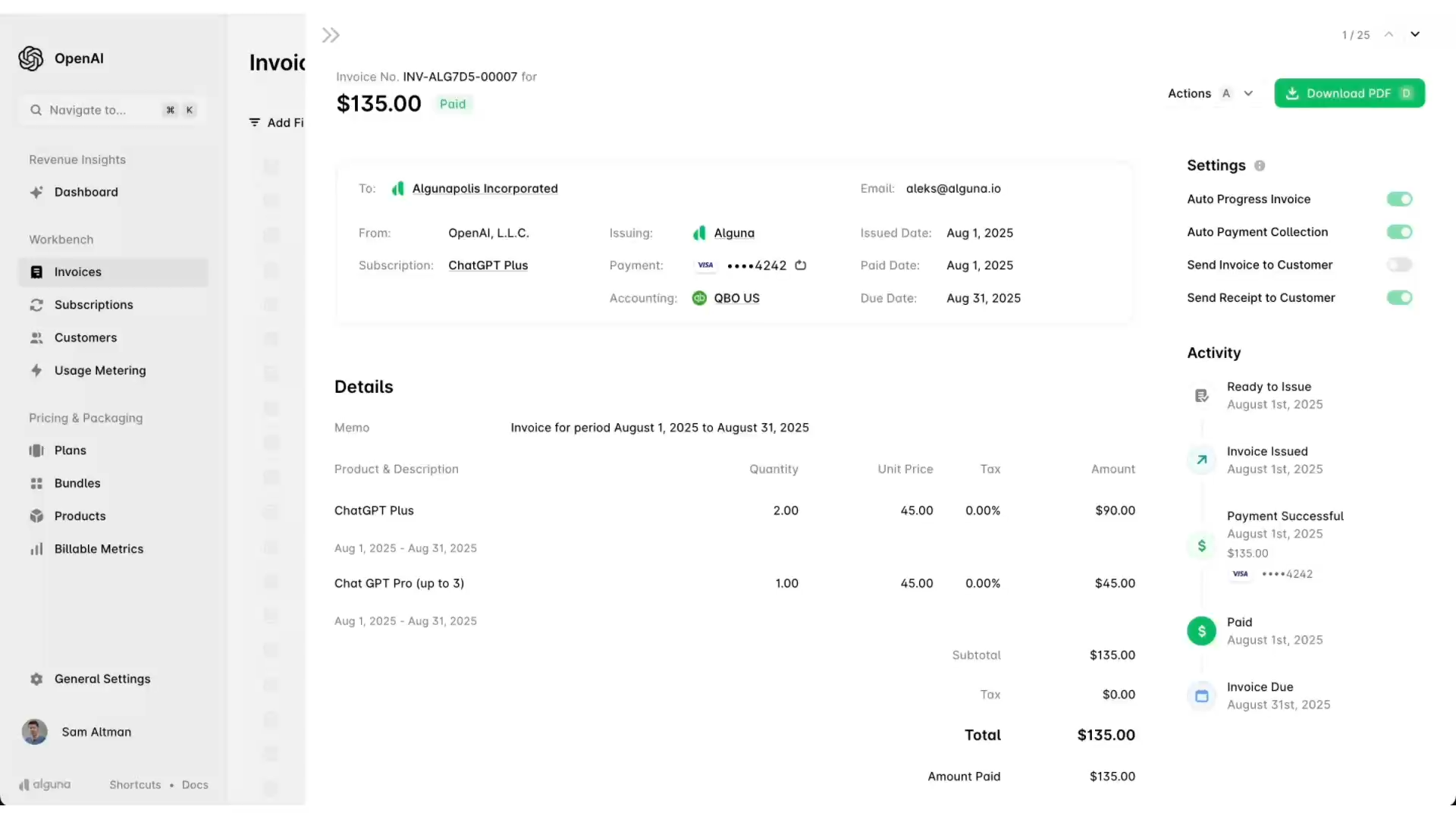
Alguna is an end-to-end quoting, billing, and invoicing platform built specifically for modern B2B companies, particularly those running usage-based, hybrid, or subscription pricing models. Where most AR tools handle one piece of the revenue puzzle, Alguna connects the entire journey from quote to cash: CPQ, billing, accounts receivables, and revenue recognition in a single platform.
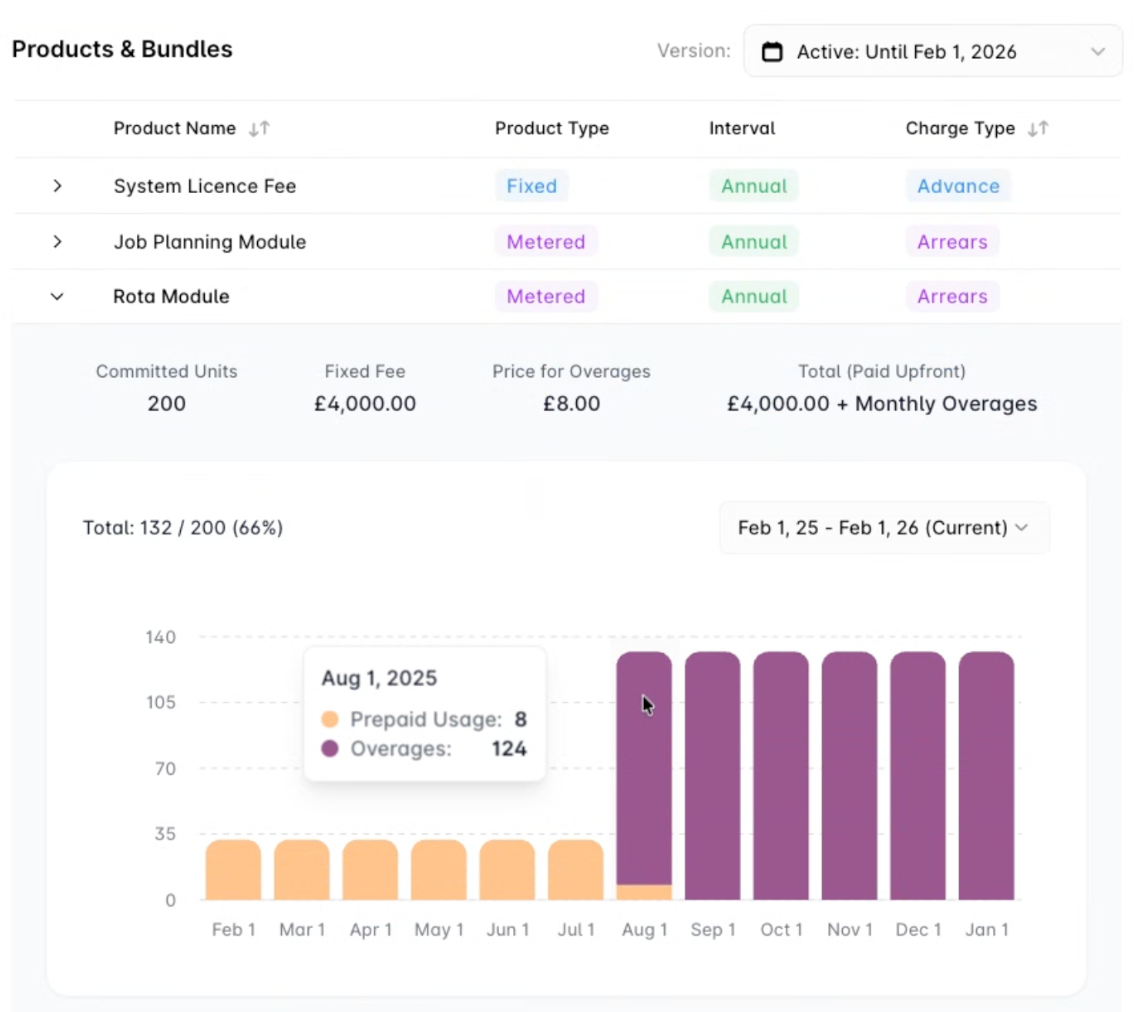
What makes Alguna stand out is how natively it handles the complexity that trips up generic tools. Whether you're billing per API call, per seat, or on a hybrid consumption model, Alguna meters usage in real time and applies your pricing logic automatically, without engineering involvement.
Its AR module provides a live dashboard synced to your CRM and billing, automated dunning workflows, smart payment retry logic, and auto-reconciliation to QuickBooks, Xero, NetSuite, and your ERP.
"Alguna enables complex usage-based billing for us in a way that other products can't." — Shane Curran, CEO at Evervault
Key features
- Real-time accounts receivable dashboard: Live visibility into current, overdue, and at-risk invoices filtered by aging bucket, customer segment, or sales rep.
- Automated collections and dunning: Configurable reminder sequences and smart retry attempts triggered automatically, no manual chasing required.
- Parent-child account hierarchies: Manage complex enterprise billing structures with consolidated reporting across subsidiaries
- Multi-method payments: ACH, SEPA, wire, cards, wallets, and offline payment logging, with smart routing rules based on amount, region, and customer type.
- Auto-reconciliation: Match payments to invoices instantly and sync to QuickBooks, Xero, Stripe, and your ERP to eliminate manual month-end close work.
- Usage-based billing: Real-time metering for any billable metric, API calls, tokens, feature access , with automatic charge calculation and customer-level usage breakdowns.
- No-code CPQ: Generate quotes, collect e-signatures, and convert to invoices in minutes, without rebuilding deal logic from scratch.
- Contracts AI: Upload contracts in bulk and extract contract data with AI in a matter of seconds
- Revenue recognition: Automated ASC 606/IFRS 15 compliance with immutable audit logs, available as part of the Enterprise plan.
Pros
- Covers the full quote-to-cash lifecycle in a single platform, reducing the number of tools your team manages
- No-code billing configuration, finance teams can manage pricing changes without engineering support
- Purpose-built for B2B SaaS, AI companies, and fintech with complex or usage-based pricing models
- Fast implementation: customers can get up and running as quickly as days. Most customers report being live in 2-4 weeks.
- Free starter plan available, low barrier to getting started
- Adam Liska, CEO at Glyphic
Discover how Glyphic went from a patchwork of tools to billing precision in 3 weeks
Cons
- Primarily optimized for B2B SaaS and tech verticals, so may be less suited to manufacturing or traditional enterprise use cases
- Newer market entrant compared to some established enterprise AR platforms
Best for
- B2B SaaS and AI companies with usage-based or hybrid pricing models
- Fintech companies that need flexible payment orchestration and compliance-ready invoicing
- Startups and scale-ups that want to avoid building and maintaining custom billing infrastructure
- Finance teams looking for a single source of truth across billing, invoicing, and AR
- Companies seeking the best accounts receivable software for startups with room to grow into enterprise features
Pricing
View full pricing at alguna.com/pricing
- Starter: Free — up to 10 monthly invoices, fixed subscription plans, usage-based metering, Stripe integration, customer portal
- Growth: $699/month — CPQ, e-signature, advanced subscriptions, HubSpot/Salesforce integration, QuickBooks/Xero, white-glove migration
- Enterprise Scale: Custom — multi-entity billing, NetSuite/ERP integrations, automated revenue recognition, 24/7 priority support
2. HighRadius: Best accounts receivable software for enterprises with complex cash application
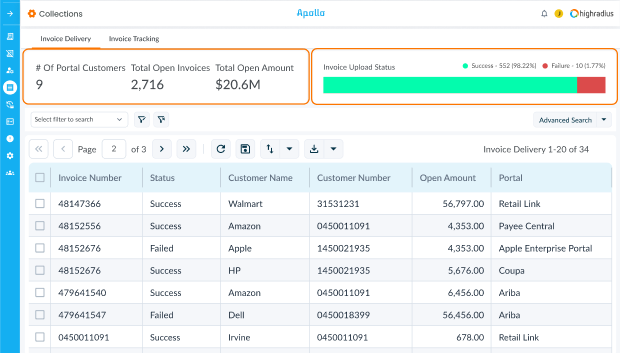
HighRadius one of the most well-known names in enterprise AR automation. The platform is built around an agentic AI model that orchestrates processes across the entire order-to-cash cycle, including credit management, collections, cash application, deductions management, and EIPP (electronic invoice presentment and payment). It's used by over 1,100 enterprises globally, including 3M, Unilever, and Lufthansa.
HighRadius has been consistently recognized as a market leader by Gartner, IDC, and Forrester. Its cash application engine is particularly strong, achieving 90%+ automation rates and connecting with 25+ check scanners and 250+ AP portals. For large organizations dealing with high transaction volumes, complex deductions, and multi-ERP environments, HighRadius is a serious contender.
Key features
- AI-powered cash application: 90%+ automation with pre-built algorithms that recognize bank information, payer names, and payment references across 25+ check scanners.
- Collections automation: Automated past-due notices from a library of 100+ email templates across 600+ AP and customer portals; in-app dialer for collectors.
- Credit risk management: Integrates with 35+ global credit agencies; AI models predict payment defaults up to 30 days in advance.
- Deductions management: AI validity predictors with 90%+ accuracy; 4-way matching for trade promotion claims.
- Real-time analytics: Customizable dashboards with KPI tracking, industry benchmarking, and performance trend analysis.
- Global payments: Supports 135+ currencies and 200+ payment methods including cards, ACH, and SEPA.
Pros
- Deep ERP integrations with SAP, Oracle, NetSuite, Microsoft Dynamics, and more, minimal custom development required
- Recognized by all major analyst firms as a category leader for enterprise AR automation
- Scales to handle thousands of users across shared-service centers
Cons
- Implementation takes 3–6 months, so it's not suitable if you need to move fast
- Initial onboarding can feel complex due to the number of configuration options
- Some advanced reports require customization support from the HighRadius team
Best for
- Large enterprises looking for the best accounts receivable software for enterprises with complex cash application needs
- Organizations with 1,000+ customers and high invoice volumes
- Companies already invested in SAP, Oracle, or NetSuite ecosystems
- Finance teams with dedicated AR staff and an appetite for a full platform transformation
Pricing
- Custom pricing based on modules selected, integration requirements, and AR complexity
- Subscription model; contact HighRadius for a tailored quote
- Stacie S., Accounting Director
Read the full review on G2
3. Quadient AR (YayPay): Best for mid-market B2B collections
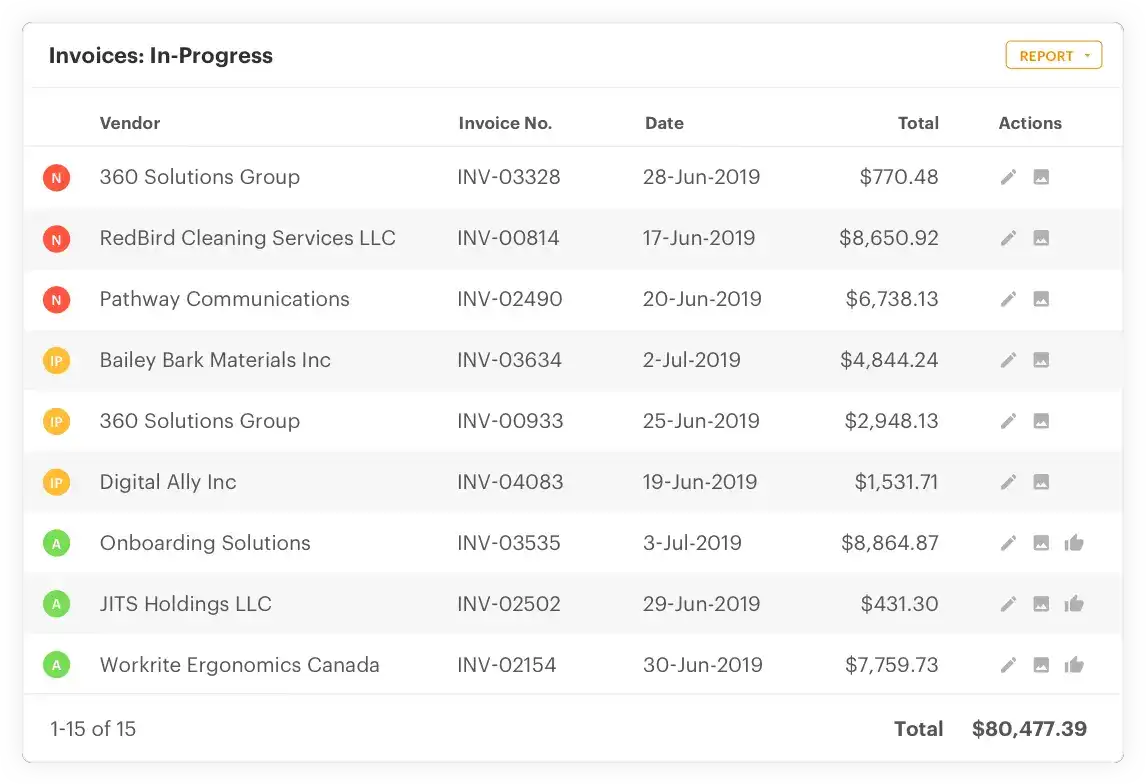
Quadient AR (by YayPay) is a cloud-based accounts receivable automation software designed for B2B finance teams that want to put collections on autopilot. It's particularly well-suited to mid-market companies processing 500+ invoices per month and looking to reduce manual AR workload across credit management, collections, cash application, and invoicing.
Quadient's own metrics are impressive: customers report a 34% reduction in DSO, 50% reduction in manual AR tasks, and 94% accuracy in cash flow forecasting. Over four years, the average customer sees 403% ROI.
🏆 Quadient also won IDC's 2025 SaaS Accounts Receivable Customer Satisfaction Award, a meaningful signal from an independent analyst firm.
If you're about to evaluate the automation company Quadient on accounts receivable software, here's what you want to keep in mind:
Key features
- Intelligent collections workflows: Highly personalized dunning sequences using AI and machine learning; automated escalations and task lists.
- Cash flow forecasting: Predictive analytics that forecast payment behavior with 94% accuracy based on historical payor data.
- Credit risk assessment: Real-time creditworthiness monitoring using external credit data and payment history.
- Self-service payment portal: Customers can view invoices, make payments, and manage their account 24/7 from any device.
- Real-time AR analytics: Customizable dashboards showing DSO, payment predictions, aging buckets, and high-priority accounts.
- ERP integrations: Connects with NetSuite, QuickBooks, Sage Intacct, Acumatica, and Xero.
Pros
- Strong track record of measurable outcomes: 34% DSO reduction and 403% ROI are well-documented
- Genuinely collaborative approach — customers consistently praise account management and responsiveness
- Cash flow forecasting at 94% accuracy is class-leading for mid-market tools
- IDC-recognized for customer satisfaction in 2025
Cons
- No universal search or consolidated reporting across billing subsidiaries — can be limiting for multi-entity companies
- Invoice-level contact segmentation has some limitations (communications are account-level, not invoice-level by default)
- Pricing starts at approximately $500/month, so it's not ideal for very small businesses
Best for
- Mid-market B2B companies looking for the best accounts receivable management software for collections-focused teams
- Organizations processing 500+ invoices per month that want to reduce manual workload
- Finance teams that want AI-powered collections without a full enterprise implementation
- Companies evaluating highly rated accounts receivable automation software options with proven ROI data
Pricing
- Custom pricing based on invoice volume and business requirements
- Starting price approximately $500/month; contact Quadient for a tailored quote
- Michelle M., Credit Manager
Read the full review on G2
4. Sage Intacct: Best for mid-market companies needing a full ERP with strong AR
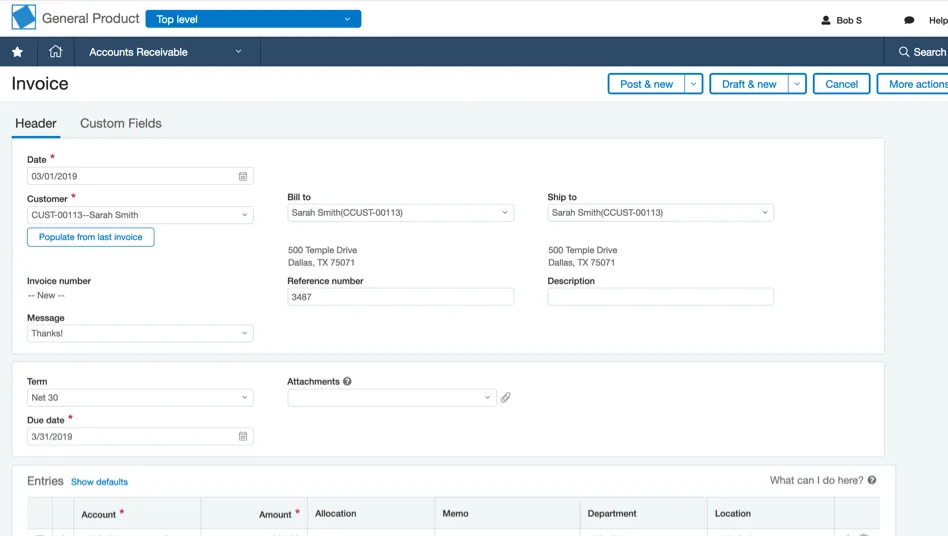
Sage Intacct is a cloud-based financial management platform that combines a full ERP with strong native accounts receivable management software capabilities. It's particularly valued by mid-market companies in professional services, healthcare, nonprofits, and SaaS that need more than just AR — and want billing, AP, revenue recognition, and financial reporting in a single system.
Sage Intacct's AR module includes configurable approval workflows, multi-dimensional reporting, real-time aging dashboards, and deep Salesforce CRM integration.
Key features
- Automated invoicing: Recurring invoice generation, deferred revenue tracking, and automated GL postings for every transaction.
- Multi-dimensional reporting: Real-time dashboards covering customer aging, invoice analyses, deferred revenue, and collections performance.
- Salesforce integration: Bi-directional sync between Salesforce CRM and Sage Intacct — new sales flow into the AR system automatically.
- Configurable workflows: Point-and-click approval processes and internal controls that align with your organizational structure.
- Tax management: Real-time, accurate sales tax calculations on demand, integrated into the billing workflow.
- Sage AR Automation add-on: An additional module (connecting to 40+ ERPs) for teams that want dedicated collections automation on top of the core Intacct platform.
Pros
- Purpose-built for mid-market companies — strong fit for professional services, nonprofits, and healthcare
- Tight Salesforce integration is a genuine differentiator if your sales team lives in CRM
- 36 hours per month in time savings is a compelling ROI figure for growing finance teams
- Extensible with Sage AR Automation add-on for dedicated collections workflows
Cons
- AR is part of a full ERP — if you only need AR, you're paying for (and managing) much more than you need
- Implementation and configuration can take significant time without dedicated IT resources
- Pricing is not publicly listed; custom quotes required
Best for
- Companies looking for accounts receivable software solutions embedded within a full cloud ERP
- Mid-market organizations in professional services, SaaS, nonprofits, or healthcare
- Finance teams already using or evaluating Salesforce as their CRM
- Organizations exploring SAP accounts receivable software alternatives in the mid-market segment
Pricing
- Custom pricing; contact Sage Intacct for a quote
- Luis M., Senior Accountant II
Read the full review on G2
5. Invoiced: Best for complex B2B invoicing with global payment needs
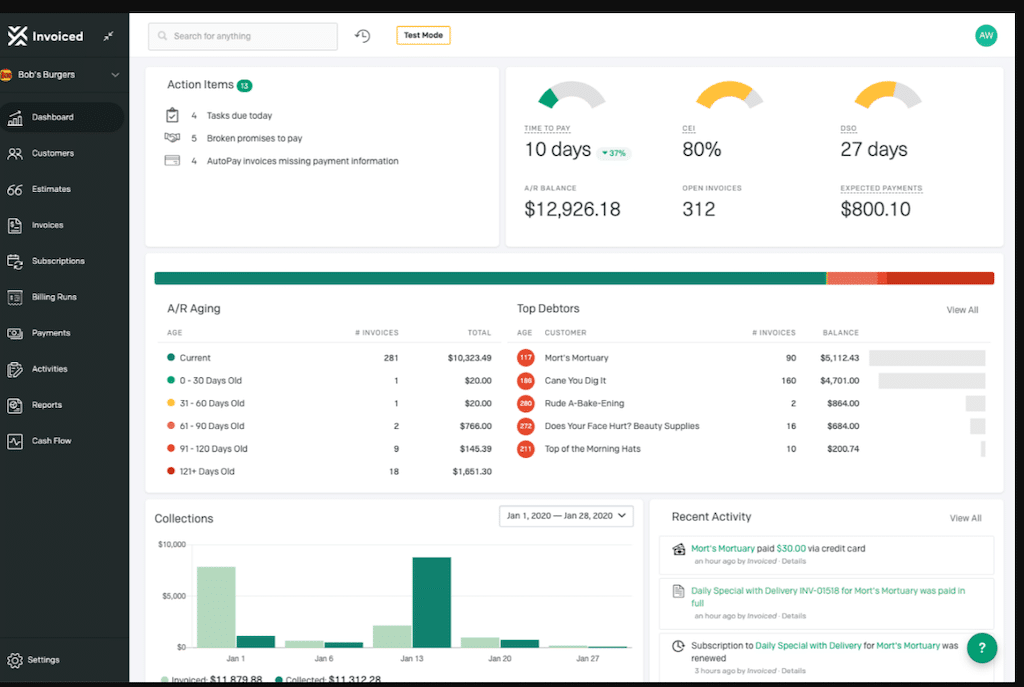
Invoiced is a G2 category leader in accounts receivable automation software, built for B2B finance teams that need to handle complex invoicing scenarios, including multi-entity structures, international payments, custom billing workflows, and deep ERP integration.
What sets Invoiced apart is its breadth: 1,200+ payment options through partnerships like Flywire, support for 240+ countries and territories, and an open API that enables almost unlimited integration possibilities.
It's a particularly strong fit for businesses that have outgrown their accounting software's native AR capabilities and need a dedicated, scalable AR platform.
Key features
- Automated collections: Customizable dunning sequences, automated reminders, and late fees, all configurable by customer segment or account type.
- Global payments: 1,200+ payment options including ACH, SEPA, Bacs, credit card, virtual card, and more. Support for 240+ countries and territories.
- Auto-reconciliation: AI-powered payment matching with real-time sync back to Sage Intacct, NetSuite, QuickBooks, and Xero.
- Customer portal: Branded self-service portal where customers can view invoices, set up AutoPay, enroll in payment plans, and pay instantly.
- Cash flow forecasting: Real-time reports across the full invoice-to-cash lifecycle, including multi-entity reporting and custom templates.
- Open API: Extensive integration options with sandbox access for testing — compatible with any ERP that allows API integration.
Pros
- Best-in-class global payments support — 1,200+ payment options and 240+ countries
- G2 Grid Leader recognition in 2025 for accounts receivable automation
- Strong multi-entity and multi-currency capabilities for international businesses
- Open API gives technically capable teams significant flexibility
Cons
- Full feature set comes at a higher price point — may be overkill for simpler invoicing needs
- Implementation can take time to configure for highly complex workflows
Best for
- B2B companies seeking the best software for automating accounts receivable collections with global requirements
- Mid-market and enterprise companies with multi-entity, multi-currency invoicing
- Finance teams that need a highly customizable AR platform with open API access
- Organizations looking for online accounts receivable software that doesn't require a full ERP upgrade
Pricing
- Custom pricing; contact Invoiced for a quote
- Caitlin D.
Read the full review on G2
6. Maxio: Best for B2B SaaS companies needing billing and revenue recognition in one platform
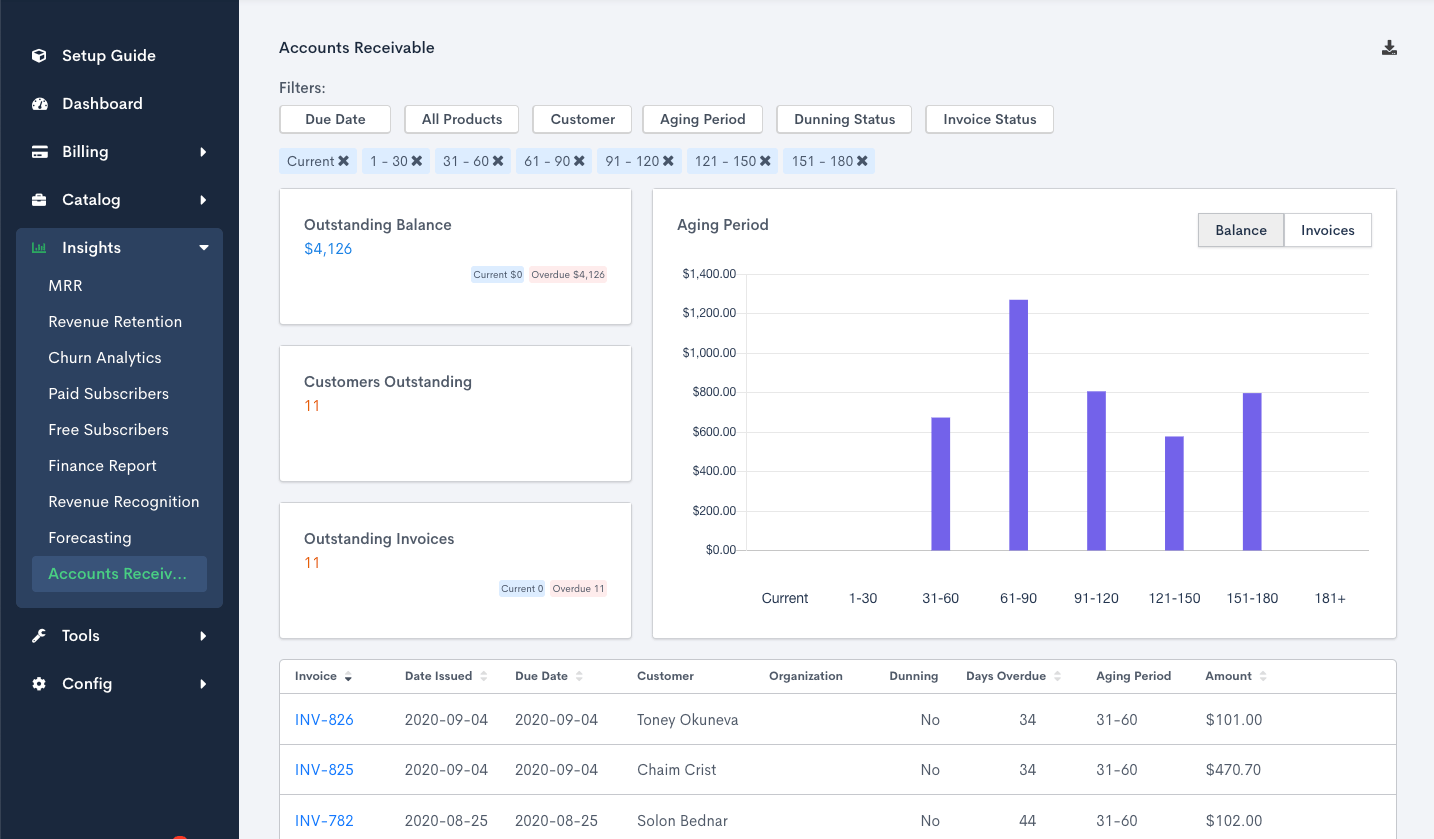
Maxio is the product of a 2022 merger between SaaSOptics (a leader in recurring revenue management) and Chargify (a leader in SaaS billing). The combined platform brings 14+ years of B2B SaaS billing expertise to a single financial operations platform that handles subscription billing, usage-based billing, revenue recognition, AR collections, and SaaS metrics in one place.
Maxio is purpose-built for the financial complexity of B2B SaaS: configurable billing workflows, automated dunning, GAAP-compliant revenue recognition (ASC 606/IFRS 15), and a robust reporting layer covering MRR, ARR, churn, and customer lifetime value.
Key features
- Accounts receivable management: Automated dunning, customizable invoicing, AR aging reports, and collections dashboards — all integrated with the billing engine.
- Revenue recognition: Automated revenue schedules, waterfall reports, and multi-book support for ASC 606/IFRS 15 compliance without manual calculations.
- SaaS metrics and analytics: Real-time dashboards covering MRR, ARR, net revenue retention, churn, and customer LTV — filterable by customer, contract, or product.
- Subscription and usage billing: Flexible billing cycles, tiered and volume pricing, and usage-based models including hybrid subscriptions.
- CRM and ERP integrations: Native integrations with Salesforce, QuickBooks, NetSuite, Sage Intacct, and Xero.
- Maxio Payments: Streamlined payment handling for ACH and card transactions, available as an add-on module.
Pros
- Deep SaaS billing heritage from the merger of Chargify and SaaSOptics — genuine expertise in B2B recurring revenue complexity
- Revenue recognition automation reduces month-end close time significantly for finance teams
- Responsive customer support team with strong implementation guidance
- Parent-child account management for enterprise clients with multiple subsidiaries
- Shane H., Small Business
Read the full review on G2
Cons
- Reporting interface can feel non-intuitive for users who aren't regular users — there's a learning curve
- Some metrics (like churn rates and MRR) have been flagged by reviewers as requiring careful configuration to ensure accuracy
- Cost escalates as you add modules like payments and AR management separately from the core subscription
- Event processing is capped at 200,000 events/day — may be restrictive for very high-volume metered billing
Best for
- B2B SaaS companies that need subscription billing and GAAP-compliant revenue recognition under one roof
- Finance teams stepping up from spreadsheet-based revenue recognition who need a structured, auditable system
- Organizations evaluating best accounts receivable management software 2025 that also want deep SaaS financial reporting
- Mid-market companies with existing Salesforce or NetSuite infrastructure
Pricing
- Grow: $599/month for up to $100,000 in monthly billing volume — includes subscription management, revenue recognition, and reporting
- Scale: Custom pricing for higher billing volumes, multi-entity support, advanced revenue recognition, and milestone-based billing
7. Chargebee: Best for subscription-first SaaS businesses wanting a mature, all-in-one revenue platform
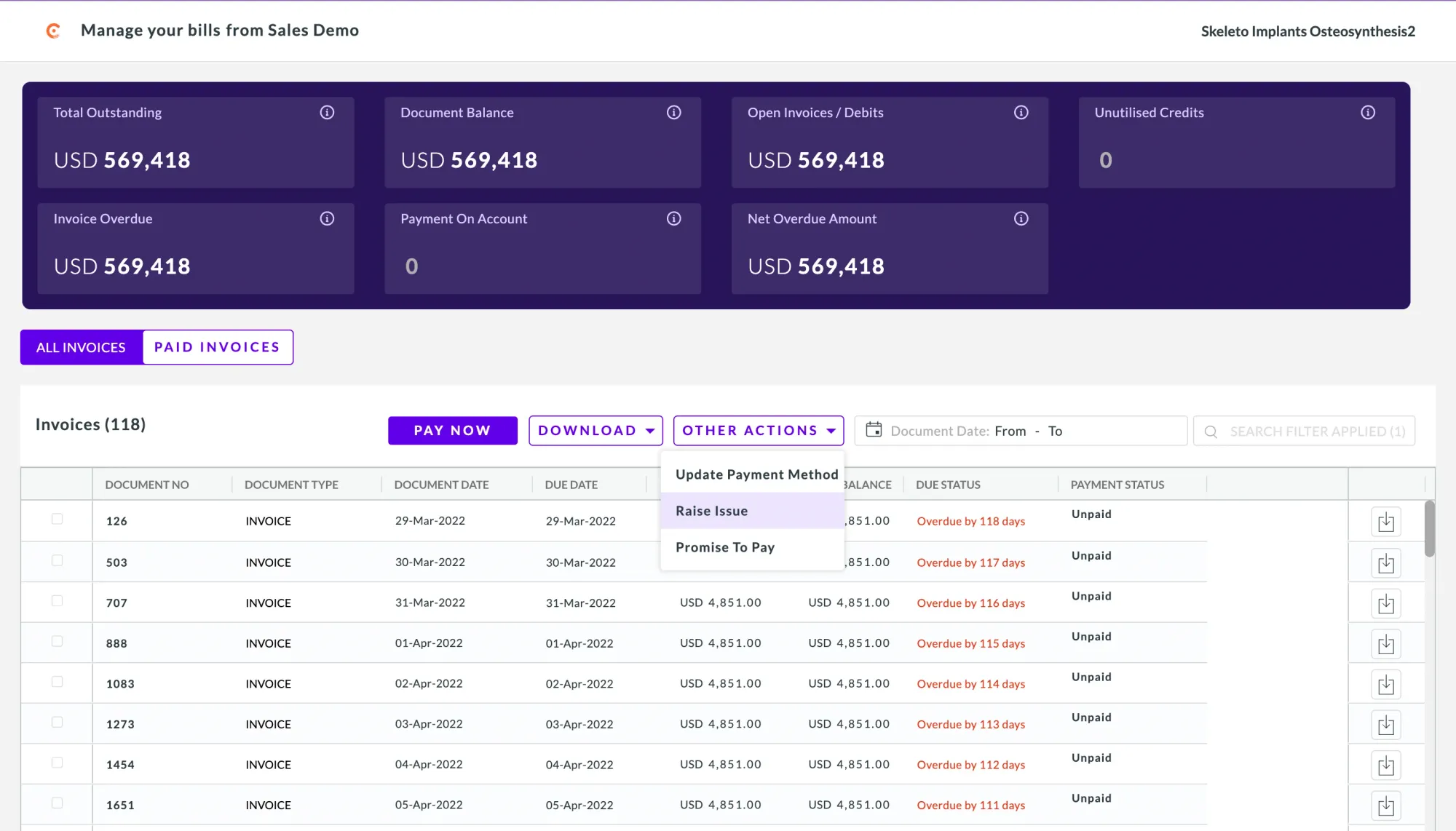
Chargebee is a Gartner Magic Quadrant Leader for Recurring Billing Applications (2025) and one of the most widely deployed subscription management platforms globally. It operates in 130+ countries and covers the full billing and revenue lifecycle: subscriptions, invoicing, dunning, revenue recognition, and customer retention.
Chargebee's AR and collections capabilities are genuinely strong. One customer reported reducing their unpaid invoices by 80% while growing 600%, and spending no more than 1–2 hours per week on accounts receivables.
Its 23+ payment recovery tactics, smart retry logic, and AI-powered card update tools make it one of the more comprehensive accounts receivable automation software options for subscription businesses that want proactive revenue recovery baked in.
Key features
- Dunning and collections automation: 23+ recovery tactics including smart retries, proactive card expiry alerts, and personalized collection workflows by customer segment.
- Revenue recognition: Built-in ASC 606 and IFRS 15 compliance with deferred revenue management, event-based recognition, and audit-ready reporting.
- Customer retention module: AI-powered cancel flow testing, smart targeting for at-risk subscribers, and predictive churn prevention.
- Auto-reconciliation: Automatically syncs financial transactions to QuickBooks, NetSuite, Xero, and other accounting systems.
- Self-service customer portal: Customers can manage their subscriptions, update payment details, and view invoices 24/7 without contacting support.
- Multi-entity and account hierarchy: Available on Enterprise — manage multiple brands, subsidiaries, or billing entities from a single platform.
Pros
- Gartner Magic Quadrant Leader recognition in 2025 — strongest independent analyst endorsement on this list
- 80% reduction in unpaid invoices is a compelling, documented outcome from a real customer
- Best-in-class subscription retention tools that go beyond basic dunning
- Operations in 130+ countries with strong global compliance and multi-currency support
- Verified User at Mid Market company
Read the full review on G2
Cons
- Starter plan has a $250K lifetime billing cap — not a long-term free option for growing businesses
- Performance plan caps at $100K MRR; exceeding it triggers overages or an Enterprise upgrade
- Some reviewers report bugs in billing and reporting that require support intervention
- Advanced personalization and reporting require the Enterprise plan
Best for
- Subscription businesses looking for the best accounts receivable automation software with built-in retention and churn prevention
- SaaS and digital businesses operating in multiple countries that need global billing compliance
- Companies seeking highly rated accounts receivable automation software options with analyst recognition
- Teams that want to consolidate billing, AR, revenue recognition, and retention in one platform
Pricing
- Starter: Free up to $250,000 in lifetime billing (0.75% overage thereafter)
- Performance: $599/month for up to $100K MRR; includes advanced dunning, analytics, and integrations
- Enterprise: Custom — multi-entity, account hierarchies, custom contracts, dedicated CSM
8. Zuora: Best for enterprise subscription businesses with complex order-to-cash requirements
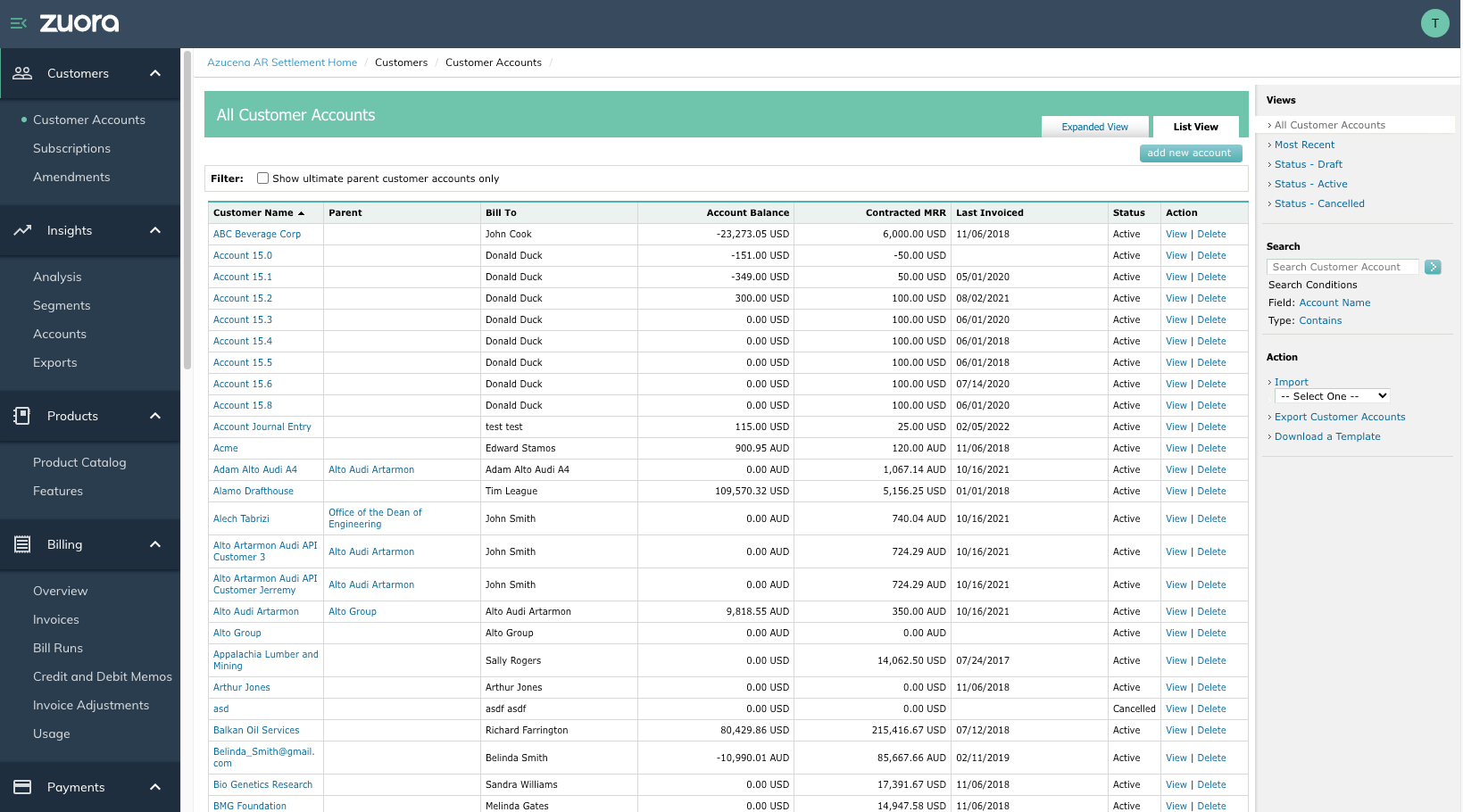
Zuora is the original purpose-built subscription management platform, it helped define the category and has been deployed by some of the world's largest subscription businesses. Its AR module is designed as an enterprise-level AR subledger, automating the full end-to-end AR process: invoicing, collections, payment application, and financial reporting, all tightly integrated with Zuora Revenue for ASC 606/IFRS 15 compliance.
What makes Zuora distinctive is its depth for enterprise subscription operations: support for parent-child account hierarchies, 5+ payment gateways, 10M+ annual usage events on enterprise plans, and a dedicated Zuora CPQ for quote-to-order workflows.
For large organizations managing hundreds of thousands of subscribers across multiple geographies, Zuora provides the infrastructure that most other platforms can't match at scale.
Key features
- Accounts receivable subledger: End-to-end AR automation covering invoicing, collections monitoring, payment application, and journal entry management.
- Collections management: Overdue balance monitoring, customer communication workflows, promise-to-pay tracking, and AI-based account prioritization.
- Revenue recognition (Zuora Revenue): ASC 606/IFRS 15 automation with up to 50% faster month-end close; 60+ real-time reports; multi-GAAP support.
- Parent-child account hierarchies: Manage complex enterprise billing structures with consolidated reporting across subsidiaries.
- Global payments: 5+ payment gateways included on enterprise plans; multi-currency support; 135+ currencies.
- Zuora CPQ: Configure-price-quote integration that connects the sales process directly to billing and AR — reducing manual handoffs.
Pros
- Deepest feature set for enterprise subscription billing and AR on this list — purpose-built for the subscription economy
- Strong Salesforce CPQ integration for end-to-end quote-to-cash automation
- ASC 606/IFRS 15 automation that can close the books up to 50% faster
- Handles extremely high subscriber volumes and transaction complexity that mid-market tools can't support
- Martin Q., Reservations Agent
Read the full review on G2
Cons
- Entry-level plans start at approximately $75,000/year — not accessible for smaller businesses
- Implementation requires significant investment in time and often external consultants
- No forever-free tier; limited free trial available
- Some users report limited flexibility for custom data queries and dashboard customization
Best for
- Enterprises evaluating top accounts receivable automation software with deep subscription billing and revenue recognition needs
- Large organizations managing 100,000+ subscribers across multiple geographies
- Finance teams that need key ERP integration features in accounts receivable software
- Companies where quote-to-cash automation across sales, billing, and finance is a strategic priority
Pricing
- Custom pricing; entry-level plans typically start at approximately $75,000/year based on subscriber volume
9. Stripe Billing: Best for developer-led teams building billing into their product
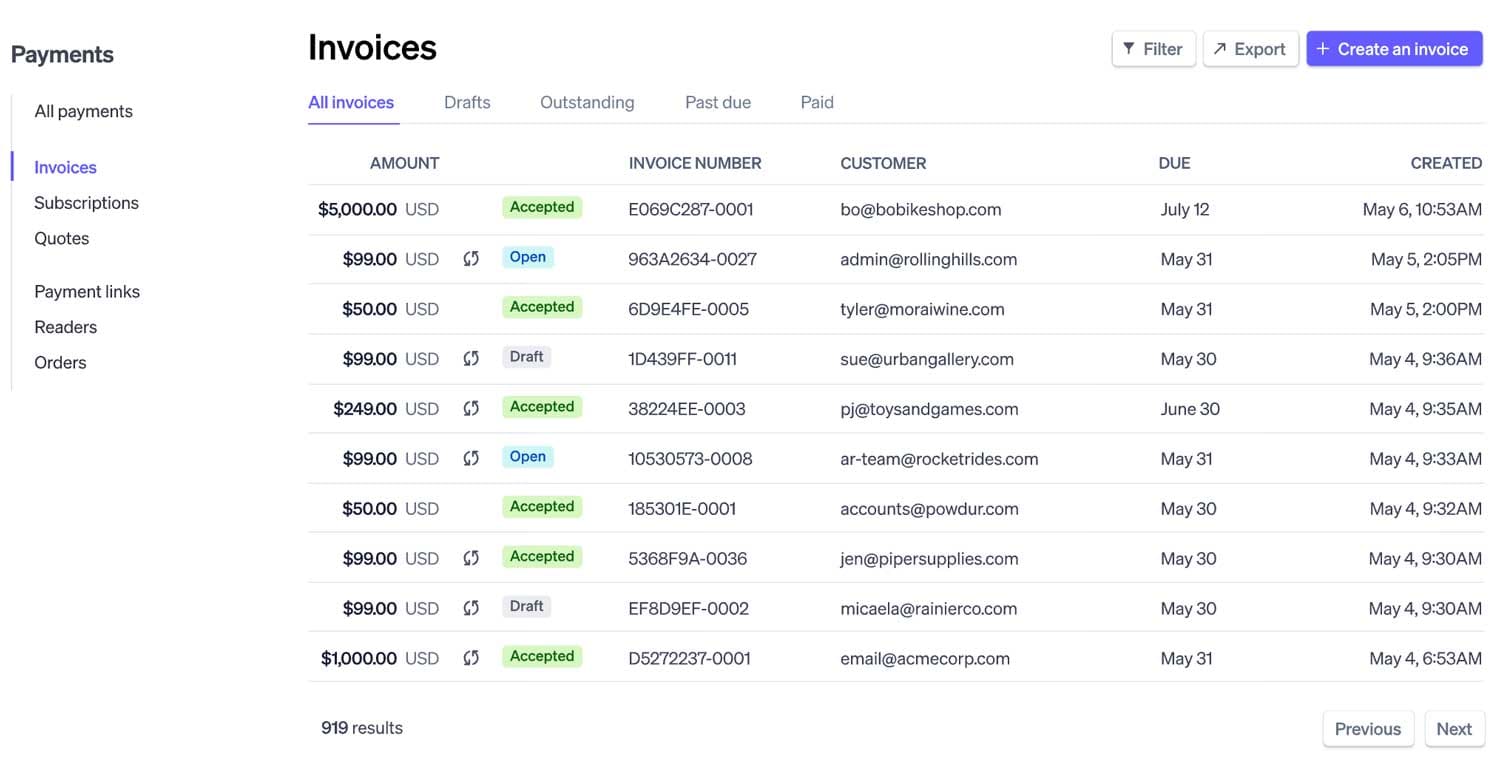
Stripe Billing is the billing and subscription layer built on top of Stripe's payment infrastructure. For developer-led companies that want to build billing directly into their product rather than integrate a separate platform, Stripe Billing is the natural starting point: it runs on the same API as Stripe Payments, with a 0.7% fee on billing volume and access to all Stripe Billing features from day one.
Stripe's machine learning recovers an average of 41% of failed invoices — a meaningful number for any subscription business. It also now includes revenue recognition for all Billing customers at no additional charge, and smart dunning with no extra cost. Where Stripe Billing has its limits is on the accounts receivable management software side: it wasn't built for B2B collections workflows, aging dashboards, or complex customer hierarchies. It excels as a payment and billing engine; it's not a purpose-built AR platform.
Key features
- Subscription management: Recurring subscriptions, usage-based billing, hybrid pricing, and one-time charges, all configured via API or Stripe Dashboard.
- Smart dunning and recovery: ML-powered payment retries recover 41% of failed invoices on average; automated reminders and retry logic included at no extra cost.
- Revenue recognition: Included with Stripe Billing for all customers; handles usage-based and recurring revenue in compliance with accounting standards.
- Global payments: 135+ currencies, 100+ payment methods including ACH, SEPA, cards, and wallets — backed by Stripe's global payment infrastructure.
- Invoicing: Custom invoice generation with tax calculations; Invoicing Starter and Plus tiers for businesses with one-off invoicing needs.
- Developer API: Stripe's API-first architecture gives developers complete control over billing logic, subscription lifecycle management, and payment flows.
Pros
- Transparent, usage-based pricing (0.7%) — scales with your revenue without fixed monthly fees
- 41% failed invoice recovery via ML is a well-documented, meaningful outcome for subscription businesses
- Revenue recognition included at no extra charge — a strong value addition for early-stage companies
- Massive ecosystem of integrations and enormous developer community
Cons
- Not designed for B2B AR workflows: limited aging dashboards, no dedicated collections module, and minimal customer hierarchy support
- Complex billing models (multi-tiered usage, hybrid pricing) often require significant custom engineering
- Fees compound: 0.7% Billing + 2.9% + 30¢ payment processing adds up at scale
- Limited AR visibility for finance teams who need more than payment status — no built-in AR aging or collections prioritization
Best for
- Developer-led startups that want billing embedded directly in their product, powered by the same infrastructure as their payments
- Companies looking for payment software for accounts receivable with a proven global payment network behind it
- Early-stage businesses that want a simple, low-friction way to get recurring billing running quickly
- Teams already on Stripe for payments who want to add subscription management without a new platform
Pricing
- Pay-as-you-go: 0.7% of billing volume (on- and off-Stripe); best for unpredictable or low volume
- Subscription plans: Volume-tiered monthly plans available; custom pricing for high-volume businesses
- One-off invoicing: Billed separately under Stripe Invoicing; Plus plan at ~$6/month for unlimited invoicing
- Maximiliano J., Operations Manager
Read the full review on G2
How to evaluate accounts receivable software: 6 key criteria
Choosing the right accounts receivable software solution is a significant decision.
Here's a framework for evaluating your options:
1. Match the tool to your business model
If you run B2B accounts receivable software with usage-based or hybrid pricing, a general-purpose AR tool may not handle your billing complexity. Make sure the platform you choose was built for your revenue model — not retrofitted to it. Alguna, for example, was purpose-built for SaaS and AI companies with metered or hybrid billing.
2. Evaluate the scope of automation
Consider what you want automated: invoicing only, or the full invoice-to-cash lifecycle? The more automated accounts receivable software can do end-to-end, the less manual coordination your team needs. Ask vendors to demo the full dunning workflow, cash application, and reconciliation process, not just invoice generation.
3. Prioritize integration with your existing stack
A common source of buyer regret in accounts receivable software is poor integration. Confirm that the platform syncs bi-directionally with your accounting software (QuickBooks, Xero, NetSuite), your CRM (Salesforce, HubSpot), and your payment processor. Ask how the integration handles edge cases like failed payments, credit memos, and multi-currency transactions.
4. Assess DSO reduction and ROI potential
Request accounts receivable software ROI data specific to businesses of your size and type. Quadient's documented 34% DSO reduction and 403% ROI over 4 years are the kind of concrete metrics you should be looking for — not generic claims. Calculate what a 20–30% reduction in DSO would mean for your own working capital.
5. Consider implementation time and support model
Enterprise platforms like HighRadius and SAP may take 3–6 months to implement. Cloud-native cloud based accounts receivable software like Alguna and Invoiced can often be live in days or weeks. If cash flow urgency is high, implementation speed matters as much as feature depth. Also check whether the vendor offers white-glove migration, dedicated onboarding, and ongoing customer success support.
6. Test the free tier or pilot before committing
Several platforms, including Alguna, offer a free tier or trial period. Use this to validate that the platform handles your specific workflows before committing to an annual contract. Ask about a pilot program with real data before signing, particularly for enterprise deployments.
Free vs. paid accounts receivable software
For early-stage businesses or those just starting to formalize their AR process, free accounts receivable software can be a good entry point. Alguna's Starter plan, for example, is genuinely free for up to 10 monthly invoices, not a time-limited trial, and includes usage-based metering, Stripe integration, and a customer portal.
The reality, though, is that free software for accounts receivable vs. manual tracking still wins meaningfully: even a free tier automates reminders, tracks payment status, and eliminates spreadsheet errors. The question isn't whether to use software, it's which tier you need.
Open-source options exist (open source accounts receivable software) but are rarely production-ready for B2B use without significant customization. For most businesses, a paid SaaS platform will deliver faster time-to-value and lower total cost of ownership than an open-source alternative requiring internal engineering.
Connecting accounts receivable software to QuickBooks
If you're already using QuickBooks as your accounting system, you'll want accounts receivable software for QuickBooks that syncs cleanly in both directions.
Alguna, Invoiced, and Quadient AR all offer QuickBooks Online integrations that automatically push invoice data, payment status, and reconciliation records without manual entry.
To connect accounts receivable software to QuickBooks, you'll typically authenticate via OAuth, map your chart of accounts, and configure which data flows back into QuickBooks automatically.
Look for platforms that support QuickBooks Online Advanced for additional reporting and user access controls.
Frequently asked questions about accounts receivable software
What is accounts receivable software used for?
Accounts receivable software automates the process of invoicing customers, tracking payment status, following up on overdue invoices, and reconciling payments. It replaces manual spreadsheets and email chains with automated workflows that reduce DSO, improve cash flow, and give finance teams real-time visibility into what they're owed.
What are the top benefits of implementing accounts receivable automation software?
The top benefits include: reduced DSO (typically 20–34% depending on the platform), fewer manual errors in invoicing and cash application, automated collections that free up team time, better cash flow forecasting, and improved customer payment experience through self-service portals and flexible payment options.
How do I choose between standalone accounts receivable software and ERP-embedded AR?
If you already have a strong ERP investment (SAP, NetSuite), the embedded AR module may be sufficient. If you need deeper collections automation, usage-based billing support, or faster implementation, a standalone stand alone accounts receivable software platform that integrates with your ERP is often the better choice. Standalone tools are also easier to switch if your needs change.
What accounts receivable software features matter most for DSO management?
For DSO management, prioritize: automated dunning sequences with escalation logic, real-time aging dashboards, payment prediction analytics, AI-driven collections prioritization, and auto-reconciliation. Platforms that offer accounts receivable automation software features for DSO management, like Quadient AR and HighRadius, typically document specific DSO reduction outcomes you can benchmark against.
What is the best accounts receivable software for B2B companies in 2025?
The best accounts receivable software for B2B companies in 2025 and 2026 depends on your size and model. For B2B SaaS and AI companies with usage-based pricing, Alguna is purpose-built. For mid-market companies with high invoice volumes, Quadient AR delivers proven outcomes. For large enterprises, HighRadius is the category leader. For full ERP with native AR, Sage Intacct is a strong choice.
Can accounts receivable software handle complex customer hierarchies?
Yes. Enterprise-grade platforms like Alguna and Zuora handle parent-child customer hierarchy payment allocation with ease. This allows payments from a subsidiary to be correctly allocated across multiple invoices or parent entities. Alguna's multi-entity support and HighRadius's enterprise credit management are both designed for this complexity.
Is there budget-friendly accounts receivable software for B2B companies?
Alguna's free Starter plan is the most accessible entry point for the best budget-friendly accounts receivable software for B2B companies in 2026 and beyond. Invoiced and Quadient AR offer structured tiers that scale with invoice volume. For very small businesses, FreshBooks and Plooto offer lighter-weight options at lower price points.
How do I improve accounts receivable collections with software?
To improve accounts receivable collections, focus on four automation levers: (1) automated dunning sequences that send reminders before and after due dates; (2) AI-driven prioritization that surfaces your highest-risk accounts first; (3) self-service payment portals that remove friction for customers; and (4) real-time aging dashboards that give collectors clear daily task lists.
What accounts receivable software integrates with QuickBooks?
Alguna, Quadient AR, Invoiced, and Sage Intacct all offer QuickBooks integration. The depth of that integration varies, look for bi-directional sync, automatic GL posting, and the ability to handle credit memos and failed payment edge cases without manual intervention.
Stop chasing payments. Start collecting automatically.
The accounts receivable function has traditionally been one of the most manual, error-prone parts of a finance team's day. But that's no longer the default. Today's accounts receivable automation software can handle the full invoice-to-cash lifecycle, from generating invoices and automating collections, to reconciling payments and forecasting cash flow, with a level of accuracy and speed that manual processes simply can't match.
Whether you're a B2B SaaS company looking for a usage-aware AR platform, a mid-market business trying to cut DSO, or an enterprise looking to replace a patchwork of AR tools with a single system of record, there's a platform built for your needs.
For B2B SaaS, AI, and fintech companies, Alguna combines the full quote-to-cash journey in a single platform, with a free tier to get started and enterprise capabilities when you need them.
As Adam Liska, Co-founder and CEO at Glyphic AI put it: "With Alguna, we're more confident in our operations, onboarding customers much faster, and we've even unlocked the ability to support self-service accounts that used to be too labor-intensive to manage."
Ready to see how Alguna can automate your accounts receivable?
Book a personalized demo with our team and see the platform in action with your own data. We'll walk you through how Alguna handles your specific billing model, integration requirements, and collections workflow — and get you up and running in days, not months.