If your finance or revenue team is still copy-pasting invoice data, chasing down approvals in email threads, or manually reconciling payments at the end of every month, you already know the problem.
Invoice automation software exists to fix exactly that.
But with dozens of platforms on the market, ranging from narrow AP tools to full revenue lifecycle platforms, picking the right one is harder than it looks.
According to McKinsey, up to 80% of invoice processing tasks are automatable today, yet most finance teams still spend significant time on manual work. The cost of that delay is real: PYMNTS research found that invoice processing delays cost companies millions annually in late fees, missed discounts, and strained vendor relationships.
We've put together this guide to help you cut through the noise. We'll cover what automated invoicing software actually does, compare the best invoice automation software side by side, and help you figure out which one fits your specific situation.
Whether you're a finance leader evaluating automated invoice processing software for the first time, or a founder who's outgrown Stripe's invoicing capabilities, you're in the right place.
What is automated invoicing software?
Invoice automation software is a category of tools that replaces manual invoice creation, approval, delivery, and reconciliation with automated workflows. Instead of generating invoicdes by hand, chasing customers for payment, or manually matching receipts to purchase orders, the software handles those steps for you.
There are a few distinct types worth distinguishing:
- Accounts receivable (AR) automation: Focuses on the money coming in. These tools generate customer invoices, send payment reminders, and reconcile incoming payments. Think Alguna and Quadient AR.
- Accounts payable (AP) automation: Focuses on the money going out. These tools automate the capture, coding, approval, and payment of vendor invoices. Think Bill.com.
- Subscription and usage-based billing platforms: Built for SaaS and recurring revenue businesses. These tools manage the full billing lifecycle: contracts, SaaS pricing models, invoice generation, and revenue recognition. Think Alguna, Chargebee, and Maxio.
- ERP-native invoicing: Invoicing built into a broader financial system. Think Sage Intacct (or NetSuite).
The term "automated invoicing software" can refer to any of these. What matters most is matching the tool to your specific workflow.
A SaaS company with usage-based pricing needs something very different from a manufacturer processing 5,000 vendor invoices a month.
In this guide, we focus primarily on invoice automation software solutions relevant to B2B companies, particularly those in SaaS, professional services, and tech-adjacent industries.
Best invoice automation software: 7 top tools at a glance
Use this table as your invoice automation software comparison starting point.
Each platform is covered in full detail in the sections below.
| Platform | Best for | Strengths | Limitations | Pricing |
|---|---|---|---|---|
| Alguna | B2B SaaS companies with complex billing | End-to-end quoting, billing, and invoicing; usage-based and milestone billing; white-glove onboarding | Less suited for high-volume B2C transactions | Starting from $699/month. Custom enterprise. Book a demo |
| Bill.com | SMBs managing AP/AR | Strong AP automation, bank integrations, two-way sync with QuickBooks | Limited revenue management; no usage-based billing | From $45/user/month |
| Quadient AR | Enterprise AR teams | Collections automation, cash application, dispute management | High cost; implementation-heavy; enterprise focused | Custom pricing |
| Stripe Billing | Developer-led SaaS teams | Flexible APIs, subscription management, payment processing | No revenue visibility dashboard; requires dev resources; limited quoting | 0.5–0.8% of billing volume |
| Chargebee | SaaS companies scaling subscriptions | Subscription lifecycle management, revenue recognition | Invoicing UX can be clunky; expensive at scale; limited quoting | From $599/month |
| Maxio | B2B SaaS companies needing billing and SaaS metrics | Subscription and usage-based billing, revenue recognition, SaaS metrics dashboard | Limited AP automation; steep pricing for smaller teams | From $599/month |
| Sage Intacct | Finance teams needing ERP-level control | Multi-entity support, GAAP compliance, ERP integration | Not built for sales-led billing workflows; high cost | Custom pricing |
7 best invoice automation software platforms for SaaS companies
1. Alguna
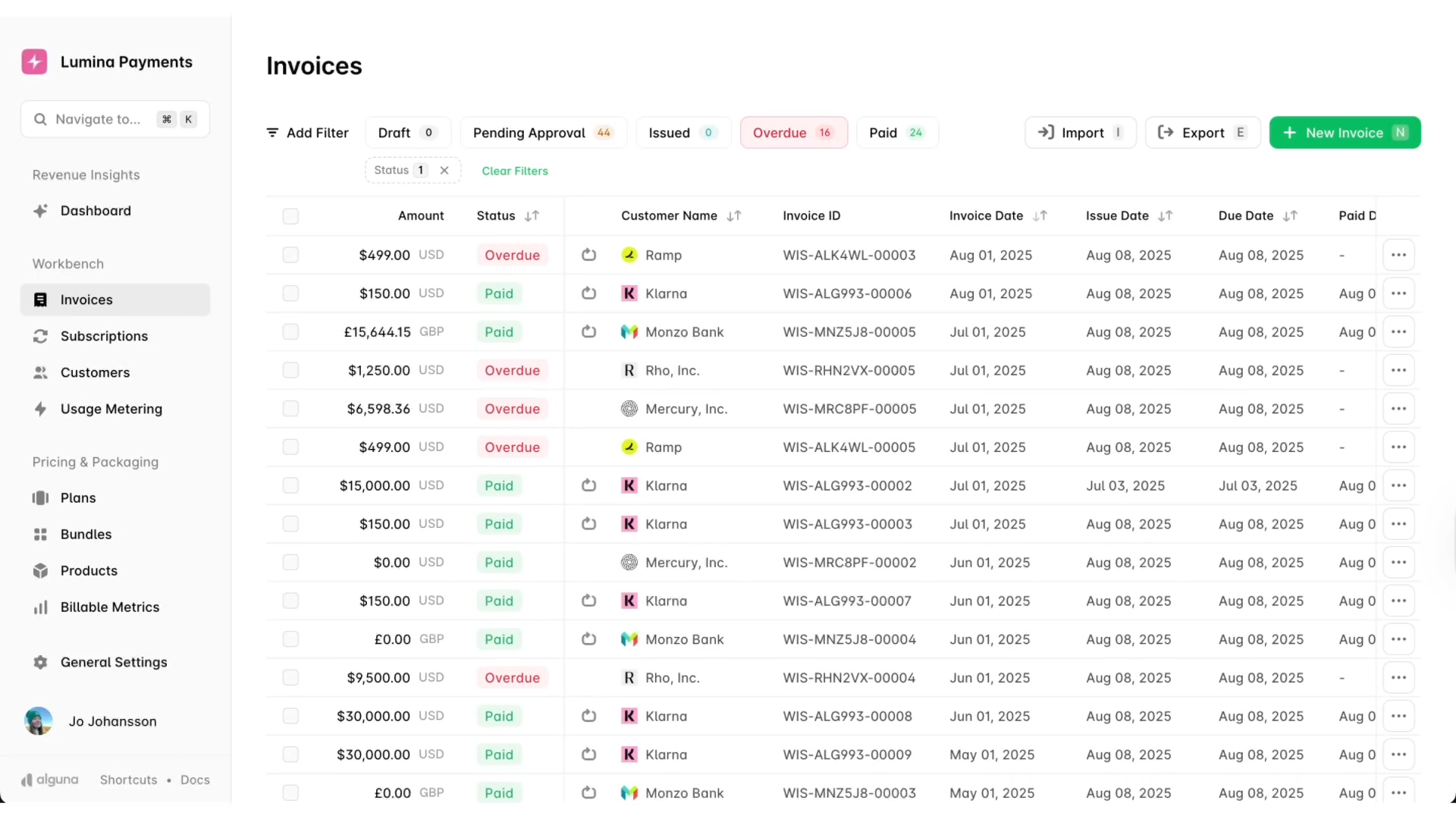
Alguna is an end-to-end quoting, billing, and invoicing platform built specifically for B2B SaaS companies. Where most invoice automation software solutions handle one piece of the revenue puzzle, Alguna connects the entire journey from quote to cash.
That means sales teams can generate accurate quotes in minutes, and finance teams don't have to rebuild that deal logic from scratch when it's time to invoice.
Alguna was designed with the complexity of modern SaaS pricing and packaging in mind. Whether you're running fixed subscriptions, usage-based contracts, milestone billing, or some combination of all three, Alguna handles it.
The platform also gives founders and revenue leaders a single source of truth for understanding what's actually happening with their revenue, something that generic tools like Stripe have historically struggled to provide.
Today, Alguna is one of the few modern players when it comes to providing the best invoice and payment software with automated reminders.
Key features
- End-to-end revenue workflow: Alguna covers quoting, contract management, automated invoicing, and payment collection in one platform, eliminating the need to stitch together multiple tools.
- Usage-based and milestone billing: Built to handle complex usage-based billing models that other platforms can't support, making it ideal for API-first and consumption-based SaaS businesses.
- Revenue visibility dashboard: Gives founders and finance teams a clear overview of revenue movements, MRR, churn, and outstanding invoices in one place.
- Automated invoice reminders — recurring invoice reminders automation software: Dunning management is built in, so you don't need a separate tool to chase payments.
- Multi-entity ready: Easily manage multiple legal entities with their own books, customers, and contracts.
- Self-service account support: Enables teams to support self-service customers that would previously have been too labor-intensive to manage.
- Native integrations: Connect to Stripe, Xero, Quickbooks, NetSuite and more out of the box.
- White-glove onboarding and migration: Alguna's team handles data migration and setup, making the switch from existing tools far less painful than expected. Most customers report going live in 2-4 weeks.
- Adam Liska, CEO at Glyphic AI
Read the case study: How Glyphic went from a patchwork of tools to billing precision in 3 weeks
Pros
- Handles the full revenue lifecycle, not "just" invoicing
- Supports complex pricing models including usage-based and milestone billing
- Built modularly, which means you can opt to only use Alguna's invoice management automation software
- Strong customer support and hands-on onboarding experience
- Clear revenue dashboard that gives revenue teams real-time financial visibility
- Fast to set up agreements post-demo (under five minutes according to customers)
Cons
- Less suited for high-volume B2C or marketplace transaction processing
- Custom pricing means you'll need to book a call to get a number
Best for
- B2B SaaS companies with complex or non-standard pricing models
- Founders who need a single source of truth for revenue and invoicing
- Revenue teams transitioning away from manual billing or patched-together stacks
- Companies that need to support both sales-led and self-service customer motions
Pricing
Free tier available. Paid plans start from $699 per month. Book a demo to get a quote tailored to your unique requirements.
What Alguna customers say:
— Juan Burgos, Co-founder and CEO at Haven AI
Read the case study: How Haven AI reduced time spent on billing by 80%
2. Bill.com
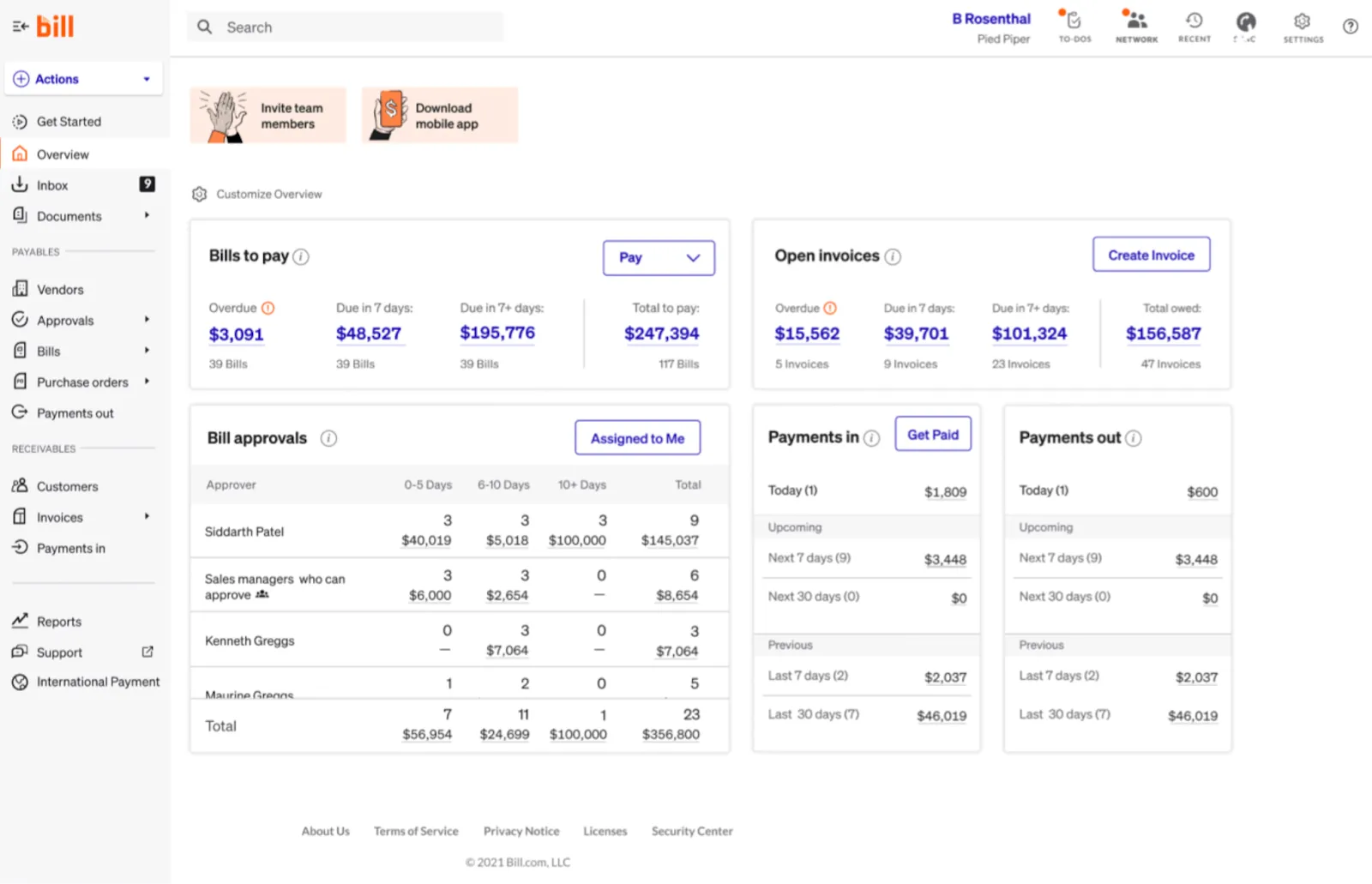
Bill.com is one of the most widely used automated invoice processing software platforms for small and mid-sized businesses, particularly those focused on accounts payable. It connects to QuickBooks, Xero, and other accounting systems, and makes it straightforward to receive, approve, and pay vendor invoices without leaving the platform.
Bill.com is particularly strong for finance teams that deal with a high volume of vendor invoices and need reliable two-way sync with their accounting software. However, it's not designed for revenue-side complexity. If you're running subscription invoicing software with automated billing features or usage-based pricing, you'll quickly hit its limits.
Key features
- Automated AP invoice capture via email, upload, or scan
- Multi-level approval workflows configurable by amount or vendor
- Two-way sync with QuickBooks, Xero, Sage, and NetSuite
- International payments in 130+ currencies
- Basic AR functionality including invoice sending and payment tracking
Pros
- Strong AP automation with reliable accounting integrations
- Easy to set up and use for non-technical finance teams
- Good audit trail and approval controls for compliance
Cons
- Very limited on the revenue side; not built for SaaS billing
- No support for usage-based or milestone-based billing models
- Can get expensive when adding multiple users
Best for
- SMBs and mid-market companies managing accounts payable
- Finance teams that need reliable QuickBooks or Xero integration
- Companies with straightforward vendor invoice workflows
Pricing
Essentials plan starts at $45/user/month. Team and Corporate plans available. Custom pricing for enterprise.
— Stacie B., Senior Manager, Accounting
Read the full review on G2
3. Quadient AR (formerly YayPay)
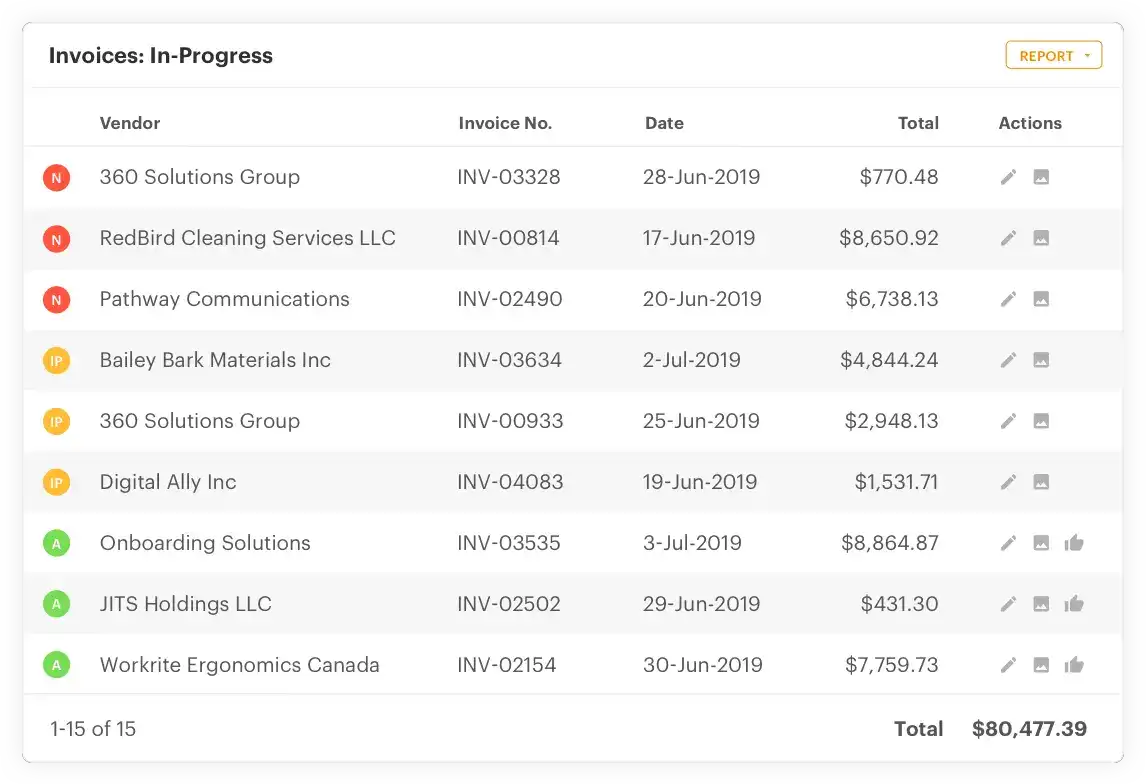
Quadient AR is an enterprise-grade accounts receivable automation platform that focuses on the collections and cash application side of invoicing. It uses AI to predict payment behavior, automate collections workflows, and streamline dispute management.
For large AR teams dealing with complex collections and cash application challenges, Quadient AR is a powerful tool. It's not designed for small teams or SaaS companies, and it doesn't handle the revenue management and quoting workflows that platforms like Alguna cover. But if collections efficiency is your primary bottleneck, it's worth evaluating as an automated invoice management software option.
Key features
- AI-driven payment prediction and collections prioritization
- Automated invoice delivery and payment reminder sequences
- Cash application automation with machine learning matching
- Dispute management and escalation workflows
- ERP integration with SAP, Oracle, NetSuite, and others
Pros
- Strong collections automation with AI-powered insights
- Excellent for high-volume AR teams managing complex portfolios
- Reduces DSO (days sales outstanding) measurably
Cons
- Expensive and implementation-heavy; not suitable for small teams
- Doesn't cover quoting, subscription management, or revenue recognition
- Overkill for companies with straightforward billing needs
Best for
- Enterprise finance teams with dedicated AR functions
- Companies with complex collections workflows and large customer bases
- Organizations looking to reduce DSO and automate cash application
Pricing
Custom pricing. Contact Quadient for a quote.
— Michelle M., Credit Manager
Read the full review on G2
4. Stripe Billing
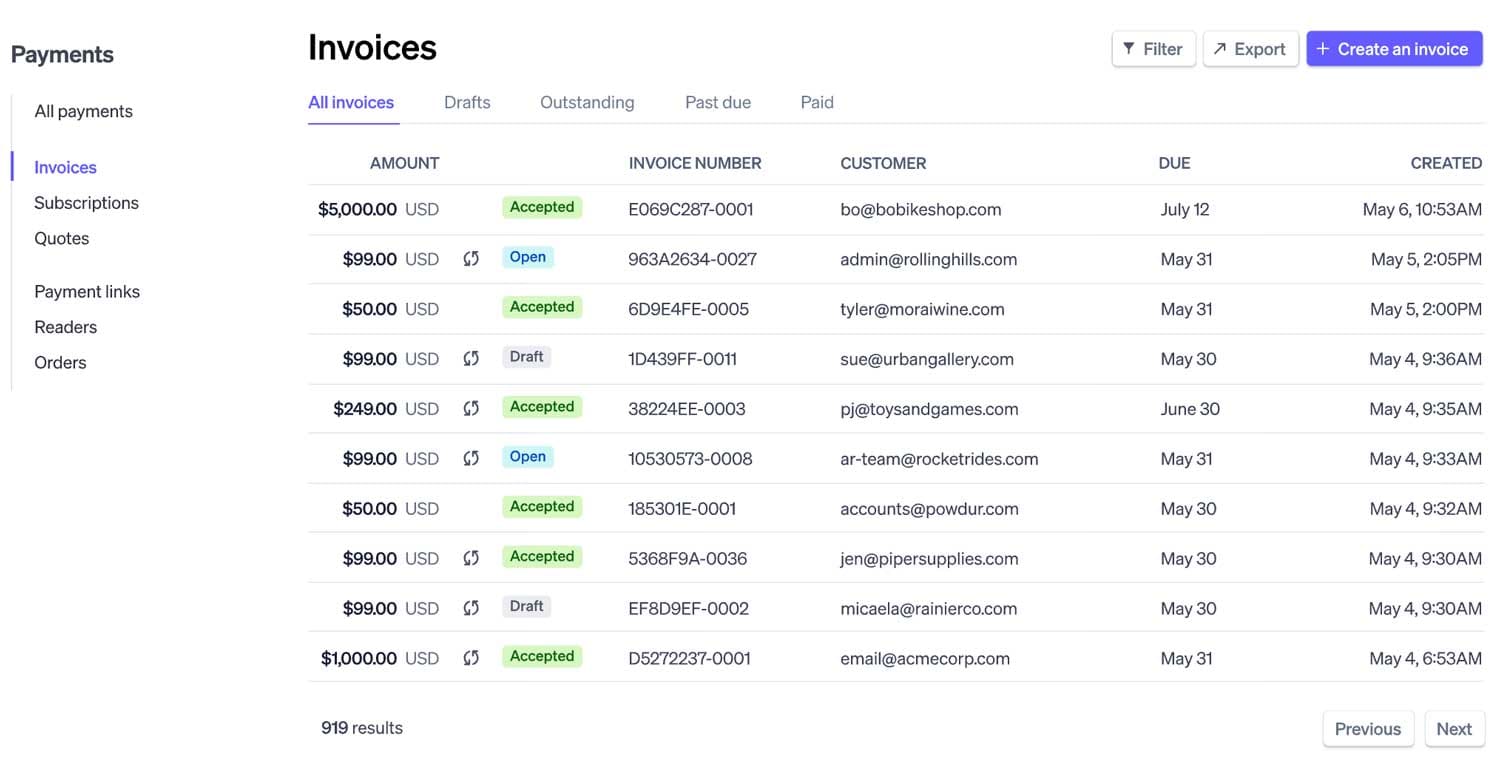
Stripe Billing is the invoicing and subscription management layer built on top of Stripe's payment infrastructure. For developer-led SaaS teams that are already using Stripe for payments, it's a natural starting point for automated invoicing software functionality. You can automate recurring billing, send invoices, and manage subscriptions without leaving the Stripe ecosystem.
The catch is that Stripe Billing is built as infrastructure, not as a business tool. It's powerful if your team has engineering resources to customize it, but it lacks the revenue visibility, quoting capabilities, and operational workflows that finance and revenue teams actually need. As Adam Liska, Co-founder and CEO at Glyphic AI, put it after switching to Alguna: it gave him a clear overview of revenue movements, "something Stripe just couldn't provide."
Key features
- Subscription management with support for multiple pricing models
- Automated invoice generation and payment collection
- Proration handling and mid-cycle upgrades/downgrades
- Webhook-driven automation for custom workflows
- Invoice automation software for QuickBooks users via third-party integrations
Pros
- Excellent developer tooling and API flexibility
- Already integrated if you're using Stripe for payments
- Good for simple and mid-complexity subscription models
Cons
- No meaningful revenue dashboard or reporting for non-technical users
- Requires engineering resources to set up and maintain
- No quoting functionality; limited operational workflows
- Percentage-of-revenue pricing gets expensive as you scale
Best for
- Early-stage SaaS teams with strong engineering resources
- Companies already deeply integrated into the Stripe ecosystem
- Simple to moderate subscription billing needs
Pricing
0.5% of billing volume on the basic plan. 0.8% with advanced features. Custom pricing for high-volume businesses.
— Maximiliano J., Operations Manager
Read the full review on G2
5. Chargebee
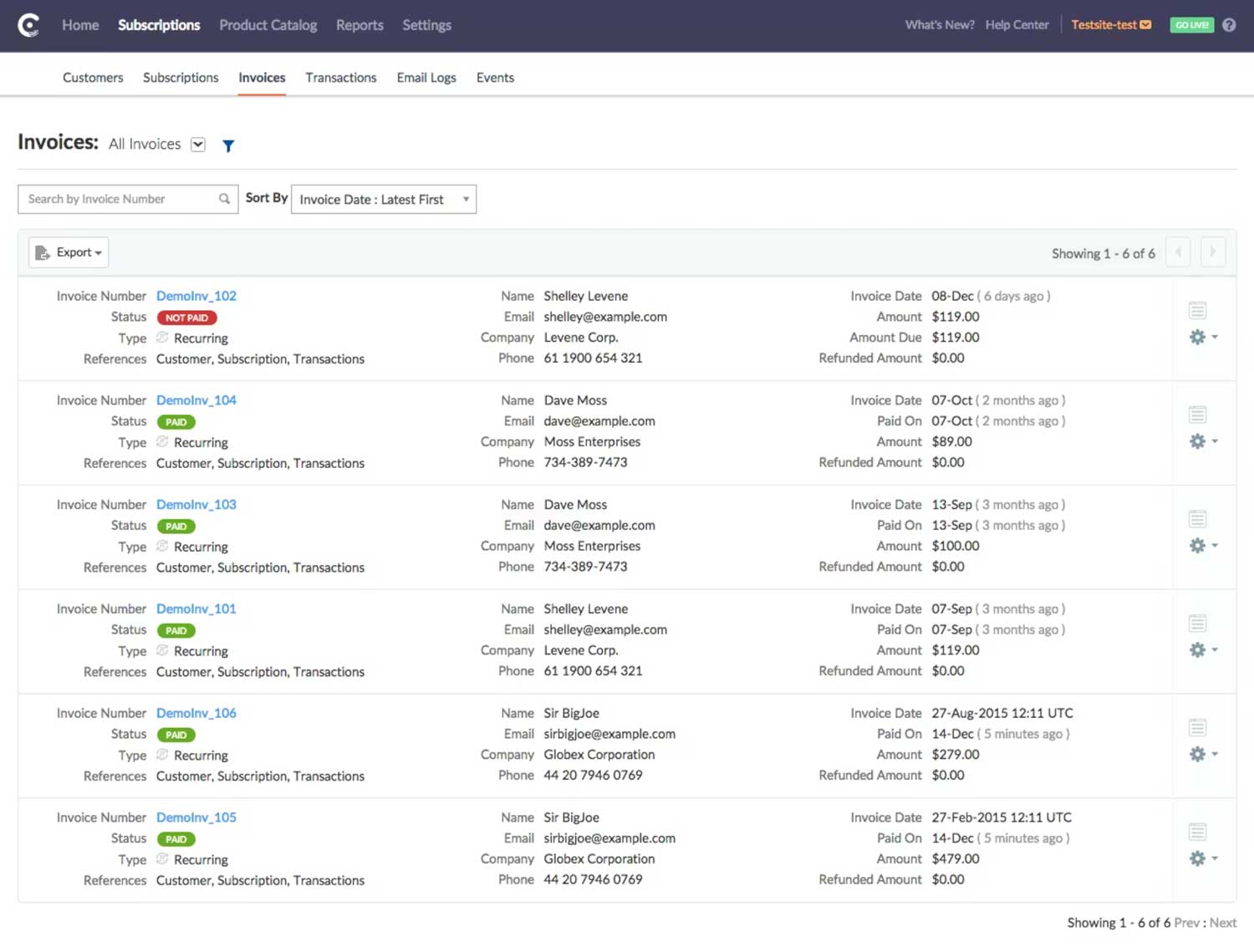
Chargebee is a subscription management and revenue operations platform that covers the full subscription lifecycle from acquisition to retention. It's a strong option for SaaS companies scaling their subscription business and needing subscription invoicing software with automated billing features, particularly those that need robust revenue recognition (ASC 606 / IFRS 15) alongside their billing.
Chargebee sits at the intersection of billing automation and financial compliance, which makes it valuable for SaaS companies preparing for audits or fundraising rounds. However, it can feel complex to navigate, and at higher tiers the pricing is significant. It also doesn't cover the quoting and sales-side workflows that platforms like Alguna handle.
Key features
- Subscription tracking software automated invoicing revenue recognition SaaS — Chargebee covers all three
- Subscription lifecycle automation: trials, upgrades, downgrades, cancellations
- Revenue recognition compliant with ASC 606 and IFRS 15
- Dunning management and automated payment retries
- Over 30 payment gateway integrations
Pros
- Strong revenue recognition and financial compliance features
- Good for complex subscription models with lots of plan variations
- Well-established with a large integration ecosystem
Cons
- Expensive at scale; pricing jumps significantly between tiers
- Invoicing UX can feel clunky compared to newer tools
- No quoting or contract management functionality
Best for
- Growth-stage SaaS companies scaling subscription revenue
- Finance teams that need ASC 606 / IFRS 15 revenue recognition
- Companies with complex subscription tier and addon structures
Pricing
Performance plan starts at $599/month. Scale and Enterprise plans available at custom pricing.
— Mercy P., Membership Coordinator
Read the full review on G2
6. Maxio (Chargify + SaaSOptics)
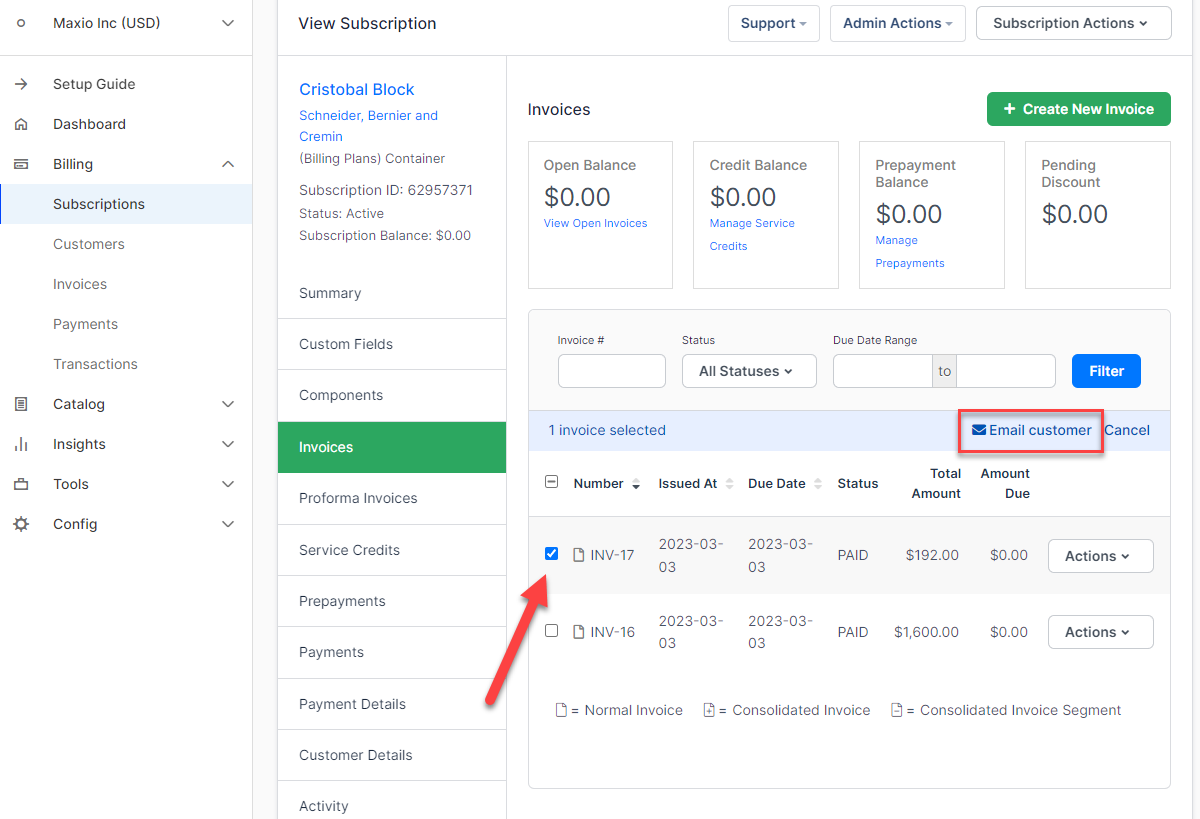
Maxio (formerly SaaSOptics, Chargify, and RevOps.io now combined) is a subscription billing and revenue management platform built for B2B SaaS companies. It covers the full billing lifecycle from subscription management and automated invoice processing software through to revenue recognition and SaaS metrics reporting.
Maxio was formed through the merger of Chargify's billing capabilities and SaaSOptics' financial operations tooling, giving it an unusually broad feature set for a single platform.
Maxio sits in a similar space to Chargebee but with a stronger focus on the financial operations and reporting needs of B2B SaaS businesses. It's particularly valued by finance teams that need both accurate subscription invoicing software with automated billing features and detailed SaaS metrics (MRR, ARR, churn, LTV) in one place. It's not a lightweight tool, and the pricing reflects that.
Key features
- Subscription and usage-based billing with flexible pricing model support
- Subscription tracking software automated invoicing revenue recognition SaaS — Maxio covers all three with dedicated modules
- SaaS metrics dashboard: MRR, ARR, churn, LTV, and cohort analysis
- Revenue recognition automation compliant with ASC 606 and IFRS 15
- Dunning management and automated payment retry logic
- Integrations with Salesforce, QuickBooks, NetSuite, and HubSpot
Pros
- Strong combination of billing automation and SaaS financial reporting
- Handles both simple and complex usage-based pricing models
- Revenue recognition and metrics in the same platform reduces reconciliation overhead
Cons
- Pricing starts high; can be expensive for earlier-stage companies
- Limited AP automation; not designed for managing vendor invoices
- Some users report that the UX feels dated in parts of the platform
Best for
- B2B SaaS companies that need billing and SaaS metrics in a single platform
- Finance teams managing ASC 606 revenue recognition alongside subscription billing
- Growing SaaS businesses that have outgrown Stripe Billing or Chargebee's entry tier
Pricing
Starts at approximately $599/month. Custom pricing available for larger teams.
— Shane H.
Read the full review on G2
7. Sage Intacct
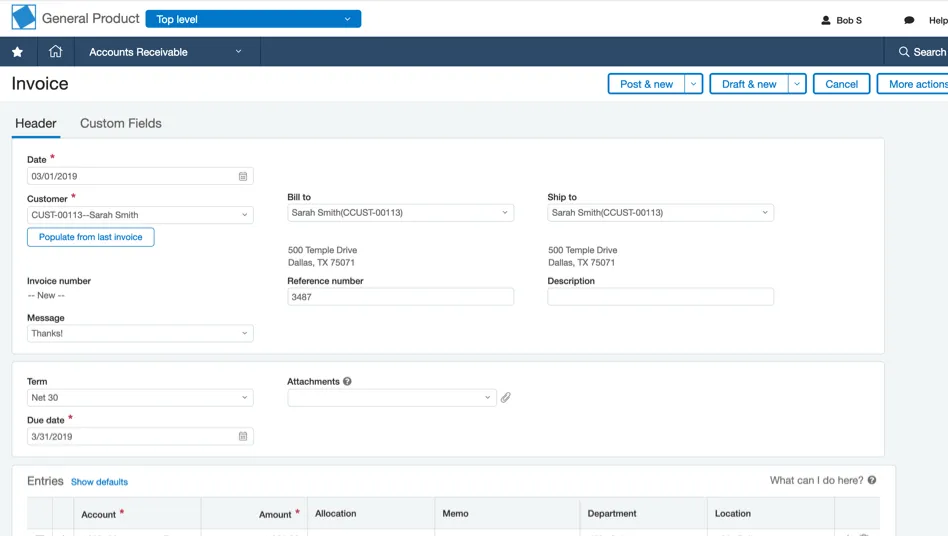
Sage Intacct is a cloud-based ERP system with strong financial management capabilities, including invoicing, billing, and revenue recognition. It's built for finance teams that need multi-entity support, GAAP compliance, and the kind of financial reporting that standalone billing tools can't provide. It's also a common choice for companies that need invoice automation software ERP integration as a core requirement.
Sage Intacct is not a nimble billing tool. It's a full financial system, and it requires implementation resources accordingly. For growing SaaS companies with a dedicated finance team, it can be the right long-term foundation. But for founders or revenue teams looking to move fast, it's likely overkill.
Key features
- Multi-entity and multi-currency financial management
- Contract and project-based billing
- Revenue recognition automation with GAAP compliance
- Robust financial reporting and audit trails
- Deep integrations with Salesforce, ADP, and major banking platforms
Pros
- Best-in-class financial controls and compliance for growing companies
- Strong for multi-entity structures and complex financial hierarchies
- Widely trusted by auditors and investors
Cons
- Expensive and complex to implement; requires dedicated IT or consulting resources
- Not built for sales-led billing workflows or self-service customer management
- Slower to adapt to SaaS-specific pricing models
Best for
- Finance-led organizations that need ERP-level controls
- Companies with multi-entity or multi-subsidiary structures
- Businesses preparing for audit, fundraising, or IPO readiness
Pricing
Custom pricing. Implementation fees typically add significant cost on top of software licensing.
— Luis M., Senior Accountant II
Read the full review on G2
How to evaluate invoice automation software
Picking the right invoice automation software solution isn't just about feature checklists. The wrong tool for your workflow creates more problems than it solves.
Here's how to think about the evaluation process.
Start with your biggest pain point
Are you spending hours generating invoices manually? Losing track of outstanding payments? Struggling to reconcile usage data with what you've billed? Or do you lack visibility into your overall revenue picture? The answer shapes which category of tool you actually need. A company drowning in vendor invoices needs something different from a SaaS company trying to get its automated invoice management software to reflect complex usage-based contracts.
Map your billing model to the platform's capabilities
This is where many teams go wrong. They evaluate a tool based on surface-level features without checking whether it actually handles their pricing model. If you charge based on API calls, seats, or usage tiers, verify that the platform can ingest that data and translate it accurately into invoices. Some tools that market themselves as best automated invoice processing software simply aren't built for that level of complexity.
Consider the full workflow, not just invoicing
Invoicing doesn't happen in isolation. It comes after quoting, contract signing, and service delivery. It triggers payment collection, reconciliation, and revenue reporting. The best invoice automation software for your business is the one that fits smoothly into that full chain, rather than requiring you to manually hand off data between systems at every step.
Evaluate integration requirements carefully
Most invoice automation software for QuickBooks users will advertise a native sync. But the depth of that integration varies significantly. Check whether the sync is two-way, how often it runs, and what happens when there's a discrepancy. For teams that need invoice automation software ERP integration, ask specifically about how the tool handles things like multi-entity consolidation and journal entry creation.
Don't underestimate onboarding and migration
Switching billing systems is genuinely risky. Historic invoice data, subscription schedules, and payment records all need to move cleanly. Ask every vendor specifically how they handle migration. Alguna, for example, is known for hands-on migration support. As one customer described it: "Revenue and invoicing are sensitive areas, so as a founder I wanted to be extra cautious. Alguna's team made me feel completely at ease: they answered every question, laid out a clear migration plan, and kept me in the loop throughout."
Think about where you're going, not just where you are
The best software for automating invoice processing and payments today might not be the right platform in 18 months if you're planning to launch a new pricing tier, expand internationally, or move toward self-serve. Build a shortlist that can grow with you, not just solve today's problem.
Frequently asked questions about invoice processing automation software
What is automated invoicing software?
At its core, it's software that replaces manual invoice creation, delivery, and follow-up with automated workflows. Depending on the platform, it may also handle payment collection, reconciliation, and revenue recognition. The key distinction is that invoices are generated, sent, and tracked automatically based on rules you define, rather than requiring someone to manually create each one.
What is the best automated invoicing software for small businesses?
For small businesses, the right answer depends on your billing model. If you're an early-stage SaaS company with simple subscriptions, Stripe Billing or Chargebee's entry tier may be sufficient. If you're already dealing with custom contracts, usage-based pricing, or a sales-led motion, Alguna is worth evaluating early rather than waiting until you've outgrown a simpler tool. The cost of switching later is significant.
How does invoice automation software integrate with QuickBooks?
Most platforms offer a native QuickBooks sync, but the quality varies. Bill.com is generally considered to have the strongest QuickBooks integration for AP workflows. For invoice automation software for QuickBooks users on the revenue side, look for two-way sync that keeps your chart of accounts aligned, handles tax codes correctly, and syncs in near real time rather than nightly batch updates.
Can invoice automation software handle usage-based billing?
Not all platforms can. Usage-based billing requires the software to ingest consumption data from your product or infrastructure, apply pricing rules to it, and then generate accurate invoices. Alguna is specifically built for this, handling complex usage-based contracts that other platforms struggle with. Stripe Billing can do it via API with engineering effort. Most traditional AP automation tools like Bill.com cannot.
How do I automate invoice and expense reconciliation together?
This is a common question for teams looking at how to choose invoice management software with automated reconciliation. The short answer is that most invoicing and billing platforms don't handle expense reconciliation natively. You'll typically need your billing platform to sync cleanly with your accounting software (QuickBooks, Xero, or NetSuite), which then handles reconciliation. Some ERPs like Sage Intacct handle both in a single system.
What's the difference between invoice automation and billing automation?
Invoice automation refers specifically to the process of generating, sending, and tracking invoices. Billing automation is a broader term that encompasses the full revenue cycle: pricing, contracts, invoice generation, payment collection, and revenue recognition. Platforms like Alguna cover the full billing automation scope, while tools like Bill.com focus more narrowly on invoice automation for the accounts payable side.
How do I automate invoice reminders?
Most recurring invoice reminders automation software allows you to set up reminder sequences that trigger automatically based on invoice due dates. You can typically configure reminders to go out a set number of days before, on, and after the due date. Alguna has this built in natively, as do Chargebee, Quadient AR, and most other platforms in this guide. The differentiator is how customizable those sequences are and whether they can be personalized per customer segment.
Stop stitching tools together: The right invoice automation platform changes everything
The best invoice automation software isn't the one with the longest feature list. It's the one that fits your current (and future) pricing models, connects to your existing stack, and removes the most manual work from your team's day.
For most B2B SaaS companies, that means going beyond basic automated invoice processing software and thinking about the full revenue workflow from quote to revenue.
Platforms built for that end-to-end journey, like Alguna, give you something that point solutions can't: a single place to manage pricing, contracts, invoicing, and revenue visibility without the manual handoffs and data inconsistencies that come with a patched-together stack.
If you're evaluating invoice automation software solutions for the first time, start with your biggest pain point and map it to the platform categories in this guide. If you're already running a SaaS business with complex pricing and you're still relying on Stripe or spreadsheets to manage billing, the cost of staying put is likely higher than the cost of switching.
Go from multiple tools and manual work to complete automation in weeks
Want to see how Alguna handles your billing? Book a 30-minute demo and we'll walk through your specific setup, from quoting to invoicing to revenue reporting.