HubSpot CPQ (Configure, Price, Quote) is a tool within HubSpot’s Commerce Hub that streamlines quoting inside the HubSpot CRM from quote generation to approvals, e-signature, and payment collection.
For sales and RevOps teams already using HubSpot, this native CPQ offers convenience and a unified workflow. However, choosing the right CPQ solution isn’t as simple as sticking with the default.
Teams with complex pricing models, high deal volumes, or specialized needs often evaluate HubSpot CPQ alternatives to find the best fit for their workflow.
This guide breaks down everything you need to know about:
- HubSpot CPQ capabilities
- Best CPQ solution for HubSpot
By the end, you’ll know how to evaluate your CPQ for HubSpot and understand the best CPQ alternatives for HubSpot-native workflows.
Let’s dive in.
TL;DR: Best CPQ solution for HubSpot
🥇 Alguna: Best overall CPQ for HubSpot
The only option here that truly unifies CPQ → billing → revenue recognition. Ideal for teams with complex pricing (usage, hybrid, ramps) that want quotes to flow cleanly into finance without manual work.
🥈 DealHub: Best sales-led CPQ experience
Strong HubSpot-native quoting with guided selling, approvals, and deal collaboration. Great for complex sales motions, but billing and revenue ops still require additional systems.
🥉 PandaDo: Best for fast, document-first quoting
Excellent HubSpot-native quoting, proposals, and e-signatures. Best for speed and polish, but limited depth for complex pricing and downstream revenue workflows.
Maxio: Best for finance-first teams
Powerful CPQ tied closely to billing and revenue recognition. Strong for subscriptions and compliance, but heavier to implement and less sales-friendly inside HubSpot.
Chargebee: Best if billing is the primary need
Solid subscription quoting that flows into billing, but not a full-featured CPQ for complex sales workflows or advanced deal configuration.
CPQ in HubSpot: Features and capabilities
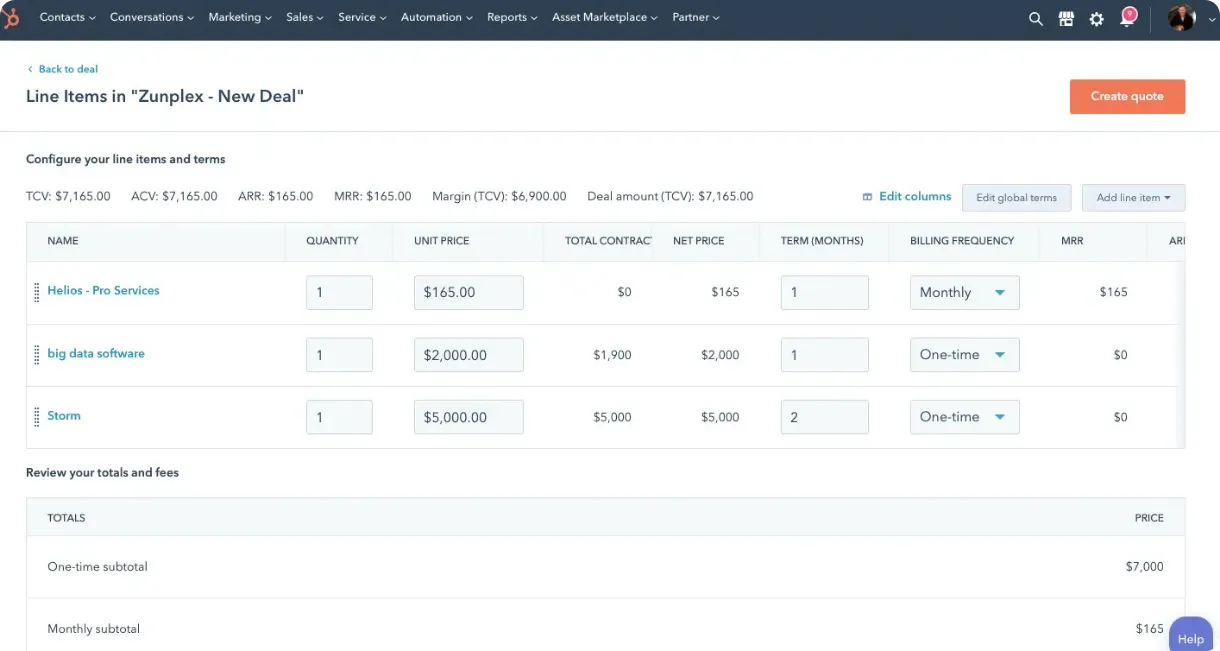
HubSpot has been steadily expanding its CPQ capabilities as part of its Sales Hub and the newer Commerce Hub. Out of the box, HubSpot’s CPQ (available in Pro and Enterprise tiers of Sales Hub or Commerce Hub) lets you create professional quotes with a product library, apply discounts with approval workflows, collect e-signatures, and even accept payments from inside HubSpot.
In practical terms, a sales rep can pull up a deal in HubSpot, click “Create Quote,” configure the line items and pricing, send the quote to the client for e-signature, and even receive payment, without using any external tools.
HubSpot CPQ features:
- Product catalog and pricing rules: You can set up a library of products/services with predefined prices, descriptions, and terms. This ensures quotes are consistent and accurate.
- Built-in quote templates: The system provides customizable quote templates (with your branding) to generate polished proposals quickly.
- Approval workflows: For discounts or special terms, HubSpot CPQ supports conditional approvals (e.g. require manager approval if discount > 20%). This enforces guardrails and speeds up deal approvals.
- E-signature and payments: Every quote can include an electronic signature option and HubSpot’s native payment links, so customers can sign and pay on the spot. This closes the loop from quote to cash without leaving the CRM.
- Subscription and billing integration: After acquiring Cacheflow in late 2024, HubSpot added subscription management and recurring billing into Commerce Hub. This means HubSpot CPQ can now handle recurring revenue (subscriptions, payment schedules, renewals) internally, and it integrates with accounting systems to log deals in tools like QuickBooks or NetSuite.
Strengths: CPQ in HubSpot
- Easy to use + unified with CRM data (quotes live where reps already work)
- Convenient for SMBs on HubSpot — no extra CPQ tool to buy, implement, or integrate
- User-friendly interface (low training overhead, fast adoption)
- Cost-effective entry point
- Basic quoting available even in free CRM
- Advanced CPQ included with Sales Hub Pro ($95/seat) and Enterprise ($140/seat)
- Good value vs standalone CPQs that can run thousands per month
Limitations: CPQ in HubSpot
- Built for simplicity and standard use cases, but not designed for highly complex quoting
- Limited configuration logic and product rules
- Strong for straightforward quotes
- Less suited to intricate bundles or multi-tier pricing out of the box
- May fall short for advanced CPQ workflows
- Build-to-order configurations
- Guided selling questionnaires
- Dynamic pricing using custom formulas
- Subscriptions + usage-based billing are “good enough” for some cases, but complex scenarios often need more tooling
- Complex usage metering
- Advanced proration rules
- Revenue recognition policies
- Best fit: SMBs with relatively standard pricing and a need for fast quoting/approvals/payments
- Watch-out: complex deals can hit flexibility limits quickly
But if you require more sophisticated CPQ functionality, the good news is there are several CPQ for HubSpot alternatives that integrate nicely while offering those advanced features.
13 criteria to consider when evaluating the best CPQ solution for HubSpot
Core HubSpot fit (non-negotiables)
If HubSpot is your system of record, your CPQ must behave like a natural extension of it. The best CPQ for HubSpot works the way HubSpot teams actually work.
- Native HubSpot integration
- Can reps create and manage quotes inside HubSpot (deal record or embedded UI)?
- Bi-directional sync for:
- Deals, products, line items
- Quote status (draft, sent, signed)
- Deal amount / ARR / MRR fields
- Supports HubSpot workflows (e.g. move deal to Closed Won on signature)
- Data model alignment
- Works cleanly with HubSpot objects (Deals, Companies, Contacts, Products)
- No brittle field mapping or manual reconciliation
- Handles multiple pipelines and deal types without hacks
CPQ depth and flexibility
This is where most teams discover the limits of native HubSpot CPQ: the moment deals stop being simple.
As pricing models, bundles, discounts, and approvals get more complex, CPQ depth becomes the difference between moving fast and constantly working around your tools.
- Pricing and configuration flexibility
- Supports:
- Tiered pricing
- Volume / graduated pricing
- Bundles and add-ons
- Discounts with guardrails
- Ability to enforce pricing rules (not just free-text line items)
- Approval and governance
- Multi-step approval workflows (not just “manager approves everything”)
- Conditional approvals (e.g. discount %, deal size, contract length)
- Clear audit trail for Finance and RevOps
- Quote experience (internal + customer-facing)
- Fast quote creation for reps
- Clean, professional quote layout for buyers
- Support for:
- E-signature
- Expiry dates
- Redlining / revisions (if needed)
Revenue and finance readiness (often missed)
Most CPQ evaluations stop at “can sales send a quote,” but that’s only half the story. If a CPQ doesn’t carry clean, structured data into billing, revenue, and reporting, Finance ends up fixing deals long after they’re signed, turning growth into operational drag.
- Billing and monetization support
- Does it stop at “quote signed” or go further?
- Support for:
- Subscriptions
- Usage-based pricing
- Hybrid models
- Amendments, renewals, expansions
- Handoff to billing and finance
- Automatic creation of billing artifacts from signed quotes
- No re-keying into a separate billing system
- Handles proration, mid-cycle changes, and upgrades cleanly
- Revenue accuracy, and reporting
- Quote data flows into:
- Forecasting
- ARR / MRR reporting
- Finance systems
- Prevents revenue leakage from custom deals and exceptions
Scale, speed, and operability
A CPQ should accelerate your sales motion, not slow it down as the business grows. This section focuses on whether a solution can be implemented quickly, adopted easily by reps, and continue to perform as deal volume and complexity scale.
- Time to value
- Can be implemented in weeks, not months
- No heavy professional services dependency
- RevOps can configure without engineering
- Usability and adoption
- Reps actually want to use it
- Minimal training required
- Doesn’t slow down deal velocity
- Scalability
- Handles:
- Growing product catalogs
- Multiple currencies
- Multiple entities or regions
- Doesn’t break when deal complexity increases
Strategic considerations
Beyond features, choosing a CPQ is a long-term platform decision that shapes how your revenue engine evolves. This section looks at whether a vendor’s focus, roadmap, and ecosystem alignment will support your business not just today, but as pricing models, go-to-market motion, and scale change over time.
- Product focus on CPQ
- CPQ is a core product, not an afterthought
- Clear roadmap aligned with modern pricing models
- Actively maintained, not stagnant
- Total cost of ownership
- Transparent pricing
- Avoids:
- Per-seat CPQ sprawl
- Hidden implementation fees
- Needing multiple tools to “fill the gaps”
Can this CPQ handle the most complex deal we expect to sell, without breaking HubSpot or creating manual work for Finance?
Best CPQ solution for HubSpot: 5 options for modern sales teams
There are dozens of CPQ tools out there, but only a subset integrate well with HubSpot. Alguna, DealHub, PandaDoc, Maxio, and chargebee are all candidates for best CPQ for HubSpot, but they serve different needs.
Alguna: Best CPQ solution for HubSpot for SaaS
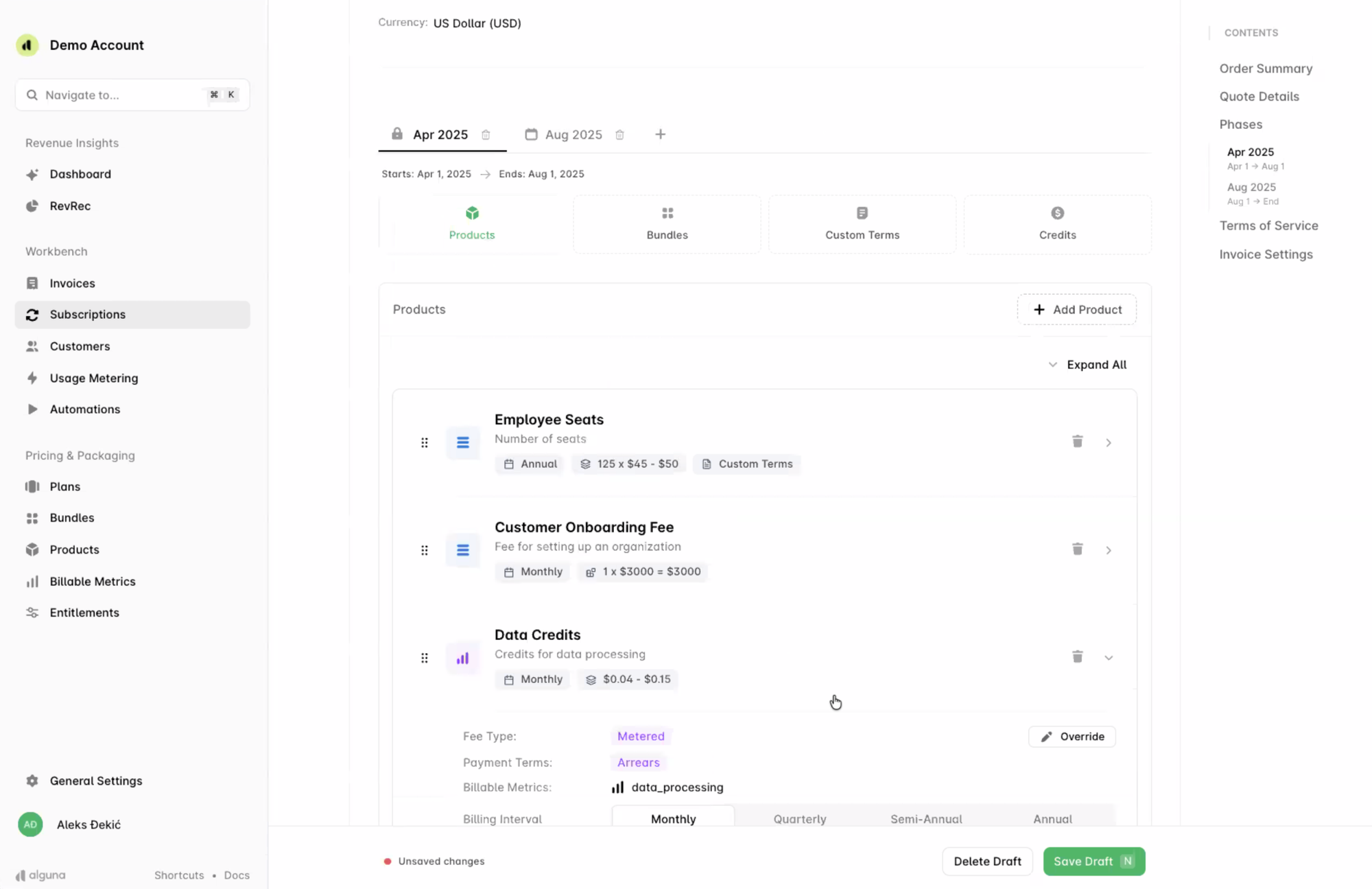
Purpose-built for modern SaaS monetization and AI pricing strategies, Alguna stands out by unifying CPQ, billing, and revenue workflows end-to-end, eliminating handoffs between sales and finance.
- Strengths and differentiators:
- Alguna is a modern no-code CPQ and quote-to-cash platform built for SaaS and AI companies. It unifies CPQ with billing, usage metering, invoicing, collections and rev rec in a single source of truth.
- Alguna’s pricing engine handles any pricing model. That includes flat, tiered, usage, hybrid and multi-attribute models out of the box.
- It includes built-in e-signature and templates for SaaS/AI bundles, letting teams quote, sign, and invoice without leaving the platform.
- HubSpot integration:
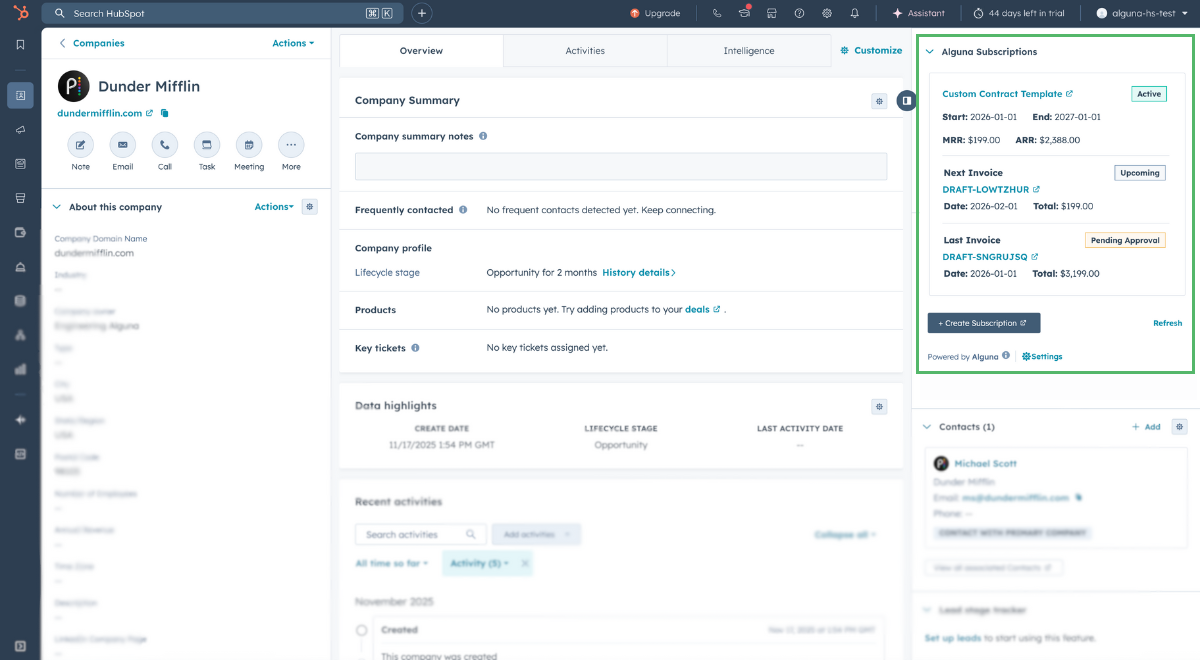
- Alguna offers a native HubSpot integration with bi-directional data sync. This means new quotes in HubSpot update Alguna and vice versa. This deep CRM integration means opportunities in HubSpot can immediately pull in Alguna quotes or pricing.
- Alguna's integration engineers ship updates weekly.
- CPQ functionality:
- The CPQ engine is highly flexible. You can mix subscriptions, one-time fees, and usage services in a single quote.
- Pricing rules can encode discounts, ramps, and complex bundles via a no-code interface.
- Choose any billing interval, broken down by product.
- Approval workflows are configurable per product or customer.
- Billing and RevOps fit:
- Alguna’s standout feature is built-in billing and revenue operations. Quotes flow automatically into Alguna Billing and Revenue Recognition, no separate integration needed.
- It supports multi-currency and multi-entity subscriptions, proration for mid-term changes, usage tracking and overages. Real-time sync shows revenue impacts of terms.
- RevOps teams get automated dunning and compliance for ASC 606/IFRS15 as part of the workflow.
- User experience:
- Sales reps configure and send quotes directly in Alguna’s portal. It takes minutes to set up even the most complex quotes and you'll see a live pricing calculation.
- Once the quote is finalized, you can imediately send it for signature. In-line e-signature means customers can accept and pay on the spot.
- The UI is modern and intuitive, aimed at non-technical users.
- Implementation:
- Alguna is designed for quick roll-out and implementation takes between 2-4 weeks depending on your existing setup.
- Out-of-the-box templates for SaaS bundles speed initial setup.
- No coding is needed to set up products or rules.
- Best for:
- Best for mid-market/enterprise SaaS or AI companies that need complex pricing (usage, hybrid, multi-attribute) and want a single platform from quote to cash.
- Great for teams frustrated with disjointed CPQ+billing stacks, or with significant subscription and usage billing needs.
- Pricing:
- Free tier and startup pricing available
- Paid plans from $699 per month
Quoting is only the first step. If your team is still re-creating deals in billing, fixing proration, or reconciling revenue after the contract is signed, your CPQ isn’t doing its job.
Alguna is built to take you from quote to revenue without handoffs, spreadsheets, or cleanup. Book your 30-minute personalized demo and we'll show you how.
DealHub: HubSpot CPQ integration for collaborative sales
- Strengths and differentiators:
- DealHub is a CPQ plus deal orchestration platform. Beyond quoting, it includes contract lifecycle management (CLM) and digital DealRooms to collaborate with buyers.
- Its big differentiators are guided selling playbooks (step-by-step flows for reps) and the ability to manage complex, multi-stakeholder deals.
- HubSpot Integration:
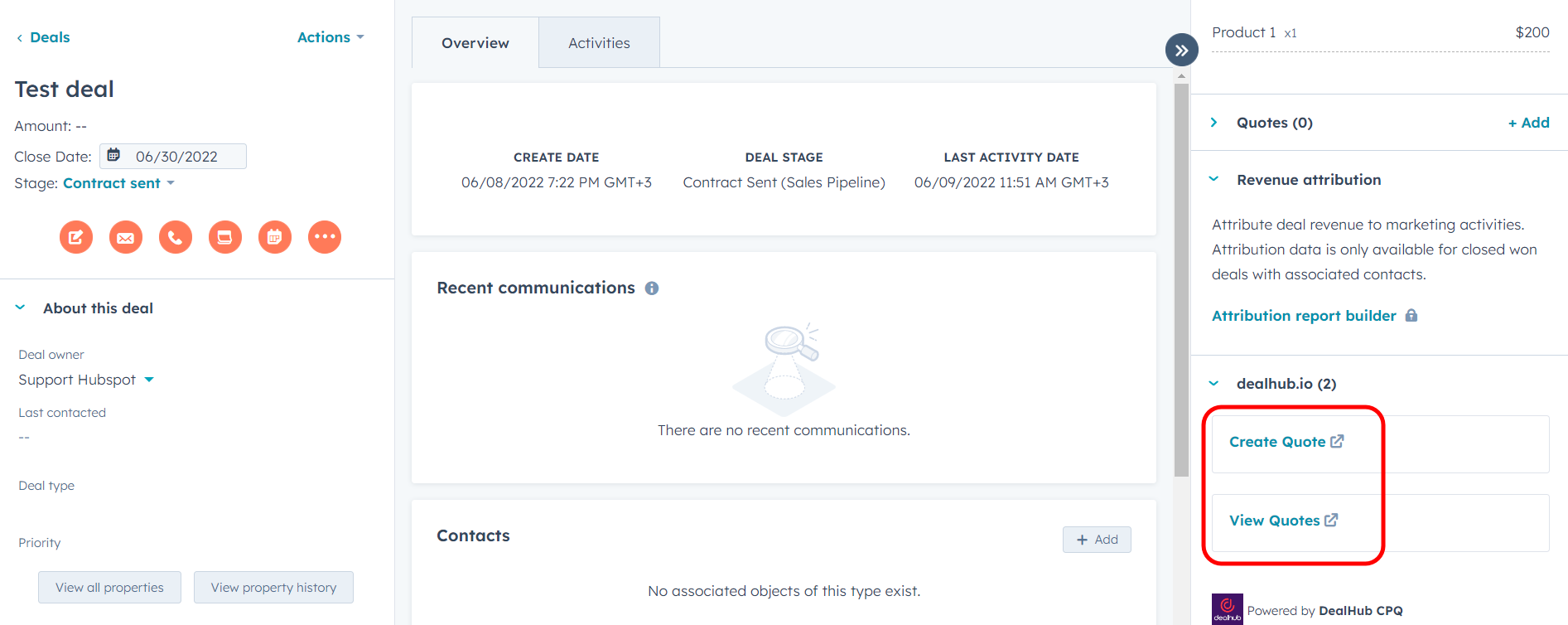
- DealHub provides a native HubSpot app. Deal data syncs in real time so that quote line items, pricing and contract status appear in HubSpot.
- All DealHub interactions (quote creation, approvals, CLM editing) can be launched from inside HubSpot, keeping reps in one environment.
- CPQ functionality:
- DealHub supports dynamic pricing rules, product bundles, volume discounts, and complex multi-option configurations.
- The guided selling engine drives reps through configurable question trees to build correct quotes that follow company pricing strategy. Rich approval workflows ensure outliers route to managers.
- DealHub also automates proposal and quote documents so reps can generate branded PDFs or presentations.
- Billing and RevOps fit:
- DealHub has its own Subscription Management and Billing modules. Quotes can turn into contracts that auto-schedule invoices, handle renewals/co-terming, and consolidate revenue data.
- DealHub acquired Subskribe in November 2025, showing a push into billing. However, usage-based pricing often needs external handling.
- User experience:
- The DealHub CPQ interface is modern and sales-friendly. Reps use interactive playbooks (guided selling) that validate selections and automatically apply discount rules.
- The digital DealRoom feature lets buyers interact with quotes, contracts, and content collaboratively.
- Implementation:
- DealHub emphasizes fast deployment. It is “no code” (config via UI) and many customers go live in weeks.
- Setup involves mapping products and rules, but templates and pre-built workflows ease configuration.
- The platform’s complexity means initial training is needed, but adoption is usually smooth due to the intuitive UI.
- Best for:
- Mid-market to enterprise B2B firms, especially SaaS or services, that run complex, multi-stakeholder sales processes.
- DealHub is strong for organizations with heavy sales operations or RevOps teams, where deal collaboration (DealRooms) and CLM integration matter.
- Pricing:
- Custom. DealHub doesn't offer transparent pricing, but expect to pay minimum $10,000 per year.
PandaDoc CPQ in HubSpot: Best for small teams with document-centric quoting
- Strengths and differentiators:
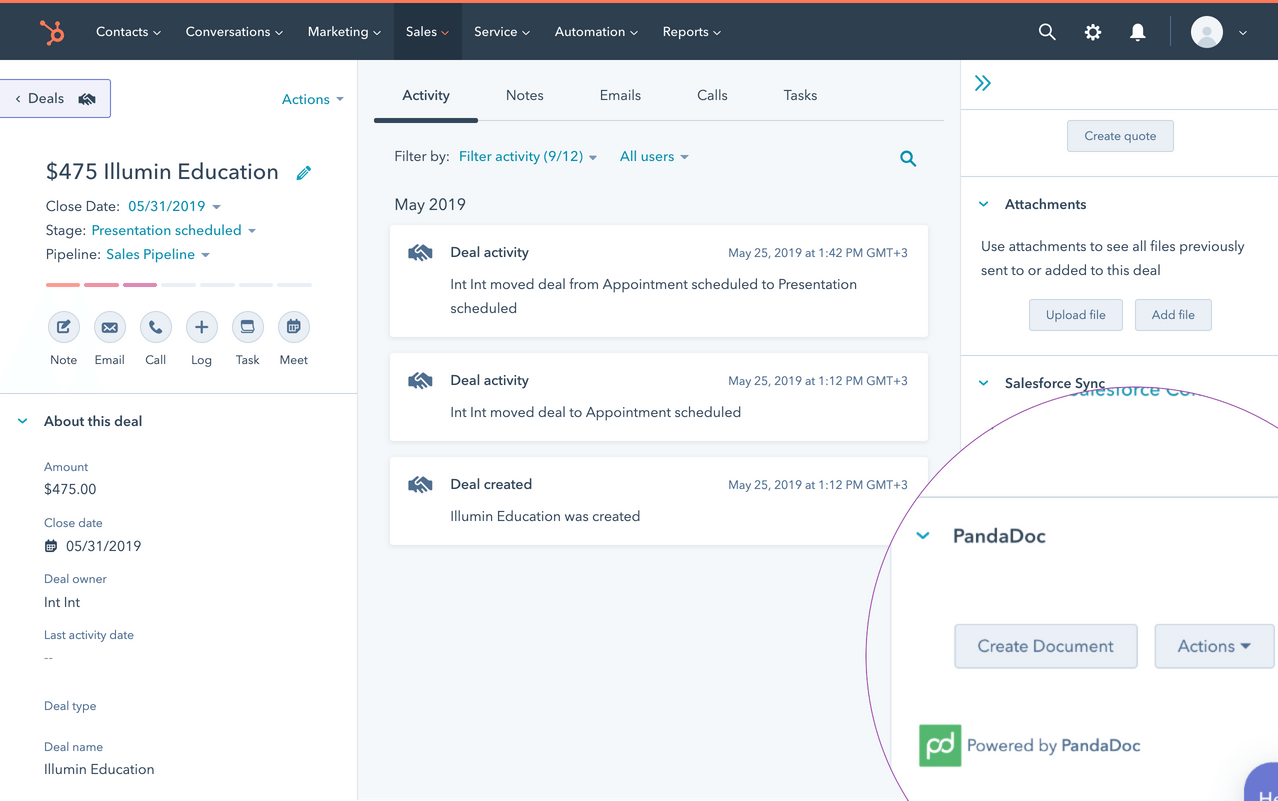
- PandaDoc’s advantage is that it is the first native CPQ app built inside HubSpot. It seamlessly unites CPQ with document generation, e-signature and payments in a single HubSpot-embedded workflow.
- Guided selling and an advanced rules engine ensure quotes respect pricing policies and upsell rules. PandaDoc’s focus on rich templates and in-app editing yields polished proposals quickly.
- HubSpot integration:
- PandaDoc’s CPQ is fully embedded in HubSpot Sales Hub. From a HubSpot deal, reps launch PandaDoc to add line items (sourced from HubSpot’s Product Library) and generate a quote document, all without leaving HubSpot.
- The two-way sync is robust: changes in HubSpot flow to PandaDoc templates, and completed quotes sync back as HubSpot events (products, pricing, statuses). Customers can finalize payment links or sign contracts right inside the HubSpot deal record.
- CPQ functionality:
- PandaDoc’s CPQ covers pricing rules, bundling and guided selling. You define custom playbooks (question flows) and rules such as auto-adding add-ons or discounts based on product selections.
- When sellers configure a deal, the system enforces approved pricing and discount policies. It supports multi-product quotes, variable durations and dollar or percentage discounts.
- Approvals can be routed via PandaDoc’s workflow if needed. The CPQ output is an editable proposal document and line items from the quote auto-populate PandaDoc’s tables and text.
- Billing and RevOps fit:
- PandaDoc itself can handle payments via e.g. Stripe, and can embed checkout links or payment tables in proposals.
- After signature, the deal’s final terms remain in HubSpot, but there is no built-in invoicing or revenue recognition engine.
- In practice, PandaDoc simplifies the quote-to-signature part of quote-to-cash; subscription billing or detailed recognition still requires a separate system. It does support quote types for renewals and amendments, but those generate new PandaDoc quotes rather than automating subtleties like proration internally.
- User experience:
- The UX is a major selling point. Sales reps build quotes using a familiar HubSpot interface; selecting products and quantities instantly previews the proposal.
- PandaDoc provides thousands of content-rich templates to craft polished documents. Because it’s native to HubSpot, reps never open another app. Analytics and engagement tracking on proposal views are also accessible.
- Implementation:
- Setup is fast. Installing the HubSpot app and enabling CPQ takes minutes. Adding product catalogs and building the first template can be done in hours and reps can start generating quotes on the same day.
- No coding or complex backend config is needed; admins use config menus in PandaDoc and HubSpot. ROI is quick, especially since it leverages the existing HubSpot install.
- Best for:
- Starups and SMBs that already use HubSpot and need a modern document-centric quoting solution will love PandaDoc.
- It’s a fit for orgs looking to consolidate quoting, contracts, and e-signature in one place.
- Pricing:
- Tiered based on seats, starting at $49/user per month.
Maxio CPQ in HubSpot: Best for finance-led teams
- Strengths and differentiators:
- Maxio is an end-to-end quote-to-revenue platform geared to subscription businesses. Its CPQ is enterprise-grade: it captures detailed quote data (products, terms, clauses) as structured records.
- It excels at renewals, amendments and expansion – automatically co-terming contracts and proration so revenue isn’t lost. It also provides live revenue forecasting from quotes, clean data sync, and compliance (built-in clauses, ASC 606).
- HubSpot integration:
- Maxio offers a bi-directional HubSpot integration.
- The Maxio product catalog is synced into HubSpot’s product library, so reps can build line-item quotes using the full suite of Maxio pricing components.
- CPQ functionality:
- Maxio CPQ is designed for complex scenarios. Prebuilt quote templates allow combinations of subscriptions, one-time fees, usage components, and discounts.
- You set up approval workflows and clause libraries so any nonstandard terms route to finance or legal.
- The CPQ also supports advanced pricing logic (tiered usage, discounts, frequency) and custom rate tables. Bundling is handled via product catalogs and components.
- Billing and RevOps fit:
- Billing and RevRec are built into Maxio’s core. When a quote is signed, Maxio automatically pushes contract terms to its billing system (native or integrated). This means invoices and revenue schedules mirror the quote exactly, preventing leakage.
- Mid-term amendments, renewals and expansions process correctly (with proration and co-terming).
- Maxio also handles multi-entity consolidation and GAAP/IFRS revenue recognition.
- User experience:
- The UX is powerful but more enterprise-focused. Sales reps may use HubSpot or a Maxio interface; the emphasis is on accuracy and approval rather than speed.
- Quote configuration is guided but with many rule-driven steps (often set by operations/finance).
- Implementation:
- Implementation is significant. Maxio (SaaSOptics) historically requires a multi-week to multi-month setup: product/pricing import, revenue rules, and integration mapping.
- Finance and IT typically lead deployment. Once live, ongoing maintenance is moderate since many features auto-handle contract logic. The time to initial ROI is longer compared to pure CPQs, but the financial controls pay off for complex businesses.
- Best for:
- Mid-market to large SaaS companies with sophisticated subscription models are the core audience.
- If your business has multi-year contracts, usage ramps, global entities, or strict compliance needs, Maxio shines.
- Well-suited for organizations that value financial rigor (forecasting, audit trails) over a lightweight quoting process.
- Pricing:
- Paid plans start from $599/month for up to $100,000 in billings.
Chargebee CPQ in HubSpot: Best for subscription-focused SaaS
- Strengths and differentiators:
- Chargebee is a leading subscription billing and RevOps platform that has added a CPQ extension for HubSpot.
- Its strengths lie in flexible pricing models (usage-based, tiered, flat, and ramp schedules) and in seamlessly bridging CRM to billing.
- Chargebee CPQ lets sales teams quote subscriptions in HubSpot with real-time price calculation from Chargebee’s catalog. It is built around the subscription lifecycle, so it excels at creating and amending subscriptions, rather than handling complex one-off products.
- HubSpot integration:
- Chargebee’s integration allows HubSpot deals to become Chargebee customers, quotes, and subscriptions.
- The HubSpot app syncs the product catalog (plans, add-ons, charges) so reps can add subscription items directly in HubSpot.
- Deals in HubSpot can automatically generate a Chargebee subscription when marked won, with no need to leave CRM. The integration also brings subscription status and events (invoices, payments) back into HubSpot for sales visibility.
- CPQ functionality:
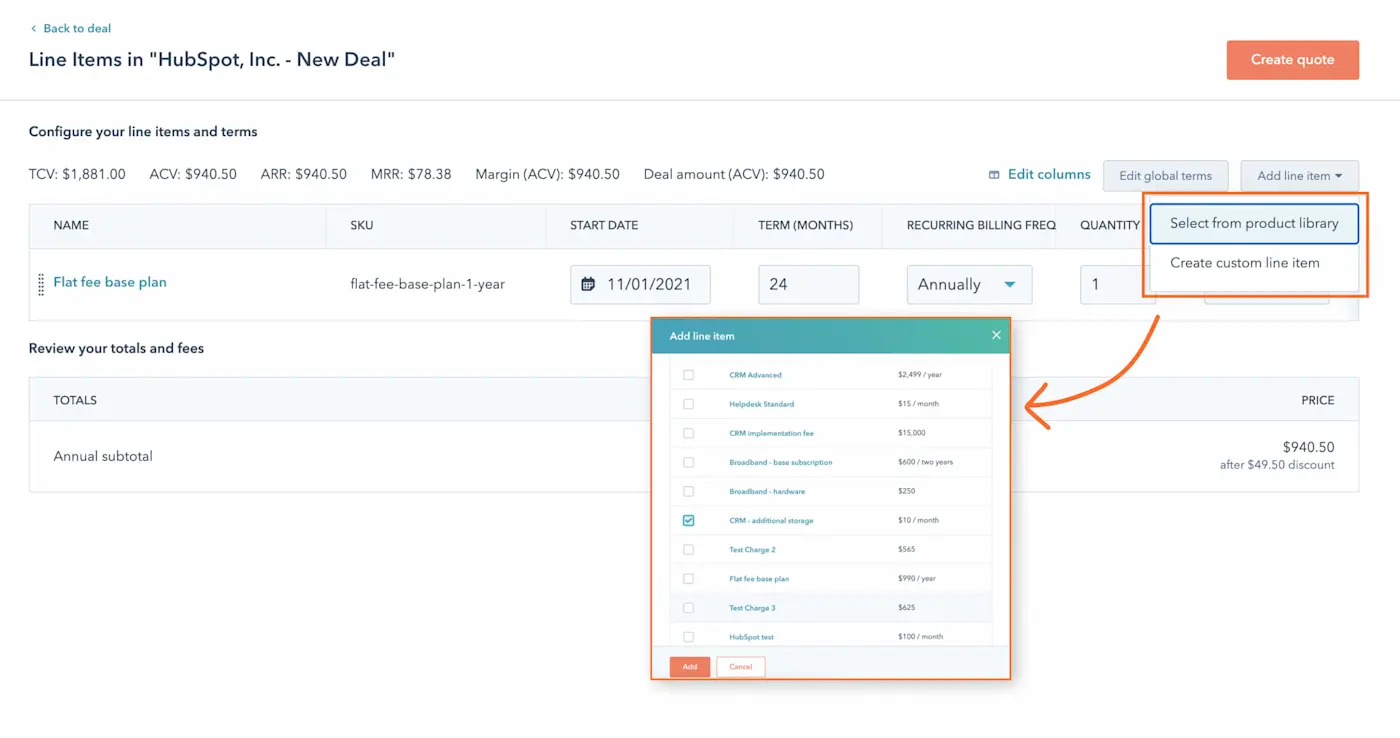
- Within HubSpot, the Chargebee CPQ adds a “Manage Quote” interface on the deal. Sales reps can build quotes that include new subscriptions, amendments or renewals.
- Pricing rules from Chargebee apply (including usage tiers, overages and discounts).
- Quotes generated are accurate and compliant, but the end-user interface is simpler than full CPQs, it primarily creates a Chargebee quote record.
- Billing and RevOps fit:
- Chargebee’s core billing engine means any HubSpot quote seamlessly becomes an actual recurring subscription in Chargebee. It handles renewals, proration, coupons, and integrates with payment gateways out-of-the-box. It also automatically triggers revenue schedules for GAAP recognition.
- While not a CPQ-first vendor, Chargebee’s quote-driven approach ensures that Salesforce/HubSpot deals flow directly into subscription billing, closing the quote-to-cash loop for typical SaaS contracts.
- User experience:
- The UX is functional but not as rich as document-centric systems. Reps remain in HubSpot and click a side-panel to “Manage Quote (Chargebee)”. They see a line-item editor with fields like quantity, price, and dates, and can preview invoices.
- It’s straightforward but lacks the polish of PandaDoc templates. On the positive side, customers get self-serve invoices and payment links via Chargebee after quoting.
- The quoting interface benefits from HubSpot’s familiarity, but ultimate acceptance and payments happen through Chargebee’s pages.
- Implementation:
- Setting up Chargebee CPQ involves configuring products/plans in Chargebee and linking to HubSpot (no custom code). It generally takes a few weeks.
- There’s no complex CPQ modeling beyond linking fields. Most of the heavy lifting is on the financial side to set up plans, tax, and dunning in Chargebee.
- Once connected, sales can quote and create subscriptions almost immediately. Time-to-value is relatively quick for standard subscription businesses.
- Best for:
- Mid-market SaaS companies that are subscription-first and need flexible billing.
- If you already use HubSpot CRM and Chargebee for billing, the CPQ integration is a natural fit to “close the loop” on quote-to-cash.
- Customers who prioritize robust revenue ops (dunning, tax) but still want quoting in CRM will appreciate Chargebee.
- Pricing:
- Identical to Maxio, Chargebee's paid plans start from $599 per month for up to $100k in billings.
Choosing the right HubSpot CPQ solution (and why Alguna wins)
Implementing a CPQ solution for HubSpot is a powerful step toward optimizing your sales funnel and revenue operations.
If your needs are modest and your team is small, you might start with HubSpot’s built-in quoting or a lightweight add-on like PandaDoc. But if you’re a growing Revenue Operations-driven organization looking to streamline and scale your quote-to-cash process, you need a solution that goes above and beyond, that’s where Alguna comes in.
Configure complex deals without errors, send out polished quotes in minutes, and have every quote accepted turn into an active subscription or order without a single spreadsheet or manual data transfer.
It’s about enabling your Sales and RevOps teams to operate at peak efficiency, with clarity and control over the entire process.
Don’t let legacy quoting tools or clunky processes slow down your sales momentum.
Alguna connects HubSpot CPQ to billing and revenue in one flow.
Book a demo to see how complex deals move from quote to invoice to revenue without any manual work.