Here's a scenario that plays out more often than anyone in finance likes to admit: a 7-figure deal closes, the champagne gets opened, and then someone in billing realizes the contract has 17 line items, 5 pricing tiers, 2 usage components, and multiple payment terms that doesn't match anything in the current system.
The sales team moves on. ✌️
Billing scrambles. 😰
And by the time the invoice actually lands with the customer, it's late, it's wrong, or both.
Welcome to another day of enterprise billing.
In this post, we'll cover what enterprise billing actually involves, why it tends to break down, the most common pain points finance teams face, and what it looks like to automate enterprise billing processes in a way that actually works.
Plus, we'll introduce you to modern enterprise billing platforms that will make turn the aforementioned scenario into a distant memory.
What is enterprise billing?
Enterprise billing is distinct from standard SaaS billing in a few important ways. While a straightforward SaaS subscription might involve one customer, one price, and one recurring charge, enterprise billing often involves:
- Multiple products or services bundled under a single contract
- Custom pricing that varies by volume, usage, or negotiated terms
- Multi-currency transactions across different geographies
- Complex approval workflows before an invoice can go out
- Revenue recognition rules that must comply with ASC 606 or IFRS 15
- Lengthy net payment terms (net 60, net 90, or longer)
Think of it this way: if standard billing is a vending machine (you put in the money, you get the product), enterprise billing is closer to a bespoke catering contract for a series of corporate events. The menu changes, the headcount fluctuates, some items get swapped at the last minute, and the invoice has to reflect all of it accurately, all while the client's accounts payable team has specific formatting requirements you need to meet or they won't process it.
What is enterprise SaaS billing?
Enterprise SaaS billing is the specific application of enterprise billing principles to software-as-a-service products. It covers how SaaS companies invoice enterprise customers for platform access, user seats, usage consumption, and any professional services delivered alongside the product.
What makes it distinct from standard SaaS billing is the layer of contract complexity enterprise deals introduce. Where a self-serve SaaS customer pays a fixed rate for a fixed tier, an enterprise customer typically negotiates custom pricing, commits to minimum spend thresholds, and expects invoicing to reflect a mix of flat fees, usage overages, and add-ons, all tied to specific contractual terms rather than a default rate card.
Why enterprise billing gets complicated
The complexity doesn't appear overnight. It tends to accumulate as a company grows and starts landing larger customers.
Here's what typically drives it.
Custom contracts create billing exceptions at scale
Enterprise deals are rarely off-the-shelf. Sales teams negotiate custom terms to win business, which means billing teams are left managing a patchwork of one-off arrangements. One customer might pay quarterly, another annually. One has a minimum commitment with an overage clause, another has a flat cap. Each contract creates its own logic, and that logic has to be executed correctly every billing cycle.
When a company has 5 enterprise customers, this is manageable. When it has 50, or 500, manual processes start to buckle.
Usage-based components add real-time variability
More enterprise contracts now include some form of consumption pricing, whether that's API calls, active users, data processed, or hours used. This is great for aligning value to price, but it means billing teams need reliable data pipelines to accurately capture and report usage before an invoice can be generated.
Disparate systems don't talk to each other
A typical mid-market or enterprise company might have a CRM, a contract management tool, an ERP, a revenue recognition platform, and a billing system—all running separately.
When a deal closes in the CRM, that data has to flow accurately into billing. When billing generates an invoice, that data has to flow into the ERP. When revenue is recognized, it has to be reconciled against what was billed.
Finance and ops teams are often underwater
Billing managers at growing companies often describe the same experience: the first week of every month is chaos. Invoices need to go out, queries need to be resolved, and disputes from the prior month are still sitting in someone's inbox.
There's rarely time to step back and fix the quote to cash process itself, because the process is all-consuming.
The 4 most common enterprise billing pain points
Before exploring solutions, it's worth naming the specific problems that finance leaders tend to encounter most often.
If any of these sound familiar, you're not alone.
1. Invoice errors and disputes
Even small errors on enterprise invoices can trigger lengthy disputes. A miscalculated usage figure, a missing line item, or an incorrect PO number can delay payment by 30 to 60 days while both sides investigate.
At scale, these disputes represent significant working capital risk.
2. Revenue leakage
Revenue leakage refers to the gap between what you're contractually entitled to bill and what you actually bill. It happens when teams miss usage overages, forget to apply price escalation clauses, or fail to invoice for professional services delivered.
Studies suggest B2B companies lose an average of 1 to 5% of revenue annually to billing-related leakage, a figure that becomes material quickly at enterprise scale.
3. Slow invoice-to-cash cycles
The longer it takes to get an accurate invoice in front of a customer, the longer your cash conversion cycle. Enterprise customers often have their own internal approval processes, which means a late invoice doesn't just sit for the net term, it sits for the net term plus however long it takes their AP team to route and approve it.
Compressing the time between deal close and invoice delivery directly improves cash flow.
4. Lack of visibility for leadership
CFOs and controllers often describe a common frustration: they can tell you revenue to the nearest million from the ERP, but they can't easily tell you which invoices are overdue, which customers have open disputes, or what's sitting uninvoiced in the pipeline.
Billing data tends to live in siloed systems, making it difficult to get a real-time picture of financial health.
What good enterprise billing looks like in practice
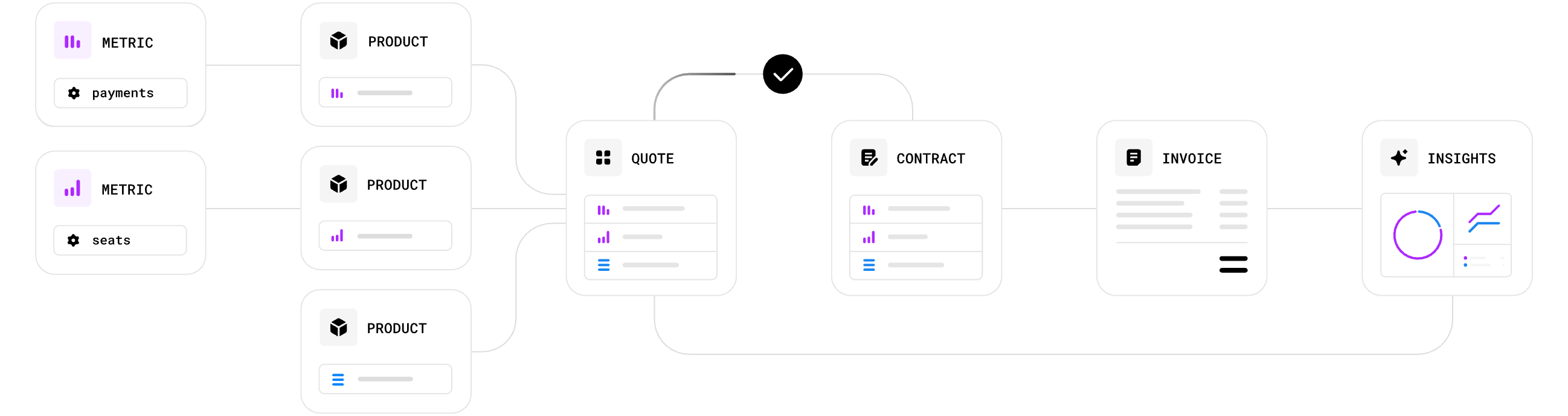
When enterprise billing is working well, a few things become true across the organization:
- Finance closes faster because billing data is clean and reconciliation is straightforward
- Sales and CS have visibility into billing status without having to ask finance
- Customers receive accurate invoices on time, which reduces disputes and accelerates payment
- Revenue leakage is minimal because nothing falls through the cracks between contract and invoice
- The billing team is proactive rather than reactive, spending time on analysis rather than data entry
None of this requires a perfect system from day one. Most companies get there iteratively, starting with the processes that cause the most pain and working outward from there.
How to automate enterprise billing processes
Automating enterprise billing isn’t about replacing your finance team, it’s about removing the manual, error-prone work so they can focus on what actually requires human judgment.
The biggest wins typically come from connecting your contract and CRM data directly to billing, automating invoice generation and delivery, and building rules-based workflows for approvals, collections, and revenue recognition.
It comes down to removing the manual, error-prone steps so your team can focus on judgment calls that actually require a human.
Most companies approach this in three layers.
- Data capture and synchronization: Contract terms, pricing logic, and usage data need to flow automatically into your billing system the moment a deal closes. If anyone is copying information from a contract PDF into a spreadsheet, that’s where automation should start.
- Invoice generation and delivery: Once billing logic is in the system, invoices can be generated automatically at the right time, in the right format, with customer-specific requirements (PO numbers, delivery preferences, approval routing) handled without anyone having to remember them.
- Collections and cash application: After the invoice goes out, automated reminders, escalation sequences, and cash matching rules reduce the manual burden on collections and reconciliation. Payment follow-up runs on rules you define, not on whoever has bandwidth that week.
Companies that automate all three layers typically see a meaningful reduction in days sales outstanding (DSO) within the first two quarters, not because they’re chasing harder, but because invoices are accurate, timely, and easy for customers to process.
Choosing your enterprise billing platform
Once you understand what you’re trying to fix and what to automate, the next question is what kind of software can actually automate your billing processes, end-to-end.
The enterprise billing software market has grown considerably over the past few years, and the options range from standalone invoicing tools to fully integrated quote-to-cash software.
There are a few questions worth asking before you start evaluating tools.
Does it handle your pricing models?
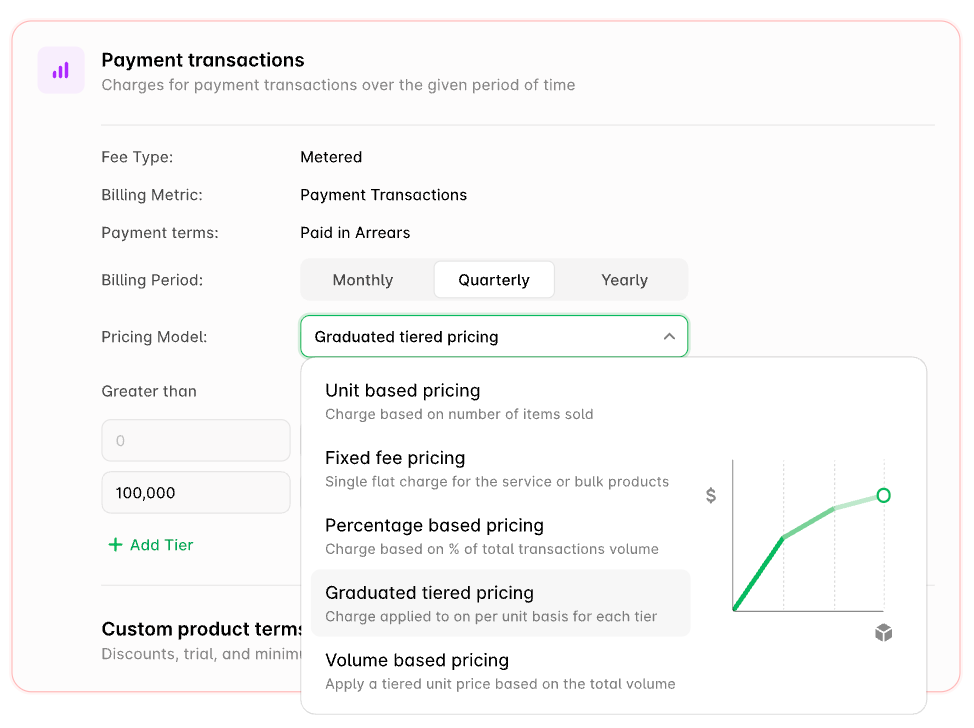
Not all billing platforms handle all pricing structures equally well. A tool built primarily for subscription billing might struggle with complex usage-based models or milestone-driven professional services contracts.
Before evaluating any software, list out every pricing model you currently use or plan to use, and verify the platform can handle each one natively, not through workarounds.
How does it integrate with your existing stack?
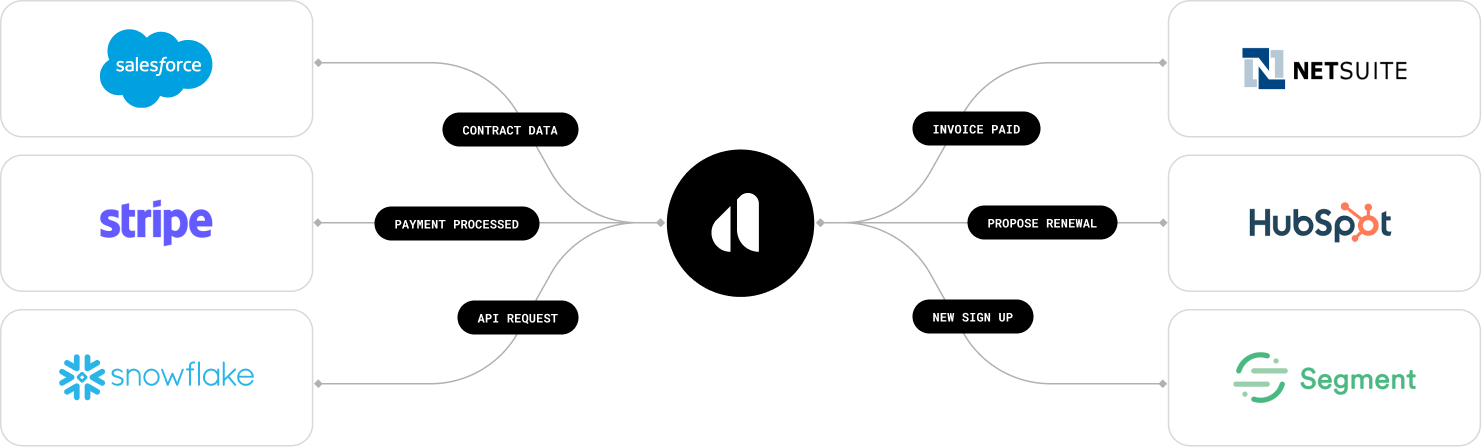
A billing platform is only as useful as the data flowing into it. Check what native integrations exist with your CRM, ERP, and contract management tool. If the integrations are thin or require heavy custom development, factor that cost into your evaluation.
The goal is reducing manual data transfer, not just moving it to a different step in the process.
Can it scale with your contract complexity?
Flexible contract modeling in Alguna, flowing seamlessly into billing.
Some billing tools work beautifully for a few hundred customers but start to show cracks at a few thousand. Others handle volume well but can’t accommodate the kind of per-customer billing logic that enterprise deals require.
It’s worth asking vendors specifically how they handle exceptions, because in enterprise billing, exceptions are the norm.
Does it support your revenue recognition requirements?
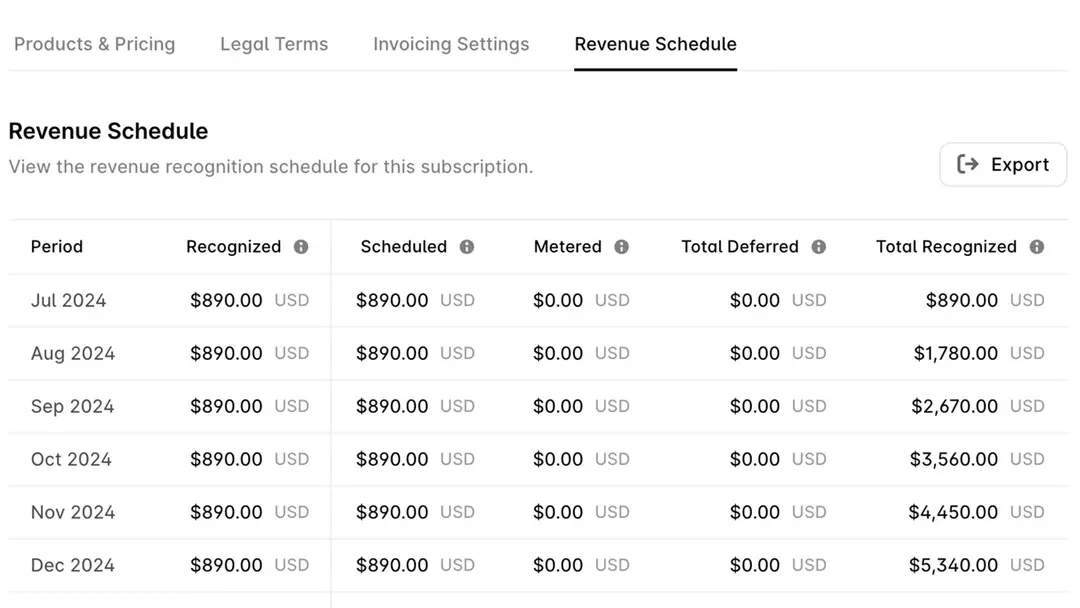
For teams operating under ASC 606 or IFRS 15, billing and revenue recognition are deeply intertwined. A platform that supports both in a unified data model will save significant reconciliation time at close.
If a tool handles billing but treats revenue recognition as an afterthought or a separate module, scrutinize how the two systems talk to each other before committing.
If you’re in the early stages of evaluating your options, we’ve put together a detailed breakdown of the enterprise billing system landscape, including what categories exist, how they differ, and what to look for depending on your company’s stage and billing complexity.
Frequently asked enterprise billing questions
What’s the difference between billing and invoicing in an enterprise context?
Billing refers to the end-to-end process of calculating what a customer owes based on their contract terms and usage. Invoicing is the specific act of generating and sending the document that requests payment.
In practice, the two are closely connected, but they’re not the same thing. You can have a billing process that’s accurate but slow to invoice, or an invoicing process that’s fast but pulling from incorrect billing data.
How does enterprise billing differ from SMB billing?
The core mechanics are similar, but enterprise billing involves a level of per-customer customization that SMB billing typically doesn’t. Enterprise deals come with negotiated pricing, custom contract terms, usage thresholds, multi-entity structures, and procurement requirements, each of which needs to be reflected accurately in every invoice.
What causes revenue leakage in enterprise billing?
The most common causes are missed usage overages, unapplied price escalation clauses, unbilled professional services, and errors introduced during manual data entry.
When should a company invest in a dedicated enterprise billing platform?
The clearest signal is when your current process, whether that’s a combination of spreadsheets, your CRM, and your accounting tool, requires significant manual effort to produce accurate invoices.
What is a billing period, and how do you choose the right one?
A billing period is the timeframe covered by a single invoice, the window during which usage is measured or services are delivered before the customer is charged. The right cadence depends on your contract structure and your customer’s preferences.
Practical next steps for improving your enterprise billing processes
You don’t need to fix everything at once. Most finance and billing teams make the most progress by starting with the single biggest source of friction, whether that’s a manual handoff from sales, a recurring invoice error with a specific customer, or a collections process that runs on memory rather than rules.
A few places to start:
- Audit your last 3 months of invoices for errors, late deliveries, and disputes. The pattern will tell you where the process is breaking.
- Map the handoff between your CRM, contract tool, and billing system. If any step involves copy-paste or manual re-entry, that’s your first automation target.
- Review your billing period structure across your top 10 customers. Are the periods, proration rules, and mid-contract change processes documented and consistent?
- Evaluate whether your current billing platform can scale with your contract complexity, or whether the workarounds you’re running are masking a platform problem.
Remember, complex contracts doesn't have to turn into billing complexity. If you're manually updating spreadsheets or creating engineering tickets, there's a modern end-to-end enterprise billing platform waiting to make your day-to-day a lot simpler.