DocuSign holds a commanding 67% share of the e-signature market, but that dominance hasn't stopped teams from looking elsewhere. T
he complaints are consistent: pricing that scales fast, envelope limits that catch you off guard, and a workflow that stops the moment a signature is collected.
The modern alternatives go further. Whether you need a free DocuSign alternative for light-volume signing, a full document workflow platform, or a quote-to-cash system where e-signature is a step in a bigger revenue process, there's a better fit for you.
We've reviewed the leading DocuSign alternatives across three categories:
- Best point tools
- Free or low-cost options
- Quote-to-cash platforms with built-in e-signature
We'll cover key features, pricing, most recent customer reviews and the types of teams each tool is genuinely built for.
What is an e-signature platform?
At a minimum, these tools let you upload a document, add signature fields, send it to recipients, and collect a tamper-proof, auditable signature.
Beyond the basics, platforms diverge significantly. Some focus purely on signing. Others layer in document creation, approval workflows, CRM integrations, or full quote-to-cash capabilities where signature is embedded directly in the revenue process.
E-signatures are legally binding in most jurisdictions. In the US, they're governed by the ESIGN Act and UETA; in the EU, by the eIDAS regulation.
Any reputable platform will comply with both and provide a full audit trail to prove it.
Why teams look for DocuSign alternatives
DocuSign is trusted and widely adopted. But that doesn't mean it's the right fit for every team. Here's what tends to push people to look for an alternative to DocuSign:
- Pricing and envelope limits: DocuSign's Personal plan allows only five envelopes per month. Even at the Business Pro tier ($40/user/month), envelopes are capped, and overages carry extra charges.
- No document creation: DocuSign handles signature capture well, but it's not built for drafting proposals, contracts, or quotes from scratch. You need other tools for that.
- Limited post-signature workflow: Once a document is signed, there's little in the way of downstream automation. Revenue teams need the signed deal to trigger billing, activate subscriptions, and update their CRM automatically.
- Cost at scale: As team size and document volume grow, DocuSign costs can climb quickly. For high-volume teams, the ROI of paying enterprise rates for a pure-signature tool becomes hard to justify.
Quote-to-cash platforms with built-in e-signature
If you're a SaaS, AI, or fintech company, a standalone e-signature tool might not be what you actually need.
What you do need is a platform where signature is embedded in the full revenue workflow, so a signed quote automatically triggers billing, activates the subscription, and updates your CRM without any manual steps.
We covered this in depth in our guide to quote-to-cash platforms with eSignature options.
Below, we focus on three standout options in this category.
1. Alguna: Quote-to-cash with embedded e-signature
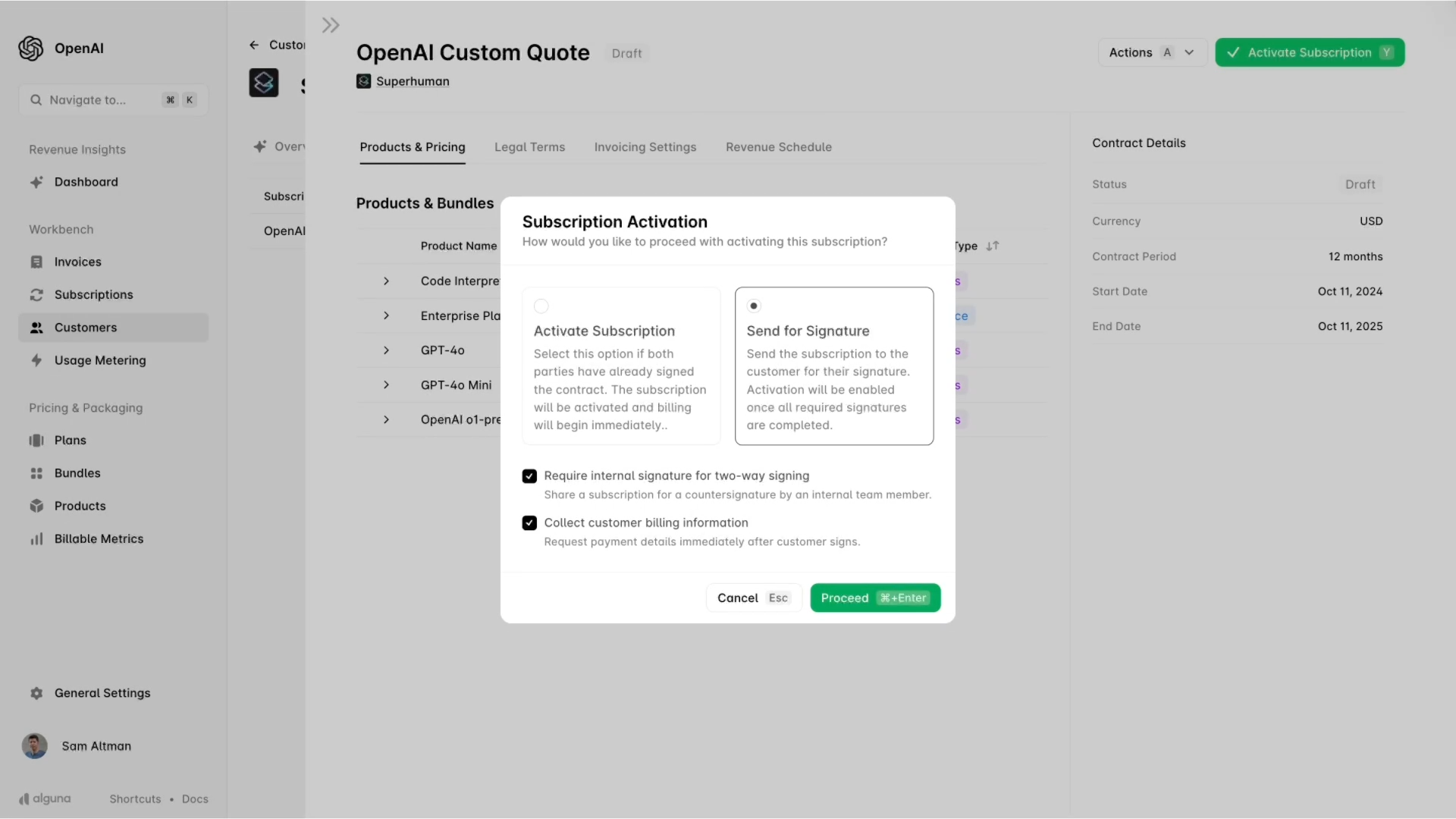
Alguna is a Y Combinator-backed (S23), AI-native quote-to-cash platform built specifically for scaling SaaS, AI, and fintech companies.
It unifies CPQ, e-signature, billing, invoicing, and revenue recognition in a single system, so signature isn't a standalone step, but instead, it's the trigger that activates everything downstream.
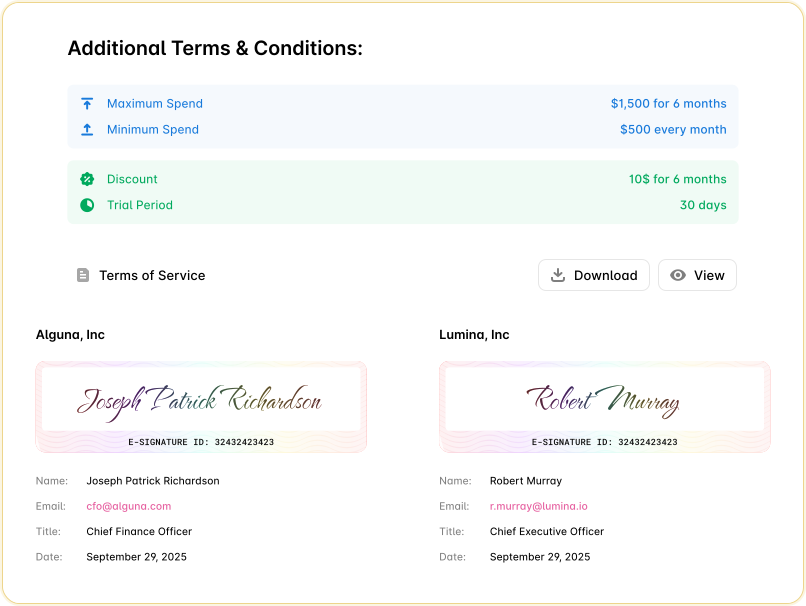
Unlike DocuSign or PandaDoc, Alguna doesn't treat e-signature as the product. Signature is embedded in the wider revenue workflow. When a customer signs a quote in Alguna, the subscription activates, billing schedules generate, and CRM records update automatically.
That's what makes it genuinely different from every other option in this list. Teams like Haven AI saw an 80% reduction in time spent on contract creation after switching to Alguna.
As Juan Burgos, Co-founder and CEO at Haven AI, put it:
"It takes me under five minutes to send someone an agreement. I can hop off a demo, set up the plan, type in the customer info, and it's done."
- Juan Burgos, Co-founder and CEO at Haven AI
Read the case study
Key features
- Native e-signature in the quote workflow: Quotes convert directly into signed contracts and live subscriptions. There's no re-uploading, no manual reconciliation between systems.
- No-code CPQ: Revenue teams can configure pricing rules, product bundles, and approval flows without engineering. Supports flat, tiered, usage-based, prepaid-with-overages, and multi-attribute pricing models.
- Usage-based billing and metering: Built for companies billing on API calls, tokens, credits, or other consumption metrics. Real-time metering ensures every billable event is captured.
- Revenue recognition: Automated ASC 606/IFRS 15 compliance with full audit logs. Finance teams get a single source of truth without manual journal entries.
- CRM integrations: Native plugins for Salesforce and HubSpot let sales reps create and manage Alguna quotes directly within the tools they already use.
Pros
- The only platform on this list where e-signature, billing, and revenue recognition are unified in one workflow
- Purpose-built for usage-based and hybrid pricing models that other tools can't handle
- No engineering required to configure pricing changes or launch new products
- Alguna's team provides white-glove migration support and transparent implementation
Cons
- Newer entrant compared to legacy players, so the third-party integration ecosystem is still growing
- Optimized for scaling B2B SaaS, AI, and fintech; not a fit for very early-stage startups or non-SaaS business models
- Integration ecosystem less mature than legacy players
Best for
- Scaling SaaS companies with subscription and usage-based pricing models
- AI companies with hybrid pricing that need real-time metering
- RevOps and finance teams that want a single source of truth for revenue without manual reconciliation
- Companies that want to embed e-signature in the deal workflow rather than use it as a standalone step
Pricing
- Starter: Free (up to 10 monthly invoices)
- Growth: From $699/month (CPQ, e-signature, advanced subscriptions, CRM integrations, white-glove migration)
- Enterprise: Custom pricing (revenue recognition, advanced compliance, dedicated support)
Book a personalized demo and we'll show you how a signed quote automatically activates your subscription, generates billing schedules, and syncs to your CRM, with no manual steps.
Book your 30 minute demo
2. Zoho Billing + Zoho Sign
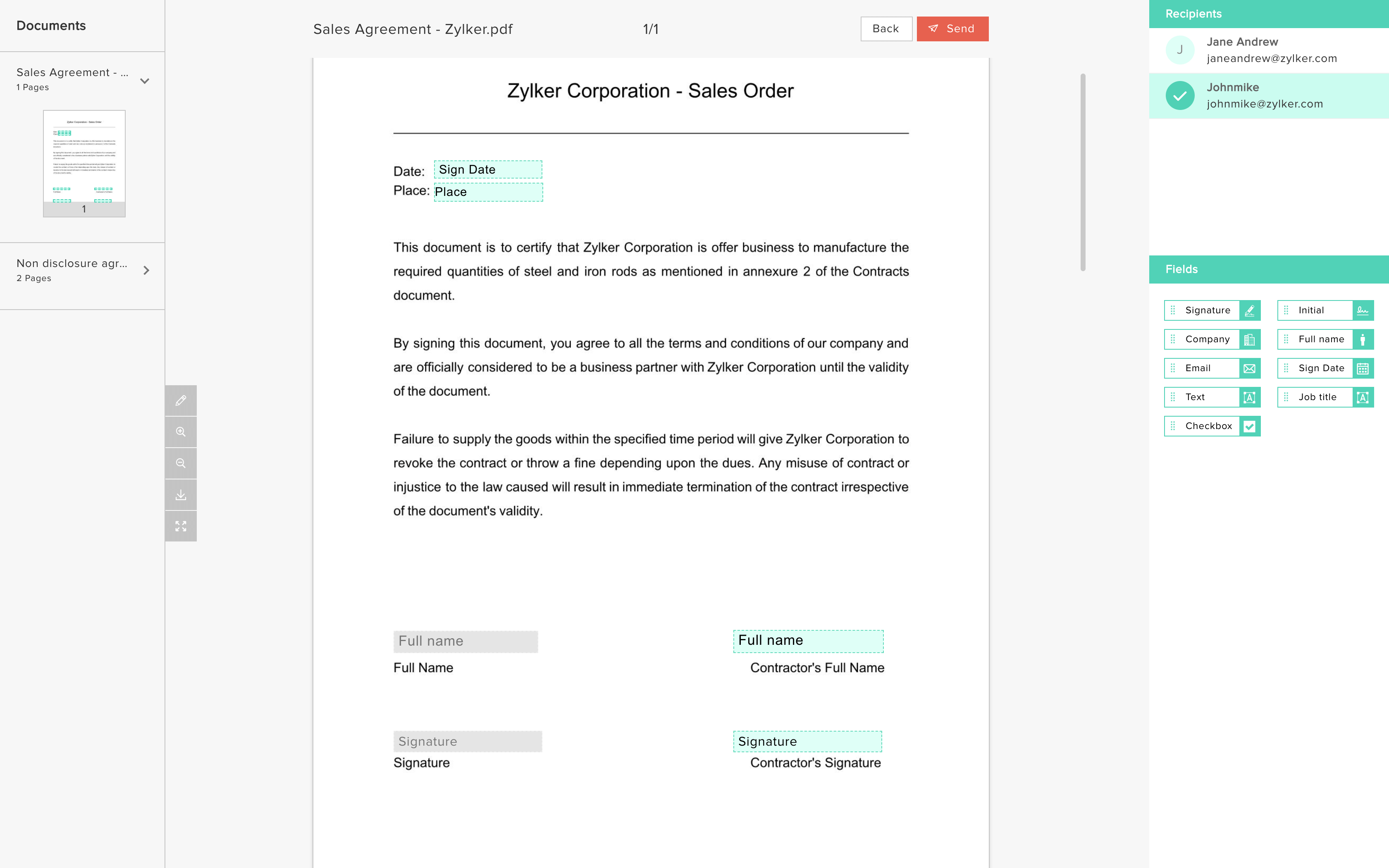
Zoho Billing is part of Zoho's broader suite of business software and pairs natively with Zoho Sign to deliver a connected billing-and-signature experience.
For SMBs that are already standardized on Zoho CRM, Zoho Books, or other Zoho tools, this combination removes the need to bolt on a third-party e-signature platform entirely. Documents sent from Zoho Billing can be signed and tamper-proofed with embedded digital signature certificates, and teams can track signature progress in real time.
The e-sign experience in Zoho is delivered via Zoho Sign's API and iframe implementation, meaning it can be embedded in customer-facing flows. Signed agreements feed back into the billing engine, and invoice and subscription workflows can proceed without manual intervention.
This is a practical, cost-effective option for growing teams that want signing and billing in one ecosystem without paying enterprise rates.
Key features
- Built-in e-sign for billing documents: Create, sign, and send invoices, quotes, and credit notes in one workflow within the Zoho suite, eliminating tool-switching between billing and signing.
- Tamper-proof documents and audit trail: Digital signature certificates make every document tamper-proof, and the platform tracks signature status in real time.
- Flexible billing engine: Zoho Billing handles one-time invoices, subscriptions, metered billing, and proration, with built-in reporting and analytics.
- Zoho ecosystem integration: Works natively with Zoho CRM, Zoho Books, Zoho Inventory, and other Zoho apps, keeping customer and financial data in sync.
- Compliance: Zoho Sign is compliant with ESIGN, UETA, and eIDAS, and supports identity verification via OTP, government ID, and knowledge-based authentication.
Pros
- Strong value for teams already using Zoho CRM or Zoho Books; no additional vendor to manage
- Tamper-proof certificates and real-time tracking are included without needing add-ons
- Competitive pricing: Zoho Sign starts at $10/user/month, well below DocuSign and Adobe Sign
Cons
- Revenue recognition features are more basic than Alguna or Zuora, making it less suited to complex ASC 606 scenarios
- Advanced CPQ logic (bundling, dependencies, AI-driven pricing) is not included and must be built via Zoho CRM or third-party tools
- Scaling beyond the mid-market may require additional integrations or customizations
Best for
- SMB to mid-market companies already using Zoho CRM, Books, or other Zoho products
- Teams that want a connected billing-and-signature experience without paying for enterprise-tier software
- Organizations that need documented eIDAS compliance for EU transactions
Pricing
- Zoho Sign Free: 5 envelopes/month, 1 user
- Zoho Sign Standard: $10/user/month (billed annually); up to 25 envelopes/user/month
- Zoho Sign Professional: $16/user/month (billed annually); unlimited envelopes, branding, multi-language
- Zoho Sign Enterprise: $22/user/month (billed annually); bulk send, advanced compliance, SignForms
- Zoho Billing: pricing varies by plan; contact Zoho for current rates
3. Zuora
Zuora is the original purpose-built subscription management platforms, having coined the term 'Subscription Economy' and helped define the category.
It targets mid-market and enterprise companies with complex subscription billing needs, offering a CPQ module (Zuora Quotes), advanced revenue recognition compliant with ASC 606 and IFRS 15, multi-currency and multi-entity support, and a rich integration ecosystem.
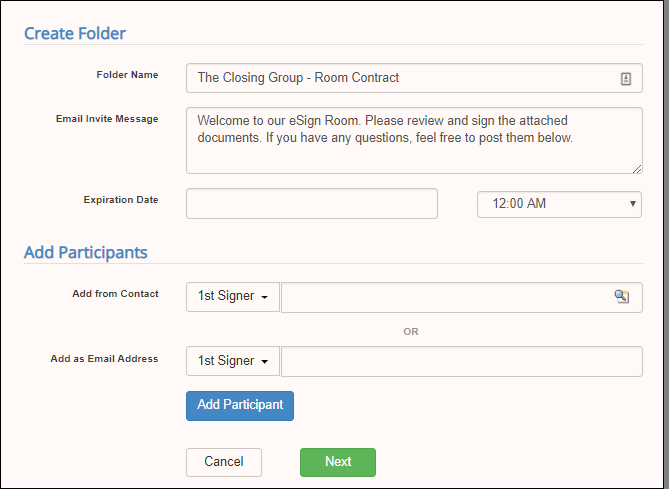
Zuora doesn't offer a native e-signature module, instead, it integrates with providers like Sertifi (pictured above), which captures both signature and payment details in a single step, so cash is collected the moment a contract is executed.
Zuora is a serious enterprise platform. Its breadth is its biggest asset and also its biggest limitation for smaller or faster-moving teams: implementations are typically resource-intensive, often requiring specialized consultants, and pricing starts around $50,000 per year before add-ons.
Key features
- Subscription-first CPQ: Zuora Quotes is built for subscription commerce, handling ramp deals, multi-year arrangements, mid-term amendments, and complex charge model combinations in one quote.
- Robust billing and revenue management: Handles subscription, usage-based, and hybrid billing; automates revenue recognition schedules; no Zuora public customer has failed a revenue audit.
- E-sign plus payment via Sertifi: Through its Sertifi integration, customers sign contracts and submit payment details simultaneously, reducing friction and accelerating cash collection.
- Global scale: Multi-currency, multi-entity, and multi-tax capabilities support global enterprises operating across multiple geographies.
- Developer ecosystem: Extensive APIs, low-code SDKs, webhooks, and an active partner community make Zuora highly customizable for complex enterprise architectures.
Pros
- The deepest feature set for enterprise subscription billing and ASC 606-compliant revenue recognition
- Audit-ready by default, with a strong compliance track record for regulated industries
- Sertifi integration creates a smooth sign-and-pay moment that accelerates cash collection
Cons
- Implementations are resource-intensive and often require specialized consultants; expect 3-6 months and significant configuration
- E-signature is integration-dependent, not native, so the quality of the signing experience depends on the integration architecture
- Pricing starts around $50K/year and scales quickly; see our Zuora alternatives guide if budget is a constraint
Best for
- Global enterprises with complex subscription billing, multi-entity structures, and high compliance requirements
- Companies where subscription lifecycle management (renewals, amendments, ramp deals) is a material part of revenue
- Organizations already using Salesforce as a system of record, where Zuora CPQ's native Salesforce integration is a natural fit
Pricing
- Custom enterprise pricing; typically starts around $50,000/year
- Add-ons for Zuora Revenue, Zuora CPQ, and advanced analytics are priced separately
- Contact Zuora directly for a tailored quote based on your subscription volume and requirements
DocuSign alternatives: Point tools
These platforms compete directly with DocuSign on e-signature and document workflow features.
If you want a pure alternative to DocuSign that handles signing, proposals, or document management, here's where to start.
2. PandaDoc
PandaDoc is a contract management and document automation platform designed primarily for sales teams. It goes well beyond e-signature, offering proposal creation, quoting, real-time document tracking, approval workflows, and CRM integrations. In 2024, PandaDoc launched a native CPQ solution for HubSpot, making it one of the more capable document-plus-signing platforms on the market.
Where DocuSign focuses on capturing the signature, PandaDoc focuses on everything that happens before it: building the document, configuring pricing tables, collaborating with prospects, and getting the deal closed. That's what makes it a genuine alternative for sales-heavy teams.
Key features
- Document creation and templates: A library of 1,000+ templates for proposals, contracts, and quotes. Drag-and-drop editor with custom branding on paid plans.
- Unlimited e-signatures: Unlike DocuSign, PandaDoc offers unlimited envelopes on paid plans with no overage charges.
- CRM integrations: Native integrations with Salesforce, HubSpot, and other major CRMs. Pull client data directly into documents.
- Collaborative redlining: Real-time document collaboration with comments, version tracking, and approval workflows.
- CPQ for HubSpot: Launched in 2024, PandaDoc's native CPQ for HubSpot lets teams configure, price, and quote directly within HubSpot.
Pros
- Unlimited document sends on paid plans, with no envelope caps
- Strong document creation tools that DocuSign simply doesn't offer
- 24/7 support included at no extra charge
Cons
- Advanced features like CRM integrations, bulk sending, and approval workflows require the Business plan ($49/user/month) or higher
- Costs can scale quickly when adding users or requiring API access and advanced automation
- No native billing or subscription management; signing and billing remain separate systems
Best for
- Sales teams that need to create polished proposals and quotes, not just collect signatures
- Teams already using HubSpot that want to add CPQ functionality natively
- Organizations replacing DocuSign that also want to consolidate document creation
Pricing
- Free plan: Unlimited e-signatures and document uploads (basic features only)
- Starter: $19/user/month (billed annually)
- Business: $49/user/month (billed annually); CRM integrations, approval workflows, bulk send
- Enterprise: Custom pricing; CPQ, full automation, API access, SSO
3. Adobe Acrobat Sign
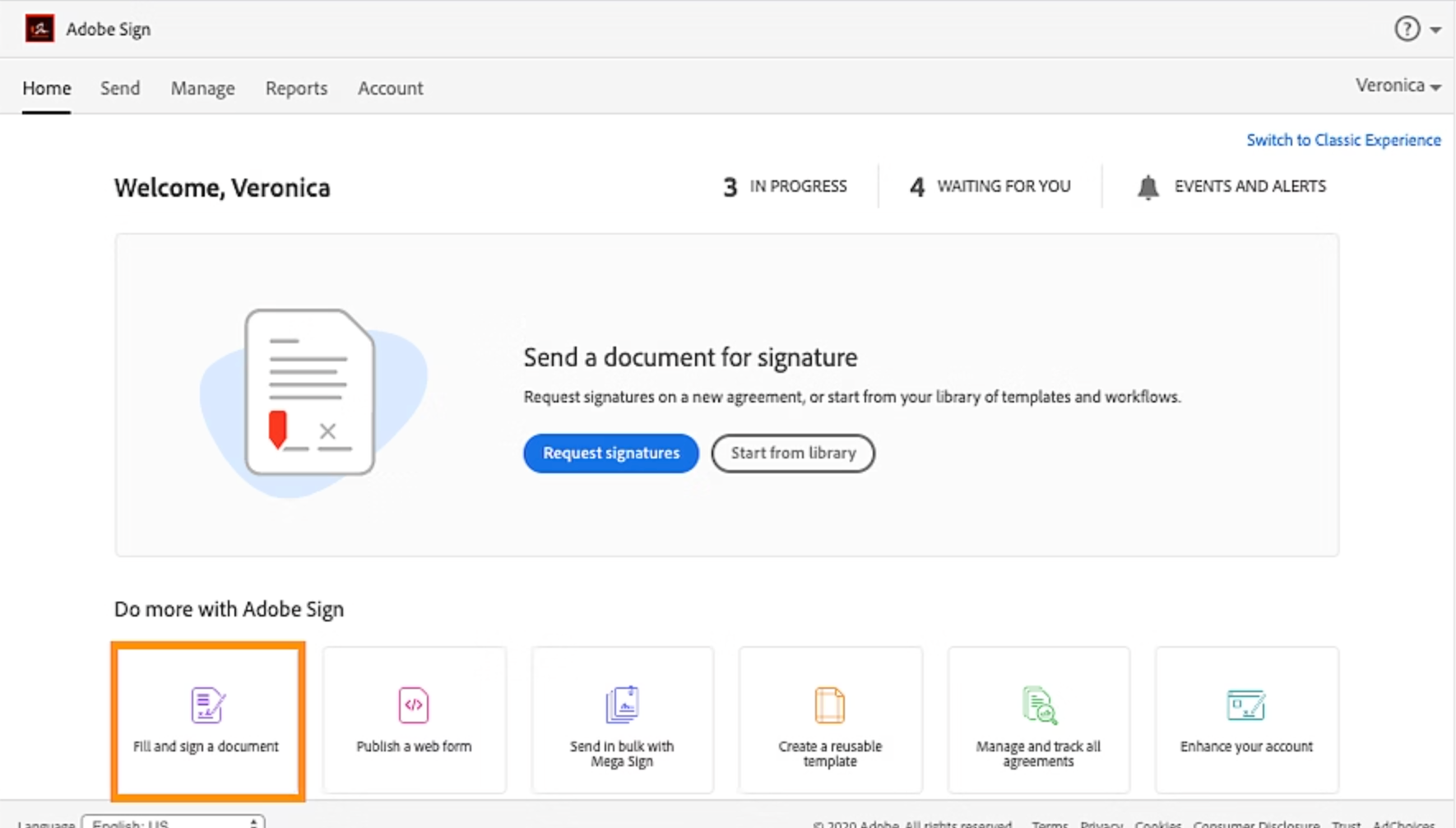
Adobe Acrobat Sign (formerly EchoSign) is Adobe's enterprise e-signature platform, deeply integrated with Adobe Acrobat and the broader Creative Cloud suite. If your team already works extensively with PDFs, Adobe Sign is the most natural fit: you can draft, edit, sign, and archive documents without ever leaving the Adobe ecosystem.
In late 2024, Adobe refreshed the Acrobat Sign interface and added a 'Sign with Witness' feature for documents requiring witnessed signatures.
Adobe Sign is most competitive at the enterprise level, where its compliance features (HIPAA, FERPA, GLBA), advanced authentication options, and deep integrations with Salesforce and Workday justify the higher price point.
Key features
- Native PDF editing: Draft, annotate, and edit PDFs directly within Adobe Acrobat before sending for signature.
- Advanced compliance: Enterprise plans include HIPAA, FERPA, and GLBA compliance, plus qualified electronic signatures (QES) for EU requirements.
- Bulk sending and routing: Send documents to large groups, set up conditional routing, and track progress with full audit trails.
- CRM integrations: Deep integrations with Salesforce and Workday at the enterprise level.
- AI Assistant: Adobe's AI Assistant for Acrobat (launched February 2025) offers contract summaries, clause explanations, and version comparisons.
Pros
- The best option for teams that live in Adobe Acrobat for PDF work
- Strong enterprise compliance features that exceed what most competitors offer
- Tight Microsoft 365 integration for document-centric enterprise teams
Cons
- Team plans cap at 150 transactions per user per year, which can be limiting for high-volume teams
- Advanced features like HIPAA compliance and API access are locked behind Enterprise plans at custom pricing
- AI Assistant is an add-on at $4.99/month extra, not included in base plans
Best for
- Enterprises and regulated industries (healthcare, legal, financial services) already using the Adobe suite
- Teams with complex PDF workflows that need editing and signing in one tool
- Organizations in the EU that need eIDAS-compliant qualified electronic signatures
Pricing
- Acrobat Standard (individual): ~$12.99/month
- Acrobat Pro (individual): ~$19.99/month
- Acrobat Pro for Teams: ~$23.99/user/month (requires minimum 2 licenses)
- Acrobat Studio for Teams: ~$29.99/user/month
- Enterprise: Custom pricing; includes HIPAA, CRM integrations, API access
4. Dropbox Sign (formerly HelloSign)
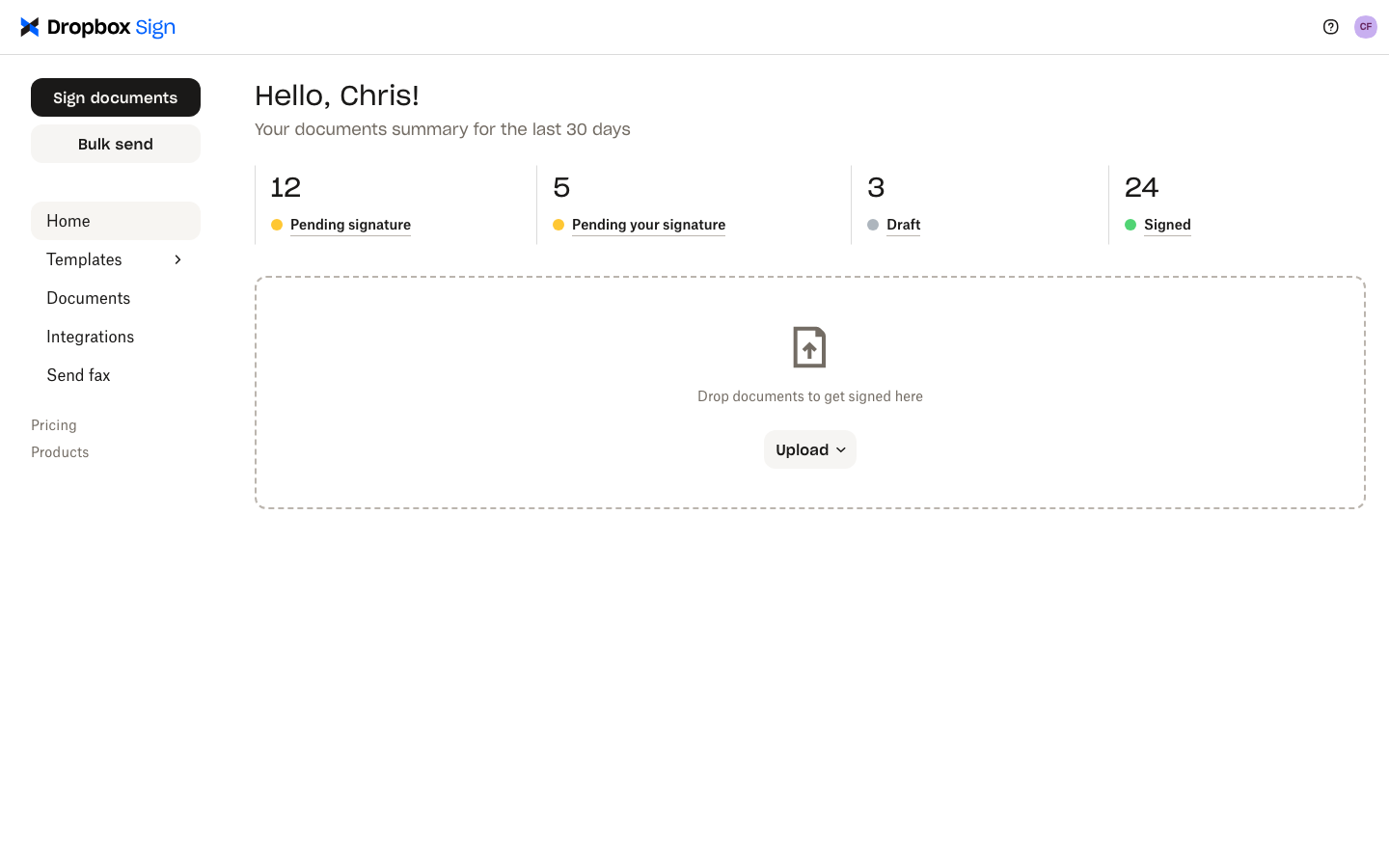
Dropbox Sign, previously known as HelloSign, is a clean, user-friendly e-signature platform that competes most directly with DocuSign on simplicity and price.
Its core differentiator is unlimited signature requests on all paid plans: no envelope caps, no overage charges. If you're moving away from DocuSign specifically because of its envelope limits, Dropbox Sign is one of the most obvious alternatives to DocuSign.
Dropbox Sign is best suited to teams that need fast, reliable, high-volume signing without the document creation overhead of PandaDoc or the PDF ecosystem of Adobe. Its interface is deliberately simple, which makes onboarding quick, but also means it offers fewer advanced features than its enterprise-focused competitors.
Key features
- Unlimited signature requests: No envelope limits on any paid plan. Send as many documents for signing as you need without worrying about overages.
- API and embedded signing: Developer-friendly API for embedding signing workflows into your own applications.
- Dropbox integration: Seamless native integration with Dropbox for document storage and retrieval.
- Audit trails and compliance: Compliant with ESIGN, UETA, and eIDAS. Every signed document includes a detailed audit trail.
- In-person signing: Available on Standard plans for situations requiring face-to-face signing on a shared device.
Pros
- No envelope limits on paid plans, making it far better than DocuSign for high-volume teams
- Simple, intuitive interface with a very short learning curve
- 30-day free trial, longer than most competitors
Cons
- Limited document creation tools; you need to upload a finished PDF rather than building from scratch
- Fewer CRM integrations than PandaDoc; less suitable for sales-heavy workflows
- Dropbox-focused storage can feel limiting for teams using other cloud platforms
Best for
- High-volume signing teams that want to escape DocuSign's envelope limits
- Teams already using Dropbox for document storage
- Lean operations teams that need simple, fast signing without complex workflows
Pricing
- Essentials: $20/month (1 user, unlimited signatures, 5 templates)
- Standard: $30/month (2 users, 15 templates, in-person signing, SMS authentication)
- Premium: Custom pricing (up to 5 users, unlimited templates, advanced conditional logic)
Free DocuSign alternatives
Not every team needs enterprise-grade signing. If you're a freelancer, a small team, or just getting started, there are legitimate free DocuSign alternatives that cover the basics well.
Here are three worth considering.
6. SignWell
SignWell (formerly Docsketch) is a clean, affordable e-signature tool with a genuinely useful free plan. The free tier allows up to 3 document sends per month, includes audit trails, and lets you create one reusable template.
It's compliant with ESIGN, UETA, eIDAS, HIPAA, and SOC 2 Type II, and it's the only native e-signature provider that integrates with QuickBooks Online.
Key features
- Free plan with 3 documents/month: Includes audit trails, tamper-proof signing, and one reusable template. No watermarks on paid plans.
- Unlimited documents on paid plans: No caps or overage charges once you upgrade.
- QuickBooks Online integration: The only native e-signature platform to integrate directly with QuickBooks.
- API with pay-as-you-go pricing: First 25 API documents/month are free; you only pay for what you use beyond that.
Pros
- Generous free plan for light signing needs
- Simple, easy-to-use interface with no learning curve
- Strong compliance credentials for a budget-tier tool
Cons
- No dedicated mobile app; mobile signing happens through a browser only
- Extra senders cost $10/sender/month on the Light plan, which adds up for growing teams
- Limited advanced workflow features compared to PandaDoc or DocuSign
Best for
- Freelancers and solo operators who sign a handful of contracts per month
- Small teams needing a clean, simple alternative to DocuSign without paying DocuSign prices
- Teams that use QuickBooks and want signing to integrate directly
Pricing
- Free: 3 documents/month, 1 template, 1 sender
- Light: $8/month (billed annually); unlimited documents, 1 sender
- Business: $24/month (billed annually); unlimited documents, 3 senders, custom branding
- Enterprise: Custom pricing
7. Xodo Sign (formerly Eversign)
Xodo Sign is a solid free DocuSign alternative with a generous free tier: up to 3 documents per month at no cost, with basic audit trails.
A standout feature is built-in PDF editing alongside signing, so you can edit and finalize your documents before sending them out, all in one place. It's eIDAS compliant, making it well-suited for European teams.
Key features
- Free plan: 3 documents/month with basic audit trail included, no credit card required.
- PDF editing: Edit PDFs directly within Xodo Sign before sending for signature, without needing a separate PDF tool.
- eIDAS compliance: Compliant with European electronic signature regulations for international teams.
- Bulk signing: Available on Professional plans for high-volume sending.
Pros
- One of the more capable free plans in the market
- PDF editing built in, reducing the need for a separate Adobe Acrobat subscription
- Good international compliance for teams operating in Europe
Cons
- The interface is less polished than SignWell or PandaDoc
- Limited templates on the Basic plan
- Fewer CRM integrations than the top-tier alternatives
Best for
- European teams that need eIDAS-compliant free signing
- Teams that need basic PDF editing alongside signing, without paying for Adobe
- Budget-conscious businesses that need occasionally more than 3 free docs per month
Pricing
- Free: 3 documents/month
- Basic: $10/month; unlimited documents, 3 templates, bulk signing
- Professional: $40/month; custom branding, in-person signing, premium support
8. SignNow
SignNow is a business-focused e-signature platform that's notably more team-friendly than most DocuSign alternatives at a similar price point. Even the entry-level Business plan is designed for multiple users. It offers strong bulk sending capabilities and a developer-friendly API, and it competes well against DocuSign for teams that don't need document creation but do need scalable, multi-user signing.
Key features
- Team-friendly plans from the start: Even the Business plan supports multiple users and team-level controls, unlike DocuSign's solo-focused entry tiers.
- Bulk send: Send a document to multiple signers at once, with separate signature certificates for each.
- Developer API: Well-documented API with sandbox environments for building custom signing integrations.
- Role-based access: Control who can send, manage, and access documents within your team.
Pros
- Very competitive pricing for multi-user teams, undercutting DocuSign significantly
- Bulk sending available at lower tiers than DocuSign offers
- Good API documentation for teams building custom integrations
Cons
- Template limits on lower-tier plans can frustrate growing teams
- Less known than DocuSign or Adobe Sign, which can create friction when sending to clients
- Less document creation capability than PandaDoc
Best for
- Growing teams that need multi-user signing at an affordable price
- Developers building e-signature into their own applications via API
- High-volume sending where DocuSign's per-envelope model becomes prohibitively expensive
Pricing
- Business: from $8/user/month (billed annually); multi-user, unlimited documents
- Business Premium: from $15/user/month; advanced fields, CRM integrations
- Enterprise: Custom pricing; dedicated support, advanced compliance
How to evaluate e-signature software
Before choosing a DocuSign alternative, it's worth getting clear on what you actually need. Here's how to think through the evaluation:
- What are you using it for? Pure signature collection is different from proposal creation, contract management, or quote-to-cash workflows. The right platform depends on where signing sits in your overall process.
- What's your volume? Envelope limits are a key differentiator. If you're sending hundreds of documents per month, platforms with per-envelope charges (like DocuSign at lower tiers) get expensive fast. Unlimited-send platforms like Dropbox Sign or PandaDoc become more cost-effective at scale.
- Do you need document creation? DocuSign doesn't let you draft documents from scratch. If you need to build proposals, quotes, or contracts within the tool, you need PandaDoc, Alguna, or a similar platform.
- What happens after the signature? For revenue teams, the signature is the beginning, not the end. If you need the signed agreement to trigger billing, activate subscriptions, and sync to your CRM, you need a platform like Alguna that connects e-sign to the full quote-to-cash workflow.
- What's your compliance requirement? Most platforms cover ESIGN and UETA for the US, and most also cover eIDAS for the EU. If you have HIPAA or qualified electronic signature (QES) requirements, shortlist Adobe Sign Enterprise or DocuSign Business Pro and above.
- What's your budget? Free plans from SignWell or Xodo Sign are perfectly good for low-volume needs. For growing teams, compare the total cost of ownership including per-user fees, add-ons, and overage charges, not just the headline price.
Frequently asked questions about alternatives to Docusign
What is the best free DocuSign alternative?
SignWell and Xodo Sign both offer genuinely useful free plans with up to 3 document sends per month. SignWell is slightly cleaner and more polished; Xodo Sign adds built-in PDF editing. PandaDoc also has a free tier with unlimited e-signatures, though it's more limited in terms of automation and integrations. For occasional signing, any of these free DocuSign alternatives will serve you well.
Are DocuSign alternatives legally binding?
Yes. Any reputable e-signature platform, including every tool on this list, complies with the US ESIGN Act and UETA, and most also comply with the EU's eIDAS regulation. Legally binding e-signatures require proof of intent, consent, and an audit trail, all of which these platforms provide. Always check compliance documentation before using any tool for regulated or highly sensitive documents.
Is PandaDoc a good alternative to DocuSign?
PandaDoc is a strong alternative to DocuSign for sales teams. It goes beyond signature collection to include document creation, proposal templates, interactive pricing tables, and CRM integrations. If you're looking to replace DocuSign and also consolidate document creation into one tool, PandaDoc is worth evaluating seriously. The main tradeoff is that costs can climb with the Business plan, and it doesn't handle billing or subscription management.
Can I use an alternative to DocuSign for free?
Yes. SignWell, Xodo Sign, and PandaDoc all offer free plans. SignWell's free plan allows 3 document sends per month with full audit trails and no watermarks after signing. Xodo Sign also offers 3 free documents per month with PDF editing included. PandaDoc's free plan supports unlimited signatures but limits automation and integrations. All three are legitimate docusign free alternatives for low-volume use cases.
What's the difference between a DocuSign alternative and a quote-to-cash platform?
A DocuSign alternative is any platform that handles e-signature, typically as a standalone or near-standalone product. A quote-to-cash platform is a broader revenue management system where e-signature is one step in a connected workflow that also includes CPQ, billing, invoicing, and revenue recognition. If you're a SaaS or AI company with complex pricing, a quote-to-cash platform like Alguna will almost always deliver more value than a standalone e-signature tool, because the signature triggers downstream revenue operations automatically.
How does Alguna compare to DocuSign?
DocuSign is a purpose-built e-signature platform. Alguna is a quote-to-cash platform with native e-signature built in. For a B2B SaaS company, the key difference is what happens after the signature. In DocuSign, the workflow ends. In Alguna, signing a quote automatically activates the subscription, generates billing schedules, and updates your CRM. If you're currently using DocuSign alongside a separate billing tool and CRM, Alguna could replace all three. You can learn more about Alguna's CPQ and e-signature capabilities here.
What should I look for in a DocuSign alternative for small businesses?
For small businesses, the most important factors are transparent pricing (no hidden add-ons), a free or low-cost entry point, unlimited signatures on paid plans, and ease of setup. SignWell and Dropbox Sign are both strong picks. If you also need proposal creation and CRM integration, PandaDoc's Starter plan is worth evaluating. Avoid platforms with per-envelope pricing unless your volume is very low.
Choosing the right DocuSign alternative: Match the tool to your workflow
The e-signature market has expanded well beyond DocuSign's original use case. The global digital signature market is projected to grow from $5.2 billion in 2024 to $38.16 billion by 2030, a 40.5% CAGR, driven by the shift to fully digital document and revenue workflows.
The best alternative to DocuSign isn't the same for every team. Here's a quick summary:
- For freelancers and small teams: SignWell or Xodo Sign (free), or Dropbox Sign (unlimited sends from $20/month)
- For sales teams that need document creation: PandaDoc (Starter from $19/user/month)
- For Adobe-centric enterprises: Adobe Acrobat Sign (from ~$23/user/month)
- For regulated enterprises that need DocuSign's breadth: DocuSign Business Pro ($40/user/month)
- For scaling SaaS, AI, and fintech companies: Alguna (from $699/month), the only platform where e-signature, billing, and revenue recognition are unified in one workflow
As Glyphic AI's founder and CEO Adam Liska put it after switching to Alguna:
"Alguna ticked every box I needed. Most importantly, it gave me a clear overview of revenue movements, something Stripe just couldn't provide."
If you're a B2B SaaS or AI company looking to move beyond standalone e-signature tools and connect signing directly to your billing and revenue operations, Alguna is worth a look.
See how Alguna connects e-signature to your full revenue workflow
Most e-signature tools stop when the document is signed. Alguna is where that process begins. Book a personalized demo and we'll show you how a signed quote automatically activates your subscription, generates billing schedules, and updates your CRM, without any manual steps.